

Running a growing business means wearing multiple hats. You’re juggling marketing campaigns, managing sales pipelines, tracking customer data, and somehow trying to find time for strategic thinking. Sound familiar?
What if I told you there’s a way to reclaim more than 10 hours every single week while actually improving your marketing and sales results? No expensive enterprise software required. No complex implementation process. Just powerful, free tools that leading companies are already using to transform their operations.
Welcome to your complete guide to HubSpot’s Growth Marketing and Sales Toolkit. Whether you’re a solo entrepreneur, a marketing manager at a small business, or part of a growing sales team, this comprehensive resource will show you exactly how to streamline your workflows, automate repetitive tasks, and focus on what truly moves the needle.
Why This Toolkit Matters for Your Business Growth
Let’s get real for a moment. Most small and medium-sized businesses struggle with the same fundamental challenges:
Customer data scattered across spreadsheets, email inboxes, and sticky notes. Marketing campaigns that take hours to set up manually. Sales follow-ups that slip through the cracks. Reports that require digging through multiple platforms just to answer basic questions.
The cost isn’t just measured in hours. It’s measured in missed opportunities, frustrated customers, and team burnout.
HubSpot’s free CRM and marketing tools solve these problems by bringing everything under one roof. The best part? You don’t need a massive budget or a technical background to get started. The toolkit includes over 20 cutting-edge features designed specifically for teams that need enterprise-level capabilities without enterprise-level complexity.
What Makes HubSpot’s Free Tools Stand Out
Before we dive into the specific tutorials and how-to guides, let’s address the elephant in the room: Why HubSpot when there are dozens of other marketing and sales platforms available?
Built for Growth, Not Just Management
Unlike basic CRM systems that simply store contact information, HubSpot’s platform actively helps you grow. The tools work together seamlessly, meaning your marketing efforts automatically feed into your sales pipeline, which connects to your customer service data. Everything talks to everything else.
Actually Free (Not a Trial)
Many platforms offer “free trials” that convert to paid plans after 14 or 30 days. HubSpot’s free CRM and core tools remain free forever. No credit card required. No surprise charges. No feature restrictions after an arbitrary time period.
AI-Powered Intelligence
The platform incorporates artificial intelligence throughout, from content creation assistance to predictive lead scoring. You’re not just organizing data—you’re gaining insights that help you make smarter decisions faster.
Professional-Grade Features
The free tier includes capabilities that many platforms reserve for paid plans: unlimited users, 1 million contacts, company and deal tracking, email marketing, forms, live chat, meeting scheduling, and detailed reporting dashboards.
Your 19-Step Journey to Marketing and Sales Mastery
Now let’s explore each component of the toolkit through detailed video tutorials. Each tutorial builds on the previous ones, creating a comprehensive learning path from beginner to strategic implementation.
1. HubSpot CRM Tutorial for Beginners: Your Foundation
Perfect for: Anyone new to CRM systems or transitioning from spreadsheets
Starting with a proper CRM foundation changes everything. This tutorial by HubSpot’s Marc walks you through the complete setup process using actual screen-sharing demonstrations.
You’ll discover how HubSpot’s CRM transforms scattered data into actionable intelligence. The tutorial covers contact management, deal tracking, and how different teams (marketing, sales, service) can collaborate within a single system without stepping on each other’s toes.
The key insight? A CRM isn’t just a digital filing cabinet. When used properly, it becomes the engine that drives sustainable business growth by ensuring every customer interaction is tracked, analyzed, and optimized.
What you’ll learn:
- Setting up your account structure from scratch
- Navigating the main dashboard and understanding each section
- Creating contact records with proper data organization
- Building deal pipelines that reflect your actual sales process
- Generating basic reports to track team performance
- Understanding how the CRM integrates with marketing and service tools
Time investment: 45 minutes for initial viewing, another hour for hands-on setup
2. List Segmentation for Marketers: Precision Targeting
Perfect for: Marketers who want to send relevant messages to the right people
Generic email blasts don’t work anymore. Your audience expects personalized communication that speaks to their specific needs and interests. Devin Bellamy breaks down the art and science of data segmentation in this essential tutorial.
List segmentation is where good marketing becomes great marketing. By creating dynamic lists based on customer behavior, demographics, engagement levels, and lifecycle stage, you ensure every message hits home.
The tutorial distinguishes between active lists (automatically updated as contacts meet criteria) and static lists (fixed snapshots), helping you choose the right approach for different campaigns.
What you’ll learn:
- Creating contact-based lists using multiple filter criteria
- Leveraging behavioral data (email opens, website visits, form submissions)
- Building demographic segments by industry, company size, or role
- Understanding the strategic advantages of active versus static lists
- Using lists for targeted email campaigns and workflow automation
- Implementing smart content that changes based on list membership
- Creating randomized samples for A/B testing purposes
Time investment: 30 minutes tutorial, ongoing refinement as you learn your audience
3. Marketing Automation for Free: Your Digital Assistant
Perfect for: Anyone tired of manual, repetitive marketing tasks
Imagine having a tireless assistant who never sleeps, never forgets a follow-up, and executes your marketing strategy with perfect consistency. That’s marketing automation.
This tutorial unveils how HubSpot’s complimentary automation tools work like a personal marketing aide, handling routine tasks so you can focus on strategy and creativity.
You’ll learn to set up automated workflows that respond to customer actions in real-time. Someone downloads your ebook? Automatically send them related resources. A prospect visits your pricing page three times? Alert your sales team immediately. A customer hasn’t engaged in 60 days? Trigger a re-engagement campaign.
What you’ll learn:
- Building automated email sequences based on contact behavior
- Creating workflows that nurture leads through your sales funnel
- Setting up form submission responses with personalized follow-up
- Using drag-and-drop email template builders for quick campaign creation
- Implementing if/then logic to create sophisticated automation paths
- Automating internal notifications to keep your team informed
- Measuring automation performance with built-in analytics
Time investment: 40 minutes for the tutorial, 2-3 hours to build your first workflows
4. Lead Management in Free HubSpot CRM: Never Lose a Lead
Perfect for: Sales teams frustrated with leads falling through the cracks
Every business owner’s nightmare: a qualified lead reaches out, gets lost in a busy inbox, and becomes your competitor’s customer instead.
This tutorial introduces HubSpot’s AI-powered lead management system that guarantees no opportunity slips away. You’ll master centralized lead tracking accessible to marketing, sales, and service teams simultaneously.
The power lies in visibility and automation. When a lead submits a form, multiple things happen automatically: they’re added to your CRM, assigned to the right salesperson based on territory or product interest, added to appropriate nurture sequences, and given a lead score based on their engagement and fit.
What you’ll learn:
- Creating effective lead capture forms optimized for conversions
- Centralizing lead data in a database accessible across departments
- Setting up lead routing rules for automatic assignment
- Customizing follow-up sequences based on lead source and behavior
- Tracking detailed customer interactions from first touch to closed deal
- Using lead scoring to prioritize high-value opportunities
- Creating automated alerts for time-sensitive leads
Time investment: 35 minutes tutorial, 1-2 hours implementing your lead management system
5. Landing Page Creation: Your Conversion Machine
Perfect for: Marketers who need high-converting landing pages fast
Your landing page has one job: convert visitors into leads. Every element matters—headline, copy, form fields, button color, social proof placement.
Adri’s comprehensive guide shows you how to tap into HubSpot’s complimentary landing page builder to create conversion-focused pages without coding knowledge or design experience.
The tutorial goes beyond basic page building. You’ll learn optimization techniques using AI-driven copy suggestions, how to A/B test different variations, and how to analyze performance data to continuously improve results.
What you’ll learn:
- Selecting and customizing professional landing page templates
- Writing compelling headlines and persuasive copy (with AI assistance)
- Optimizing form fields to maximize conversion rates
- Implementing trust signals and social proof effectively
- Setting up proper page settings for SEO and tracking
- Analyzing landing page performance with built-in analytics
- Integrating pages seamlessly with your CRM for automatic contact creation
- Creating mobile-optimized experiences that convert on any device
Time investment: 50 minutes tutorial, 1 hour to create your first landing page
6. Setting Up HubSpot CRM for Small Business: Complete System Implementation
Perfect for: Small business owners ready to transition from spreadsheets to a professional system
Making the leap from scattered tools to an integrated CRM system feels daunting. This step-by-step tutorial removes all guesswork from the setup process.
You’ll transition from spreadsheets to a polished, comprehensive system engineered specifically for business expansion. The tutorial focuses on small business realities—limited time, limited resources, immediate need for results.
The key is customization. While HubSpot provides excellent default settings, tailoring the system to match your specific business model, sales process, and team structure unlocks the real power.
What you’ll learn:
- Complete initial account setup and configuration
- Importing existing customer data without losing history
- Customizing properties to track information specific to your business
- Setting up deal stages that mirror your actual sales cycle
- Creating user accounts with appropriate permission levels
- Configuring integrations with tools you already use
- Establishing naming conventions and data hygiene practices
- Training your team on the new system effectively
Time investment: 60 minutes tutorial, 3-4 hours for complete implementation
7. Free Website Builder: Build Your Digital Presence
Perfect for: Anyone who needs a professional website without hiring developers
Your website is often the first impression prospects have of your business. It needs to look professional, load quickly, work on mobile devices, and convert visitors into leads.
Join Marc Hans from HubSpot Academy as he builds a website for his fictional donut business, demonstrating every feature along the way. This isn’t a sterile technical tutorial—it’s a real-world example you can follow step-by-step.
The drag-and-drop builder means you can create sophisticated pages without touching code. But the real magic happens when your website integrates with your CRM, tracking every visitor interaction and turning anonymous traffic into known leads.
What you’ll learn:
- Choosing and customizing professional website themes
- Using the drag-and-drop page builder to create custom layouts
- Creating website pages, blog posts, and resource sections
- Implementing SEO best practices built into the platform
- Adding forms, CTAs, and conversion elements strategically
- Setting up website analytics to track visitor behavior
- Using HubSpot’s content assistant for AI-powered writing help
- Publishing your site on a custom domain
Time investment: 75 minutes tutorial, multiple hours for complete website development
8. Understanding HubSpot CRM Plans: Maximizing Free Tools
Perfect for: Decision-makers evaluating whether HubSpot fits their needs
Before you invest time learning any platform, you need to understand what’s free, what’s paid, and whether the free tier truly meets your needs.
This tutorial provides complete transparency about HubSpot’s smart CRM capabilities, explaining how AI integrates with customer data to elevate decision-making and service quality.
You’ll discover that the free tier isn’t a stripped-down trial—it’s a genuinely powerful system that consolidates all customer-facing teams into a single platform. The forever-free tools include landing page builders, deal pipelines, live chat functionality, and much more.
What you’ll learn:
- Complete breakdown of free versus paid features
- Understanding when you might need to upgrade (and when you don’t)
- How the smart CRM uses AI to enhance your work
- Comparing HubSpot’s free tools to competitor offerings
- Planning your growth path within the platform
- Maximizing value from free features before considering paid upgrades
Time investment: 30 minutes to understand your options
9. Setting Up Companies in HubSpot CRM: Organization Structure
Perfect for: Teams managing B2B relationships with multiple contacts per company
In B2B sales and marketing, you’re not just tracking individuals—you’re managing relationships with entire organizations. One company might have multiple decision-makers, influencers, and users.
Mark demonstrates the straightforward process of adding companies to your CRM, emphasizing the drag-and-drop functionality for tailoring views to your preferences. This tutorial is essential for sales, marketing, and customer service teams seeking workflow efficiency.
The company-contact relationship model ensures you see the complete picture: all deals, activities, emails, and interactions associated with an organization in one centralized location.
What you’ll learn:
- Creating company records manually or through imports
- Associating contacts with their respective companies
- Using parent-child relationships for complex organizational structures
- Customizing company properties to track industry-specific data
- Creating company-based lists for account-based marketing
- Viewing all activities related to a company across all contacts
- Setting up deal pipelines that track company-level opportunities
Time investment: 25 minutes tutorial, 30 minutes to organize your existing data
10. Creating Customized Active Lists: Dynamic Segmentation
Perfect for: Advanced users ready to leverage dynamic, self-updating contact segments
This tutorial takes list creation to the next level, focusing specifically on active lists that update automatically as contacts meet or stop meeting your criteria.
You’ll master effortlessly filtering and organizing contacts, including specific roles like CEOs and COOs, while witnessing how HubSpot’s CRM streamlines list maintenance to propel your business forward.
Active lists are powerful for ongoing campaigns. Create a list of “engaged prospects who haven’t purchased” and it automatically updates as people move through your funnel. When someone purchases, they’re automatically removed and added to customer lists instead.
What you’ll learn:
- Building sophisticated multi-criteria filters
- Creating role-based segments (executives, managers, end-users)
- Using engagement data to identify hot prospects
- Setting up lifecycle stage-based lists
- Combining multiple properties for precise targeting
- Understanding list membership logic and troubleshooting
- Using active lists for evergreen campaigns and workflows
Time investment: 35 minutes tutorial, ongoing refinement
11. Organizing Customer Data: Data Management Best Practices
Perfect for: Teams struggling with messy, inconsistent customer data
Garbage in, garbage out. The quality of your insights depends entirely on the quality of your data. This tutorial addresses the common challenge of organizing customer information effectively.
You’ll learn to set up company and contact records using HubSpot’s CRM in a way that makes data actually useful. The platform is free forever, but only valuable if you maintain good data hygiene practices.
The tutorial covers filtering, managing, and retrieving extensive customer data efficiently—perfect for sales, marketing, service, and operations teams alike.
What you’ll learn:
- Establishing data entry standards for your team
- Creating custom properties for business-specific information
- Using required fields to ensure data completeness
- Implementing data validation to prevent errors
- Cleaning and updating existing data systematically
- Setting up automated data enrichment
- Creating views and filters for quick data access
- Exporting and backing up your data properly
Time investment: 40 minutes tutorial, ongoing data maintenance
12. Reports and Dashboards: Turning Data into Decisions
Perfect for: Managers who need clear visibility into performance metrics
You can’t improve what you don’t measure. Yet many teams struggle to answer basic questions: Which marketing channels generate the most leads? What’s our average sales cycle length? Which salespeople need coaching?
Jorie Munroe guides you through transforming HubSpot into your ultimate data hub for robust, comprehensive analytics reporting.
The power comes from connecting everything: CRM data links with marketing data, which connects to sales data, which integrates with service data. You can even merge data from external business applications to consolidate all your information and construct impactful custom reports.
What you’ll learn:
- Creating custom reports from scratch
- Using pre-built report templates for common metrics
- Building comprehensive dashboards for different roles
- Setting up automated report delivery via email
- Combining data from multiple sources in single reports
- Creating attribution reports to track ROI by channel
- Implementing sales forecasting and pipeline analysis
- Sharing reports with stakeholders who don’t use HubSpot
Time investment: 55 minutes tutorial, 2 hours to build your first dashboard
13. Creating Chatbots: 24/7 Automated Engagement
Perfect for: Websites with traffic but limited resources for live chat coverage
Modern website visitors expect instant responses. They won’t wait hours for an email reply or until business hours for a phone call. But staffing live chat 24/7 isn’t realistic for most businesses.
HubSpot’s free chatbot builder software empowers you to create messenger bots that handle common scenarios automatically: qualifying leads, scheduling appointments, answering frequently asked questions, and routing complex inquiries to the right team member.
Your team gains freedom to prioritize high-value conversations while the bot handles routine interactions with professional consistency.
What you’ll learn:
- Designing conversation flows using visual builders
- Creating qualification questions that route leads appropriately
- Integrating chatbots with your meeting scheduler
- Setting up knowledge base integration for FAQ responses
- Personalizing bot responses based on visitor data
- Configuring when bots hand off to human agents
- Tracking chatbot performance and optimization opportunities
- Installing chatbots on your website pages strategically
Time investment: 45 minutes tutorial, 1-2 hours to build your first chatbot
14. Task Management: Keeping Your Team Aligned
Perfect for: Teams struggling with missed follow-ups and unclear responsibilities
The best CRM in the world doesn’t help if tasks fall through the cracks. HubSpot Tasks provides an intuitive task management solution directly integrated with your customer data.
Adriti Gulati demonstrates task creation, assignment, and linkage with CRM records, ensuring every to-do is connected to the customer or deal it relates to.
The tutorial covers priority settings, task queues, reminders, due dates, viewing options, filtering capabilities, completion procedures, reassignment functionalities, and reporting tools.
What you’ll learn:
- Creating tasks linked to specific contacts, companies, or deals
- Setting priorities and due dates effectively
- Using task queues to organize daily workflows
- Setting up automatic task creation through workflows
- Implementing recurring tasks for regular check-ins
- Assigning tasks to team members with clear context
- Creating task-based reports to track team productivity
- Integrating tasks with your calendar and notifications
Time investment: 30 minutes tutorial, immediate daily application
15. Exploring Free Tools: Understanding the Complete Platform
Perfect for: Anyone wanting a comprehensive overview before diving deep
Before committing significant time to learning individual tools, it helps to see the complete picture. What can you actually accomplish with HubSpot’s free tier?
Kyle Jepson, Professor at HubSpot Academy, provides a tour of the array of free tools available—emphasizing that while HubSpot offers paid upgrades, there’s substantial functionality accessible without spending a dime.
He demonstrates building a complete website using complimentary CMS tools, showcasing AI-assisted creation, manual page development, and form integration. You’ll also see the meeting scheduling tool, live chat with chatbot functionality, and robust reporting features in action.
What you’ll learn:
- Complete inventory of available free tools
- Understanding how tools work together as a system
- Seeing AI features in action across the platform
- Comparing free versus paid capabilities honestly
- Planning which tools to implement first
- Understanding upgrade paths when you’re ready
Time investment: 50 minutes for comprehensive overview
16. Meeting Scheduler: Eliminating Scheduling Back-and-Forth
Perfect for: Anyone tired of the “does Tuesday at 3pm work for you?” email chains
Time zone math, calendar conflicts, double-bookings—scheduling meetings shouldn’t be this hard. HubSpot’s Free Meeting Scheduler eliminates the exhausting back-and-forth entirely.
The tool allows contacts to book convenient time slots directly from your availability, automatically syncing with your calendars and arranging video calls when needed. The result? A hassle-free experience for both parties.
What you’ll learn:
- Setting up your meeting types and availability
- Customizing booking pages with your branding
- Syncing multiple calendars to prevent conflicts
- Adding buffer time between meetings automatically
- Creating meeting-specific questions for context
- Sending automatic confirmations and reminders
- Generating personalized meeting links to share
- Tracking meeting metrics and show-up rates
Time investment: 25 minutes tutorial, 30 minutes setup
17. Advanced Meeting Features: Team Scheduling and Round-Robin
Perfect for: Teams that need sophisticated scheduling capabilities
Once you master basic meeting scheduling, advanced features unlock even more productivity gains. This tutorial explores how teams can utilize the Meeting Scheduler’s advanced capabilities to boost efficiency.
You’ll discover round-robin scheduling (automatically rotating meeting assignments among team members), team meeting pages (allowing prospects to book with multiple people), and advanced customization options.
What you’ll learn:
- Setting up round-robin assignment for lead distribution
- Creating team meeting pages for collaborative calls
- Implementing qualification questions before booking
- Customizing confirmation and reminder emails
- Adding routing logic based on contact properties
- Integrating meeting data with workflows and reporting
- Managing team member availability and time zones
Time investment: 35 minutes tutorial, 1 hour for team implementation
18. Importing Contacts: Migrating Your Existing Data
Perfect for: Anyone transitioning from spreadsheets or another CRM
You’ve accumulated customer data over months or years. Moving it into HubSpot without losing information or creating duplicates requires proper technique.
Devyn Bellamy, Senior Marketing Manager at HubSpot, guides you through importing contacts from spreadsheets (Google Sheets or Excel) into the free CRM, focusing on data quality and compliance.
The tutorial emphasizes importing clean, current data from individuals who have consented to receive communications—crucial for both deliverability and legal compliance.
What you’ll learn:
- Preparing your spreadsheet data for successful import
- Mapping your columns to HubSpot properties correctly
- Handling duplicates during the import process
- Importing companies and associating them with contacts
- Adding contacts to appropriate lists during import
- Verifying data accuracy after import completion
- Importing historical data like past purchases or interactions
- Maintaining GDPR and CAN-SPAM compliance during migration
Time investment: 40 minutes tutorial, 2-4 hours for data preparation and import
19. Adding Forms to Any Website: Universal Lead Capture
Perfect for: Anyone with an existing website who wants to start capturing leads
You don’t need to rebuild your website to start benefiting from HubSpot’s CRM. The forms tool works on any website, regardless of what platform it’s built on.
This tutorial explains the significance of forms in inbound strategies and their pivotal role in converting anonymous website visitors into known prospects. You’ll learn to integrate forms into websites using WordPress, other CMS platforms, or even HubSpot’s own CMS Hub.
HubSpot’s forms aren’t just for marketing. When integrated with the CRM and other Hubs, they support sales and customer success initiatives by capturing information at every customer touchpoint.
What you’ll learn:
- Creating forms with optimal field selection for conversion
- Embedding forms on external websites using simple code
- Styling forms to match your website design
- Setting up progressive profiling to gradually collect data
- Implementing dependent fields based on previous answers
- Creating multi-step forms for complex information gathering
- Connecting form submissions to automated workflows
- Tracking form analytics and optimization opportunities
Time investment: 35 minutes tutorial, 30 minutes to implement your first forms
Supercharge Your Productivity: 20 AI Tools Transforming Modern Work
While HubSpot provides incredible marketing and sales capabilities, the broader AI revolution is transforming every aspect of how we work. Leading companies are adopting artificial intelligence tools not just for automation, but for fundamentally redefining productivity.
Before exploring specific tools, understanding the strategic importance of AI in your workflow is crucial. Sam Altman, CEO of OpenAI, provides essential insights into how AI tools can significantly enhance your productivity across various work scenarios.
Why AI Tools Matter Beyond Simple Automation
The narrative around AI often focuses on replacing human work. The reality is far more interesting: AI tools amplify human capabilities, allowing us to focus on uniquely human skills like creativity, strategic thinking, and relationship building.
Key Benefits of Integrating AI into Your Workflow:
Automation of Repetitive Tasks: AI tools eliminate tedious, repetitive work that drains energy without adding value. Instead of spending hours on data entry, formatting documents, or scheduling posts, AI handles these tasks in seconds, freeing time for complex work that requires human judgment.
Enhanced Decision Making: Modern AI analyzes patterns in data that humans would miss, providing insights that lead to more informed and accurate decisions. Whether evaluating marketing campaign performance or identifying sales opportunities, AI processes information faster and more comprehensively than traditional methods.
Improved Time Management: AI-powered applications manage schedules with unprecedented efficiency, optimizing how time is allocated throughout the workday. Smart calendaring, automated prioritization, and intelligent reminders ensure important tasks receive appropriate attention.
Multi-Faceted Utility: Beyond basic automation, AI tools assist with complex cognitive tasks—setting contextual reminders, answering specific questions instantly, generating creative content, providing research assistance, and enabling strategic planning with data-driven recommendations.
Measurable Efficiency Gains: Organizations implementing AI tools report tangible productivity improvements. The reduction in administrative burden allows employees to dedicate more energy to critical thinking, creative problem-solving, and strategic initiatives that directly impact business outcomes.
Industry Adoption and Validation: Leading companies across industries increasingly rely on AI to enhance productivity, signaling both effectiveness and long-term viability. This widespread adoption demonstrates that AI tools deliver real business value beyond initial hype.
The 20 AI Tools Leading Companies Trust
 From intelligent writing assistants to advanced data analysis platforms, AI tools now address virtually every business function. While we can’t cover all 20 tools in depth here, understanding that this ecosystem exists empowers you to explore solutions specific to your role and challenges.
These cutting-edge solutions are making significant impacts on both efficiency and accuracy in organizations worldwide. The key is identifying which tools align with your specific workflow challenges and gradually integrating them into your daily routine.
The combination of HubSpot’s integrated marketing and sales platform with broader AI productivity tools creates a powerful tech stack that enables small teams to compete with much larger organizations.
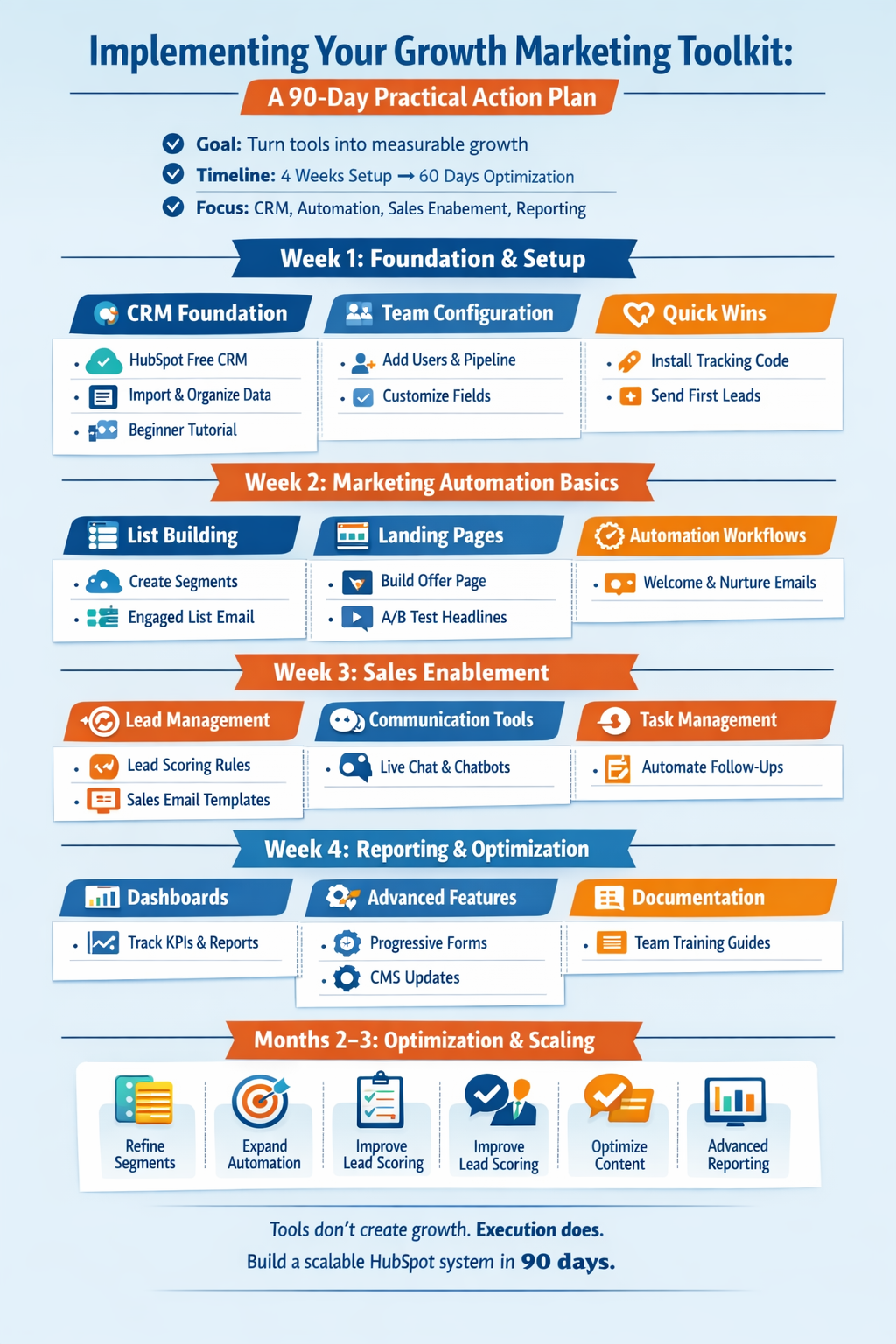
Implementing Your Growth Marketing Toolkit: A Practical Action Plan
Learning about tools is one thing. Actually implementing them to achieve measurable results is another entirely. Let’s create a practical roadmap for putting everything you’ve learned into action.
Week 1: Foundation and Setup
Day 1-2: CRM Foundation
- Sign up for HubSpot’s free CRM (no credit card required)
- Complete the beginner CRM tutorial
- Import your existing contact data using proper mapping
- Set up your company structure and initial contact records
Day 3-4: Team Configuration
- Add team members with appropriate permission levels
- Customize properties to match your business needs
- Create your sales pipeline stages
- Set up basic deal tracking
Day 5: Quick Wins
- Install the HubSpot tracking code on your website
- Create your first simple form for lead capture
- Set up your meeting scheduler link
- Send it to five prospects to test functionality
Week 2: Marketing Automation Basics
Day 1-2: List Building
- Complete the list segmentation tutorial
- Create 3-5 core contact lists based on customer attributes
- Build one active list for engaged prospects
- Set up a test email campaign to a small segment
Day 3-4: Landing Pages
- Complete the landing page tutorial
- Create your first landing page for a key offer
- Implement basic A/B testing on headline or CTA
- Connect the page to an email nurture sequence
Day 5: Automation Workflows
- Build your first automated welcome sequence
- Create a lead nurturing workflow for new contacts
- Set up internal notifications for high-value actions
- Test all workflows thoroughly before activating
Week 3: Sales Enablement
Day 1-2: Lead Management
- Complete the lead management tutorial
- Configure lead routing rules for your team
- Set up lead scoring based on engagement and fit
- Create sales enablement email templates
Day 3-4: Communication Tools
- Set up your meeting scheduler with team features
- Create a simple chatbot for your website
- Configure live chat availability schedules
- Test all communication channels
Day 5: Task Management
- Implement task workflows for common scenarios
- Create task queues for each team member
- Set up recurring tasks for regular customer check-ins
- Train team on task completion and handoffs
Week 4: Reporting and Optimization
Day 1-2: Dashboard Creation
- Complete the reports and dashboards tutorial
- Build a marketing performance dashboard
- Create a sales activity dashboard
- Set up automated weekly reports for leadership
Day 3-4: Advanced Features
- Explore chatbot conversation flows
- Implement progressive forms on key pages
- Create website pages using the CMS tools
- Test all integrations and connections
Day 5: Documentation and Training
- Document your processes and workflows
- Create quick reference guides for your team
- Schedule ongoing training sessions
- Plan your next optimization projects
Months 2-3: Optimization and Scaling
With the foundation in place, focus on continuous improvement:
Refine Your Segmentation: As you collect more data, create increasingly sophisticated contact segments. Test messaging variations for different audiences and measure which resonates best.
Expand Automation: Build more complex workflows that handle entire customer journeys automatically. Connect multiple tools together for seamless experiences.
Improve Lead Scoring: Refine your scoring model based on which leads actually convert. Adjust point values for different actions based on observed behavior.
Optimize Content: Use analytics to identify which landing pages, emails, and content pieces perform best. Double down on what works and eliminate what doesn’t.
Advanced Reporting: Create attribution reports showing which marketing channels generate revenue, not just leads. Build forecasting models based on pipeline data.
 Measuring Success: Key Performance Indicators to Track
Implementation without measurement is just activity, not progress. Track these metrics to ensure your toolkit investment generates real business results.
Marketing KPIs
Lead Generation Metrics:
- Total leads generated per month
- Leads by source/channel
- Cost per lead (if running paid campaigns)
- Lead-to-MQL conversion rate
- Form conversion rates by page
Engagement Metrics:
- Email open and click-through rates
- Landing page conversion rates
- Website session duration and pages per session
- Content engagement by type
- Social media reach and engagement
Efficiency Metrics:
- Time saved through automation (track weekly)
- Campaign setup time before and after implementation
- Manual tasks eliminated
- Team capacity freed up for strategic work
Sales KPIs
Pipeline Metrics:
- Number of opportunities in pipeline
- Total pipeline value
- Average deal size
- Pipeline velocity (how quickly deals move through stages)
- Win rate percentage
Activity Metrics:
- Calls/emails sent per rep
- Meetings scheduled and held
- Proposals sent
- Follow-up completion rate
- Response time to new leads
Revenue Metrics:
- Monthly recurring revenue (MRR) for subscriptions
- Customer acquisition cost (CAC)
- Customer lifetime value (LTV)
- Sales cycle length
- Revenue by source/channel
System Adoption Metrics
Usage Statistics:
- Daily active users
- Features utilized by team
- Data quality scores
- Login frequency
- Mobile app usage
ROI Indicators:
- Hours saved per week per team member
- Cost savings from eliminated tools
- Revenue increase since implementation
- Team satisfaction scores
- Customer satisfaction improvements
Common Pitfalls and How to Avoid Them
Even with excellent tools and training, teams encounter predictable challenges during implementation. Avoiding these common mistakes accelerates your path to results.
Pitfall 1: Analysis Paralysis
The Problem: Trying to learn every feature before starting anything leads to overwhelm and procrastination.
The Solution: Start simple. Implement one feature, use it successfully, then add another. Progress beats perfection.
Pitfall 2: Poor Data Hygiene
The Problem: Importing messy data or failing to maintain standards creates a database of garbage that generates useless insights.
The Solution: Establish data entry rules from day one. Use required fields, validation rules, and regular audits. Clean data pays dividends forever.
Pitfall 3: Set It and Forget It
The Problem: Building workflows and never reviewing performance leads to outdated automation that frustrates customers.
The Solution: Schedule monthly reviews of all automated sequences. Update messaging, adjust timing, and eliminate underperforming elements.
Pitfall 4: Lack of Team Buy-In
The Problem: Leadership embraces the tools but team members resist change, creating incomplete adoption.
The Solution: Involve team members in the selection and setup process. Show how tools make their jobs easier, not harder. Celebrate early wins publicly.
Pitfall 5: Ignoring Mobile Experience
The Problem: Designing everything for desktop means mobile visitors have poor experiences, reducing conversions.
The Solution: Test every form, landing page, and email on mobile devices. HubSpot’s tools are mobile-responsive, but content and design choices still matter.
Pitfall 6: Over-Automation
The Problem: Automating every interaction removes the human touch that builds relationships and trust.
The Solution: Automate the routine, personalize the important. Use automation to free up time for meaningful conversations, not to replace them entirely.
Advanced Strategies for Power Users
Once you’ve mastered the basics, these advanced strategies unlock even more value from your toolkit.
Account-Based Marketing (ABM) Implementation
Use company-level segmentation and personalization to target high-value accounts with coordinated campaigns across all touchpoints. Create specific content, workflows, and outreach sequences for each target account.
Revenue Attribution Modeling
Connect marketing activities to actual revenue using multi-touch attribution. Understand which channels, campaigns, and content pieces contribute to closed deals, not just initial lead generation.
Predictive Lead Scoring
Combine behavioral data with demographic information to create predictive models that identify which leads are most likely to convert. Adjust your scoring model quarterly based on actual conversion data.
Lifecycle Stage Automation
Move contacts through lifecycle stages (subscriber → lead → MQL → SQL → opportunity → customer) automatically based on engagement and qualification criteria. Trigger appropriate actions at each stage transition.
Content Personalization at Scale
Use smart content and dynamic personalization to show different messaging to different segments on the same web pages and emails. Create experiences that feel individually tailored without creating dozens of variations manually.
Sales and Marketing Alignment (SMarketing)
Use shared dashboards, service level agreements (SLAs), and closed-loop reporting to ensure marketing and sales work toward common goals with complete visibility into each other’s activities.
Integration Strategies: Connecting Your Tech Stack
HubSpot excels as a central hub, but most businesses use multiple specialized tools. Strategic integrations multiply the value of your entire tech stack.
Native Integrations to Consider
For E-commerce: Shopify, WooCommerce, or BigCommerce integrations sync product data, purchases, and customer behavior automatically.
For Accounting: QuickBooks or Xero connections ensure financial data flows seamlessly between systems.
For Communication: Slack integrations keep teams notified of important CRM activities in real-time.
For Video: Vidyard or Wistia integrations track video engagement and trigger workflows based on viewing behavior.
For Events: Eventbrite or Zoom connections automate registration tracking and follow-up.
API-Based Custom Integrations
For unique requirements, HubSpot’s API allows custom integrations with virtually any other system. This enables sophisticated workflows across your entire business ecosystem.
Security, Privacy, and Compliance Considerations
Free doesn’t mean unprotected. HubSpot takes data security seriously, but you also have responsibilities.
Data Protection Best Practices
- Enable two-factor authentication for all users
- Regularly review user permissions and remove unnecessary access
- Implement IP restrictions if appropriate for your business
- Train team members on secure password practices
- Back up critical data regularly (HubSpot provides export capabilities)
Privacy Compliance
GDPR Requirements: If serving European customers, implement proper consent mechanisms, cookie notices, data processing agreements, and individual data access processes.
CAN-SPAM Compliance: For US email marketing, include physical addresses, honor opt-outs within 10 days, and avoid deceptive subject lines.
CCPA Considerations: California residents have specific privacy rights requiring transparent data practices and opt-out mechanisms.
HubSpot provides tools to support compliance, but implementing proper procedures remains your responsibility.
When to Consider Upgrading to Paid Plans
The free tools provide exceptional value indefinitely, but certain business scenarios justify paid upgrades.
Signals You’ve Outgrown Free Tools
Volume Limitations: Need to send more than 2,000 marketing emails monthly or manage more complex automation workflows.
Advanced Features: Require multi-currency support, custom objects, predictive lead scoring, or sophisticated attribution reporting.
Enhanced Support: Need priority technical support with faster response times.
Team Scaling: Require additional user seats beyond what the free tier provides, or need advanced permission controls.
Integration Requirements: Need certain premium integrations or custom API access limits.
Reporting Complexity: Require advanced attribution modeling, custom reporting dashboards, or deeper analytics.
Evaluating ROI of Paid Plans
Before upgrading, calculate potential return on investment:
- Quantify time savings from additional automation features
- Estimate revenue impact of advanced capabilities
- Compare cost against current tools you could eliminate
- Consider team productivity improvements
- Factor in reduced technical overhead
If the numbers work, upgrading accelerates growth. If not, maximize free tools first.
Real-World Success Stories: How Businesses Transform with This Toolkit
Understanding theory is valuable. Seeing practical results inspires action.
Small Service Business: 15 Hours Saved Weekly
A boutique consulting firm with five employees struggled with scattered client data, manual email sends, and unclear pipeline visibility. After implementing HubSpot’s free tools:
- Automated client onboarding saved 6 hours weekly
- Centralized CRM eliminated 4 hours of data searching
- Meeting scheduler removed 3 hours of scheduling back-and-forth
- Automated reporting saved 2 hours of manual compilation
Result: The owner redirected 15 hours weekly toward strategic growth initiatives, resulting in 40% revenue increase over six months.
Growing SaaS Startup: 3X Lead Generation
A software startup with limited marketing budget needed scalable lead generation without expensive tools. Implementation results:
- Free landing pages converted 23% better than previous solution
- Automated nurture sequences engaged 67% of leads
- Chatbot qualified 40% of inquiries automatically
- Marketing automation replaced $600/month in paid tools
Result: Lead generation tripled while marketing costs decreased, enabling the company to scale profitably.
Established Business: Unified Customer View
A 20-person professional services firm used disconnected systems for sales, marketing, and client service. After centralizing in HubSpot:
- Eliminated three separate paid tools, saving $1,800 monthly
- Reduced client onboarding time by 60%
- Increased referral generation through systematic follow-up
- Improved team collaboration with shared data access
Result: Enhanced client experience drove retention from 72% to 91% and significantly increased lifetime value.
Building Your Learning Plan: Continuous Improvement
Mastering this toolkit isn’t a one-time event. It’s an ongoing journey of learning, implementing, and optimizing.
Immediate Next Steps (This Week)
- Sign up for HubSpot’s free CRM if you haven’t already
- Watch the beginner CRM tutorial and one additional tutorial relevant to your role
- Import at least 50 contacts to start building your database
- Create your first form and landing page
- Set up your meeting scheduler link and share it with five prospects
Short-Term Goals (This Month)
- Complete all 19 video tutorials in the toolkit
- Implement at least five features in your business
- Build your first automated workflow
- Create a basic reporting dashboard
- Train your team on core functionality
Long-Term Commitment (This Quarter)
- Achieve full team adoption of the CRM
- Automate at least 10 hours of weekly manual work
- Generate measurable improvements in lead generation or sales efficiency
- Build sophisticated segmentation and personalization
- Create comprehensive dashboards tracking all key metrics
Ongoing Education Resources
HubSpot Academy: Free certification courses covering marketing, sales, and service topics in depth. Earn certifications to validate your skills.
HubSpot Community: Connect with other users, ask questions, share strategies, and learn from collective experience.
YouTube Channel: Regular new tutorials, feature announcements, and best practice demonstrations.
Blog and Resource Library: Detailed articles, templates, and guides covering every aspect of inbound methodology.
Partner Network: If you need implementation help, certified HubSpot partners provide consulting and setup services.
Conclusion: Your Path to 10X Productivity Starts Now
You’ve discovered a comprehensive toolkit that leading businesses use to transform their marketing and sales operations. These aren’t theoretical concepts or distant possibilities—they’re practical, accessible tools you can implement starting today.
The 19 video tutorials provide step-by-step guidance through every feature. The free forever access removes financial barriers. The only remaining ingredient is your commitment to taking action.
Consider where your business stands right now. How much time does your team spend on manual data entry, scheduling meetings, sending individual emails, searching for customer information, or compiling reports? How many leads slip through because of disconnected systems? How much revenue is left on the table because follow-ups don’t happen systematically?
These aren’t hypothetical problems. They’re real costs your business incurs every single day you continue with current processes.
The opportunity cost of not implementing these tools exceeds the time investment required to learn them. A few hours of focused learning creates years of ongoing efficiency gains.
Imagine your business three months from now. Marketing campaigns run automatically based on customer behavior. Sales teams focus on high-value conversations instead of administrative tasks. Customer data centralizes in one accessible location. Reports generate automatically, providing instant visibility into performance. Your team redirects 10+ hours weekly toward strategic initiatives that drive real growth.
This isn’t fantasy. It’s the reality for thousands of businesses already using this toolkit effectively.
The question isn’t whether these tools can transform your operations—they demonstrably can. The question is whether you’ll take advantage of this opportunity or continue struggling with inefficient processes.
Start small if you need to. Watch one tutorial today. Set up your free account tomorrow. Import your first 100 contacts this week. Build your first automation next week. Each small step compounds into meaningful transformation.
The businesses that thrive in competitive markets aren’t necessarily the ones with largest budgets or biggest teams. They’re the ones that leverage technology strategically to multiply their effectiveness. They’re the ones willing to invest time in learning tools that create lasting competitive advantages.
Your competitors are either already using these capabilities or will discover them soon. The window for gaining a first-mover advantage in your market closes a bit more each day.
Don’t let another week pass watching opportunities slip away because of inefficient systems. Don’t waste another month on manual processes that automation could handle better. Don’t sacrifice another quarter of growth because scattered data prevents strategic decision-making.
The tools exist. The training is available. The only missing piece is your decision to get started.
Book your free demo, dive into the first tutorial, and take the first step toward reclaiming 10+ hours weekly while accelerating your business growth. Your future, more productive self will thank you for the investment you make today.
The path to transformation starts with a single action. Take it now.
Frequently Asked Questions
Q: Is HubSpot’s free CRM really free forever, or does it convert to paid after a trial period?
A: HubSpot’s free CRM and core tools remain genuinely free forever with no time limits or required credit card. You can use them indefinitely without upgrading. Paid plans offer additional features, but the free tier provides substantial value permanently.
Q: How long does it take to implement the complete toolkit?
A: Basic implementation takes 3-4 weeks following the structured plan outlined above. However, optimization and advanced features represent an ongoing process. Most businesses see meaningful results within the first month.
Q: Do I need technical skills or coding knowledge to use these tools?
A: No coding knowledge is required. HubSpot’s interface uses drag-and-drop builders and visual editors. If you can use email and spreadsheets, you can use HubSpot. The video tutorials show everything step-by-step.
Q: Can I use HubSpot with my existing website and tools?
A: Yes. HubSpot integrates with most popular platforms including WordPress, Shopify, Salesforce, Stripe, and hundreds of other tools. You don’t need to rebuild your entire tech stack.
Q: What’s the catch with free tools?
A: There isn’t a hidden catch. HubSpot’s business model provides free tools to help businesses grow, then offers paid upgrades as companies need more advanced features. Many businesses never need to upgrade.
Q: How much time will I actually save using these tools?
A: Time savings vary by business and implementation thoroughness, but most teams report saving 10-15 hours weekly once fully implemented. Automation, centralized data, and efficient workflows drive these gains.
Q: Will my team actually adopt these new tools?
A: Adoption depends on change management approach. Involve team members early, show how tools make their jobs easier, provide adequate training, and celebrate early wins. The tutorials and this guide provide the roadmap for successful adoption.
Q: What happens to my data if I decide HubSpot isn’t right for my business?
A: You maintain ownership of your data and can export it anytime in standard formats. There’s no lock-in. However, most businesses find the free tools so valuable that migration becomes unnecessary.
Q: Can I start small and expand gradually?
A: Absolutely. The recommended approach is implementing one or two features successfully before adding more. This prevents overwhelm and ensures solid foundations.
Q: How does this compare to other CRM and marketing platforms?
A: HubSpot’s free tier is exceptionally comprehensive compared to competitors. Most other platforms offer time-limited trials or very restricted free tiers. HubSpot provides genuine, ongoing value at no cost.
Ready to transform your business operations and reclaim 10+ hours weekly? Start with tutorial #1 today and take the first step toward unprecedented productivity and growth.