
Somewhere in your phone right now there’s probably a WhatsApp chat with a lead who went cold. You meant to reply. Then three other things happened that afternoon, and by the time you circled back, they’d already bought from someone else. Whoever replied first, basically. That’s not a sales problem, not really. It’s a system problem. And a decent WhatsApp CRM is the thing that actually fixes it.
We went through nine tools Indian businesses are genuinely paying for right now. Checked current pricing, poked at what each one is weak on, and we’re not going to sit here and tell you one of them wins at everything. Anyone who tells you that hasn’t used more than two of these.
What a WhatsApp CRM Even Is
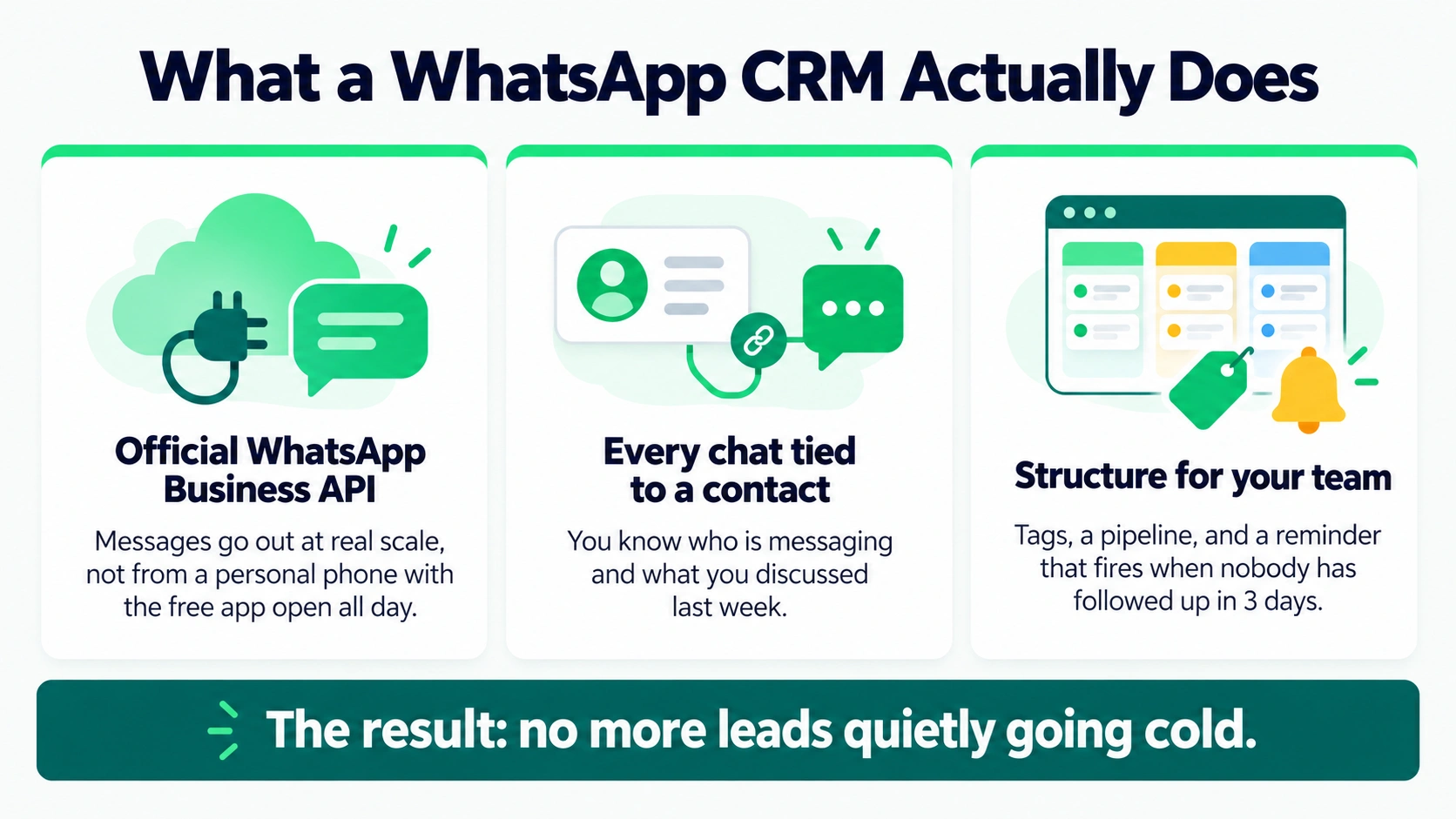
Cut through the sales pitch and it comes down to three things. It connects to the official WhatsApp Business API, so messages go out at real scale, not from someone’s personal phone with the free app open all day. It ties every conversation to an actual contact record, so when a message lands you already know who this is and what you two talked about last week. And it puts some shape around your team’s work, tags, a pipeline, a reminder that fires when nobody’s followed up in three days, so a lead doesn’t just quietly rot because the person handling it took a Friday off.
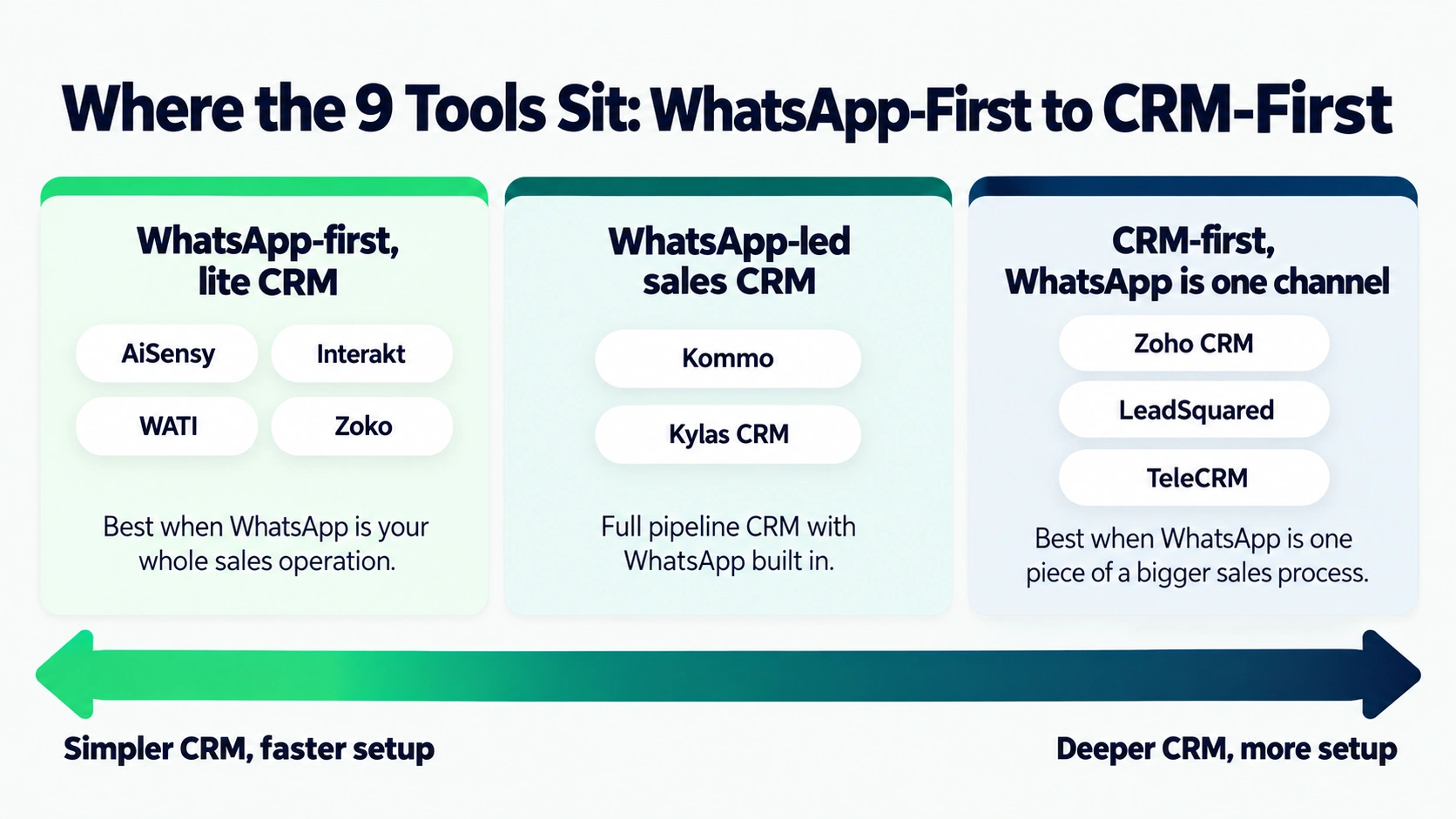
Some of these are WhatsApp-first products with a thin CRM sitting on top. Others are proper CRMs where WhatsApp is one channel out of several, next to email, next to phone calls. Neither is the “correct” choice by default. Depends entirely on whether WhatsApp is basically your whole sales operation or just one piece of something bigger.
How We Actually Judged These
Five things mattered, roughly in this order. How deep does the CRM go, real pipeline stages and tagging and reporting, versus just being a chat inbox wearing a CRM costume? Is the WhatsApp side solid, official API, a chatbot builder that isn’t a toy, real broadcast tools? What does it cost in 2026, including the fees that never make it onto the pricing page? Does it plug into what Indian businesses already run, Shopify, Zoho, that sort of thing? And does it still hold up once a three-person team turns into thirty people fighting over the same leads?
Quick Comparison
| Tool | Starting Price | Best For | CRM Depth |
| AiSensy | ₹1,500/month | D2C brands, broadcast-heavy sellers | Lite CRM |
| Interakt | ₹1,000-2,500/month | Shopify and WooCommerce stores | Lite CRM |
| WATI | ₹2,199-16,999/month | Support-heavy mid-size teams | Lite CRM |
| Zoko | ₹3,499-9,699/month | Ecommerce, WhatsApp-native selling | Lite CRM + commerce |
| Kommo (amoCRM) | ~₹1,243/user/month | Sales teams wanting a visual pipeline | Full pipeline CRM |
| Zoho CRM | ₹800/user/month | Businesses already on Zoho | Full enterprise CRM |
| Kylas CRM | ~$250/month flat | Growing SME sales teams, unlimited users | Full CRM |
| LeadSquared | ₹2,075-8,300/user/month | Education, real estate, BFSI | Full enterprise CRM |
| TeleCRM | ₹799-1,099/user/month | Telecalling and outbound sales teams | Full sales CRM |
AiSensy — The One Most People Should Just Start With
₹1,500 a month, unlimited agents from day one. That second part matters more than it sounds, because half the tools on this list charge per seat, and that number gets ugly fast once your team isn’t just you and your cousin anymore.
What you actually get for that: a drag-and-drop chatbot builder, broadcast tools, Click-to-WhatsApp ads that plug straight into Meta’s ad manager, an AI helper for writing ad creative and message templates when you’re staring at a blank screen at 11pm, and a CRM layer that’s fine, tagging, a basic pipeline, nothing fancy. It won’t replace Zoho if your sales process has six stages and three approval layers. But most small D2C brands and service businesses don’t need that. They need to catch a lead, message it back fast, and not lose track of who’s who. AiSensy does that without a two-week setup.
The catch, and there’s always one: the CRM here really is lite. Custom deal stages, real forecasting, deep reports, you’ll hit a ceiling eventually. And the bots are mostly button-driven still, tap this, see that, which is fine until a customer type something genuinely weird and the flow just sits there confused.
Interakt — Built for Shopify, and It Shows
If you sell on Shopify or WooCommerce, this one was basically designed around your exact daily headache. Abandoned carts, order status pings, turning WhatsApp into something that actually drives sales instead of just fielding complaints. Runs ₹1,000 to ₹2,500 a month depending on plan, and a few tiers don’t even charge a markup on messages, which almost nobody else in this space does.
Because it’s actually looking at your real order history through the Shopify integration, the follow-ups feel less like guesswork. “You bought this, here’s a matching item” instead of some random suggestion pulled from nowhere. Cart recovery, delivery updates, order confirmations, all running without you building a single flow yourself.
Step outside ecommerce though and this stops making sense. A consultant or a B2B service business paying for Shopify-depth integration they’ll literally never touch? Skip it.
WATI — For When Your Support Queue Is the Real Problem
Five or more agents answering WhatsApp all day, needing clean assignment and a shared view of who’s talking to whom, plus a CRM that actually plays nice with Zoho or HubSpot? WATI handles that better than most of the WhatsApp-first tools here. Starts around ₹2,199 a month, climbs toward ₹16,999 on the bigger plans. One thing to watch, agent seats are capped on the cheaper tiers, unlike AiSensy, so factor in what extra seats cost before you commit.
It’s pricier than AiSensy or Interakt right out of the gate, for less marketing muscle. If broadcast campaigns matter to you more than a support queue, you’re paying for a lot of stuff sitting unused in a corner.
Zoko — WhatsApp as a Storefront, Not Just a Chat Window
Zoko doesn’t really behave like a messaging tool. Catalogs, in-chat payments, cart recovery, these aren’t add-ons, they’re basically the whole product. ₹3,499 to ₹9,699 a month depending on tier, plus roughly ₹1.25 per conversation stacked on top of what Meta already charges. Worth actually running those numbers if your volume’s high, because that per-conversation fee sneaks up on you.
The CRM piece is thinner than a dedicated sales tool, though. If real pipeline management matters alongside the commerce stuff, you’ll probably end up bolting on something else anyway.
Kommo — If Your Team Lives in a Visual Pipeline
Some sales teams think in kanban boards. Drag a deal from “contacted” to “negotiating” to “won,” and WhatsApp is just where those conversations happen to sit. Kommo is built for exactly that person, a genuine WhatsApp sales CRM rather than a chatbot tool with a pipeline bolted on as an afterthought. ₹1,243 per user per month on the base tier, up to ₹3,730 for Enterprise. Heads up though, the base plan skips chatbot and bulk messaging entirely. You need Advanced or higher for that.
Per-user pricing gets expensive quick once the team grows, and a few users mention support taking its time to respond. There’s usually a six-month minimum too, so this isn’t a month-to-month kind of commitment.
Zoho CRM — For Anyone Already Living in the Zoho Ecosystem
Already running Zoho Books or Zoho Desk? Bolting WhatsApp on through the marketplace extension keeps everything under one roof instead of juggling tools that don’t talk to each other. ₹800 per user per month gets you the Standard plan, though WhatsApp itself only shows up once you’re paying, so budget for that.
This is a genuinely deep CRM, workflow automation, real reporting, custom modules, the whole thing. WhatsApp’s just one channel among several here, not the centerpiece.
If you’re not already inside Zoho’s world, though, the WhatsApp piece feels bolted on rather than built for the channel. Businesses that treat WhatsApp as their main line tend to get a smoother experience from something built around it specifically, not adapted to fit.
Kylas CRM — Flat Fee, Unlimited Users, Built for Growing Teams
Here’s something different: one flat fee, about $250 a month, unlimited users. No per-seat pricing quietly punishing you every time you hire someone. Native WhatsApp comes as an add-on, roughly ₹3,500 a month plus messaging credits, and there’s a 10% markup sitting on top of Meta’s own rates there.
For an SME growing fast, where per-user costs are turning into an actual line item on the budget, this shape of pricing can beat the seat-based alternatives once you cross 15 or 20 people. Lead management, pipeline tracking, automated follow-ups, all handled without much of a learning curve.
Smaller integration marketplace than Zoho or Salesforce though, and a few users say reporting gets less flexible once things scale.
LeadSquared — For Education, Real Estate, and BFSI, Basically
Some sales processes are genuinely sprawling. One lead touched by five different people across three weeks before anything closes, that’s the world LeadSquared was built for, education, real estate, financial services. ₹2,075 per user per month on Lite, up to ₹8,300 for Enterprise. WhatsApp arrives here through integration, not as something native to the core product.
Where it earns its price is field sales logic, routing leads by territory, tracking what a rep’s actually doing out there, reporting that goes well past what any WhatsApp-first tool bothers with.
For a small business just wanting to manage WhatsApp chats without a whole sales machine underneath? This is overkill, and frankly overpriced for that job. Save it for teams that already have a defined process they need to automate, not one they’re still figuring out.
TeleCRM — Built Around the Phone, WhatsApp Comes Second
If your sales motion runs on actual phone calls more than chat, this pairs a one-click auto-dialer and call recording with lead capture from 25-plus sources, then syncs WhatsApp on top. ₹799 to ₹1,099 per user per month as a base, WhatsApp Chat Sync adds ₹200 per user per month, and there’s a one-time API setup fee around ₹1,999.
Good fit for real estate, insurance, and education businesses running telecalling teams who also want WhatsApp tied to the same lead record, so nobody’s bouncing between two separate tools to track one person.
Calling comes first here, though, WhatsApp second. If WhatsApp is genuinely your main channel and calls are the afterthought, a tool-built WhatsApp-first is going to feel more natural in your hands.
The Costs Nobody Puts on the Homepage
Quick reality check before you pick anything. The subscription fee is never the whole bill. You’re also paying Meta directly, roughly ₹0.86 per marketing message and ₹0.12 for utility or authentication messages in India right now, and most platforms tack a markup on top of that, anywhere from nothing to 30%. Ask for that number outright. It almost never shows up clearly on the pricing page, funnily enough, you usually have to dig or just ask sales directly.
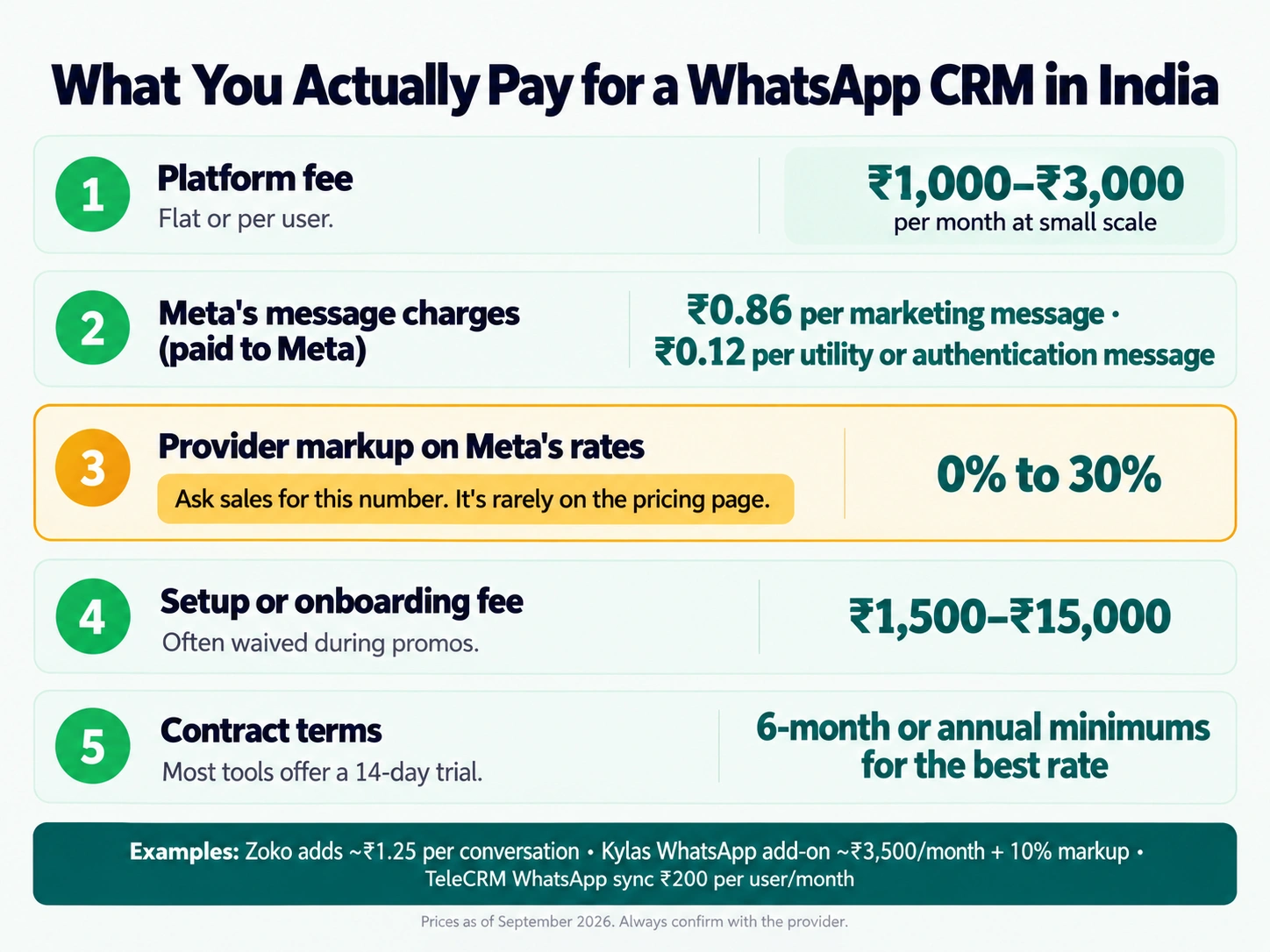
Flat-rate versus per-user pricing matters more than people assume too. A ₹1,500 tool with unlimited agents can end up cheaper than an ₹800-per-user tool the second your team crosses five or six people. Worth doing that math before signing anything annual.
And keep an eye on setup fees and minimum terms. Some platforms waive onboarding during a promo but normally list it anywhere from ₹1,500 to ₹15,000, and a handful lock you into six-month or annual contracts just to get their best rate.
The API Bit You Genuinely Can’t Skip
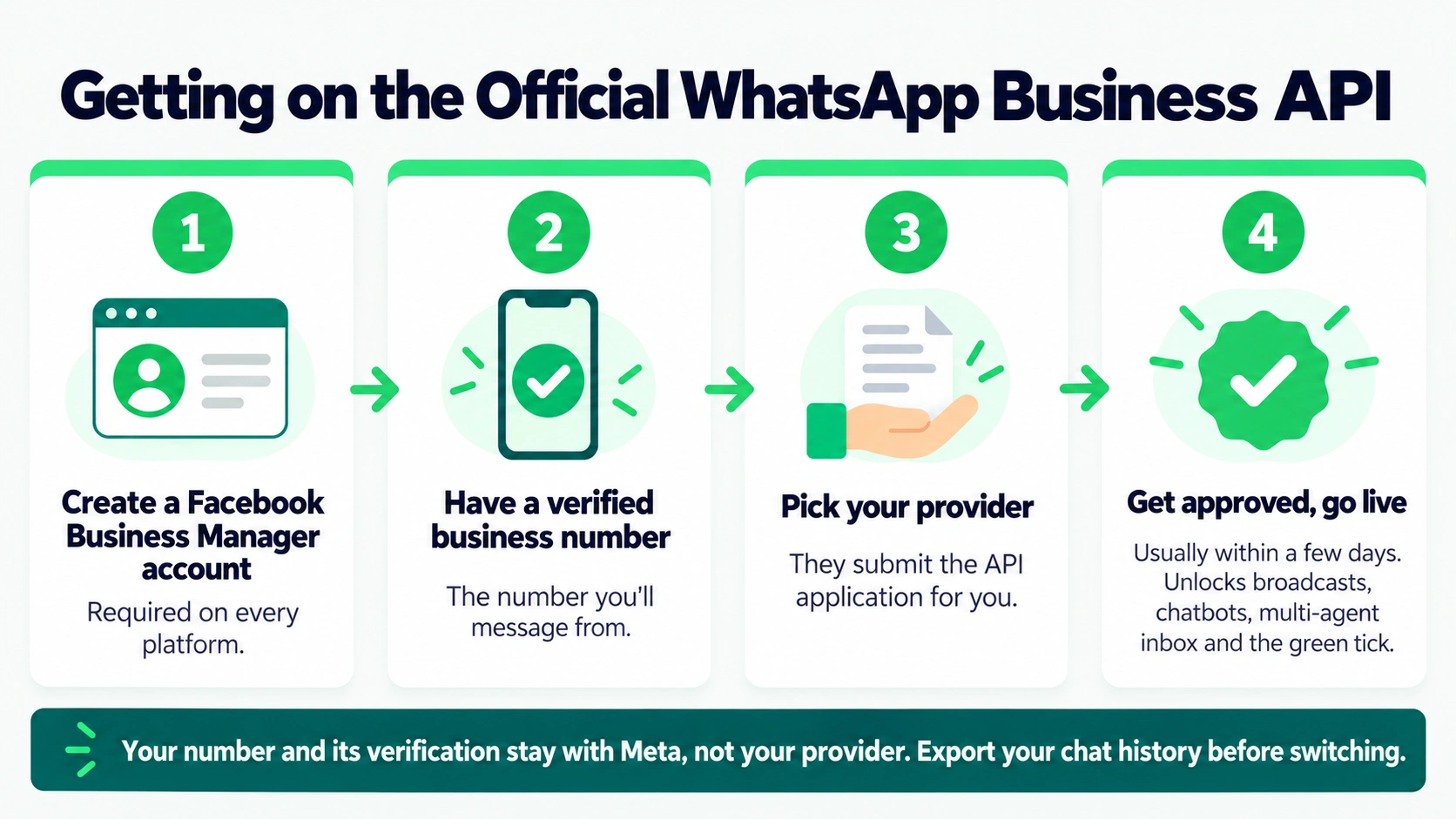
Every single tool here sits on top of the official WhatsApp Business API, sometimes called the Cloud API, not the free app most shopkeepers already have installed. That’s non-negotiable if you want real scale, broadcast tools, or that green tick verification badge. The provider usually handles getting you approved within a few days, but you’ll still need a Facebook Business Manager account and a verified number no matter which platform you land on.
Integrations, Check the Specific One You Need
Running Shopify, WooCommerce, Zoho, HubSpot, Salesforce? Check that exact integration rather than trusting a vague “integrations available” line somewhere on a pricing page. Interakt and Zoko go hardest on Shopify specifically. WATI and Zoho CRM connect more naturally with existing CRM setups you might already have. Kommo and Kylas both hook into Zapier or Integrately if you need something custom that the native option doesn’t cover.
Security and Compliance, the Short Version
Two things apply no matter what you pick here. Real opt-in before you message anyone, not a checkbox someone forgot was pre-ticked, both because Meta’s policy demands it and because India’s DPDP Act treats consent as something that has to be specific and clearly given, never assumed. And since Meta’s January 2026 policy shift, open-ended, general-purpose AI chatbots got banned from the Business API entirely. Every tool here builds task-specific bots instead, orders, bookings, support, which keeps you compliant without thinking about it. Worth knowing why your bot can’t just “chat about anything,” even if a sales rep somewhere makes it sound like it can.
So, Which One Do You Actually Pick
If you’re running a small or mid-size business and WhatsApp is basically your whole sales and support operation, start with AiSensy for the price-to-feature balance, or Interakt specifically if you’re on Shopify. If your team already thinks in pipeline stages and wants real depth, Kommo or Kylas earn the extra spend. And if you’re already committed to Zoho, or running a big field sales operation across education, real estate, or BFSI, Zoho CRM or LeadSquared will serve you better than anything built purely for WhatsApp, even with WhatsApp not being their strongest card.
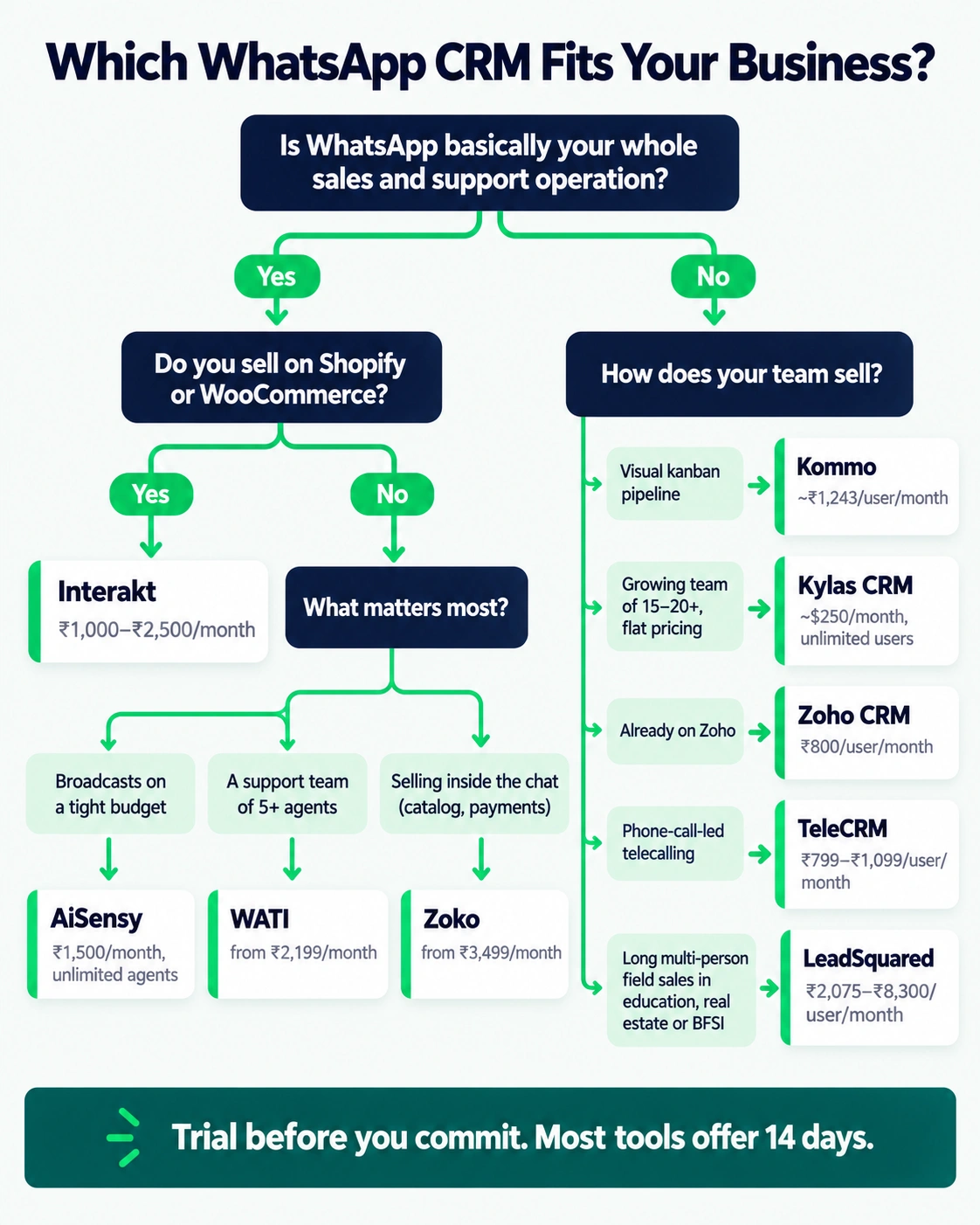
Just don’t lock into a year-long contract before actually trialing one. Most give you 14 days. The only real way to know if a tool fit is running actual messy conversations through it and watching where it breaks.
FAQs
Q. Do I need the official WhatsApp Business API, or is the free app enough?
A. The free app’s fine if you’re one person handling a handful of chats. The moment you need broadcasts, multiple agents, or chatbots, you need the official API, which comes bundled through whichever provider you pick.
Q. What does a WhatsApp CRM cost per month, roughly?
A. Figure ₹1,000 to ₹3,000 for the platform fee at small scale, then Meta’s own per-message charges stack on top, usually a few thousand more depending on volume and whether you’re leaning marketing-heavy or utility-heavy.
Q. Can I switch providers later without losing my number?
A. Generally, yes. The number and its verification sit with Meta, not the provider, so switching is doable. You might lose chat history stored inside the old platform though, unless you export it first.
Q. Is the AI chatbot quality basically the same across all of these?
A. Not even close. Most still run button-based flows with a bit of AI stitched in for parsing free text. Actual conversational AI that handles a messy customer message reliably varies a lot tool to tool, so test it yourself with real, weird customer phrasing before committing.
Q. Which is cheapest for a very small business just starting out?
A. AiSensy at ₹1,500 with unlimited agents, or Zoho CRM’s ₹800-per-user Standard plan if you’re already comfortable in that world, both work as a starting point for WhatsApp customer management without blowing a small budget.
At the end of the day, none of this is really about finding the tool with the longest feature list. It’s about matching what you’re already doing, ecommerce, telecalling, field sales, pure support, to something built around that shape of work specifically. Get that match right for your WhatsApp CRM India setup, and honestly, the rest mostly takes care of itself. Whatever you land on, it just needs to feel like solid WhatsApp business software for the way your team actually works, not the way a demo video made it look.

The Team Compare BizTech is made up of people from marketing backgrounds, digital marketing & content marketing backgrounds, each with unique experiences and nuggets of wisdom to share with you. The team is passionate about creating unique, accurate, and engaging content.