
Your customers already expect an instant answer at 11pm on a Sunday. That’s just where things are now. The real question isn’t whether you need some form of AI customer service. It’s which parts of your support setup actually benefit from it, and which parts you’d be foolish to hand a bot. So, let’s get into the real numbers, the real tools, and the tradeoffs nobody bothers putting on a pricing page.
What “AI Customer Service” Actually Covers
People throw this phrase around like it’s one thing. It isn’t. There are at least four separate jobs an AI customer support setup can do, and most businesses only need one or two of them, not all four at once.
Chatbots handle the front door. That’s the little chat widget on your site or app answering a question before a human ever sees it. Voice agents do roughly the same job over the phone, and yes, they’ve actually gotten decent in the last year or two, nothing like the robotic phone tree from 2019 that made everyone hang up in frustration. Ticket automation works behind the curtain: tagging, routing, sometimes closing out tickets that come in by email, no chat window in sight. And intent detection sits quietly under the other three, the part that figures out whether someone’s asking about a refund, a shipping delay, or a login that just won’t work, so the right response, or the right human, gets pulled in.
Which of these four do you actually need? That question matters a lot more than picking whatever’s “top rated” this month. A five-person online shop probably wants a chatbot and some ticket automation, and that’s it. A 200-agent call center needs voice and intent routing instead. Buy the wrong shape of tool and you’re paying monthly for features nobody on your team ever bothers opening.
Chatbots: Where Most Businesses Actually Start
A chatbot’s the most common entry point, and there’s a good reason for that. It’s visible, cheap to test, and customers already expect one sitting in the corner of the screen. The decent ones do more these days than spit back FAQ answers word for word. They can check an order, compare a return request against your actual return window, and hand off cleanly the second they hit something out of their depth.
Here’s the part nobody likes admitting out loud. A chatbot is only as good as whatever it was trained on. Outdated help articles, product info scattered across five different tools, and the bot will tell a customer something confidently wrong. That’s worse than no bot at all, if you think about it, because a human support agent at least knows when they don’t know something.
Voice Agents: The Newer, Pricier Frontier
Voice is where this gets expensive fast, and where the gap between “impressive demo” and “actually works on a real call” is at its widest. Vendors like Sierra and Decagon build custom voice agents for bigger companies, and none of them publish a price. Reported year-one costs for these custom builds run anywhere from the low hundreds of thousands up into the mid six figures, once setup, integration, and ongoing tuning get counted. That’s an enterprise price tag. Nobody built it with your budget in mind.
Smaller business wanting voice? The realistic move right now is a lighter platform, something like Vapi, Retell, or a voice add-on bolted onto whatever helpdesk you already run, rather than chasing a fully custom build. Treat voice as the least mature piece of your stack this year. Low call volume, skip it for now, revisit next year. A bad phone call annoys people a lot more than a clunky chat window ever will, and there’s really no getting around that.
Ticket Automation and Intent Detection
This is the unglamorous half of customer service automation, and it’s often where the real money quietly disappears, in a good way, without any customer ever noticing anything changed. Instead of, or alongside, a customer-facing bot, ticket automation tags incoming emails by topic, routes billing questions to whoever handles billing, auto-closes tickets that match a known, low-risk pattern. “Where’s my order” once tracking already shows it delivered? Classic example.
Intent detection is what makes any of that work in the first place. It’s the piece reading a ticket and figuring out what it’s actually about, and that matters because real customers don’t write clean, categorized requests. They write “hey this thing broke can u help,” and something has to sort out whether that’s a refund ask, a bug report, or a how-to question before anything useful happens next.
FAQs, Multilingual Support, and the Human Handoff
Three smaller pieces round out a real deployment, and skipping any of them tends to bite you about two months in.
FAQ handling sounds almost too basic to write a section about, but it’s the single highest-value use case for most businesses. A huge share of support volume is the same handful of questions asked a thousand slightly different ways, and once you notice that pattern you can’t unsee it. Nail this and you’ve probably automated 30 to 40% of ticket volume before touching anything fancier.
Multilingual support used to be a real reason to skip these tools entirely. Not anymore, not really. Most major platforms handle a wide range of languages right out of the box now, spotting whatever language the customer’s writing in and answering in kind. Matters a lot if you sell outside your home market and don’t have staff fluent in six languages just sitting around waiting.
Then there’s the human handoff, and this might be the single most important design choice in the whole setup. A good tool knows when it’s out of its depth and hands off cleanly, with context attached, so the customer isn’t stuck repeating themselves to a human all over again. A bad one either never hands off and just keeps guessing at the answer, or hands off with zero context, so your human agent starts from scratch anyway, wasting everyone’s time. Test this specifically before you sign anything. Ask a vendor to actually show you, live, what a handoff looks like from the customer’s side, not just the tidy admin dashboard they’ll want to demo instead.
WhatsApp and the Channels That Actually Matter
Customers in Latin America, parts of Europe, India, or the Middle East? WhatsApp isn’t a nice-to-have for them. It’s often the main channel, full stop. Most of the big players, Intercom, Zendesk, Freshdesk, support WhatsApp, usually tacking on an extra per-message or channel fee on top of the base AI cost. Don’t assume “omnichannel” printed proudly on some pricing page means every channel comes free once you’re through the door. Go check the actual channel fees before you commit to anything, because they pile up fast on high-volume channels like WhatsApp and SMS.
The Tools: What They Actually Cost, and Who They’re For
Here’s where the vendor comparisons get honest, because pricing pages in this category are confusing on purpose. Nearly every tool bills you two separate ways: a seat fee, plus a usage fee that shows up as a surprise a few months later.
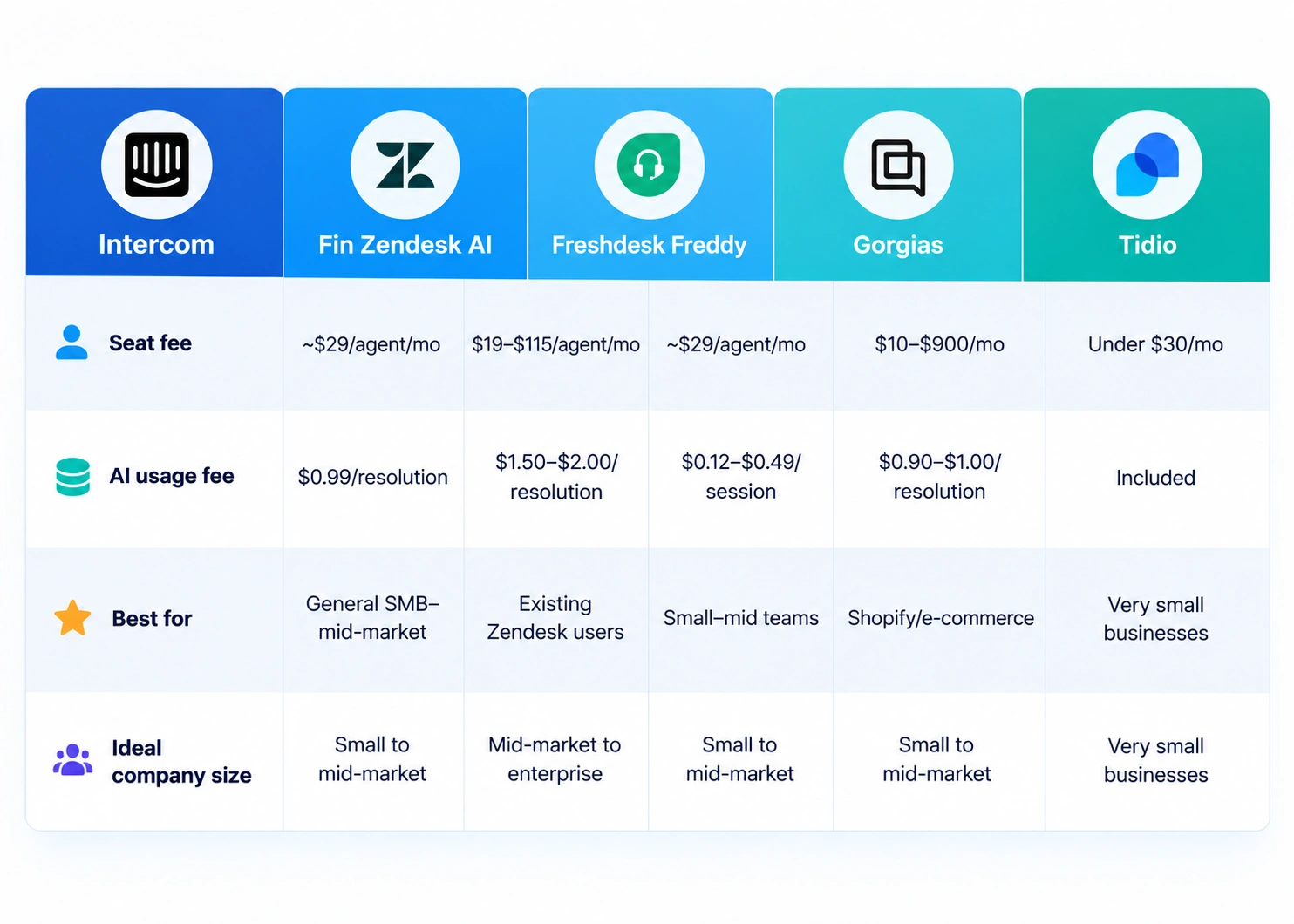
Start with Intercom Fin, the best-known name in this space. It’s priced completely differently than a typical seat model. Fin charges $0.99 per resolution, meaning you only pay when it actually resolves a conversation without a human stepping in, and that sits on top of seat pricing starting around $29 a month per agent. A small team resolving a few hundred conversations monthly lands under $700 total, genuinely reasonable. Push past a few thousand resolutions a month, though, and that per-resolution fee turns into a serious line item. Potentially $5,000 or more, no ceiling in sight. Fin’s a capable tool, no argument there. Just know the pricing rewards you at low volume and quietly punishes you at real scale, unless you go and negotiate.
Zendesk AI runs on a similar idea but at a steeper rate, around $1.50 per resolution on committed volume, $2.00 pay-as-you-go, stacked on top of Suite plans running $19 to $115 per agent monthly. Want AI helping your human agents draft replies too? That’s a separate $50-per-agent Copilot fee. Zendesk itself is mature and full-featured, so bolting AI on top makes sense if you’re already running support through it. Starting from scratch? The layered pricing here, seat plus Copilot plus per-resolution, adds up a fair bit faster than the headline number lets on.
Freshdesk’s Freddy AI splits the same way, more or less. Freddy Copilot runs around $29 per agent monthly for your human team, and Freddy AI Agent handles the customer-facing side, billed by session, somewhere between $0.12 and $0.49 depending on plan and channel. Freshdesk tends to land as the friendlier-priced option among the mainstream helpdesks. Reasonable pick if you’re a small to mid-sized team wanting AI features without piling up a giant stack of add-ons.
Then there’s Gorgias, built specifically for e-commerce, mostly Shopify stores, and the pricing reflects exactly that. Plans start at $10 a month for a genuinely tiny shop and scale up to $900 for high-volume brands, with AI automation billed on top at roughly $0.90 to $1.00 per resolved conversation. Running a Shopify store where most tickets are order status, returns, product questions? Worth a serious look. Outside e-commerce, it’s a lot less useful, and there’s no real point forcing it.
For a very small business just dipping a toe in, something like Tidio offers a simpler, cheaper way in, often under $30 a month. Less sophisticated, sure. But also, far less to configure, and a lot less risk of an ugly pricing surprise three months down the road.
The Real ROI Numbers
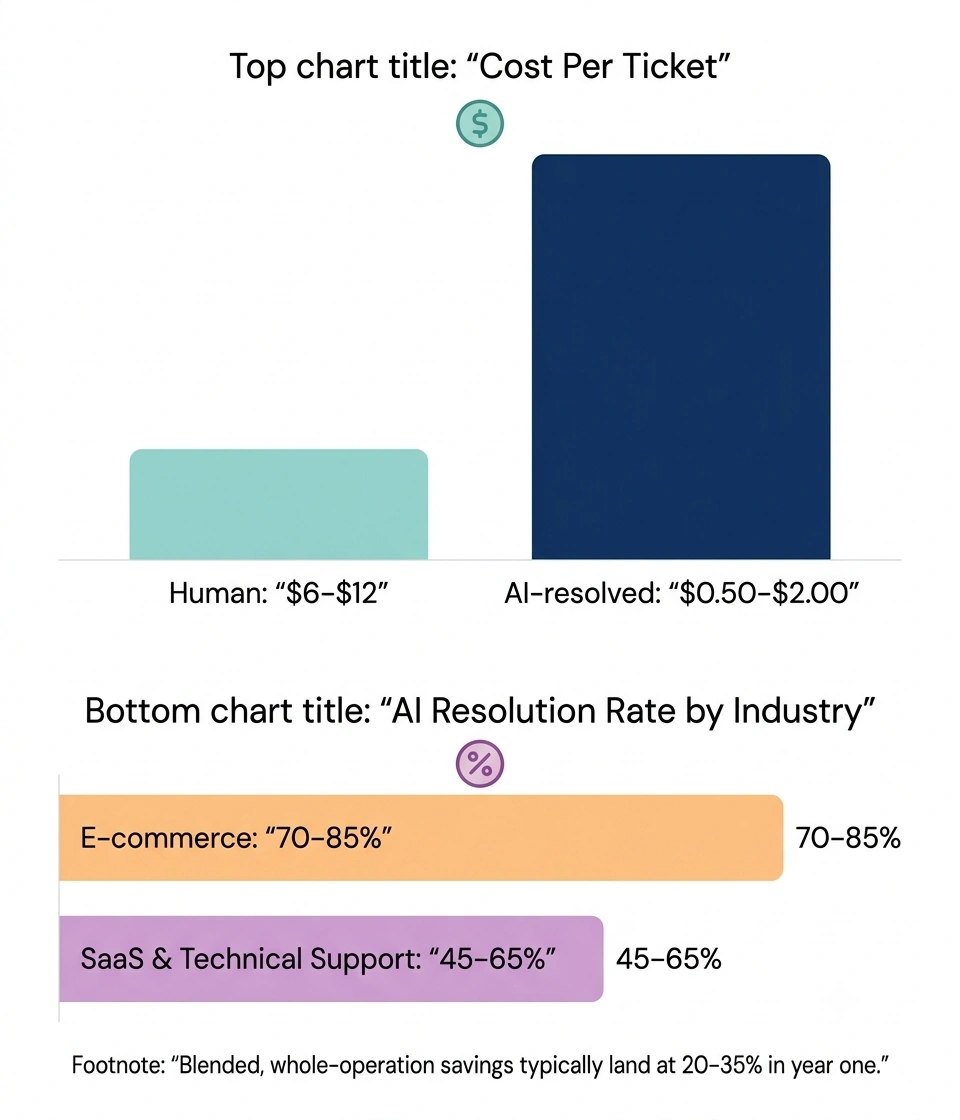
Here’s where you separate the marketing copy from actual math. A human-handled support ticket usually runs $6 to $12 once you count wages and overhead. An AI-resolved ticket, depending on vendor and volume, runs $0.50 to $2.00. That’s not a small gap. Close to a 90% reduction on the tickets AI actually resolves.
Don’t take that number and multiply it across your whole ticket volume, though. That’s not how any of this actually plays out. Real, whole-operation cost reduction, once you factor in AI licensing, the tickets still needing a human, and the tuning time it takes to get a bot working properly, lands somewhere between 20% and 35% in year one. Vendor case studies waving around 60 to 80% savings are almost always measuring only the tickets AI successfully handled, not your total support spend. Those are meaningfully different numbers, and vendors will happily let that ambiguity slide unless you push back and ask directly which one they’re quoting.
Resolution rates swing hard by industry too. E-commerce sees the highest AI resolution rates, somewhere around 70 to 85%, since so much of that volume is predictable, order status, returns, that sort of thing. SaaS and technical support cap out lower, often 45 to 65%, because technical issues tend to be messier and a lot less standardized. Know which bucket you’re actually in before setting expectations internally. Tell your team “We’ll automate 80% of tickets” while running a technical B2B product, and you’ve set yourself up for a rough quarter for no good reason.
Where AI Customer Service Goes Wrong
The failure modes here are pretty consistent, worth naming plainly instead of dancing around them.
Bots left untrained on current information will confidently tell customers the wrong thing, wrong policy, wrong price, wrong order detail, and that erodes trust faster than a slow human reply ever could. Handoffs done badly frustrate people more than skipping AI entirely, because now they’ve had to explain their problem twice to two different things. And companies measuring success purely by “resolution rate,” with no eye on actual accuracy, end up automating the wrong stuff: technically closing tickets while the customer’s still sitting there fuming.
There’s a sharper risk too, in industries where a wrong answer has real teeth: healthcare, financial services, anything brushing up against a legal or safety question. Keep AI out of those decisions entirely, or build in a mandatory human check before anything ships. No vendor’s accuracy stats are good enough to justify skipping that step.
How to Actually Roll This Out
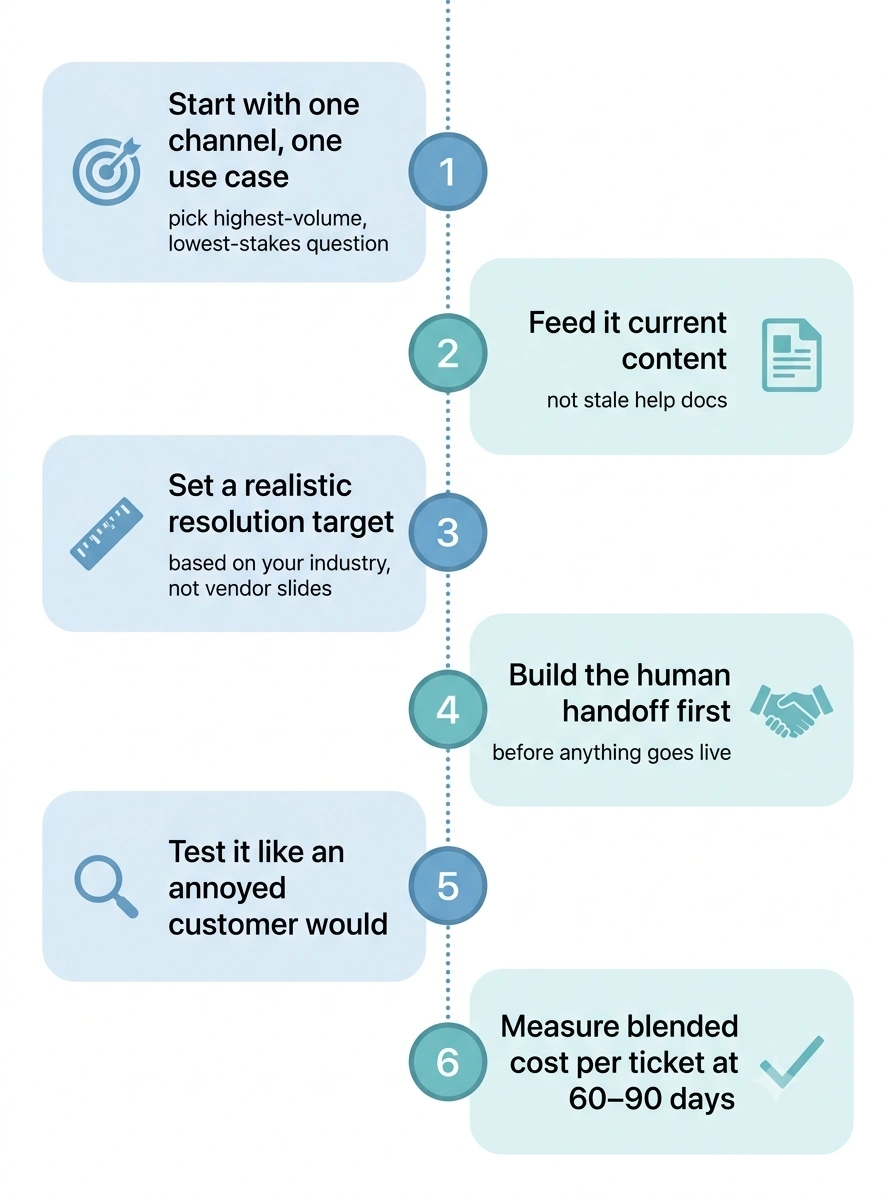
Start with one channel and one-use case. Not everything at once, tempting as that sounds. Pick your highest-volume, lowest-stakes question type, order status is the classic pick, and get that working well before expanding anywhere else. Feed the bot your most current help content, not whatever’s been sitting untouched for two years gathering digital dust. Set a real resolution-rate target based on your own industry, not some vendor’s best-case marketing slide. Build the human handoff first, before anything customer-facing goes live, and test it yourself the way an annoyed customer would. Then measure actual cost per ticket, blended across the whole operation, after 60 to 90 days, not just the AI’s self-reported “resolution rate,” because those two numbers tell very different stories about what actually happened.
The Bottom Line
AI support software genuinely saves money and speeds up response times. That part isn’t hype, it’s just math. But the tool you pick needs to match your real ticket volume, your industry’s realistic resolution ceiling, and the channels your customers actually use, not whichever vendor happened to run the flashiest demo. An AI chatbot handling FAQs and order status is an easy win for almost any business out there. A custom voice agent replacing your entire phone support team is a much bigger bet, and for most SMBs, not one worth making yet. Start small, measure honestly, and let the numbers, not the pitch deck, tell you when it’s time to expand.

The Team Compare BizTech is made up of people from marketing backgrounds, digital marketing & content marketing backgrounds, each with unique experiences and nuggets of wisdom to share with you. The team is passionate about creating unique, accurate, and engaging content.