

If your CFO called you right now, on video, and told you to wire $250,000 in the next twenty minutes, would you do it? Sit with that for a second, because a finance employee at the engineering firm Arup faced that exact call and got it wrong.
He joined a video meeting with what looked, sounded, and moved exactly like his CFO and a few familiar colleagues. No bad connection. No frozen frame or robotic voice. Nothing that would have made you or me pause either. Every single person on that call was AI-generated, and he still signed off on fifteen wire transfers totalling $25.6 million before anyone caught it. This isn’t a scary anecdote a vendor invented to sell you a subscription. It happened, and enough copies of it have happened since that the FBI now tracks deepfake fraud as its own line item in financial crime reports.
Running a small or mid-sized business in 2026 puts you in a strange spot, honestly. The same tools making your team faster, the writing assistants, the customer service bots, the coding copilots, are handing attackers the exact same speed boost. Big companies at least have security teams watching this stuff around the clock. Most small businesses have one IT guy who also refills the printer.
None of this is here to scare you into buying every product on a vendor’s price sheet. It’s a plain look at what’s actually changed, which threats deserve real attention right now, and what a business with a normal-sized budget can actually do about it.
Why 2026 Feels Different
Cybersecurity’s always been a cat and mouse game. What’s changed is that the cat and the mouse are running the same software now. Attackers used to need real skill, or at least real time, to write a convincing phishing email or dig up enough detail on a target to sound believable. Not anymore. A model writes a flawless, personalized email in seconds. It clones a voice off three seconds of podcast audio. It can even fake a live video call while you’re sitting in it.
The numbers back this up, and they’re not subtle. Hoxhunt’s researchers tracked AI-generated phishing jumping roughly 14-fold in a single month at the end of 2025, and it’s held steady since at around 40% of everything landing in inboxes. Other trackers, Keepnet and VIPRE among them, put that share even higher, north of 80%, depending on how they’re counting. Pick whichever number feels more believable to you. Either way, a big chunk of the phishing your team sees today was written, at least in part, by a machine.
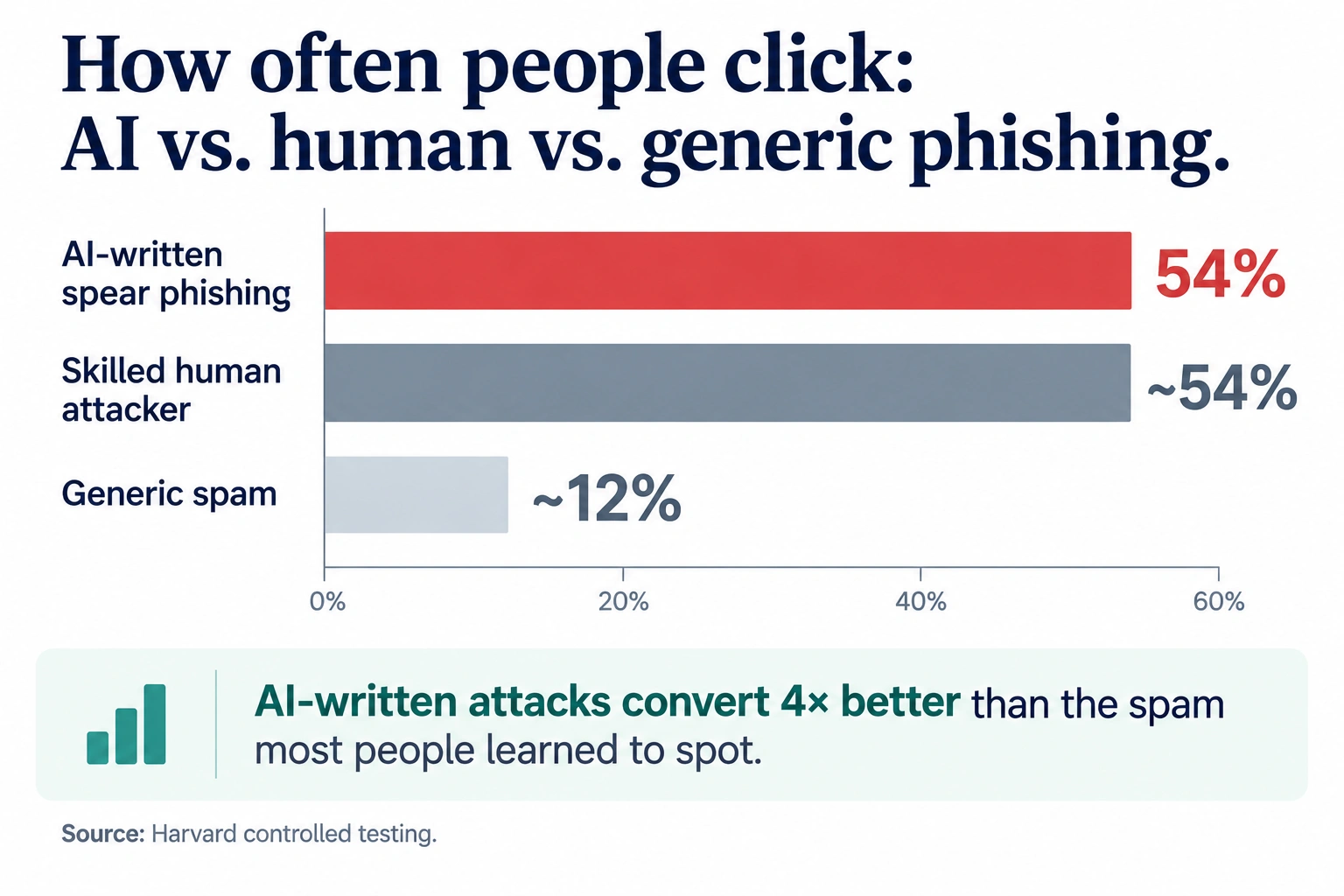
Here’s the part that actually worries security researchers, though: it works better than the old stuff did. Harvard ran controlled tests and found AI-written spear phishing pulls a 54% click rate. That’s statistically about the same as phishing written by a skilled human attacker, and more than four times the roughly 12% click rate of the generic spam most of us learned to spot years ago. IBM’s breach research lines up with this. When AI shows up in an attack, it’s usually driving phishing (37% of cases) or deepfake impersonation (35%). Add those together and you’ve basically described the modern threat landscape.
The Threats Actually Worth Losing Sleep Over
Plenty of scary buzzwords float around the AI cybersecurity world right now, and honestly, most of them matter more to a bank or a hospital than to a 40-person marketing agency. So, let’s skip the exotic stuff and stick to what actually lands on a small business’s doorstep.
Phishing and business email compromise
This one gets you first, no contest, because it’s cheap for attackers to run and genuinely hard for a normal employee to catch. The old tells are gone. No more bad grammar, no more weird phrasing, no more sender name that’s obviously off by one letter. These emails read like they came from a real colleague who already knows your vendor names, your recent projects, even how your company talks internally. Why? Because the attacker probably scraped that context straight from your website, your team’s LinkedIn pages, or an old data breach nobody ever cleaned up.
The money involved is real too, not theoretical. Tracking of FBI data pins AI-assisted business email compromise at roughly $2.77 billion in losses across more than 21,000 incidents in a single year. And it’s rarely some elaborate scheme. Usually, it’s just an invoice email that looks exactly like your actual supplier, asking you to update the bank details before the next payment goes out. Simple, and that’s exactly why it works.
Voice cloning and deepfake video
Three seconds of audio. That’s all it takes to build a voice clone that’s roughly 85% accurate. Think about how much audio of your CEO is floating around online right now, a podcast interview here, a conference talk there, maybe an all-hands recording somebody accidentally left public on YouTube. Plenty of raw material, and none of it took any real effort to find.
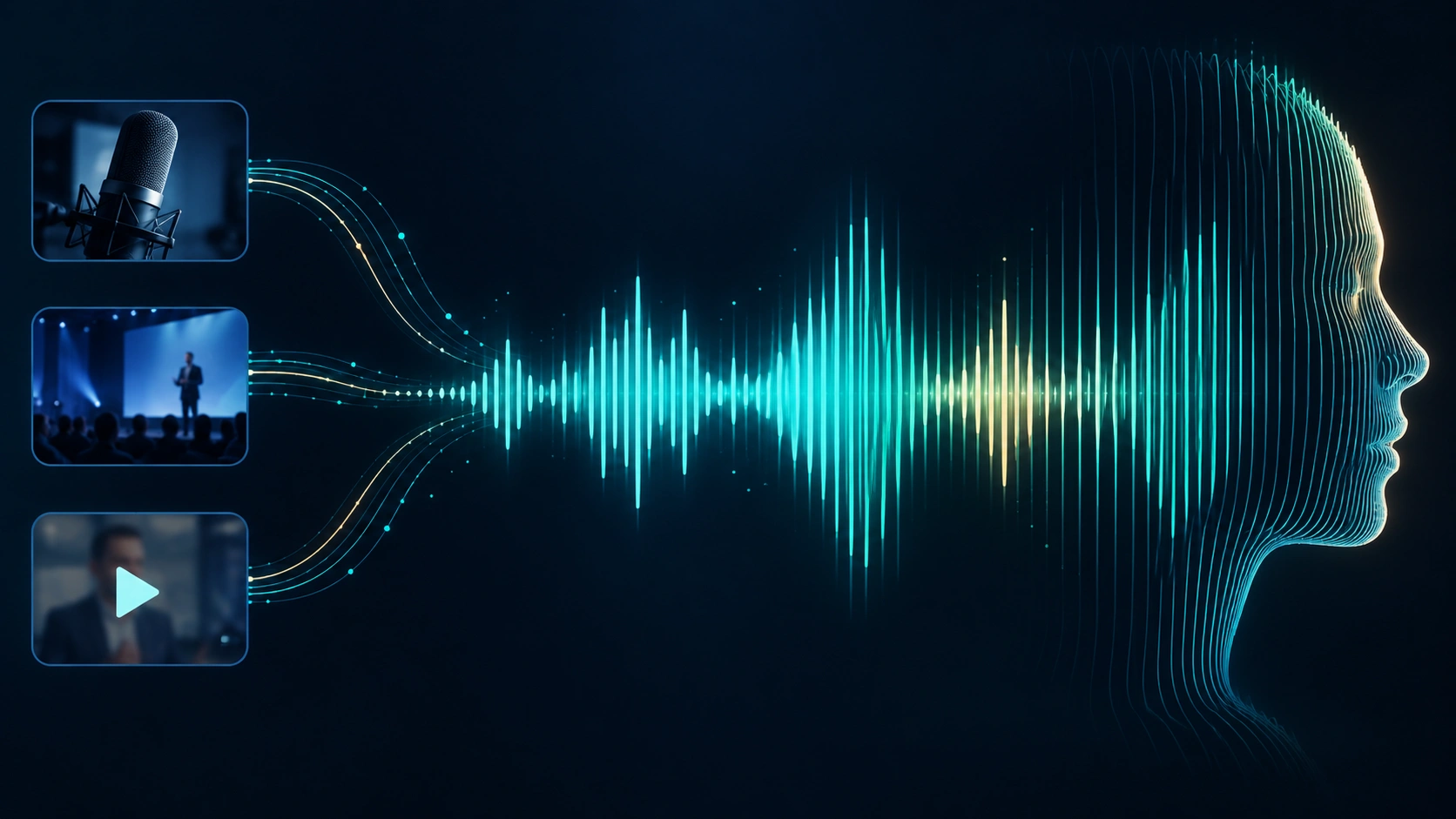
Deepfake-driven fraud losses in the US reportedly tripled between 2024 and 2025, landing somewhere around $1.1 billion depending on which tracker you believe. And it’s not just wire fraud, either. Vishing, meaning voice-based phishing calls, grew more than 400% in a single six-month window according to CrowdStrike. A recent survey even found two out of three workers admit an AI-generated message could fool them into thinking it came from a coworker. Two out of three. Think about your own team for a second.
Shadow AI, or the risk your own people are creating
Nobody likes bringing this one up in a meeting, because it’s not really an attacker problem. It’s a your-own-employees problem. Shadow AI is what happens when someone pastes client data, a contract, or a chunk of source code into ChatGPT or some free transcription tool nobody ever vetted, purely because it’s faster than doing the task the approved way.

IBM’s 2026 Cost of a Data Breach Report found 43% of breached organizations had a shadow AI incident tangled up somewhere in the mess, up from just 20% a year earlier. Those breaches averaged $5.39 million, about 8% above the overall average. But here’s the number that should really bother you: 92% of organizations breached through AI had zero real access controls on the tools involved. Zero. This isn’t a sophisticated hack. It’s one employee dropping a spreadsheet of customer emails into a free tool, with no idea where that data goes next.
Prompt injection and AI-targeted attacks
Are you running any kind of AI chatbot or AI agent that can take actions on your behalf, booking things, sending emails, pulling records? Then you’ve already got a new attack surface, whether you’ve thought about it or not. Prompt injection is when someone hides instructions inside a document or webpage that your AI reads, tricking it into doing something it shouldn’t, leaking data, or firing off an action nobody approved. IBM puts the average prompt injection incident at $5.89 million, with model inversion attacks (probing a model to pull out data it was trained or fed on) costing even more. Most small businesses aren’t building custom AI agents yet, fair enough, but if you’re using one through a vendor, ask them point blank how they guard against this. If they can’t answer clearly, that tells you something on its own.
What Actually Works: A Practical Defense Framework
Here’s the good news, finally. You don’t need a six-figure budget to make real progress on enterprise AI security, not even close, at a small company. You mostly need a handful of specific habits, backed by a couple of tools that punch well above their price.
1. Build a verbal passphrase system for money moves.
This is the cheapest, most effective single thing you can do against deepfake fraud, and it costs literally nothing. Agree on a code phrase, or a callback number, set up through some channel an attacker can’t touch, that has to come up before anyone authorizes a wire transfer or changes payment details. If your CFO calls and says “move the money” and the code word never comes up? Stop right there. Hang up. Call the number already saved in your phone, not whatever number showed up in the email. It would’ve stopped Arup’s $25 million loss cold, and it takes about ten minutes to set up.
2. Put your AI use policy in writing.
Most companies still don’t have one, and yours is probably no exception. Write a single page. Spell out which AI tools are approved, what data should never touch a public AI tool (customer information, financial records, source code, anything under NDA), and who to ask when someone wants to try something new. Then tell people about it. Don’t bury it in a handbook nobody opens on a good day, let alone a busy one. This single habit closes most of the shadow AI gap quietly driving breach costs up across the board.
3. Layer AI-aware email security on top of what you already have.
Running Microsoft 365 or Google Workspace? You’ve already got baseline phishing protection. Problem is, it mostly works off signatures and known bad patterns, so it’s not built to catch a well-written, contextually accurate email with no malicious link anywhere in it. That’s exactly the gap tools like Abnormal Security and Proofpoint exist to close, using behavioral AI to notice when an email doesn’t sound like how a vendor or executive actually writes, even when the content itself looks totally clean.
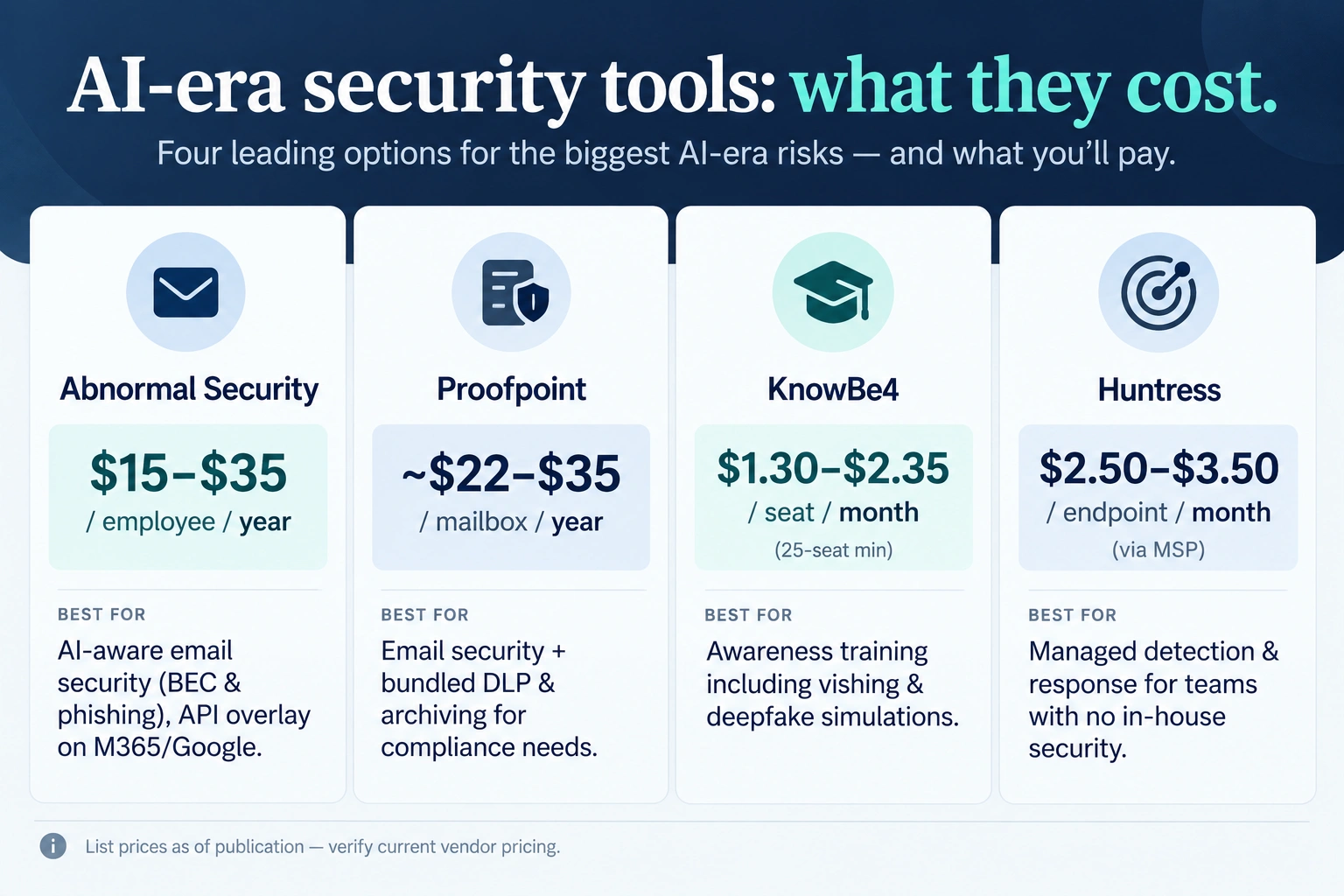
Abnormal typically runs $15 to $35 per employee per year at list price, layered on top of your current setup through an API, so no need to reroute your mail servers. For a 100-person company, that’s roughly $1,500 to $3,500 a year, which is nothing next to what one successful BEC payout would cost you. Proofpoint runs a little higher, often quoted around $22 to $35 per mailbox, but it bundles in more DLP and archiving, worth knowing if you’ve got compliance requirements to satisfy anyway.
4. Train people on deepfakes and voice cloning, not just email.
Most security awareness training still lives entirely in “spot the suspicious link” territory. Necessary, sure, but nowhere near enough anymore. Look for a platform running vishing simulations and deepfake awareness content, not just the same phishing test your team’s seen a hundred times already. KnowBe4 is the name everyone knows, and it’s genuinely reasonable for smaller teams: $1.30 to $2.35 per seat per month depending on tier, 25-seat minimum, putting a 100-person company around $1,600 to $2,800 a year at the base tiers. The top Diamond tier throws in AI-driven simulated attacks, worth paying for if your business moves a lot of wire transfers or client funds. Huntress sells a similar add-on around $2 per learner per month, a smart pick if you’re already using them for endpoint protection and want fewer vendors to juggle.
5. Get a managed detection layer if nobody in-house owns security.
Most small businesses don’t have a dedicated security person. If that’s you, a managed detection and response service matters more than any single tool on this list. Huntress keeps coming up here because it was built for small businesses and the MSPs serving them, not shrunk down from some enterprise product. Through an MSP partner, expect $2.50 to $3.50 per endpoint per month, so a 50-device shop lands around $125 to $175 a month, with real people reviewing alerts around the clock instead of software dumping warnings nobody has time to read.
6. Lock down identity, not just devices.
A big share of today’s AI cyber-attacks isn’t even bothering with malware anymore. They just want your login session, so they can walk right through the front door instead of breaking a window. Adversary-in-the-middle kits that steal active session tokens grew more than 139% in six months, per KnowBe4’s tracking, and they sail right past standard multi-factor authentication because they’re stealing the session after MFA already happened, not the password before it. If your business hasn’t already, move to phishing-resistant MFA, hardware keys like YubiKey or passkeys, for anyone touching financial systems or sensitive data. It’s a genuine upgrade over app-based codes, which these newer attacks are built specifically to intercept.
Who Should Prioritize What
You don’t need every layer on day one, so here’s a rough way to sort the order based on what kind of company you’re actually running.
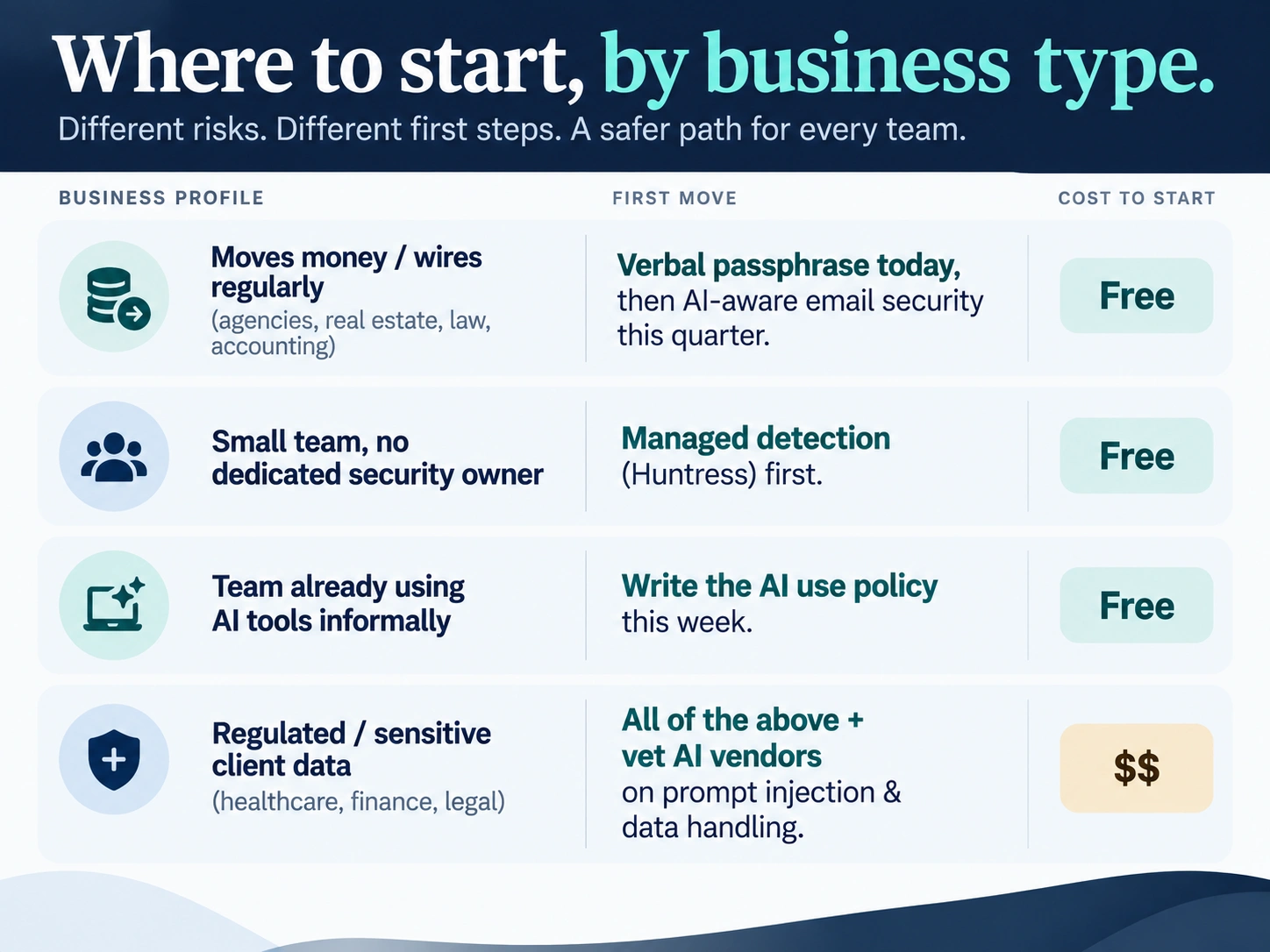
Moving money for clients, or handling wire transfers regularly? Agencies billing big invoices, real estate firms, law offices, accounting shops, this is you. Start with the verbal passphrase today, it costs nothing, then get AI-aware email security like Abnormal in place before the quarter’s out.
A small team without anyone dedicated to security? Huntress, or something like it, should be your first purchase. You need eyes on your systems around the clock more than you need any single point tool.
Team already experimenting with AI tools informally, even without anyone officially signing off? Write the AI use policy this week, not after something goes sideways. It’s the cheapest fix on this whole list, and it’s probably already a live problem at your company right now, whether anyone’s noticed yet or not.
Regulated, or sitting on sensitive client data, healthcare, financial services, legal work? You need everything above, plus a real look at whether any AI vendor you use, including customer service chatbots, actually documents its own AI security practices. Ask vendors point blank how they handle prompt injection and data protection before you sign a thing.
A Simple Incident Response Checklist
Even with solid defenses, something will eventually slip through. Print this and keep it somewhere physical, not buried in a file that becomes inaccessible the second your systems get compromised.
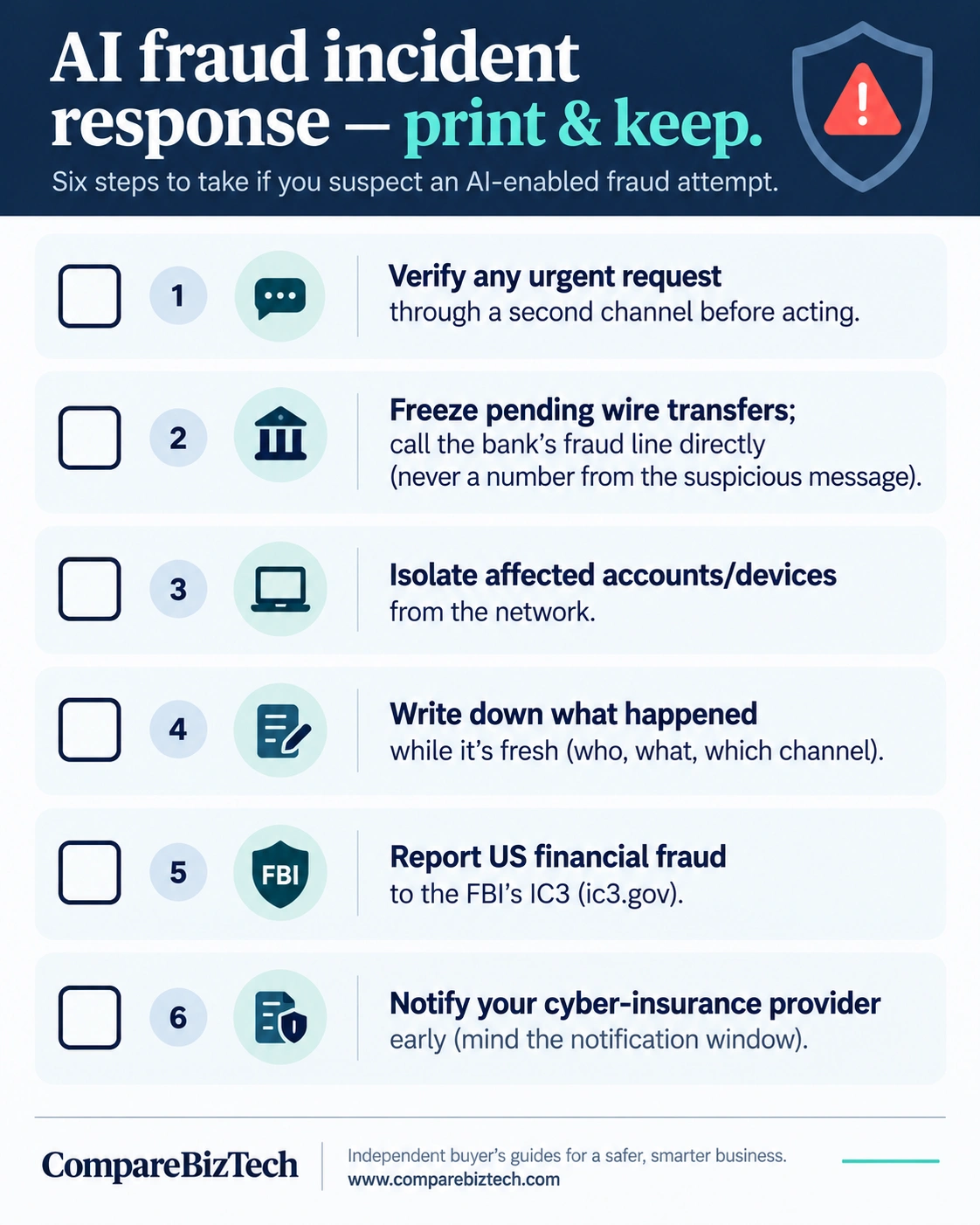
– Confirm the request through a second channel before acting on anything urgent, especially payment requests
– Freeze any pending wire transfers immediately if fraud’s suspected, then call your bank’s fraud line directly, never a number pulled from the suspicious email itself
– Isolate affected accounts or devices from the rest of your network
– Write down what happened while it’s fresh: who was contacted, what they asked for, which channel it came through
– Report it to the FBI’s IC3 (ic3.gov) if it’s a US-based financial fraud case, even if you don’t expect to see the money again, since the report still helps track the wider pattern
– Loop in your cyber insurance provider early. Most policies have strict notification windows, and missing one can cost you the whole payout
The Bottom Line
None of this requires becoming a security expert or hiring a whole team. It just means picking three or four specific habits, mostly around verification and awareness, and pairing them with one or two reasonably priced tools built for how attacks actually work today. Heading further into cybersecurity 2026, the businesses that get hurt won’t be the ones without unlimited budgets. They’ll be the ones still judging AI-powered cyber threats by the old rules, back when bad grammar was the tell and a weird sender name gave the whole thing away. That era’s done. Plan like it is.

The Team Compare BizTech is made up of people from marketing backgrounds, digital marketing & content marketing backgrounds, each with unique experiences and nuggets of wisdom to share with you. The team is passionate about creating unique, accurate, and engaging content.