

Replacing a legacy dispatch system is one of the few software decisions that can stop trucks from moving. The risk sits on the dispatch floor, where a booking that takes a minute longer or a driver who can’t find delivery notes turns into missed windows by mid-morning. A staged migration removes that exposure by keeping the old system live until the new one has proven itself under real operating pressure.
Know when the legacy system has become the bigger risk
Every dispatch operation reaches a point where the old system costs more to keep than to replace. Maintenance bills climb on aging on-premise servers, and vendor support gets slower each year. Dispatchers spend longer per booking because the system can’t automate route sequencing, and customers lose the real-time visibility they expect as standard.
For operations managers, the trigger points are usually measurable. Time per booking creeps up month over month.
Staff build spreadsheet workarounds for tasks the system should handle, and each workaround is another place for data to break. When workarounds outnumber the functions the system actually performs, it is doing more harm than good.
The cash-flow impact shows up differently by fleet size. A small carrier sees it in dispatcher overtime; a larger operation sees it in contract penalties.
A legacy TMS – a transport management system tied to older servers and manual processes – also limits what you can connect. Modern customer portals and accounting packages expect live data feeds, and older databases often can’t supply them.
Map every dependency before setting a date
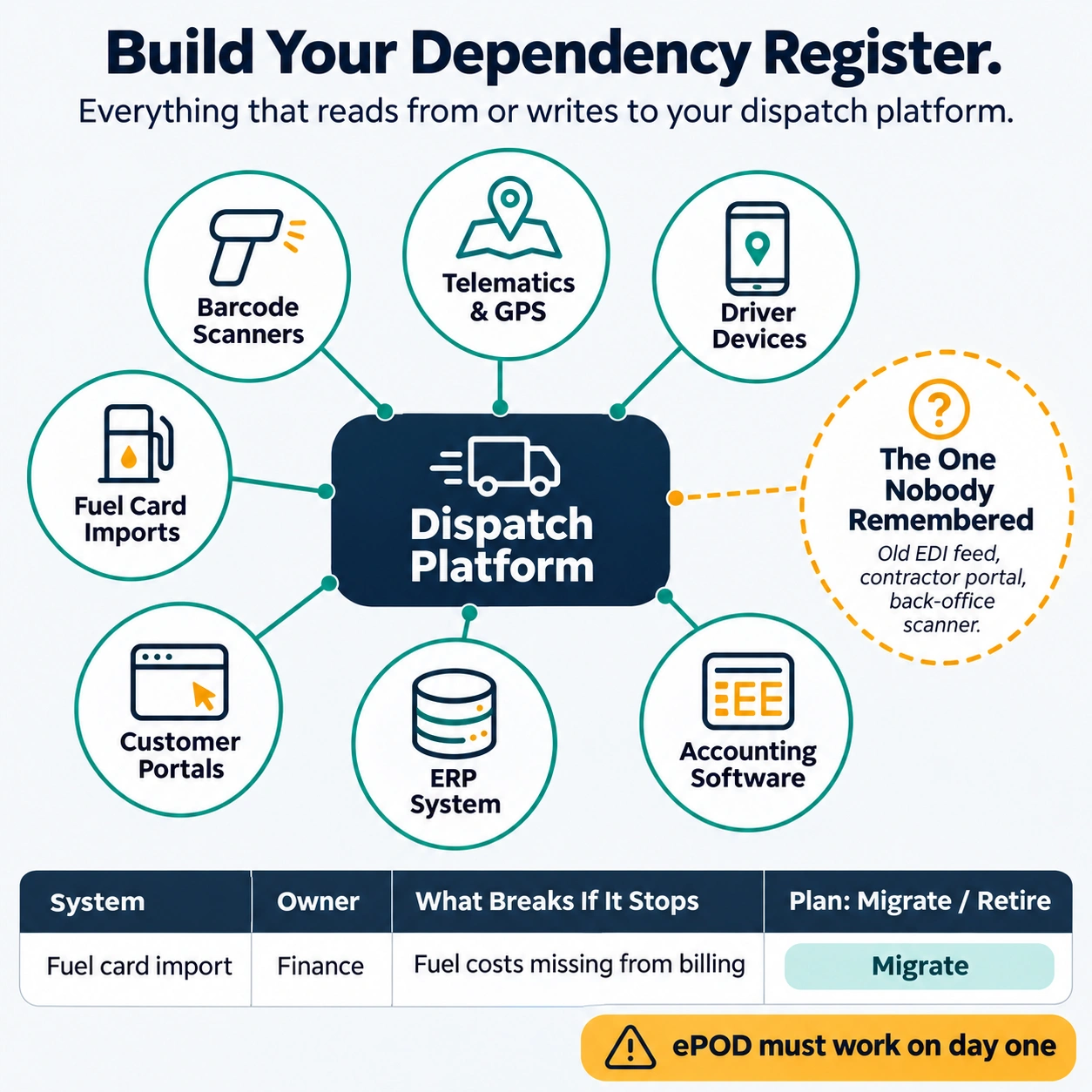
A dispatch database touches more of the business than its screen suggests. Barcode scanning hardware, telematics units, driver devices, and warehouse printers all exchange data with it.
So do accounting software, ERP systems, customer eCommerce portals, and fuel card imports. Electronic proof of delivery – sign-on-glass signatures, photo capture, GPS coordinates, and timestamps – must function on day one of any new system.
Before picking a migration date, build a dependency register. List every piece of hardware and software that reads from or writes to the dispatch platform, who owns it, and what breaks if the feed stops. This exercise usually surfaces one connection nobody remembered: a contractor’s portal, an old EDI feed, a forgotten fuel import, or a scanner in a back office.
Telematics and GPS tracking need a line of their own on the register. Driver devices and in-cab hardware must map into the incoming dispatch dashboard, and older units sometimes speak protocols the new platform doesn’t recognize. Test one of each hardware model against the new system during evaluation, not after contracts are signed.
The register becomes the checklist for the whole project. Every item on it needs a migration plan or a retirement decision, and every plan needs an owner.
Clean the data before it moves
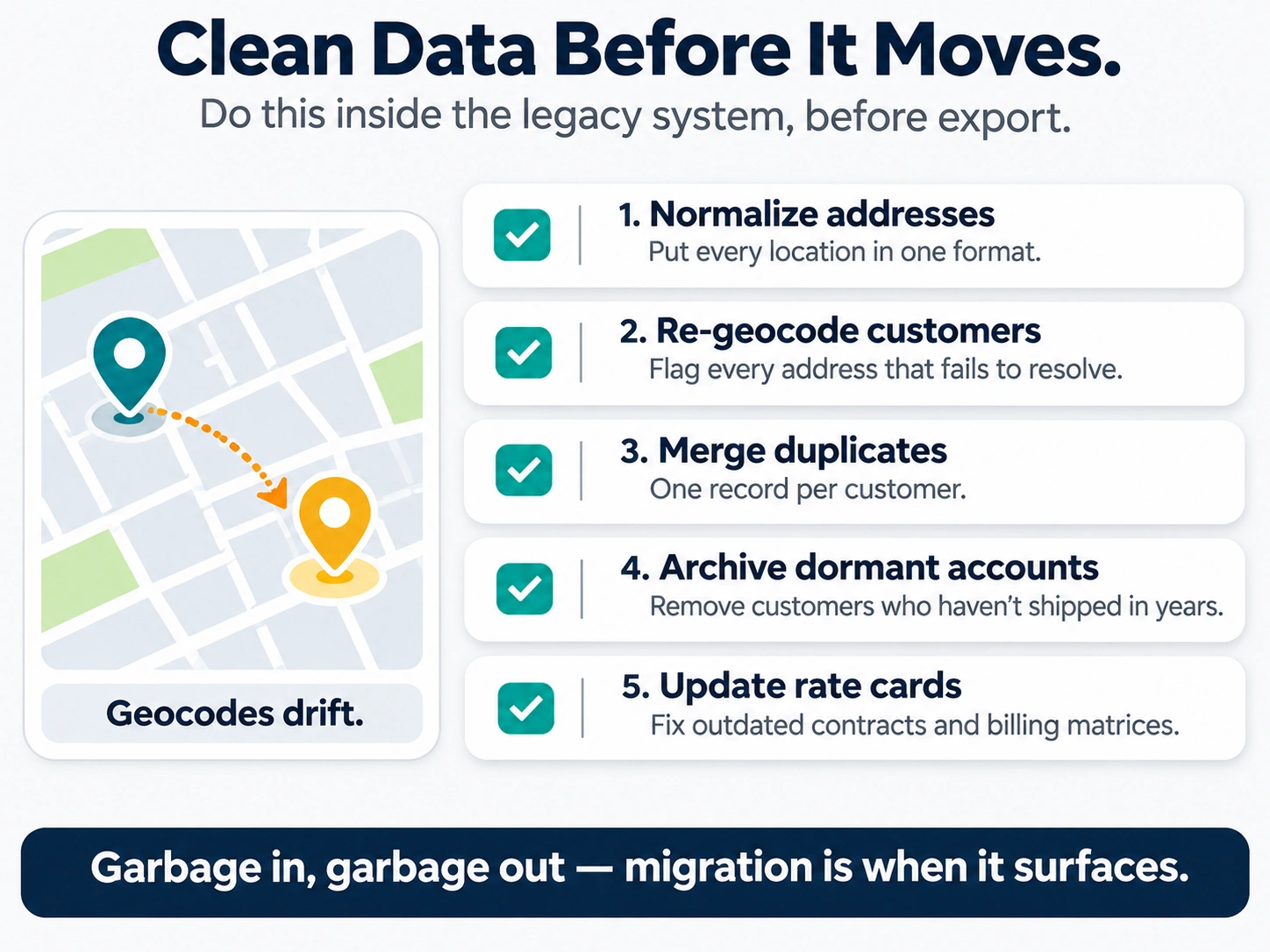
Routing engines are literal about input. If a customer address book holds duplicate entries and stale geocodes, the new platform will route freight to the wrong place with complete confidence. This is the “garbage in, garbage out” problem, and migration is when it surfaces.
Geocodes drift more than most teams expect. New suburbs appear, streets get renamed, industrial estates renumber their lots, and postcode boundaries shift. An address that geocoded perfectly three years ago can now drop a pin on the wrong street, and the driver absorbs the delay.
Data hygiene has to happen inside the legacy system, before export. Normalize the master address data so every location follows one format.
Re-geocode the customer list and flag every address that fails to resolve. Merge duplicate customer records, and archive accounts that haven’t shipped in years.
Rate cards deserve the same attention. Customer contracts and billing matrices that drifted out of date in the old system will bill incorrectly in the new one, and billing errors hit revenue the week they appear. Cleaning rate matrices before migration protects cash flow during the period when the operation can least afford disputes.
Define requirements before comparing platforms
With a dependency register and clean data in hand, the evaluation criteria mostly write themselves. Modern courier software should include a route optimization engine that sequences stops and balances loads automatically, plus a driver mobile application simple enough to learn in an afternoon.
Most transitions succeed or fail on the driver app. API webhooks – live data connectors – must sync dispatch events with the accounting package and the ERP, and push status updates to customer portals, so nobody re-enters data by hand.
Cost is a factor, but the migration lives or dies on capability. Operations teams that get new courier software should score every option against the dependency register built in the audit. A platform that misses two register items creates manual workarounds from week one, and the old problem returns in a new system.
Electronic proof of delivery belongs high on the requirements list. Customers who signed for freight on glass last month won’t accept paper dockets next month, so ePOD has to work from the first pilot run.
Integration testing belongs in the sandbox stage, well before any go-live date. Ask each shortlisted vendor for a test environment, then connect copies of the accounting package, the ERP, the busiest customer portal, and the telematics feed through the platform’s pre-built APIs and webhooks. Push test bookings through the full chain and check where the data lands. If manual re-entry shows up here, it is a configuration task. If it shows up after launch, it is a billing backlog.
Run a phased pilot before the full cutover
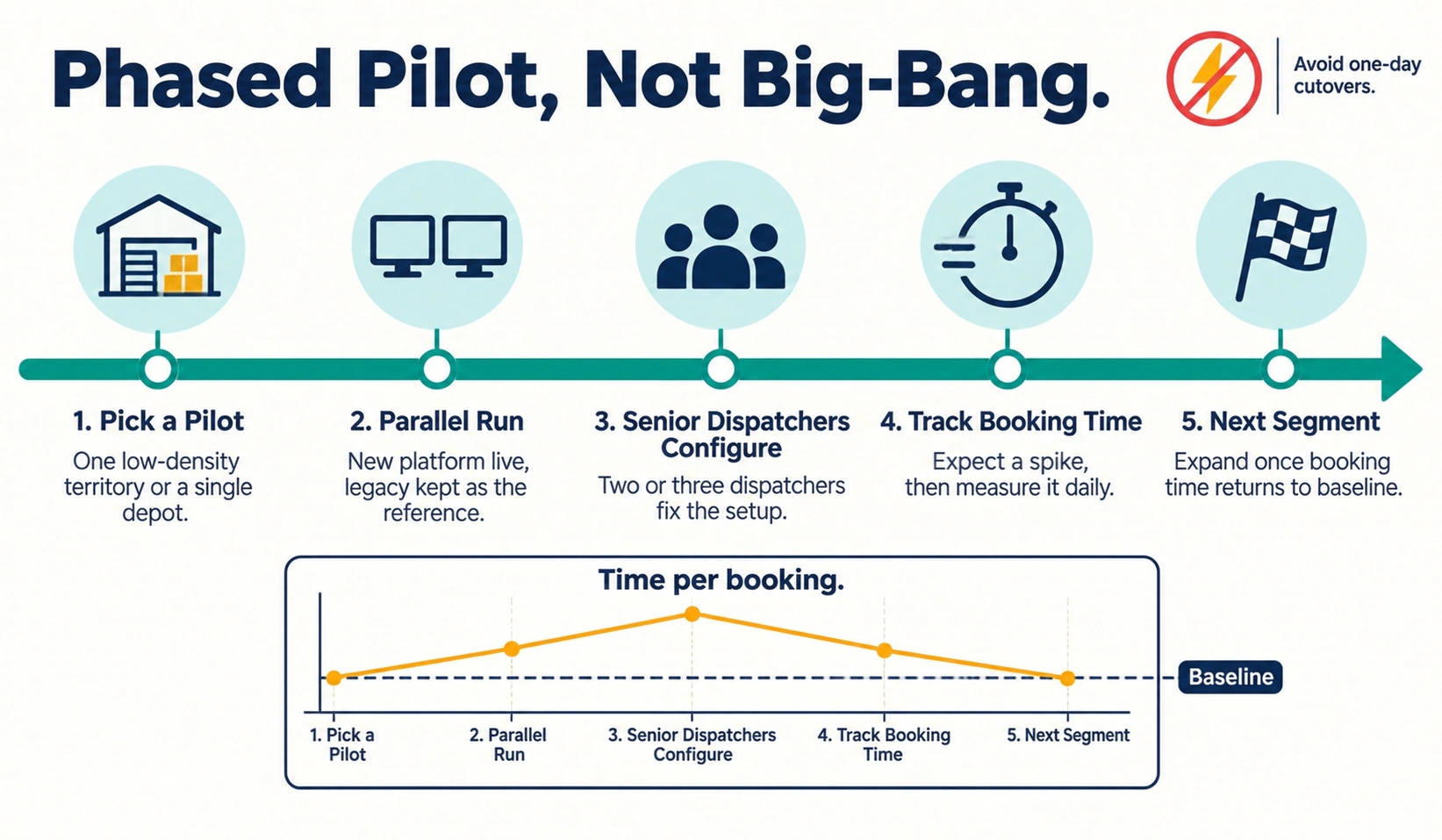
A big-bang switch, where everything moves on one date, concentrates all the risk into a single morning. A phased pilot spreads that risk out. Pick one low-density territory or a single depot, and run the new platform there first. Low volume means mistakes cost less and fixes arrive faster.
Then run both systems together for a set period. In this parallel run, dispatchers process real work on the new platform while the legacy system stays live as a reference. Shadow dispatches on the old system catch configuration gaps – a missing delivery zone or a wrong default vehicle type – before customers feel them.
Dispatchers are often the most change-averse people in the building, and with reason: they carry the blame when freight stops moving. Involve two or three senior dispatchers in the pilot configuration. Their corrections improve the setup, and their involvement turns potential critics into the people who explain the new screens to everyone else.
Expect dispatcher workflow latency to spike at first. Time per booking will rise while staff learn new screens; that is normal. Measure it daily, and when booking times return to baseline in the pilot territory, the platform is ready for the next segment.
Train drivers in small doses
Drivers are the largest group of users and the hardest to retrain, because their work happens alone in a cab against a tight schedule. Long classroom sessions tend to fall apart once drivers are back on a Monday route.
Short micro-training modules fit the job better: ten minutes on the home screen in week one, proof-of-delivery capture in week two. Exception handling and dispute workflows can wait until the basics stick.
Keep the mobile interface simple during rollout. Every extra tap invites confusion at a customer’s door, and a confused driver at the door often means a dropped run by end of day. Fleet supervisors should ride along during the first week and log every point where drivers hesitate.

A written change management protocol keeps this honest. It sets who communicates what, when training happens, where drivers report problems, and how fast answers come back.
Office staff need the same structure: customer service teams need to know which system holds the truth on each day of the parallel run.
Around 70% of large-scale digital transformations fail to achieve their stated objectives, with employee resistance and weak change management among the most common causes (McKinsey & Company). For a dispatch operation, that figure has a practical meaning: budget as much time for driver adoption as for technical setup.
Protect SLAs through the first two weeks
Service-level agreements don’t pause for a software migration. Customers still expect their windows met, and the learning curve is exactly when windows get missed. Automated SLA monitoring pays off here: alerts flag a run that is falling behind schedule, which gives dispatchers time to intervene before the customer notices.
Switch on automated SMS and email customer alerts from day one of each phase. If a delivery runs late, the customer hears it from you first, which turns a service failure into a managed communication.
Keep manual dispatch overrides open too. During the first two weeks, an experienced dispatcher who resequences a run by hand will often beat the optimizer, because the optimizer hasn’t yet learned the territory.
Run a short daily standup during those two weeks. Dispatchers, customer service staff, supervisors, and the implementation lead review the previous day’s misses, then assign fixes before the afternoon peak. Most issues that surface in week one are configuration problems with quick answers.
Set rollback triggers before launch
Every migration needs an explicit rollback plan, agreed in writing before the first pilot begins. The plan names the conditions under which the project pauses and operations revert to baseline workflows on the legacy system.
Those conditions must be measurable numbers, agreed in advance. A 15% increase in missed delivery windows across two consecutive days is one trigger.
A sustained doubling of time per booking, or an ePOD failure rate that leaves deliveries unverified, is another. When a trigger fires, the response is already decided: pause the rollout, revert the affected segment, fix the cause, and reschedule.
Baseline numbers have to exist before the pilot starts, or the triggers mean nothing. Record the current missed-window rate, the average time per booking, the redelivery frequency, and ePOD completion rates from the legacy system. Those figures are the yardstick the new platform gets measured against.
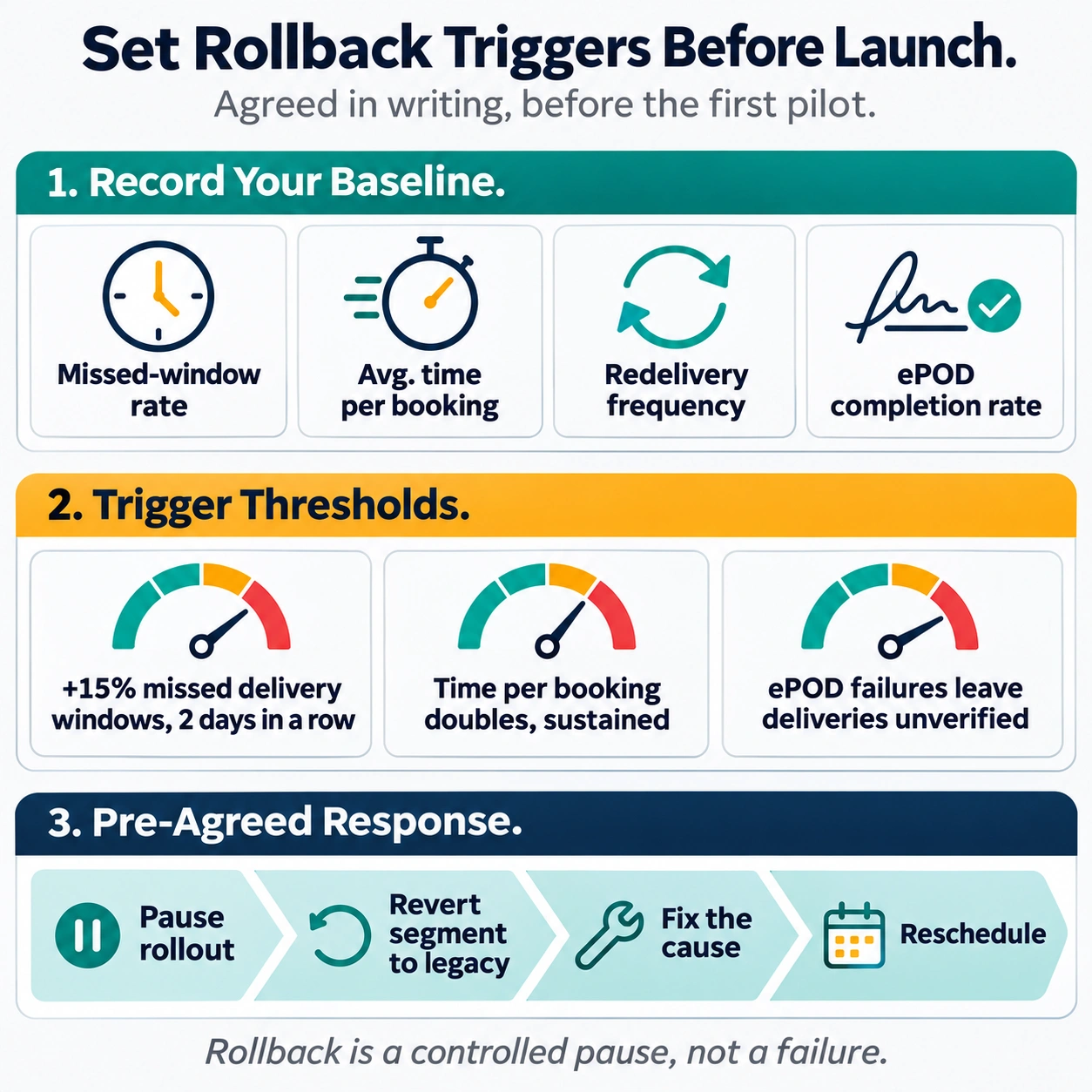
Rollback is a controlled pause. It protects revenue while the configuration gets fixed. Teams that define triggers in advance can revert without panic; teams that skip this step end up improvising on a bad day.
The dispatch floor should barely notice the switch. For operations managers starting now, the dependency register is the first task. Everything else on the plan – the data work, the pilot, the training, the rollback triggers – hangs off it.

The Team Compare BizTech is made up of people from marketing backgrounds, digital marketing & content marketing backgrounds, each with unique experiences and nuggets of wisdom to share with you. The team is passionate about creating unique, accurate, and engaging content.