

Ask ten business owners if their AI spend is paying off, and eight will say something like “it feels like it’s helping.” Feels like. Not “we saved forty grand last quarter.” Not “support costs are down 22%.” Just a fuzzy sense that things run a bit smoother now that someone’s using ChatGPT to bang out emails faster.
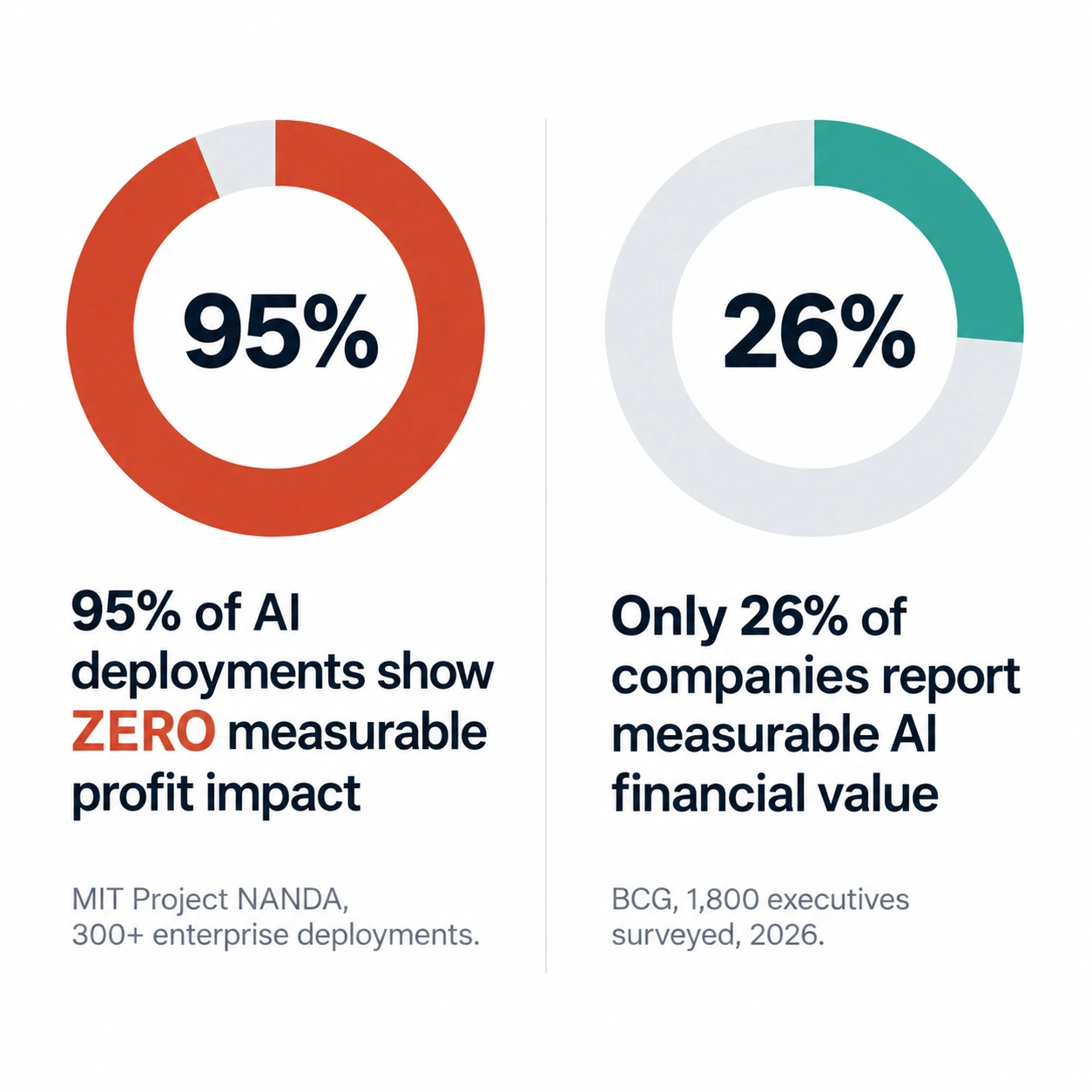
That fuzziness isn’t a personal failing, by the way. It’s basically the industry’s dirty secret. MIT’s Project NANDA looked at over 300 enterprise AI deployments and found that 95% showed zero measurable impact on profit or loss. Zero, not “a little.” And these weren’t companies who never bothered trying AI. They were spending real money, running real pilots, and still couldn’t point to anything on a spreadsheet at the end of it.
So, here’s a question worth chewing on: is AI actually not working at most companies, or are most companies just terrible at measuring whether it’s working? Honestly? Mostly the second one. **AI ROI** isn’t hard to calculate because AI fails to create value. It’s hard because almost nobody sets up the tracking before they start, and six months in, nobody even remembers what things looked like before.
Why AI ROI Is Difficult
Here’s the actual problem, and it’s not a technical one at all. Most AI adoption creeps in from the bottom up. Someone on the team starts using ChatGPT because it’s faster, a manager notices, other people copy them, and half a year later most of the company’s using some AI tool without anyone ever writing down what “success” was even supposed to look like. You can’t measure a return against a baseline that was never recorded in the first place.
Compare that to buying, say, a new CRM. Someone builds a case first. Current close rate. Target close rate. Cost of the tool. Expected payback window. AI adoption almost never gets that treatment, mostly because it’s cheap enough per seat that nobody thinks it deserves a formal business case. ChatGPT Plus runs $20 a month. Who’s writing an ROI memo for twenty bucks?
That’s exactly the trap, though. The tool is cheap. The real cost sits somewhere else entirely, people learning it, workflows getting rebuilt around it, decisions made faster or slower because of it, and none of that shows up on an invoice. Boston Consulting Group surveyed 1,800 executives in 2026 and found only 26% of companies had generated meaningful financial value from their AI spending. The other 74% probably weren’t wasting money exactly. They just couldn’t prove otherwise, which is the real AI business ROI problem hiding underneath all those adoption headlines.
The fix isn’t complicated. It just takes discipline nobody wants to apply to a $20 subscription. You need a baseline before rollout, a metric tied to an actual business outcome, and a habit of checking back on a schedule. Skip any one of those three and within a month you’re right back in “it feels like it’s helping” territory.
Cost Savings: The Easiest Place to Start
Cost savings tend to be the cleanest number to calculate here, mostly because you already have a “before” figure buried in your books somewhere. If a task used to cost a certain amount in labor hours or outsourced work, and now costs less because AI’s doing part of it, that’s a number you can actually walk into a CFO’s office with.
Customer support is the clearest example going right now. Freshworks research puts a human-handled support interaction at around $4.32, versus roughly $0.18 once an AI-handled one is mature. Intercom’s Fin charges $0.99 per resolved conversation on top of a seat fee starting near $29, and companies report resolution rates anywhere from 40 to 67%, depending heavily on how good their help documentation actually is. Zendesk’s AI resolutions run pricier per ticket, somewhere around $1.50 to $2.00, but it lives inside a platform a lot of support teams already use anyway.
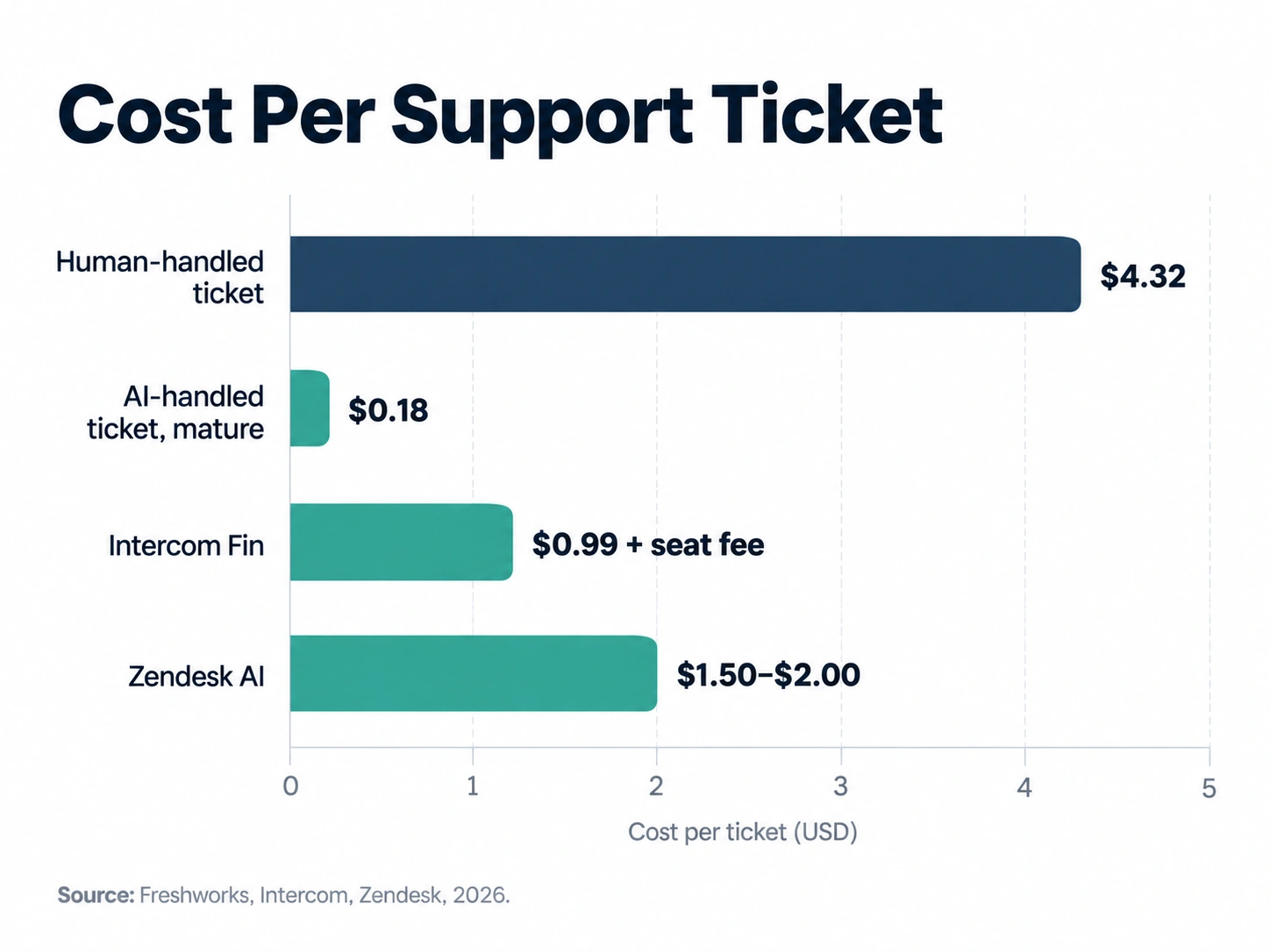
One honest caveat, though: resolution rate is doing all the heavy lifting in this math, and vendor numbers tend to run rosier than what real small businesses actually see. Independent testing across several small business Fin rollouts found an average resolution rate closer to 38%, not the marketed 50%, and the gap was almost entirely explained by documentation quality. So, calculate your savings off your own numbers after 60 to 90 days. Not the sales decks.
Revenue Growth: The Harder, More Valuable Number
Cost savings tell you AI made something cheaper. Revenue growth tells you AI made something bigger, and that’s a much harder question, because revenue moves for a dozen reasons at once. Did sales climb because of the AI tool, or the new hire, the seasonal bump, or a competitor who just jacked up their prices?
The way around this isn’t giving up, it’s isolating things properly. Run a controlled comparison wherever you can. One sales rep using an AI tool for prospecting, one who isn’t, same period, similar territories. Or a before-and-after window where nothing else changed except the rollout. Neither is a perfect lab experiment. Both beat guessing.
Where businesses actually see real revenue lift tends to be speed and personalization. Faster follow-up emails. AI-drafted proposals going out the same day instead of three days later. Product recommendations that match what someone was actually browsing. None of it shows up overnight, though. Give it a full sales cycle before drawing conclusions, and track it against something you’d have tracked anyway, closed deals, average deal size, not some AI-flavored vanity metric that has nothing to do with actual revenue.
Productivity: Real, But Overstated More Often Than Not
Individual productivity gains from AI genuinely are well documented, and this is one spot where “it feels like it’s helping” is often correct. Developers using AI coding assistants finish certain tasks noticeably faster. Marketing teams knock out first drafts in minutes instead of hours. Support agents handle more tickets an hour when AI suggests replies and auto-summarizes conversations. Zendesk’s own numbers put that bump around 45%.
The catch is the gap between what an individual feels and what the company can actually bank, and that’s exactly the wall MIT’s research kept hitting. An employee genuinely saving two hours a week doesn’t automatically become dollars, because most companies never build a system for turning saved time into either lower cost or more output. The time just… gets absorbed. People check email a little more, take on a slightly heavier load, and the P&L doesn’t move an inch.
Want productivity gains to count as real AI productivity ROI instead of a nice feeling everyone has? Decide in advance what happens to the freed-up time. Does the team take on more accounts per person? Does a role get folded into another? Does turnaround shrink enough to win business you’d otherwise lose to a faster competitor? Pick one. Measure it. Otherwise, the gain stays a story people tell each other in meetings.
Time Saved: Useful, But Convert It to Money
Time saved is the most commonly quoted AI metric, and also the most commonly abused one. “We save ten hours a week” sounds great in a meeting. It means nothing on a balance sheet until you multiply it by something.
The math itself isn’t complicated. Hours saved times the fully loaded hourly cost of whoever’s doing the work, not just salary divided by hours, but salary plus benefits plus overhead. A $70,000-a-year employee’s loaded rate often lands closer to $45 to $55 an hour once everything else the business spends on them is counted. Ten saved hours a week at that rate works out to roughly $450 to $550 weekly, somewhere around $23,000 to $28,000 a year. That’s a number a CFO can actually do something with.
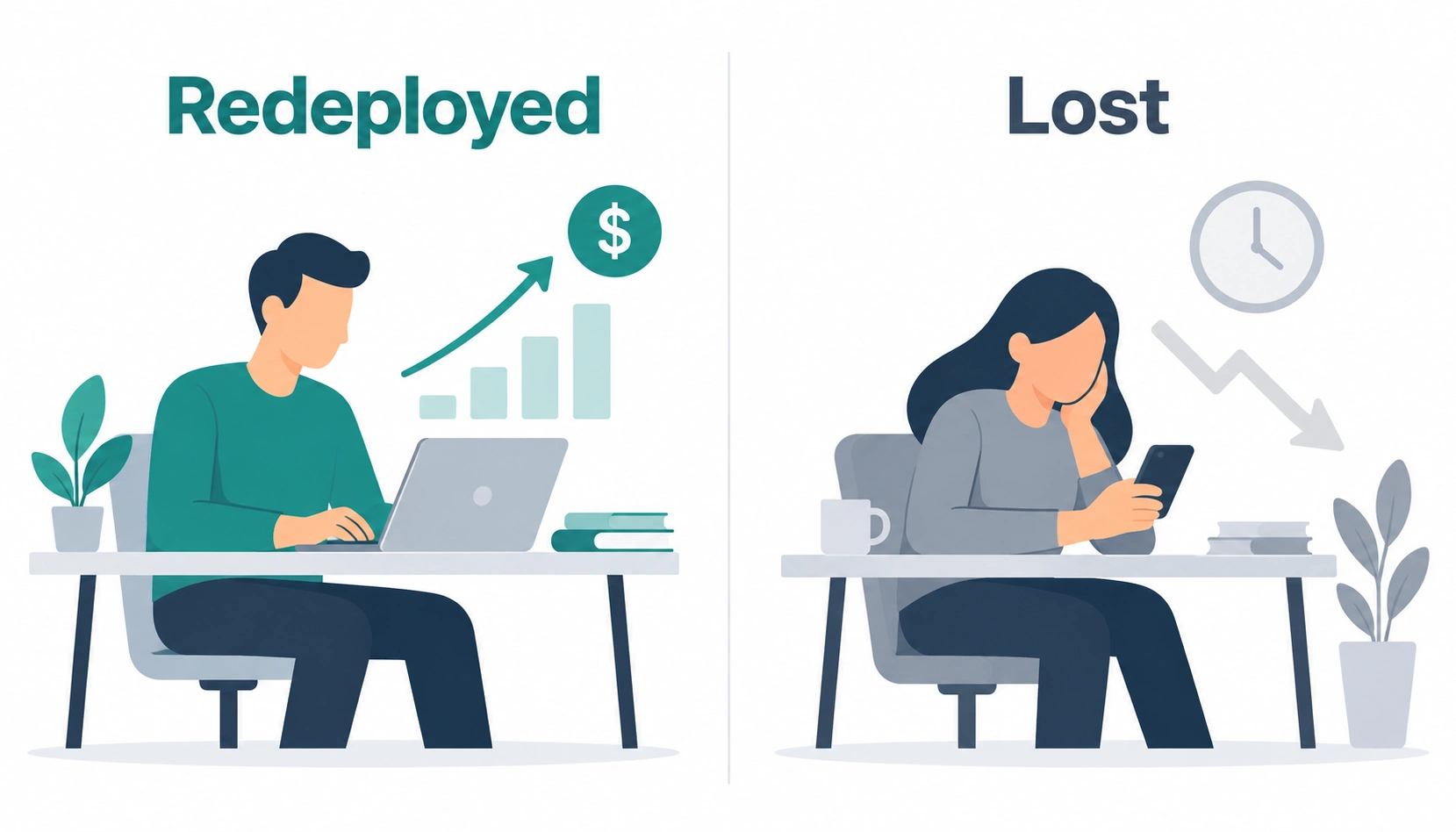
But here’s the part that separates real time-saved ROI from wishful thinking: saved time only counts as value once it’s redeployed somewhere useful. Someone saves five hours a week and spends four of them scrolling LinkedIn? You haven’t captured a dime of ROI. You’ve just relocated the unproductive time to a different afternoon. Track where the saved hours actually go, not just that they technically exist.
CAC: Where AI Quietly Moves the Needle
Customer acquisition cost is one of the more underrated places AI shows up, mostly because the change creeps in rather than arriving all at once. AI-assisted ad copy, faster A/B test iteration, AI-drafted outbound that lets a smaller sales team cover way more ground, any of these can quietly lower CAC without anyone ever labeling it “the AI thing.”
To actually see it, track CAC on a rolling basis, before and after your AI tools went live, broken out by channel if you can manage it. Went from 50 personalized emails a day to 200 because an AI tool handles the first draft, and reply rate held steady? Cost per acquired customer through that channel should drop, and you should be able to point at the exact month it happened.
Conversion: The Metric Most Businesses Already Track, Just Not for AI
Conversion rate is probably already sitting in your dashboard somewhere, whether that’s site visitors turning into signups or sales calls turning into closed deals. The mistake most people make isn’t failing to track conversion. It’s failing to connect it back to specific AI changes, and instead treating the whole number as one lump that moves for mysterious reasons.
Break it apart instead. Added an AI chatbot to the site? Look at conversion specifically for the visitors who talked to it versus the ones who didn’t. Rolled out AI-generated follow-up sequences for sales? Compare close rates for leads who got that sequence against a control group still getting manual follow-up. This kind of segmented tracking is maybe an extra hour of setup in whatever analytics tool you already have. It’s the difference between “conversion went up, probably the AI” and an actual number you’d defend in front of a board.
Support Costs: The Category with the Clearest Before-and-After
Support costs get their own mention here because this is the one area where most companies genuinely have clean historical data sitting around. You almost certainly already know what support cost last year, per ticket or per agent, before any AI tool ever touched it.
Just be honest about the comparison. Total cost after AI needs to include the AI tool’s fees, any headcount or hours saved, and any bump in complaints about being stuck in a bot loop, because that carries its own cost in churn even when it never shows up as a line item anywhere. A tool resolving 40% of tickets at 99 cents each but annoying enough customers to nudge churn up half a point might not be the clean win the resolution number makes it look like.
Tool Costs: What You’re Actually Paying in 2026
Getting measuring AI ROI right starts with actually knowing what you’re spending, and pricing across the major business AI tools has gotten a bit more transparent lately, even if it’s still messier than most SaaS categories. As of late 2026, Claude Team runs $20 to $25 per seat a month, with Claude Enterprise at $20 per seat plus usage billed at API rates on top. Microsoft 365 Copilot is officially $30 per user monthly, but that’s an add-on riding on top of a qualifying M365 license, so the real all-in cost lands closer to $69 to $90 per seat once the base subscriptions counted. ChatGPT Enterprise still won’t publish a price and requires a 150-seat minimum, but reported 2026 contracts cluster around $45 to $75 per seat, with bigger deployments negotiating down toward $40.
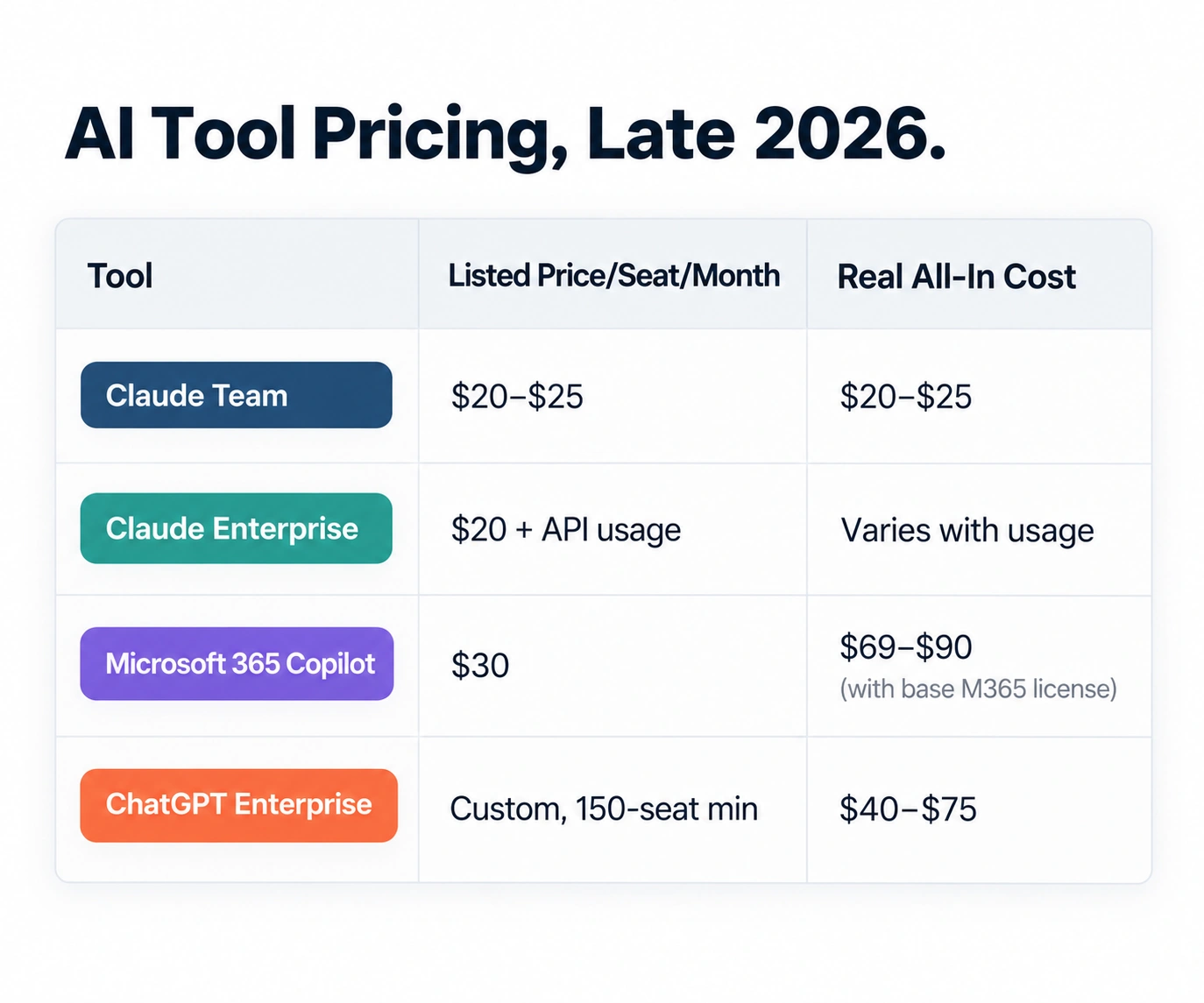
None of those numbers tell the whole story alone, though. A $20 seat nobody actually uses well costs more, in the end, than a $90 seat that genuinely changes how a team works. Cost per seat matters. Cost per outcome matters a lot more, and that’s the number most companies never get around to calculating at all.
Implementation Costs: The Line Item Everyone Forgets
Seat fees are the visible cost. Implementation is the invisible one, and it’s usually the bigger of the two. Training time. Workflow redesign. The stretch where output actually dips because people are learning something new instead of just doing their job. IT hours spent on integrations and security review. All of it belongs in the real cost of a rollout, whether anyone budgets for it or not.
A rough rule that seems to hold up across company sizes: plan for implementation costs roughly equal to the first year’s licensing, sometimes more for anything customer-facing or tangled up with existing systems. Skip that line item in your planning and you’ll end up being the company that sees a month-one dip in output and pulls the plug right before it would’ve started paying off.
The ROI Formula That Actually Works
Strip away the jargon and AI return on investment comes down to one formula, applied the same way every time: value generated minus total cost, divided by total cost, times 100 for a percentage.
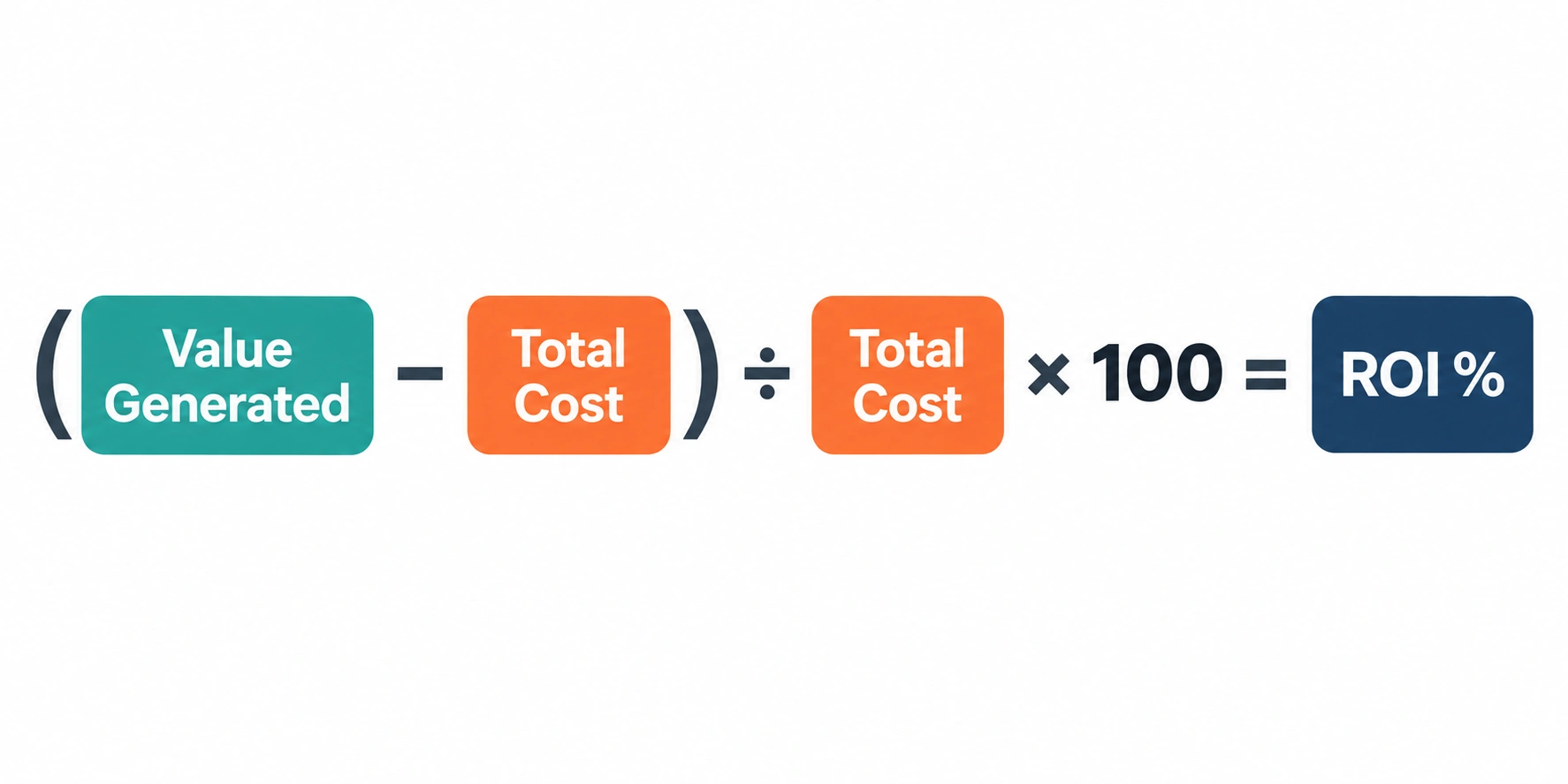
Value generated is everything you can honestly attribute to the tool, cost savings, revenue lift, time saved and converted into dollars, whatever fits your use case. Total cost is seat fees, usage fees, implementation, training time, all of it, not just whatever line shows up on the credit card statement.
Here’s a concrete version. A 20-person support team adopts an AI resolution tool. Seat and resolution fees run $1,800 a month, $21,600 a year. Implementation, training, and the rollout dip add another $15,000 in year one. Total cost: $36,600. If the tool resolves enough tickets to avoid hiring two extra support agents at $55,000 fully loaded each, that’s $110,000 in avoided cost. ROI works out to (110,000 minus 36,600) divided by 36,600, which lands around 200%. Now that’s a number worth putting in front of a board. “It feels like it’s helping” isn’t.
Building a Simple ROI Dashboard
You don’t need enterprise BI software for this. A shared spreadsheet, updated monthly, does the job for most small and mid-sized businesses. The columns that actually matter: the metric, its baseline before AI, its current value, the dollar value of that change, and the running cost of whatever’s generating it.
Stick to the handful of metrics that connect directly to money. Cost per resolution. Average deal cycle. CAC by channel. Hours saved and where they actually went. Resist the urge to track everything just because it can be measured. A dashboard with twenty metrics nobody looks at is worse, in a real sense, than one with four that get checked every month.
A Worked Example: 90 Days of an AI Support Rollout
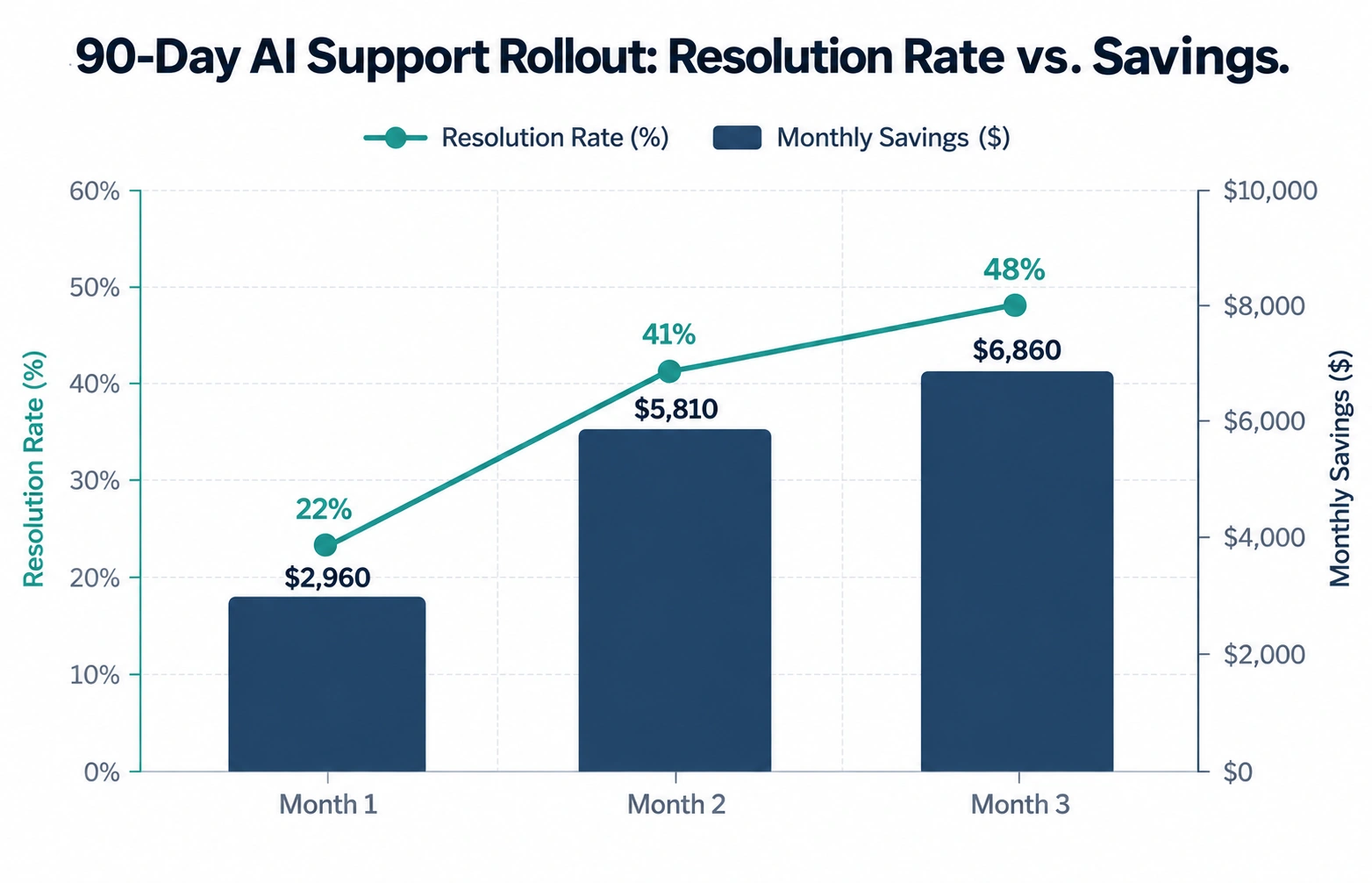
A 12-person e-commerce customer service team adopts an AI tool at $0.99 per resolution plus a $29 per-seat base fee, roughly $350 a month in seats before resolution fees even kick in. Before rollout, they’re handling 3,000 tickets a month fully by hand, at around $6 per ticket in labor cost, or $18,000 monthly.
Month one, resolution sits at 22%, well below the marketed range, because the knowledge base wasn’t actually ready for it. AI cost that month: $350 plus 660 resolved tickets at $0.99, about $1,000 total. Human cost for the leftover 2,340 tickets: $14,040. All told: $15,040, a modest $2,960 saved against baseline. Less than anyone hoped for.
Month two, after the team fixes the documentation gaps that showed up in month one, resolution climbs to 41%. AI cost: roughly $1,570. Human cost for the remaining 1,770 tickets: $10,620. Total: $12,190, now $5,810 saved.
Month three, resolution stabilizing around 48%: AI cost near $1,780, human cost for 1,560 tickets at $9,360, total $11,140, saving $6,860 against baseline. Ninety days in, the tool’s genuinely saving money, but only because someone tracked resolution rate weekly and actually fixed the documentation problem instead of trusting the vendor’s marketed number to show up on its own.
A 90-Day Framework for Measuring AI ROI
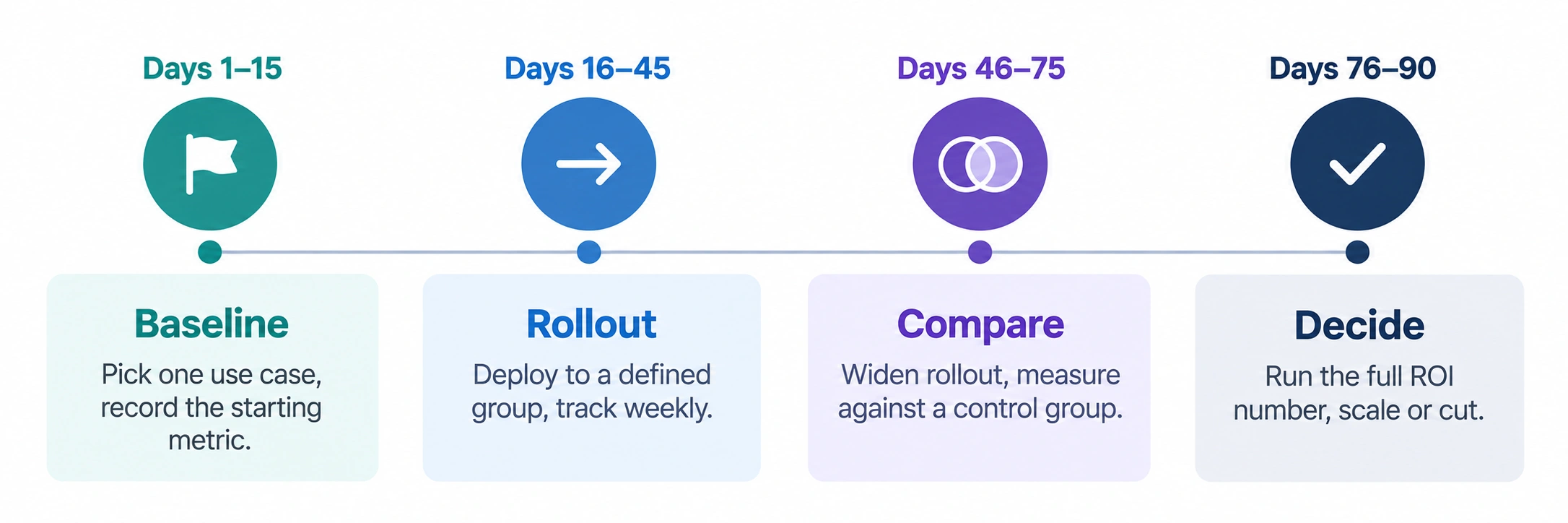
Days 1 to 15: Pick one AI use case. Just one, not five. Write down the exact baseline metric it should move, cost, time, conversion, whatever fits, before anything changes at all.
Days 16 to 45: Roll it out to a defined group, not the whole company at once. Track the metric weekly, not just at the end of the month. Fix the obvious problems early, bad documentation, unclear prompts, missing integrations, instead of hoping they sort themselves out.
Days 46 to 75: Widen the rollout if the early numbers actually hold up. Compare against a control group where you can, a team or segment not using the tool yet, so you can tell the AI’s real effect apart from everything else moving through the business at the same time.
Days 76 to 90: Run the real ROI number, full costs against full value, and decide honestly whether to scale it, tweak it, or kill it. A tool that isn’t paying off by day 90 with a properly measured baseline probably isn’t hiding a surprise for month six. Cut it loose early instead of late.
None of this needs a data science team or expensive software behind it. It just needs the discipline to write down a number before you start, check it on a schedule, and be honest about what the AI actually changed versus what you were hoping it changed. That discipline, more than any particular tool, is what separates the small slice of companies actually seeing returns from the much bigger pile still guessing.

The Team Compare BizTech is made up of people from marketing backgrounds, digital marketing & content marketing backgrounds, each with unique experiences and nuggets of wisdom to share with you. The team is passionate about creating unique, accurate, and engaging content.