

So, you are all geared up and decided to go with artificial intelligence (AI) for businesses. Maybe your competitor just declared they cut support response times in half. Maybe your board asked what your AI plan is, and you gave a reply that sounded more confident than it felt. Either way, you’re not late, and you’re certainly not alone. Most small and mid-sized businesses are still figuring it out.
Here’s the part nobody tells you up front: the companies actually getting value out of this aren’t the ones who moved fastest. They’re the ones who had a plan before they opened their wallets.
That’s what an AI implementation roadmap is really for. Not a strategy deck that sits in a shared drive collecting digital dust, but an actual sequence of moves you can make over the next twelve weeks that turns “we should probably use AI” into tools your team opens every single day without being told to. This guide walks through that sequence, week by week where it matters, with real pricing and real tools. No hypotheticals, no vague “leverage synergies” nonsense.
Why Most AI Projects Fail Before They Even Start
Let’s get the scratchy part out of the way first.
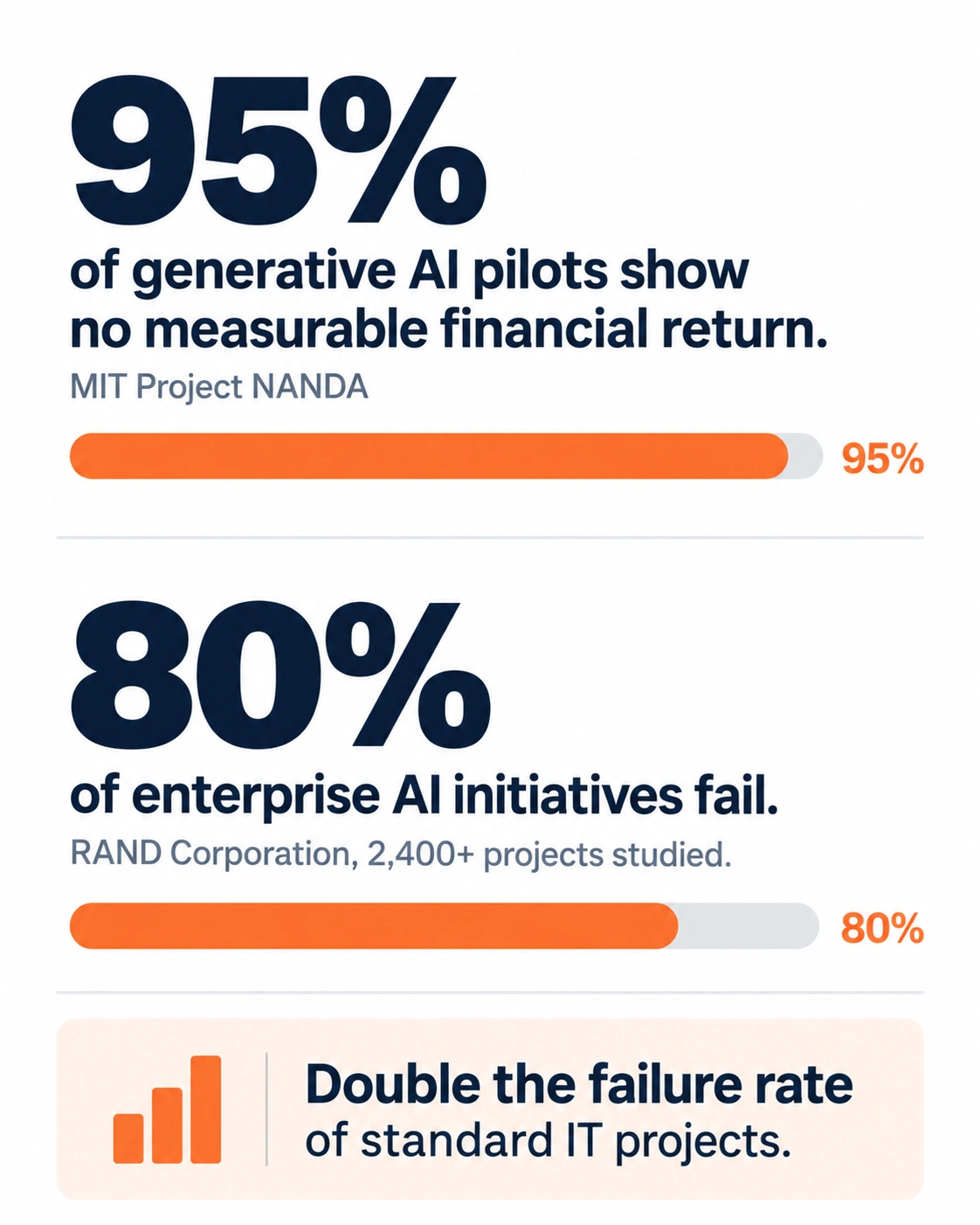
Research out of MIT’s Project NANDA found that roughly 95% of generative AI pilots inside companies produce no measurable financial return. RAND Corporation, looking across more than 2,400 enterprise AI initiatives, put the failure rate closer to 80%, which is double the failure rate of ordinary IT projects. Different studies measure slightly different things, so don’t get stuck arguing over which number is the “true” one. The pattern underneath all of them is identical: most companies buy a tool, hand it to employees, and just… hope. And hope, it turns out, is not a plan.
The actual causes, over and over again, are almost boringly fixable. Nobody wrote down what success was supposed to look like before they started. The data feeding the tool was a chaos nobody wanted to touch. Leadership treated the whole thing like an IT rollout in place of a change to how people actually do their jobs. Employees got a link and a “check this out” as opposed to training, so they pushed against it for five minutes and quietly went back to their old habits. And nobody measured anything, so three months later leadership couldn’t say whether it worked or just felt like it worked.
Here’s the good news buried in all that: none of it requires a genius AI adoption strategy or a data science team on payroll. It requires sequencing. Audit before you buy. Pick your use case before you pick a vendor. Pilot before you scale. That’s most of the roadmap right there. Everything below just fills in the details.
Step 1: Audit What You Actually Have
Before anything else, spend a week figuring out where you actually stand. This isn’t a formal exercise that needs a consultant billing by the hour. Grab a spreadsheet. Answer four questions, honestly, even the ones that sting a little.

What monotonous tasks consume the maximum time across your team? Not the glamorous strategic stuff, the grinding stuff: drafting the same kinds of emails over and over, briefing call notes, pulling numbers into reports, responding customer queries you’ve already answered a hundred times.
What data do you actually have, and is any of it usable? If your customer records live in three disconnected systems and half the fields are just blank, an AI tool doesn’t fix that on day one. Nothing fixes that on day one. You need to know this now, before you sign anything, not after.
What tools is your team already using without asking permission? This happens more than owners want to admit. Someone on your team is probably pasting client details into a free ChatGPT account right now, this week, without anyone signing off on it. An audit drags this “shadow AI” use into the open instead of letting you pretend it isn’t happening.
And what’s your real budget, once you count the people-time it takes to actually roll something out properly? A $20-a-month tool nobody hesitates to set up right ends up costing more than a $200 tool that gets used the way it’s supposed to.
Write the answers down somewhere real, not just in your head. This audit is the foundation the rest of your AI transformation sits on. Skip it, and you’ll be back here in month two wondering why the pilot stalled.
Step 2: Find Use Cases Worth Actually Solving
Once you know where the pain lives, get specific about use cases. Vague goals like “use AI to improve efficiency” don’t survive contact with a busy Tuesday morning. Specific ones do.
Good starting use cases for smaller businesses tend to cluster in a handful of places. Customer support, where an assistant drafts first-pass responses to the common tickets. Sales, where reps use AI to prep for calls or knock out a follow-up email instead of staring at a blank screen. Internal knowledge, where employees ask a chatbot trained on your own documents instead of pinging the one coworker who “just knows this stuff.” Content and marketing, where the first draft comes faster even if a human still edits every word before it goes out. And the back office: expense categorizing, meeting notes, the data entry nobody enjoys doing.
Notice what’s missing from that list. Anything touching legal liability, medical decisions, or money commitments made without a human double-checking the output first. Start there and you’re asking for a bad time. Start with lower-stakes, high-frequency work instead, and you build actual trust in the tools before anyone bets something important on them.
Step 3: Rank Use Cases by ROI, Not by Excitement
Every use case on your list is going to sound exciting the moment you say it out loud in a meeting. Not all of them deserve to go first. Score each one on two things only: how much time or money it could realistically save, and how hard it would actually be to pull off given your current data and systems.
The sweet spot is high impact, low difficulty. That’s where you start. Always. High impact but genuinely hard, say, an AI workflow that needs clean data pulled from four systems that don’t talk to each other, goes on the roadmap for later, not for now. Low impact stuff isn’t worth the training time it eats up, even if it happens to be easy.
This is exactly where most companies get edgy and jump straight to the impressive-sounding project instead of the boring one that would’ve actually worked. Don’t do that. A working tool that drafts customer emails is worth more in week four than an ambitious AI agent project that’s still stuck in testing come week twelve.
Step 4: Pick Tools That Match the Job, Not the Headlines
This is where the AI strategy conversation needs to get grounded in real numbers, because pricing in this space is confusing on purpose, and it moves fast.
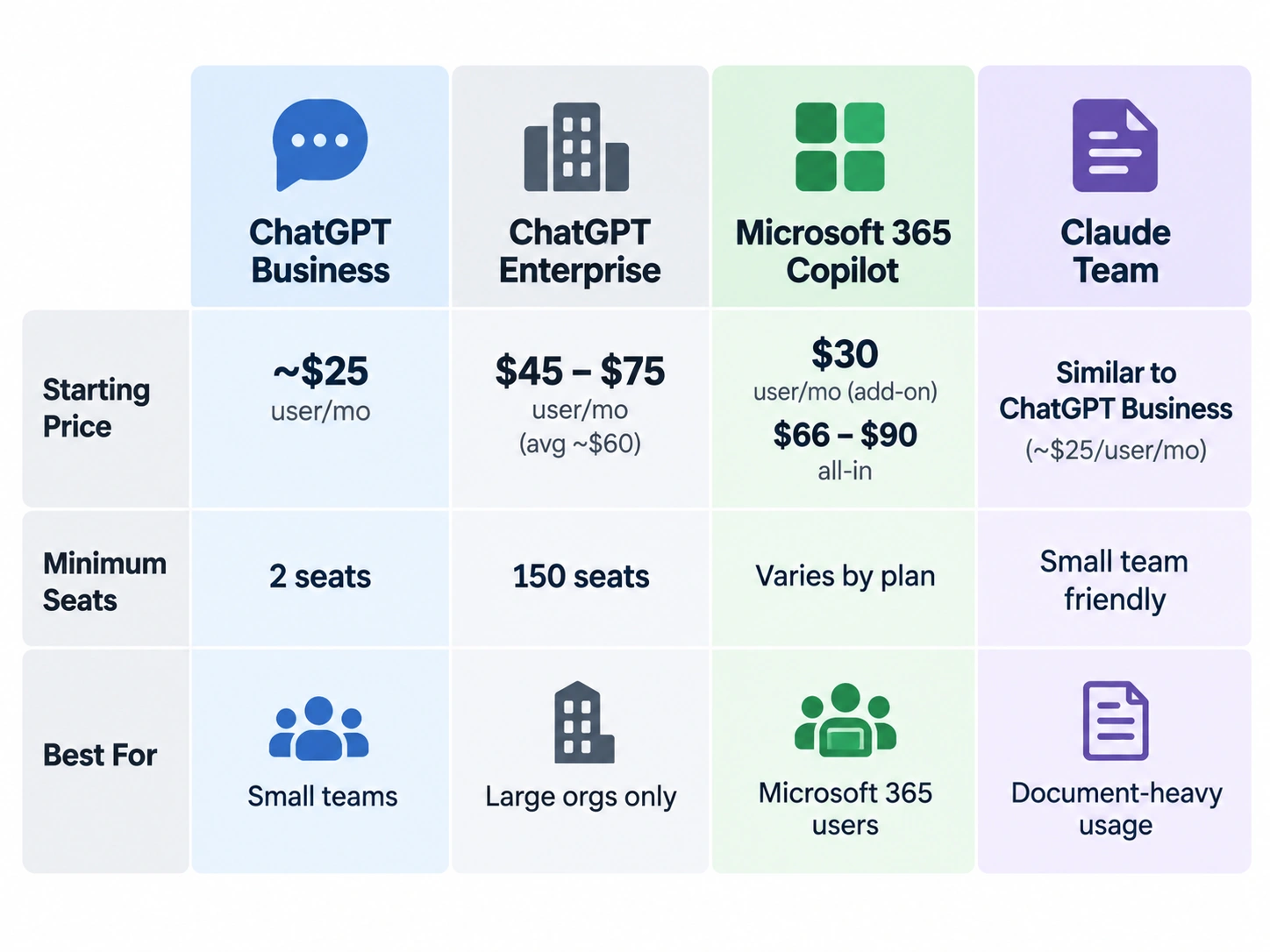
For general-purpose assistants, the three names everyone’s heard are OpenAI’s ChatGPT, Microsoft’s Copilot, and Anthropic’s Claude. ChatGPT Business, the tier actually built for small teams, runs around $25 per user per month on annual billing, with a two-seat minimum. A five-person team can get rolling for a few hundred bucks a month. ChatGPT Enterprise is a different animal entirely: OpenAI doesn’t publish a price, and buyers who’ve actually negotiated deals report figures landing somewhere between $45 and $75 per seat monthly, averaging around $60, with a 150-seat minimum and the whole thing paid upfront annually. That puts real entry cost near six figures a year. That’s well outside most SMB budgets, and frankly, it’s not built for you anyway.
Microsoft 365 Copilot lists at $30 per user per month as an add-on. Key word: add-on. That’s on top of a Microsoft 365 license you already need to own, which pushes the real all-in cost to somewhere between $66 and $90 per seat based on which Microsoft plan you’re already on. If your team lives inside Outlook, Word, and Excel all day already, that integration might be worth paying for. If you don’t, you’re paying for plumbing you’ll never touch. Microsoft does offer a cheaper Business tier for companies under 300 seats, closer to $18 to $21 per user, and that’s a far more realistic entry point for most SMBs.
Claude’s team plans land in a similar range to ChatGPT Business, and its enterprise pricing shifts toward usage-based costs as you scale up, which matters a lot if your use case involves chewing through a ton of documents rather than casual back-and-forth chat.
None of this is about crowning a winner. The “best” tool depends entirely on what you already run and what problem you’re actually trying to fix. If the biggest pain point on your team is drafting customer emails and internal docs, a $20 to $30 seat with zero extra integrations might be plenty. If you’re trying to automate a workflow that spans five different apps, you need something that actually connects to those apps, and that changes which vendor makes sense for you.
One rule worth carving into your desk: never buy the enterprise tier before you’ve proven the use case on the cheapest tier that can test it. Upgrading later is easy. Getting out of a signed annual enterprise contract is a much worse conversation to have with your finance team, trust me on that one.
Step 5: Get Your Data in Order
This step gets skipped constantly, and it’s quietly the one that kills more projects than any bad vendor choice ever does. AI tools are only as useful as whatever you feed them. If your customer database has three different spellings of the same client’s name, if your product catalog hasn’t been touched in a year, or if nobody’s totally sure which spreadsheet is the “real” one anymore, an AI tool sitting on top of that mess is going to produce confidently wrong answers. Confidently. That’s the scary part.
You don’t need perfect data. You need clean-enough data for whatever you’re piloting right now. If the first use case is drafting customer support replies, your help articles and past ticket resolutions need to be accurate and current. If it’s sales call prep, your CRM notes need to actually say something instead of sitting blank. Spend real time here, even though it feels like unglamorous housekeeping instead of “doing AI.” Quietly, it’s most of the actual work.
Step 6: Run a Real Pilot, not a Demo
A pilot isn’t the same thing as letting one enthusiastic employee poke around with a tool for a week and come back saying it’s “pretty cool.” A real pilot has a defined group of users, usually somewhere between five and fifteen people from the team who’ll actually use it day to day, a fixed window of two to four weeks, and one clear question you’re trying to answer: does this actually save time, does the output need heavy editing before it’s usable, and do people still bother using it once the novelty’s worn off?
Pick a pilot group that includes both your most enthusiastic employee and your most skeptical one. Seriously. The skeptic will find the problems the optimist won’t even notice, and if the tool wins the skeptic over, that tells you a lot more than universal excitement from people who were already sold before you started.
Step 7: Train People Like You Actually Mean It
This is the step companies underestimate the most. Buying the license is the easy part, honestly the easiest part of this whole process. Getting a 52-year-old operations manager who’s never used a chatbot in her life to actually change how she writes her weekly reports takes more than sending her a link and a “give this a try.”
Real training here isn’t a one-hour webinar people half-watch while checking email. It’s short, exact, role-based sessions: here’s exactly how you’d use this for the three things you do daily, here’s what good output looks like versus bad output, here’s what to double-check before anything goes out to a customer. Follow that up with office hours in the first couple weeks, where people can ask “why did it do this weird thing” without feeling stupid for asking. Adoption dies quietly when someone hits a confusing moment alone at their desk and just gives up on the whole thing.
Step 8: Put Governance in Place Before You Scale
Governance sounds like a word only big companies with entire legal departments need to worry about. A basic version of it matters even for a five-person shop. At minimum, write down what data employees can and can’t paste into an AI tool. Client contracts and health data generally shouldn’t go anywhere near a consumer-grade chatbot, for instance. Decide who evaluates AI-generated content before it reaches a customer’s inbox. And set one clear rule: anything touching legal, financial, or safety consequences gets checked by an actual human before it’s called final.
This doesn’t need to be a fifty-page policy nobody reads. One page, something every employee actually reads and signs off on, includes most SMBs perfectly well. And it protects you from mistakes that end up costing a lot more than any software subscription ever would.
Step 9: Measure What Actually Happened
Before your pilot even kicks off, decide what “it worked” means in actual numbers, not vibes. Time saved per task, measured honestly, not guessed at optimistically after the fact. Error rates or how much rework the AI’s output needs before it’s usable. Actual usage, meaning how many people are still opening the tool in week four versus week one, because that gap tells you everything. And if you can tie any of it to something financial, even roughly, fewer support hours needed, a faster sales cycle, do it.
Companies that skip this step end up in month four unable to answer one simple question: was any of this worth it? Don’t be that company. Rough numbers beat no numbers every time.
The 90-Day Plan, Week by Week
Here’s how all of it actually fits onto a calendar.
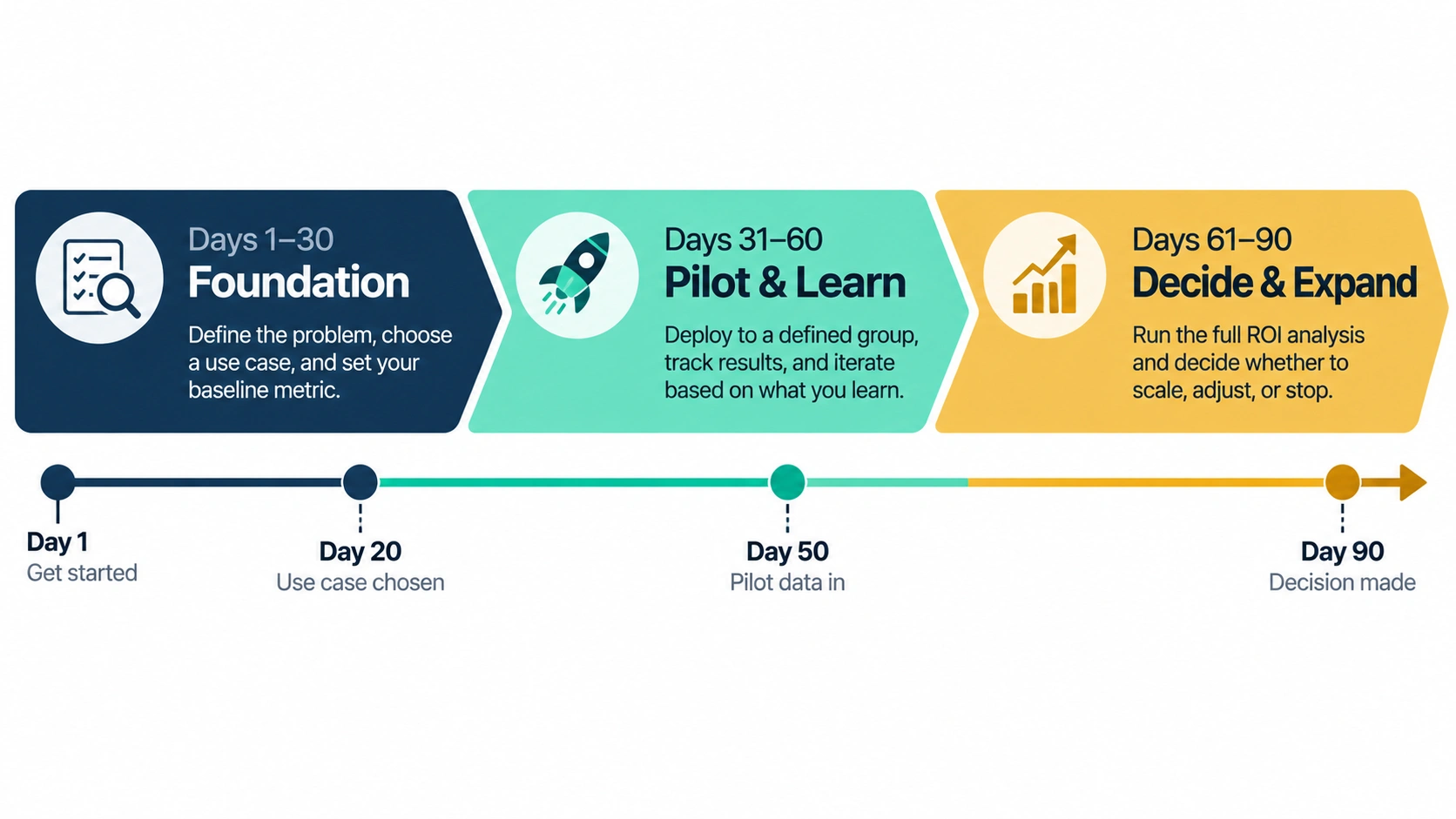
Days 1 through 30: Foundation
Spend the first two weeks running your audit, listing use cases, and ranking them by impact versus difficulty. By day 20, you should have your first use case picked and your pilot tool chosen. Spend the rest of the month getting the relevant data cleaned up and writing your one-page governance rules. Don’t buy the enterprise license yet. Start with whatever tier lets you test this cheaply.
Days 31 through 60: Pilot and Learn
Run the pilot with your chosen group. Check in weekly, not just at the finish line. Ask people what’s annoying about it, not only what’s great about it, because the annoying stuff is where the real information lives. By day 50, you should have real numbers on time saved and actual adoption. Use what’s left of this window to fix whatever’s broken, whether that’s more training, better prompts, or realizing your first use case wasn’t the right pick after all. It’s totally fine to pivot here. That’s the whole point of running a pilot.
Days 61 through 90: Decide and Expand
Based on real pilot data, not gut feeling, decide whether to roll the tool out wider, adjust the approach, or kill it and try something else. If it’s working, start the audit-to-pilot process again on your second use case, and figure out whether you need to move up a pricing tier now that you actually have proof it’s worth paying for. By day 90, you should have one working AI use case in production, real numbers backing it up, and a clear next one already lined up.
Notice this plan doesn’t get you to “AI everywhere” by day 90. That’s on purpose. A real AI strategy builds one solid win first, then compounds from there. Companies that try to do everything at once in month one is, statistically speaking, the ones who show up in next year’s failure studies.
A Simple Checklist to Keep You Honest
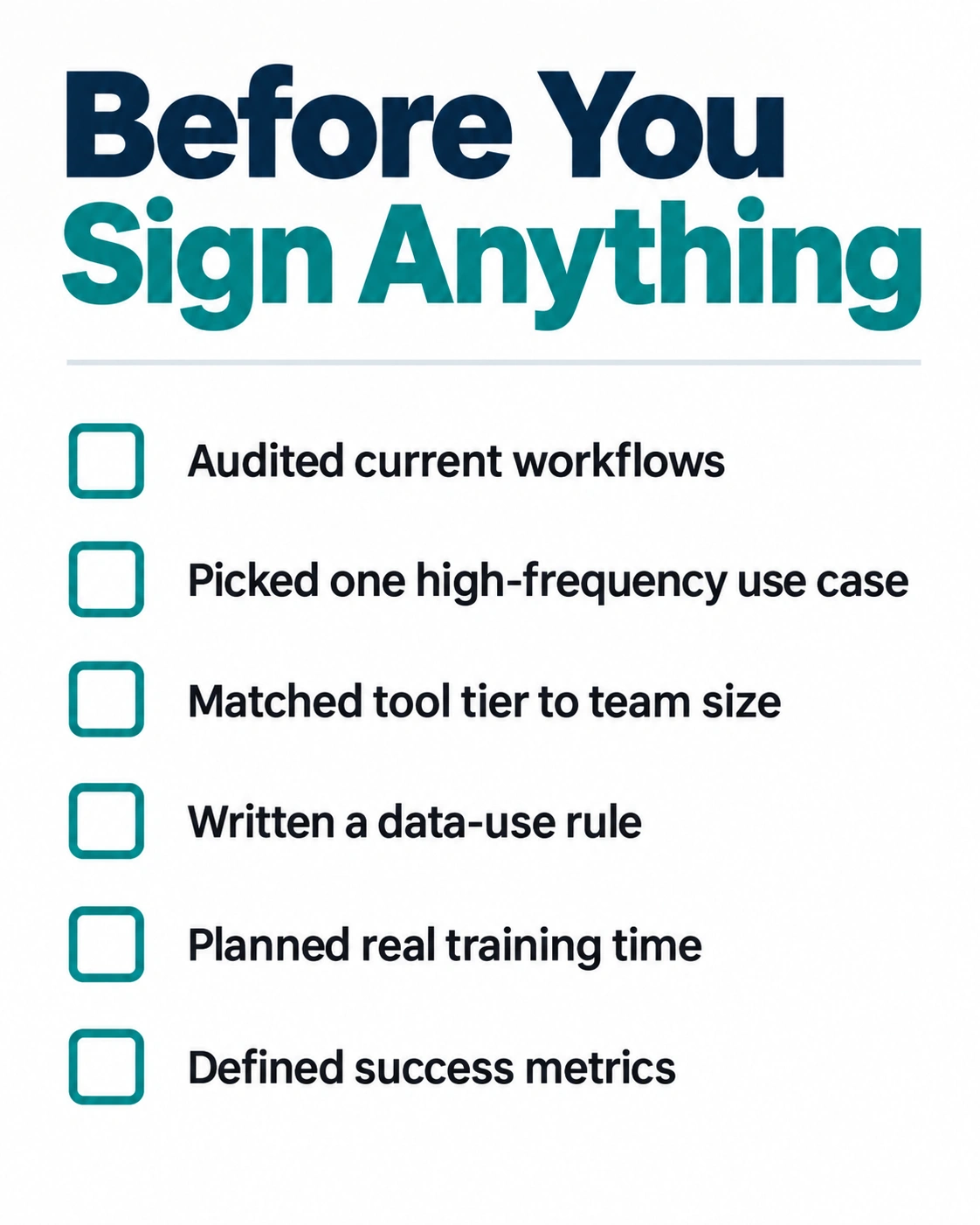
Before you sign anything, ask yourself a few things.
Have you actually audited current workflows and data quality, or just assumed it’s probably fine? Do you have one specific, high-frequency, low-risk use case picked, with a real definition of success written down somewhere? Have you chosen a tool tier that matches your actual team size, not just the biggest name you happen to recognize? Is there a written rule, even a short one, about what data can and can’t go into these tools? Have you built in real training time, not just a link buried in a Slack message? Do you have a way to measure results before the pilot even starts, so you’re not guessing your way through the wrap-up meeting?
If you can answer yes to all six, you’re already ahead of most companies attempting this. If you can’t yet, that’s fine too. That’s exactly what the first 30 days are for.
The Bottom Line
An AI implementation for business doesn’t need to be complicated, and it definitely doesn’t need to be expensive to get off the ground. What it needs is order. Know your problems before you buy a solution. Prove value on the cheapest tier before committing to the expensive one. Train people properly instead of handing them a link. Measure honestly instead of trusting your gut. Do that, and you’ll land in the small group of companies that can actually say, with numbers to back it up, that AI made the business better. Skip it, and you’ll just be another data point in next year’s failure report.

The Team Compare BizTech is made up of people from marketing backgrounds, digital marketing & content marketing backgrounds, each with unique experiences and nuggets of wisdom to share with you. The team is passionate about creating unique, accurate, and engaging content.