
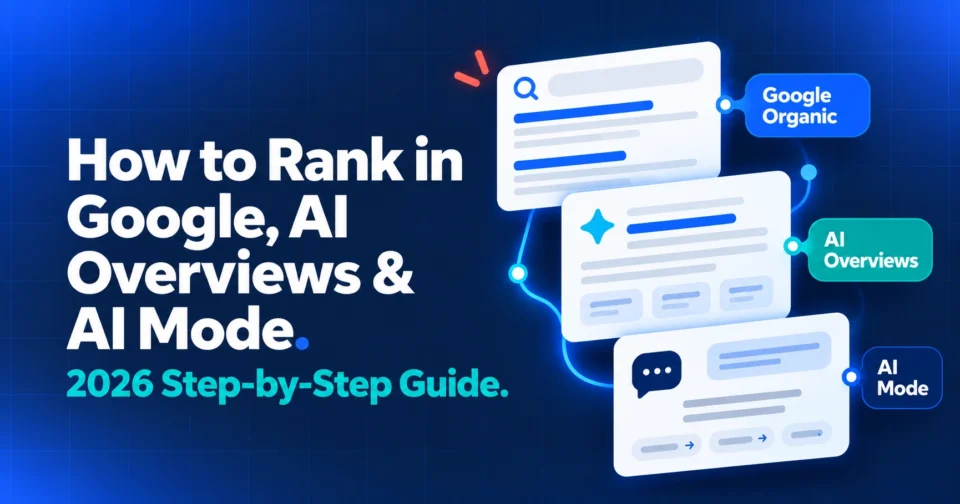
Ranking first on Google used to be the whole game. It isn’t anymore. When an AI Overview sits above your listing, the top result loses about 58% of its clicks. So where should your effort go now? Here’s the plan we’d follow, step by step, to rank in Google AI Overviews plus the tools that make it easier to track.
How do you rank in Google, AI Overviews and AI Mode?
You need three separate plays. Rank your pages in the classic blue links, write short direct answers that an AI Overview can lift, and build connected topic clusters so AI Mode keeps naming you across follow up questions. Each surface pulls from different pages, so one tactic won’t cover all three.
That’s the short version. Everything below is the long one; in the order we’d actually do it.
Why is ranking first worth so much less now?
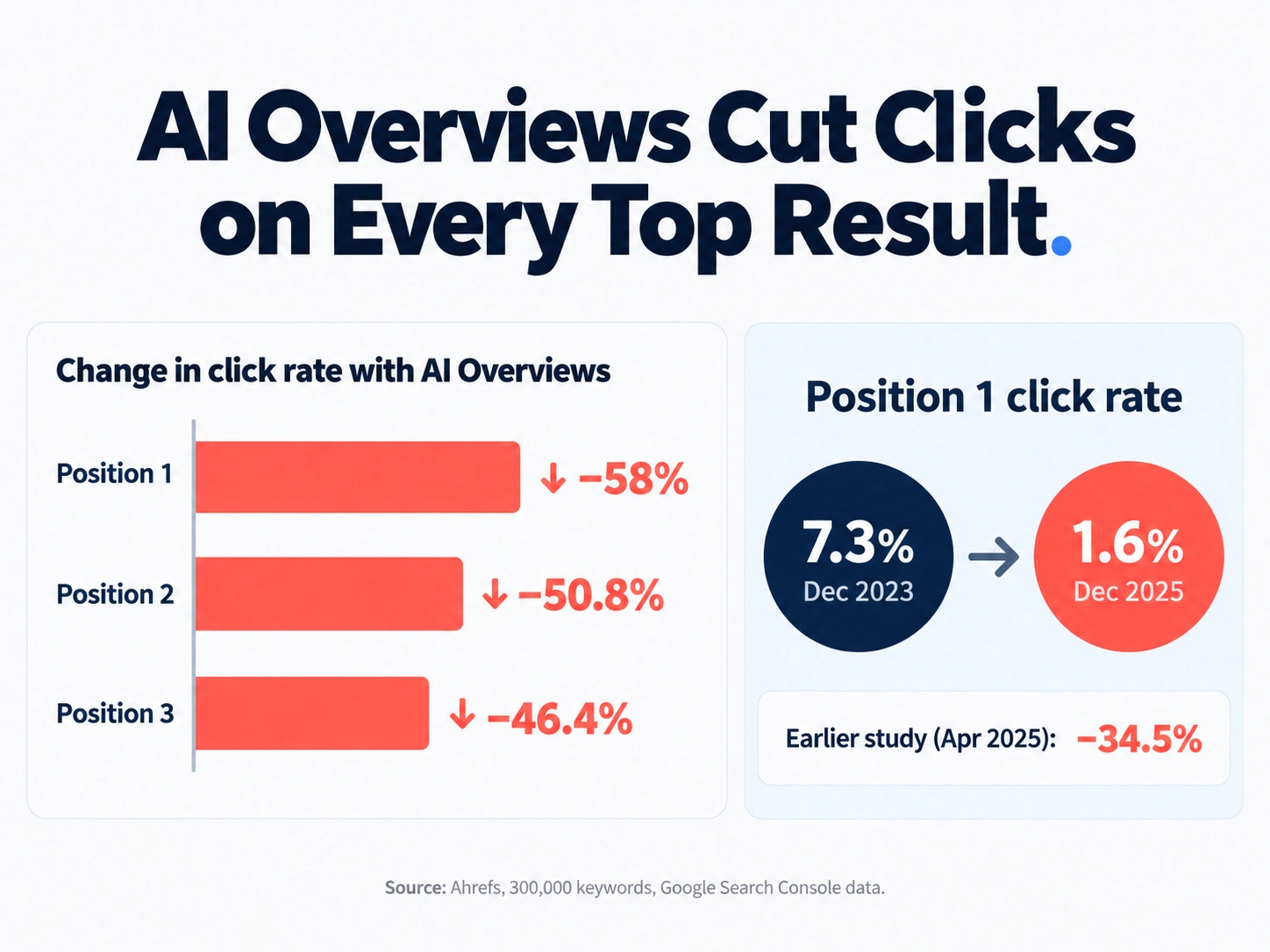
Because the answer now sits above your link. Ahrefs found that an AI Overview cut clicks to the top organic result by about 58%. Position two loses 50.8% and position three loses 46.4%, so the whole first page takes a hit, not just number one.
Here’s how Ahrefs got there. Its study compared 300,000 keywords using Google Search Console data. For keywords that trigger an Overview, the click rate at position one fell from 7.3% in December 2023 to 1.6% in December 2025. Ahrefs’ earlier study, from April 2025, had put the drop at 34.5%. So it’s getting worse, not better. That’s also why zero-click search has changed how businesses measure success.
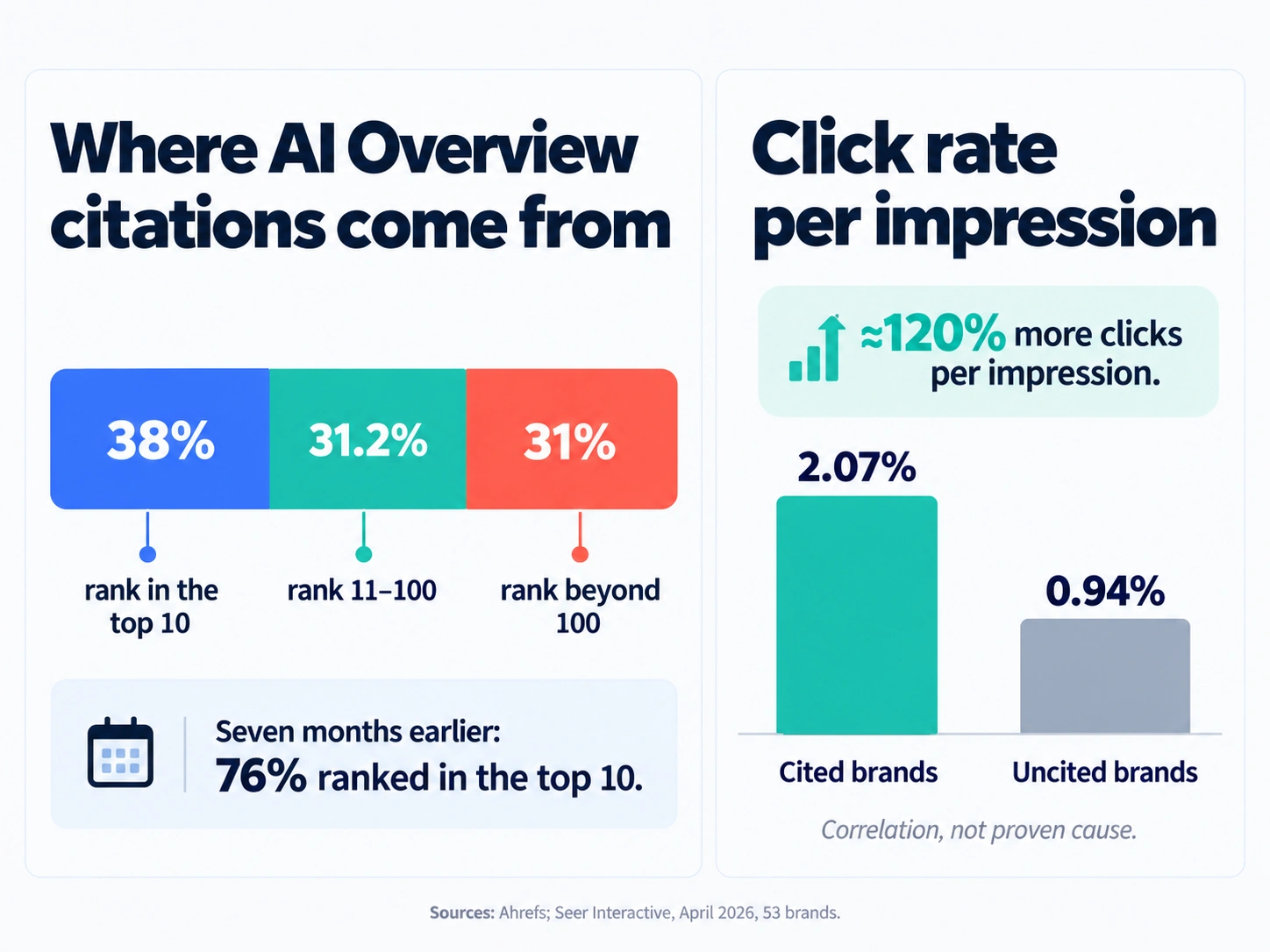
So, is ranking pointless? No, but it’s not the whole story either. Ahrefs also found that only 38% of pages cited in AI Overviews rank in the organic top 10. Seven months earlier, that figure was 76%. Another 31.2% of cited pages rank between positions 11 and 100, and 31% sit beyond 100. Other studies measure this differently (BrightEdge puts the top 10 share closer to 17%), but they all point the same way. Ranking gets you into the pool. It doesn’t guarantee the AI citation.
And citations are worth chasing. Seer Interactive’s April 2026 study of 53 brands found that cited brands earned a 2.07% organic click rate, against 0.94% for uncited brands. That’s roughly 120% more clicks per impression. Seer is careful to say it can’t prove citations cause that gap, since stronger brands are more likely to be cited anyway. We’d read it as a strong hint, not a guarantee.
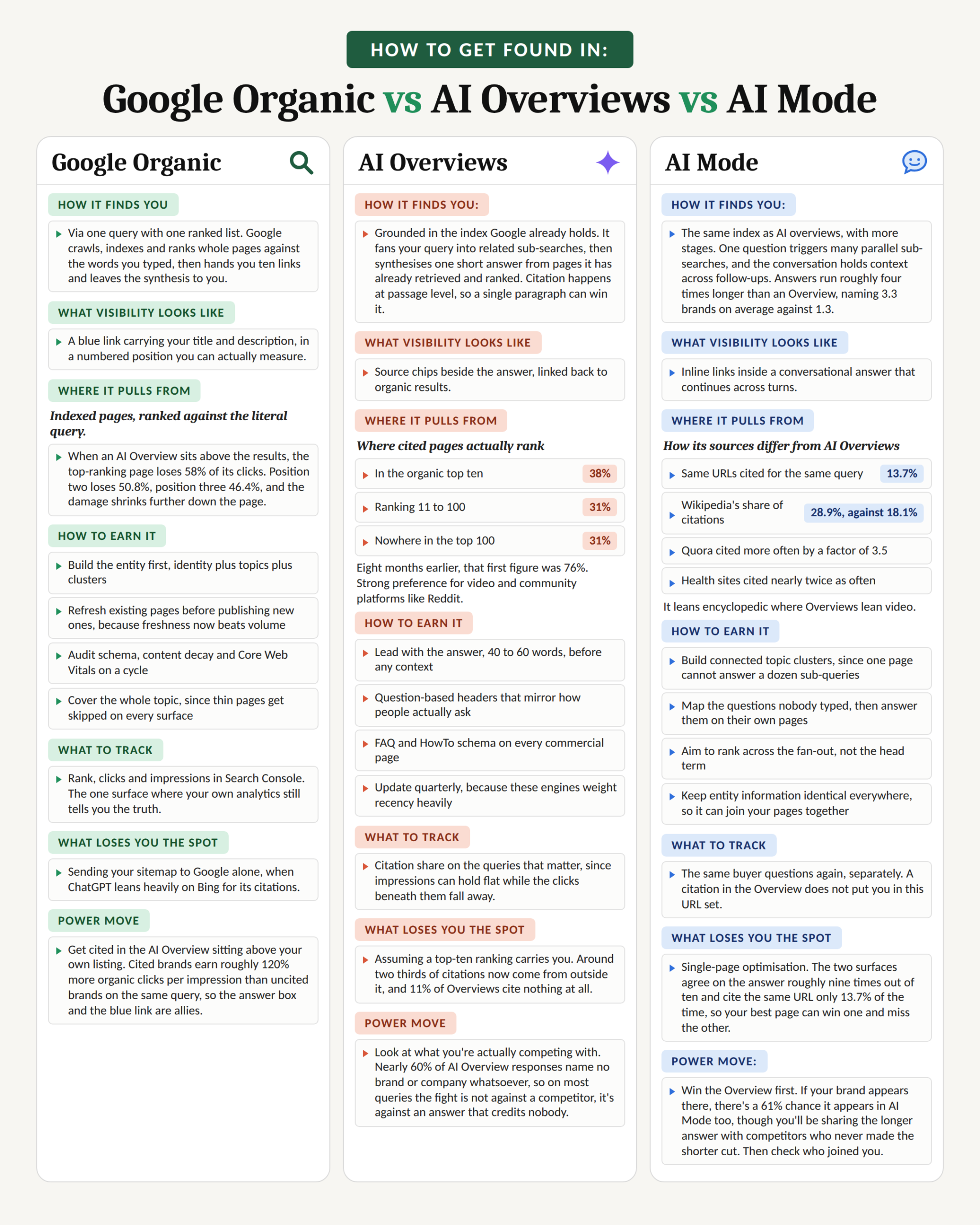
The three-surface idea is a handy way to organize the work. We traced the main numbers back to their original studies and added the tools, the prices and a few warnings. If you want the wider picture of what still works, our piece on the old SEO playbook covers it.
How do Google organic, AI Overviews and AI Mode differ?
They’re three separate surfaces pulled from different places. Google organic ranks whole pages, AI Overviews write one short answer from passages, and AI Mode runs many searches at once and keeps the conversation going. You win each one a different way.
| Surface | How it picks sources | What wins | What to track |
| Google organic | Ranks whole pages against the words typed | Fresh, useful pages that match what the searcher wants | Rankings and clicks in Search Console |
| AI Overviews | Splits the question into sub-searches, then writes one short answer from passages it found | One clear paragraph that answers one sub-question | Whether you’re cited for each key query |
The gap between the last two is bigger than it looks. In Ahrefs’ study of 730,000 response pairs, AI Mode answers ran about four times longer and mentioned 3.3 brands on average, against 1.3 in Overviews. About 61% of the time, AI Mode repeated every brand from the Overview and then added more. So, getting into the Overview is the first win, but you’ll share AI Mode with more competitors.
How do you rank on all three, step by step?
Seven steps, grouped by surface. Do them in this order, because the early ones are cheap and the later ones build on them.
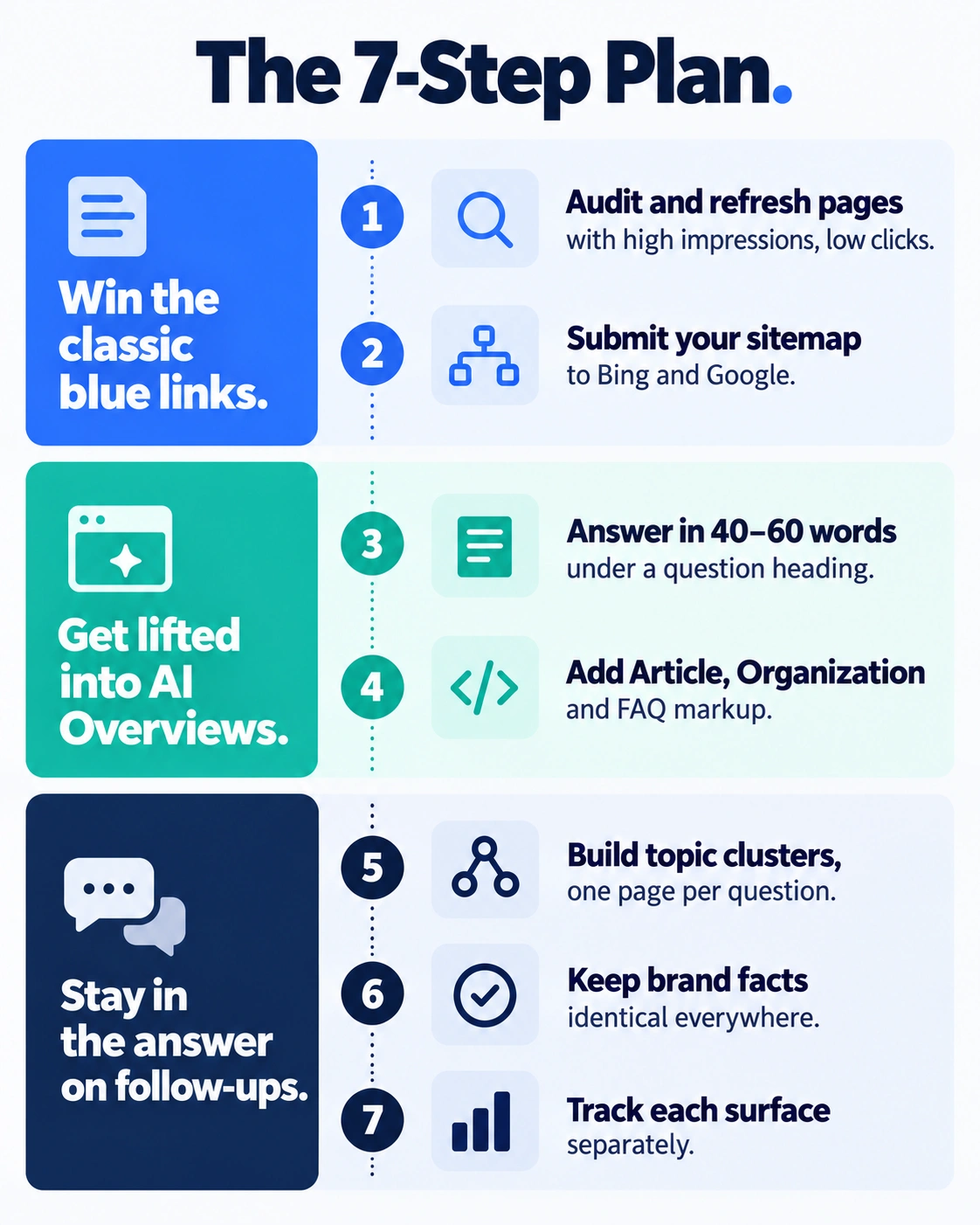
Steps 1 and 2: Win the classic blue links
1. Audit and refresh what you already have before you publish anything new. Open Search Console and filter for pages with lots of impressions but few clicks. Those are your best bets. Update the facts, prices and examples, fix thin sections, and change the date only when the content really changed. Freshness tends to beat volume here, so one refreshed page often does more than three new ones.
2. Submit your sitemap to Bing as well as Google. ChatGPT search draws on Bing’s index, according to several analyses. One analysis of Seer Interactive data put the overlap at 87% of ChatGPT citations matching Bing’s top results, against 56% for Google. Sign in to Bing Webmaster Tools, import your site from Search Console, and confirm your sitemap went through. Microsoft also added an AI Performance report there in February 2026. Our guide on how to appear in ChatGPT search goes deeper.
Steps 3 and 4: Get lifted into AI Overviews
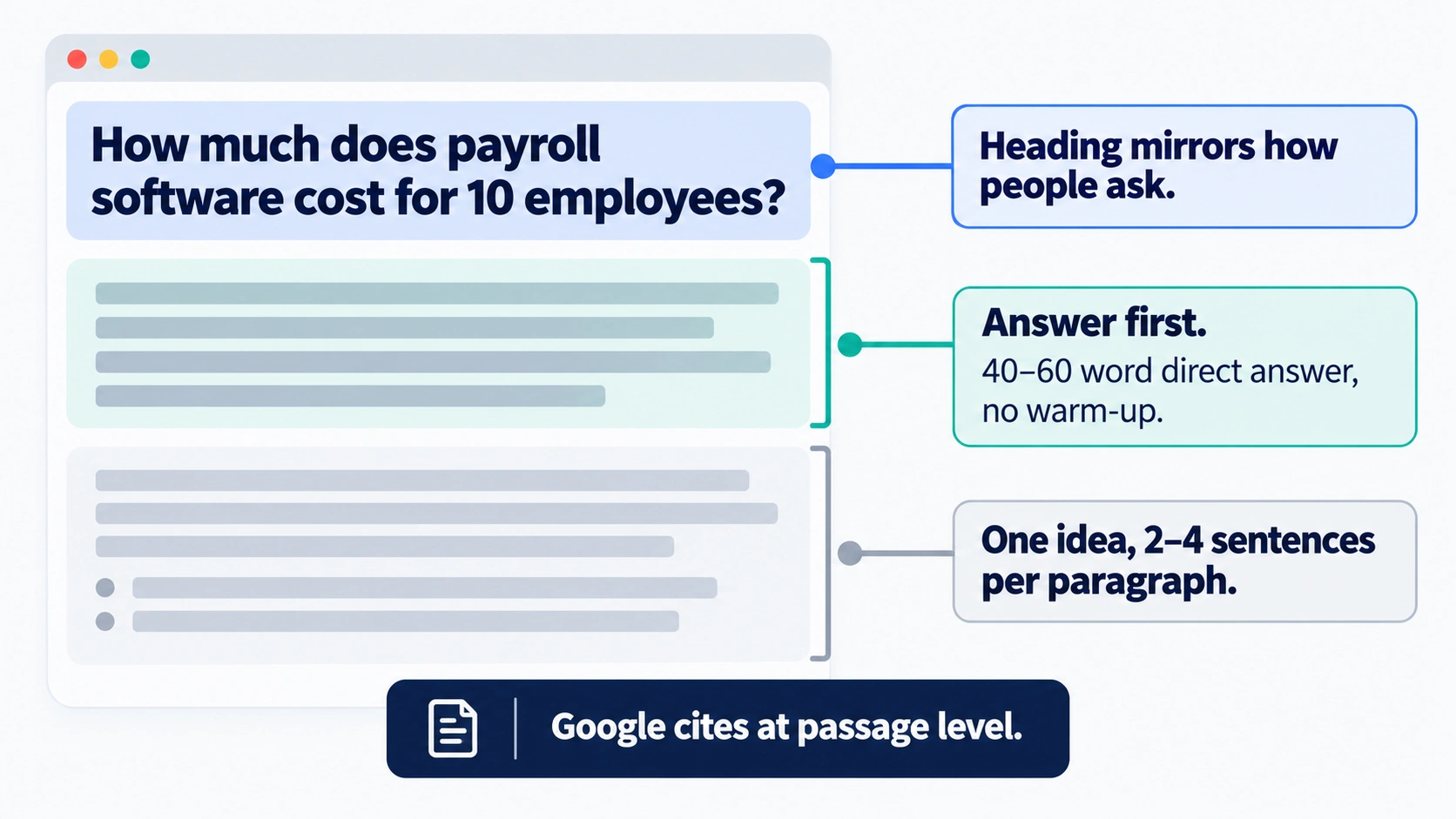
3. Answer the question in 40 to 60 words, right under a heading that sounds like the question. Google cites at the passage level, so one strong paragraph can win a citation even if the page around it doesn’t rank. A heading like “How much does payroll software cost for 10 employees?” works because it mirrors how people ask. Put the answer first, with no warm up, then add the detail. Keep each paragraph to one idea and two to four sentences. If you use AI to draft these, edit hard. Our look at AI content vs human content shows that unedited AI pages fade fast.
4. Add structured data, but don’t expect magic. Article, Organization and FAQ markup help machines read your page, so add them. But Google has cut back FAQ and HowTo rich results in its own listings, so don’t promise yourself a snippet. Think of schema as a clean label, not a trick. Our guide to building an AI-ready website walks through the markup.
Steps 5 to 7: Stay in the answer when people ask follow ups
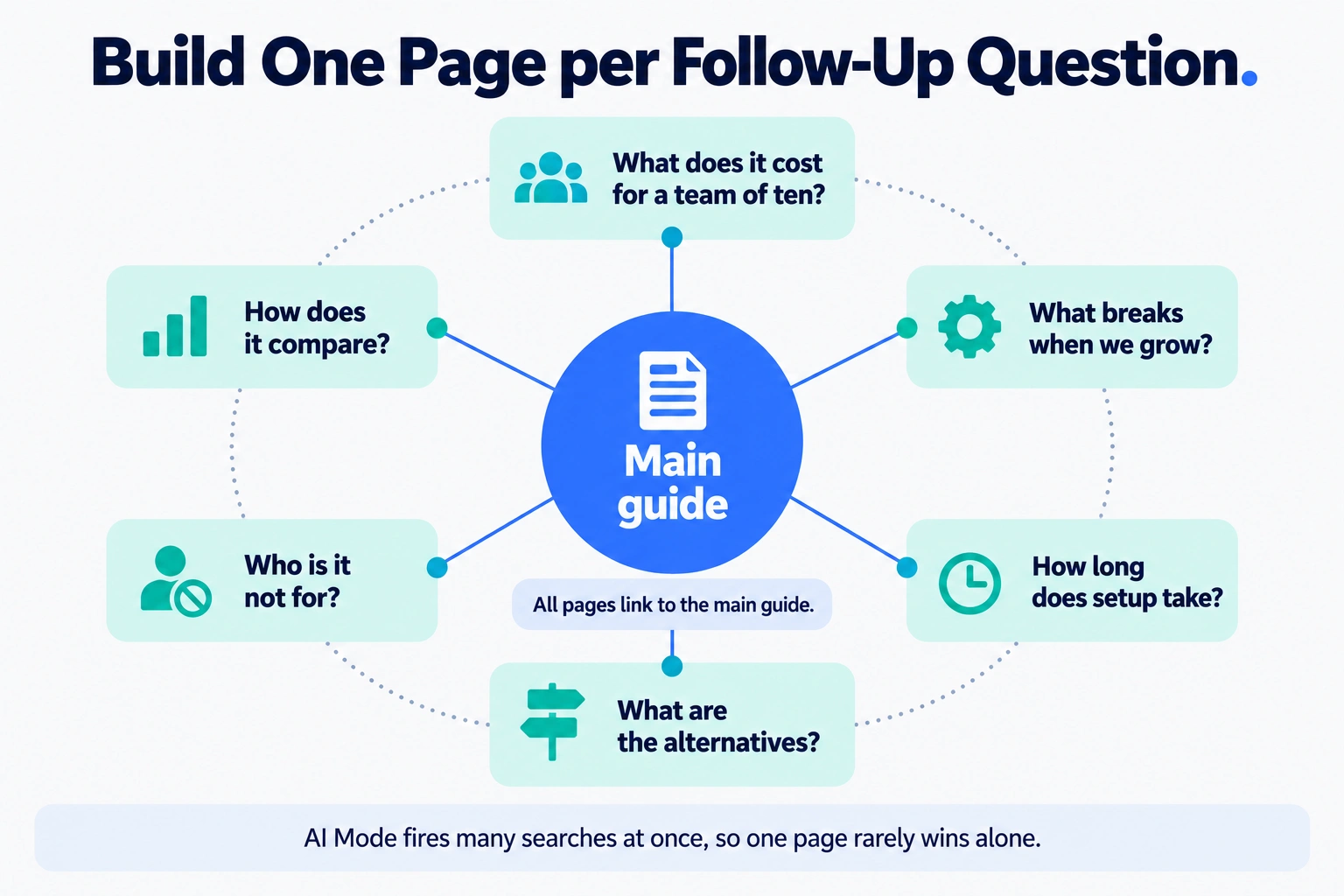
5. Build topic clusters, one page per real question. AI Mode fires many searches at once, so a single page rarely wins on its own. Map the questions nobody types into a search box, the follow ups like “what does it cost for a team of ten” or “what breaks when we grow.” Give each one its own page, link them together, and point them all at one main guide.
6. Keep your brand facts identical everywhere. That means your name, one line description, pricing, founder names and categories. Match them on your site, LinkedIn, Google Business Profile and review sites like G2 and Capterra. It helps the system join the dots, and a mismatch can make you look like two different companies.
7. Track each surface separately. Rankings and clicks come from Search Console and Bing. Citations and brand mentions need an AI visibility tool. Win the Overview first. Ahrefs found that when a brand shows up in an AI Overview, there’s a 61% chance it also appears in the longer AI Mode answer.
Which tools help with each step?
Start free. Google Search Console and Bing Webmaster Tools cover steps 1, 2 and half of step 7 at no cost, so set them up before you pay for anything. As far as we can tell, neither gives you a clean per query view of whether an AI answer named you. That’s where paid AI visibility tools come in. Prices below were checked on October 24, 2026.
| Tool | Best for | Main weakness | Price |
| Semrush | Teams already on Semrush | AI add-on is per domain, so costs climb with more sites | SEO Toolkit from $139.95/mo
AI Visibility Toolkit $99/mo per domain |
| Ahrefs | Rank tracking plus AI prompt tracking | Costs add up fast, and no discounts | Lite $129/mo, Brand Radar from $199/mo, prompt packs $50 to $250/mo |
| SE Ranking | Small teams wanting SEO and AI tracking together | The fuller AI tracking is an add-on | Core $129/mo ($103.20 billed annually), AI Search add-on $89/mo |
| Surfer | Content teams writing and refreshing pages | Few tracked prompts on lower tiers | AI Search Analytics $82/mo, Standard $99/mo, billed yearly |
| Searchable | Brands wanting AI tracking plus fixes | AI Mode tracking costs extra | Pro $125/mo, Scale $400/mo, 14-day free trial |
Semrush: If you already pay for Semrush, adding its AI Visibility Toolkit is the path of least resistance. It’s $99 a month per domain, on top of an SEO plan that starts at $139.95. That’s fine for one site and painful for five. Skip it if you manage lots of domains.
Ahrefs: It’s strong on rankings and backlinks, and it now tracks AI prompts too. Lite includes 150 checks on AI prompts, Brand Radar starts at $199 a month, and custom prompt packs run $50, $100 or $250. The catch is that Ahrefs says it never runs discounts and generally doesn’t give refunds, so try its free AI Overviews and AI Mode trackers first.
SE Ranking: Core tracks 100 prompts daily across five AI models. The AI Search add-on brings 200 prompts covering AI Overviews, AI Mode and ChatGPT for $89 a month, or $71.20 billed annually. There’s a 14- day free trial with no credit card. It’s good value for small teams, but the best AI features cost extra.
Surfer: It’s built for people who write. The content tools help you refresh pages, and AI Search Analytics tracks 50 prompts daily across ChatGPT, Perplexity, Google AI Mode, AI Overviews and Gemini. Standard at $99 adds the writing tools but tracks only 25 prompts weekly, and only on ChatGPT. All prices are billed yearly. Skip it if you don’t publish often.
Searchable: ChatGPT, Google AI Overviews and Perplexity come on every plan, with 100 tracked prompts per model on Pro and 500 on Scale. Pro also includes 20 articles and 200 site audits a month. The weak spots: Google AI Mode is a paid add-on, which matters in a guide partly about AI Mode. Pro keeps 12 months of data, and API access comes only from Scale. Some of Searchable’s own comparison pages still show older, lower starting prices, so trust the pricing page.
One warning for every tool here. AI answers change from one run to the next, so read the trend over weeks, not one day’s score.
Who should skip what?
Here’s the honest version.
- Solo owner or tiny team: Use Search Console and Bing Webmaster Tools, work through steps 1 to 6, and skip paid AI trackers for now.
- Already on Semrush or Ahrefs: Add their AI tracking before signing with a new vendor. One bill, one login.
- Content team that publishes weekly: Surfer fits best, because it’s built around writing and refreshing pages.
- Want tracking and fixes in one place: Try Searchable or SE Ranking on their free trials, and check whether you need AI Mode, since it costs extra on Searchable.
- Agencies with many clients: Work out the cost per domain or project first. Semrush’s AI toolkit charges per domain, while Searchable’s Scale plan and SE Ranking’s Agency Pack include white label reporting.
FAQ
Is SEO still worth it with AI Overviews?
Yes, because ranking still gets you into the pool of pages an AI answer can pull from. The catch is that it no longer guarantees a click. Ahrefs found AI Overviews cut clicks to the top result by about 58%, so pair your rankings with answer-ready paragraphs and clear brand facts.
How do I get cited in an AI Overview?
Put a direct answer of 40 to 60 words right under a heading that mirrors the question. Google cites at passage level, so one strong paragraph can win a citation even when the page doesn’t rank in the top 10. Keep one idea per paragraph, back claims with named sources, and refresh the page regularly.
What’s the difference between AI Overviews and AI Mode?
An AI Overview is a short summary at the top of regular results. AI Mode is a separate conversational experience where you ask follow ups. Ahrefs found AI Mode answers run about four times longer and mention 3.3 brands on average, compared with 1.3 in Overviews, so more brands compete for attention.
Does Bing matter for SEO now?
Yes, mainly because ChatGPT search draws on Bing’s index, according to several analyses. If Bing hasn’t indexed your pages, you’re harder to find there. Verify your site in Bing Webmaster Tools, import your Search Console setup, and submit your sitemap. It’s quick and free.
How do I track AI visibility?
Check Search Console and Bing Webmaster Tools for clicks and rankings, then use an AI visibility tool to see whether ChatGPT, Google AI Overviews and AI Mode name you for your key questions. Track each surface separately, and watch trends over weeks, because AI answers change between runs.

Prashant Srivastava is a digital marketing leader and AI-powered growth strategist with nearly two decades of experience across SaaS, healthcare, real estate, D2C, and B2B. His expertise spans SEO, paid media, marketing automation, analytics, and Generative Engine Optimization, helping businesses achieve measurable, sustainable growth.