
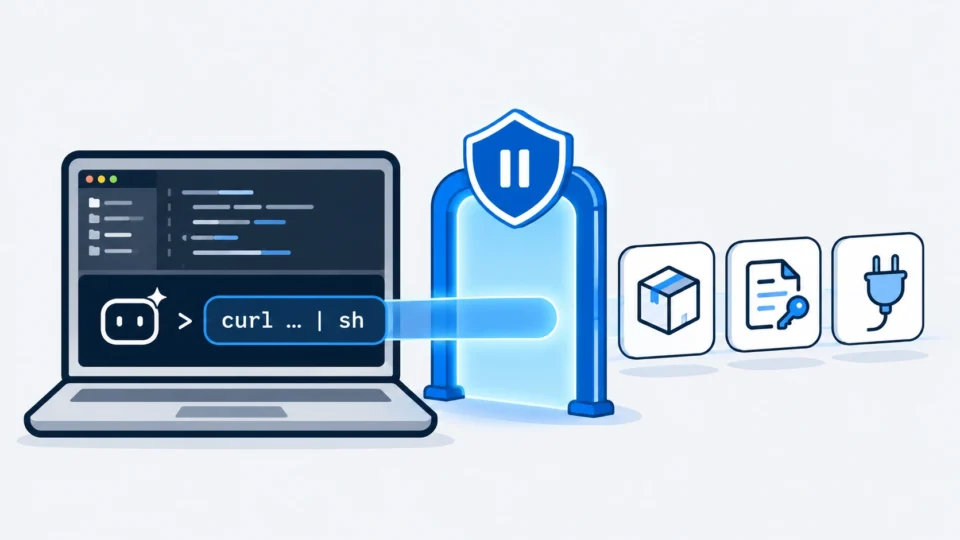
An AI coding agent is updating a project. It needs a dependency, so it proposes an install command. A few steps later, it wants to run a shell script, read a configuration file, and call an MCP server. Each request could be legitimate. Each is also a point where a coding assistant can do more than the developer meant to authorize.
The useful security question is not whether the agent is generally trustworthy. It is what evidence you get before a particular action runs, and what happens if the tool or package has changed since your last approval.
I work on HOL Guard, an open-source tool built for exactly this boundary. This guide explains where a local approval layer can help, where it cannot, and how to check that protection is actually attached to your coding agent.
Why AI Agent Permission Prompts Need Real Context
A permission prompt is only as good as the action it describes. If the prompt hides what the command actually does, approving it is a guess, not a decision.
Shell commands: read the whole action, not the label
Consider a proposed curl ... | sh command. The developer needs to know that it fetches a script and immediately hands it to a shell. An approval screen that says only “run terminal command” misses the important part.
The next questions follow from there. Is the destination expected? Can the script be inspected first? Does the command need network access at all?
Package installs: a name is not the full picture
The same problem appears with a package install. A package name alone does not describe its scripts, its dependencies, or what will execute afterward.
A useful checkpoint separates a routine, unchanged operation from a new package, a changed lockfile, or a command that could modify important files. A warning is evidence to review, not proof of malware.
MCP servers: capabilities can change after installation
MCP tools create another boundary. A server may have been acceptable when it was first installed, then gain a new tool or change its configuration later.
Re-reviewing those changes is different from scanning the original server package once. The developer still needs a way to decide whether the changed capability should run.
How HOL Guard Fits Into the AI Coding Agent Workflow
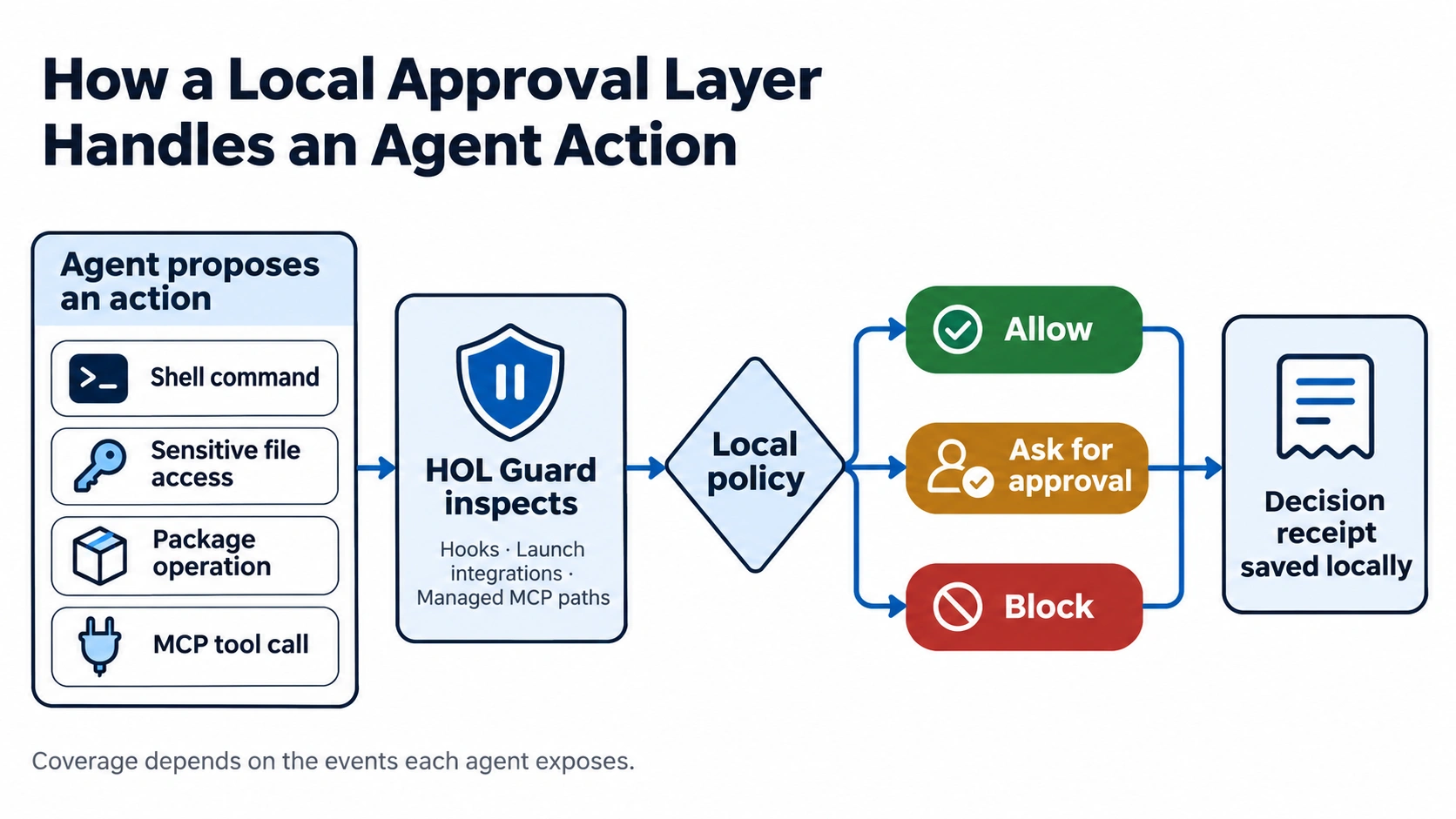
HOL Guard runs locally alongside supported coding agents. It uses the hooks, launch integrations, and managed MCP paths each agent makes available to inspect supported shell commands, sensitive file access, package operations, and MCP tool calls.
Based on local policy and the event it can observe, Guard can allow the action, block it, or ask for approval. It keeps local decision receipts, so developers can see what happened afterward.
What “supported” actually means
That qualifier matters. Claude Code, Codex, and Cursor expose different events. A hook that runs before a shell command can stop it; a post-execution event can report a problem but cannot undo the action.
Not every agent exposes every file read or tool invocation before it happens. The Guard support matrix documents these gaps instead of treating a successful installation as proof of universal protection.
A second review point when things change
Guard also checks local artifacts an agent depends on, including tool configuration, skills, and other managed integrations. This gives developers a second review point when something changes between sessions.
A local approval is still a human decision. Approving an unfamiliar command without reading it defeats much of the benefit.
How to Install HOL Guard and Verify What Is Protected
The open-source local runtime is licensed under Apache-2.0 and does not require a Guard Cloud account.
Requirements
- Python 3.10 or newer for the documented CLI setup (Python 3.11 or newer is recommended for the pipx installation path)
- A working native runtime for your platform (check the platform notes)
Installation
pipx install hol-guard
hol-guard --version
hol-guard command test 'echo guard-install-check' --json
hol-guard init
The harmless command test inspects a command without executing it. Its normal no_match result is not a failure. A native_unavailable result means the native installation is not ready.
The init wizard then presents setup steps for review, including which supported agent integrations to install. Do not treat a version number, a green dashboard, or a dry test on its own as proof that a particular agent is covered.
Verify the agent integration after setup
- Run
hol-guard statusandhol-guard doctor <harness>. - For a managed Codex launch, the documentation shows
hol-guard run codex --dry-runfollowed byhol-guard run codex. - Confirm the agent integration is active and that a benign action produces the expected decision receipt.
- Use
hol-guard approvalsfor pending decisions andhol-guard receiptsto inspect what was recorded.
These are verification steps to perform in your own environment, not test results claimed for this article.
What to Review When an AI Agent Action Is Paused
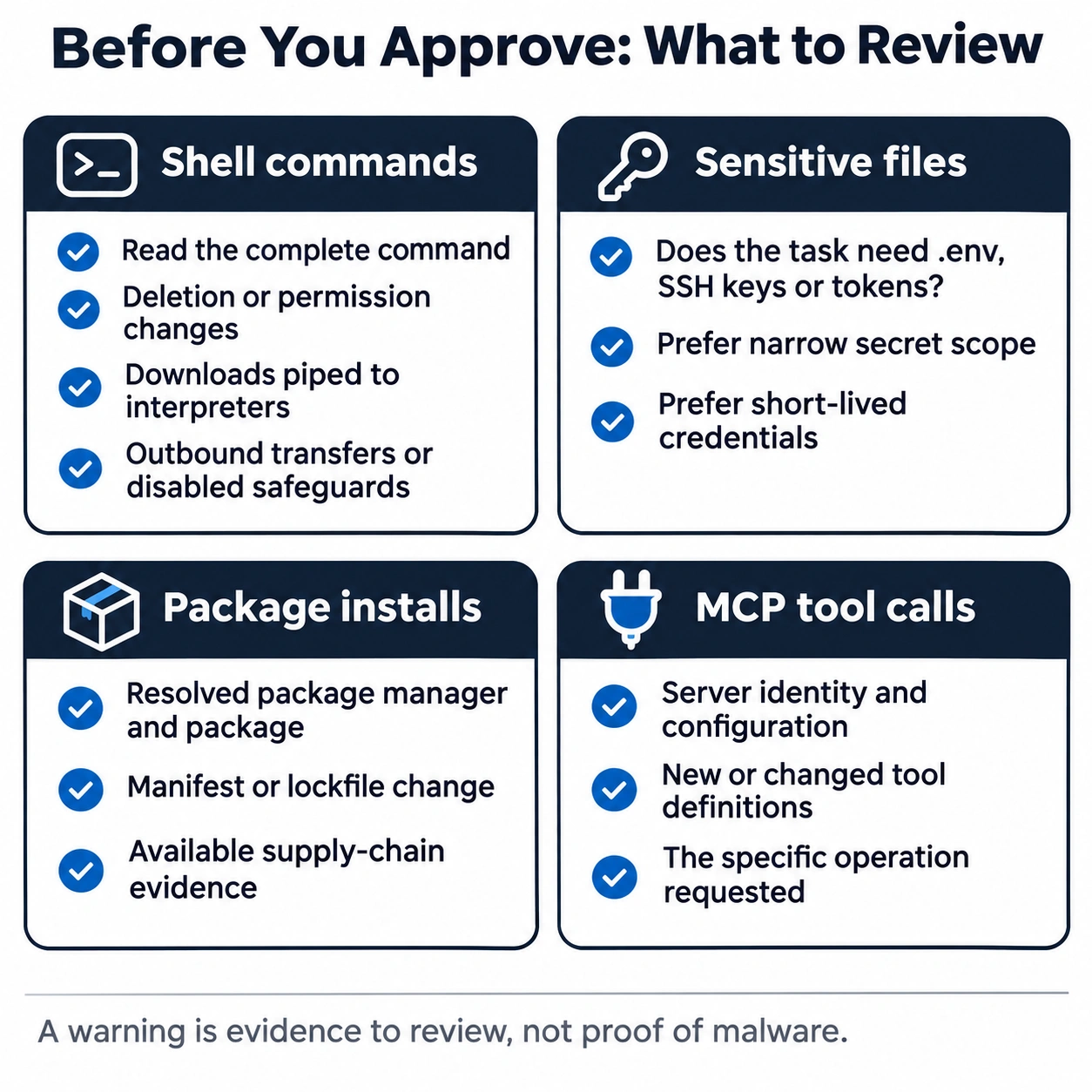
When Guard pauses an action, the review is only as good as what you check. Here is what to look for by action type.
Shell commands
Look at the complete command, not just the first executable. Pay particular attention to:
- Deletion and permission changes
- Downloads piped to interpreters
- Outbound transfers
- Attempts to disable safeguards
A command that mentions credentials may be doing legitimate deployment work, but the destination and the required access still need checking.
Sensitive files and credentials
Ask whether the task really needs a .env file, an SSH key, a cloud credential, or a package registry token. Prefer a narrow secret scope and a short-lived credential over giving a coding agent broad access.
Package installs
Check the resolved package manager and package, the manifest or lockfile change, and any available supply-chain evidence. Coverage depends on the ecosystem; unsupported package managers should not be described as blocked by advisory checks.
MCP tool calls
Check the server identity and configuration, new or changed tool definitions, and the specific operation requested. A server that only reads project metadata today should not silently gain permission to write files or call an outside endpoint tomorrow.
The right default depends on the task, but the change deserves explicit review.
Local Protection vs. Guard Cloud: What Is Free and What Is Paid
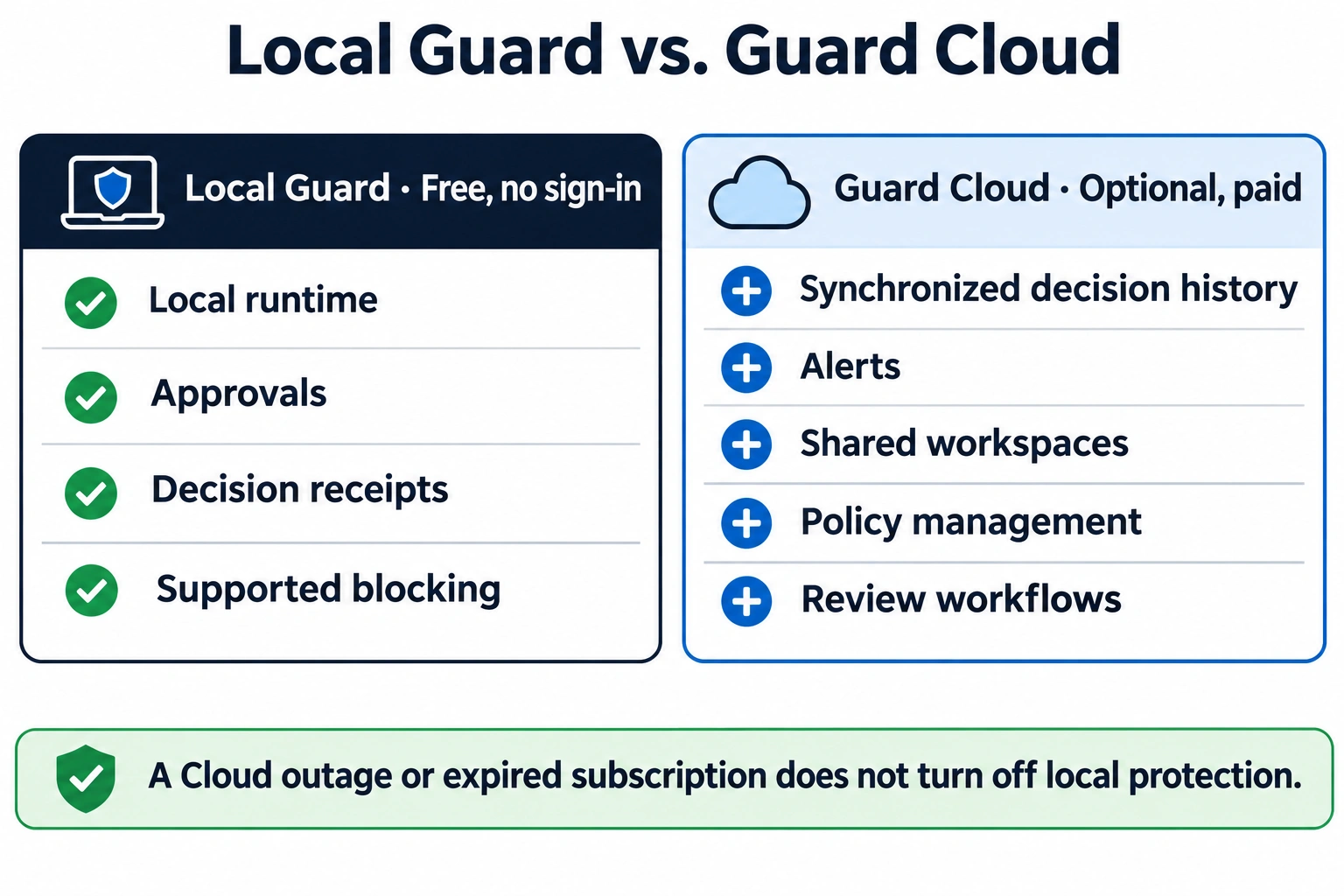
The local Guard runtime, approvals, receipts, and supported blocking all work without signing in or paying. Guard Cloud is optional.
Paid individual and team plans add features such as synchronized decision history, alerts, shared workspaces, policy management, and review workflows. A Cloud outage or an expired subscription does not turn off local protection already installed on a device. The local-versus-cloud documentation describes the distinction in detail.
The project and its installation options are available at HOL Guard. I disclose my role because I work on the project. The open-source license is not a claim that every related cloud feature is free.
Where Approval Software Stops Helping
An approval layer is not an operating-system sandbox, a malware guarantee, or a replacement for least-privilege credentials. It cannot stop an action that never crosses an integration it can observe.
Different agent hooks can fail open or fail closed in different circumstances. The support matrix and a real local receipt are more useful than a broad “fully protected” label.
Layer your defenses for sensitive projects
For sensitive projects, combine action reviews with:
- Isolation
- Restricted network access
- Minimal credentials
- Dependency pinning
- Backups
- Code review
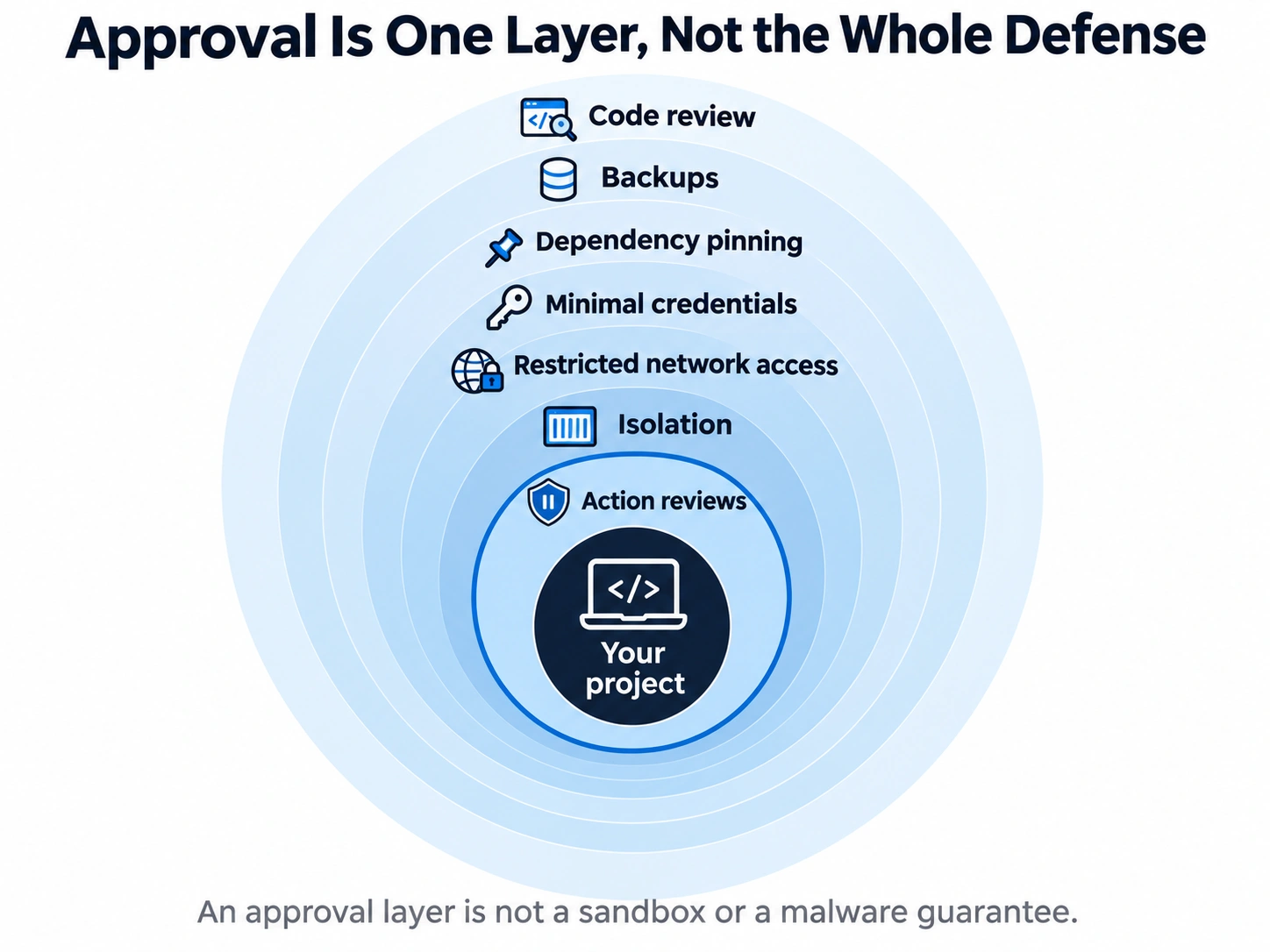
Keep the agent’s permissions no broader than the work requires. Treat changed tool definitions, a new package install, or an unexpected credential read as a reason to slow the workflow, not necessarily as proof that the agent is malicious.
Conclusion: A Simple Test for Any AI Coding Security Tool
The practical test for any AI coding security tool comes down to three questions:
- Can you see the exact action and its reason before it runs?
- Can you confirm the integration really intercepted it?
- Can you find an accurate record of what you decided afterward?
If any of those steps is missing, find out why before trusting the tool with more access.
Frequently Asked Questions
What should a developer review before an AI coding agent runs a command?
Review the complete command, not just the first executable. Check for deletion, permission changes, downloads piped to interpreters, outbound transfers, and attempts to disable safeguards, and confirm the destination and access the command needs.
What is HOL Guard?
HOL Guard is an open-source tool that runs locally alongside supported AI coding agents. It inspects supported shell commands, sensitive file access, package operations, and MCP tool calls, then allows, blocks, or asks for approval based on local policy.
Does HOL Guard require a paid account?
No. The local runtime is Apache-2.0 licensed and works without a Guard Cloud account. Local approvals, receipts, and supported blocking work without signing in or paying.
Does HOL Guard protect every coding agent the same way?
No. Claude Code, Codex, and Cursor expose different events, and not every agent exposes every file read or tool call before it happens. The Guard support matrix documents these gaps.
What does a no_match result mean after installing HOL Guard?
It is the normal result of the harmless hol-guard command test check and is not a failure. A native_unavailable result means the native installation is not ready.
Why should MCP server changes be re-reviewed?
A server that was acceptable at installation can later gain a new tool or change its configuration. Scanning the original package once does not cover those later changes.
Is an approval layer the same as a sandbox?
No. An approval layer is not an operating-system sandbox, a malware guarantee, or a replacement for least-privilege credentials. It cannot stop an action that never crosses an integration it can observe.
What happens to local protection if a Guard Cloud subscription expires?
Local protection already installed on a device stays on. A Cloud outage or an expired subscription does not turn it off.

I am Michael Kantor, President of HOL, where I focus on developing open-source security tools and advancing interoperability standards for AI agents.