
Your developers are already using one of these. Probably both, if you’re honest, and probably on a personal card.
That’s why cursor vs. github copilot isn’t really a tool question anymore. It’s a standardization question. Somebody has to decide which one gets a company license, which one gets blocked, and what happens to your source code when it’s sent to a model. If you’re hunting for the best ai code editor for engineering teams, the answer depends less on which tool writes prettier code and more on three boring things: how much of your repo it can see, what your security team will sign off on, and what the bill looks like when 50 people lean on it all day.
So, here’s the cursor vs github copilot enterprise comparison I’d want if I were the one signing the purchase order. I’ll cover where each tool is strong, where each one is annoying, and who should pick what. And if you’re weighing, cursor ai vs copilot for teams because half your devs love one and half love the other, there’s a split-the-difference section near the end.
One heads-up. Both products changed their pricing in 2026, and plenty of articles online still quote last year’s numbers. Everything below comes from Cursor’s and GitHub’s own documentation, checked in mid-October 2026. Where I couldn’t confirm something, I’ll say so.
Quick Comparison: Cursor vs. GitHub Copilot at a Glance
Here’s the short version before we get into the details.
| Cursor | GitHub Copilot | |
| What it is | A standalone editor, built as a fork of VS Code | An add-on for the editors you already use (VS Code, JetBrains and others), plus GitHub’s own web and CLI tools |
| Team pricing | Teams seats at $30, $100 or $200 per user per month, depending on how much usage you want | Business $19 per user per month, Enterprise $39 per user per month |
| Enterprise pricing | Custom, through sales | $39 per user per month (needs GitHub Enterprise Cloud) |
| Included usage | Matches the seat tier; extra usage billed at model list prices | 1,900 AI credits (Business) or 3,900 (Enterprise) per user; extra credits cost $0.01 each |
| Models | Cursor’s own models plus Claude, GPT and Gemini on paid plans | A broad catalog of models; premium ones draw from your credits |
| Big strength | Deep agent work across many files, and a smooth editing flow | Easy rollout, GitHub integration, and a mature enterprise story |
| Big weakness | Switching editors is a real ask, and costs can climb with heavy use | Less “agent-first” feel for some developers, and usage rules have changed more than once |
If you want a one-line answer, here it is. Cursor is the better tool for developers who want AI to do big chunks of work. Copilot is the easier tool to roll out across a company. Neither is wrong. They’re built for different kinds of teams.
Codebase Context & Indexing: Single File Autocomplete vs. Full Repository Awareness
This is where people argue the most, so let’s start here.
Autocomplete is easy
Every tool can finish the line you’re typing. What separates them is whether the tool understands your whole project: the helper function in another folder, the naming rules your team follows, the config file that explains why something is weird. That’s what a full repository context ai coding tool is supposed to give you.
Cursor’s approach
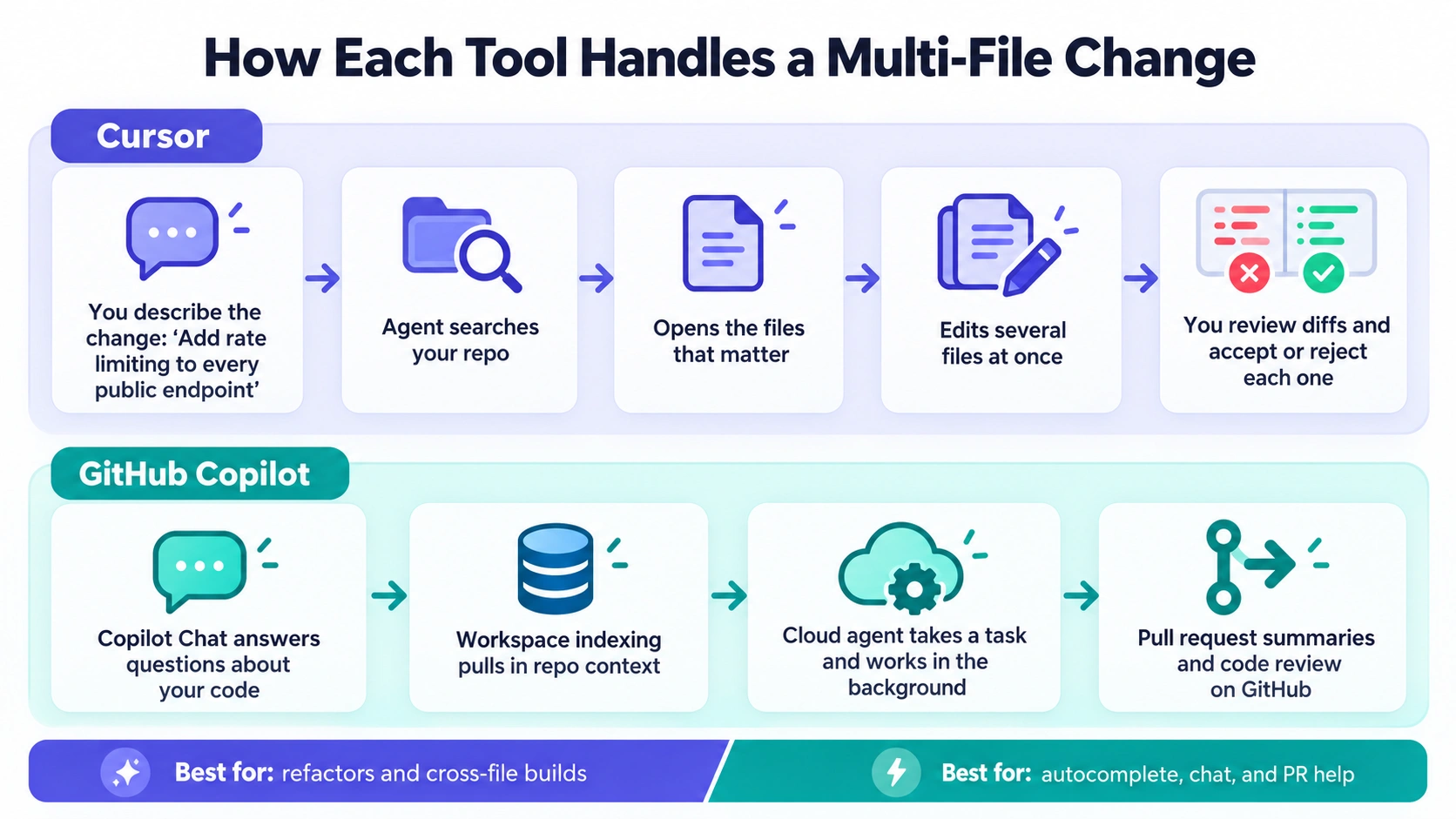
Cursor was built around the idea that the AI should see your whole repo. Its agent can search your project, open the files that matter and edit several of them in one go. That’s the heart of **multi file code generation ai**: you describe a change (“add rate limiting to every public endpoint”), and the agent works through the files, shows you the diffs and lets you accept or reject each one.
A note on terms, because search results are full of old names
People still search for cursor composer vs github copilot workspace. Today, Composer is the name of Cursor’s own family of models (Composer 2.5 is the current one), and the thing you actually use is Cursor’s Agent. On the GitHub side, the comparable pieces are Copilot’s agent features and its cloud agent, which can take a task and work on it on its own. So, when you read old comparisons, translate the names before you trust the verdict.
On cursor codebase indexing vs copilot, there’s one detail worth knowing. Cursor’s current docs say its fast search runs on your own machine, builds and queries its index locally, and doesn’t store embeddings of your codebase for search. But when the agent opens a file, that file’s contents can still go into the request sent to the model. So “local” doesn’t mean “nothing leaves your laptop.” More on that in the security section.
Cursor also lets you write down the rules your team cares about. Older guides talk about `.cursorrules` files. The current docs point to project rules in a `.cursor/rules` folder and to an `AGENTS.md` file you check into the repo, so everyone gets the same instructions. On Teams and Enterprise plans, admins can also push team-wide rules and mark some as required. That’s a big deal if you’ve ever watched five developers get five different code styles out of the same model.
Copilot’s approach.
Copilot started as the autocomplete you installed and forgot about. It’s grown well past that. Copilot Chat can answer questions about your code, and a third-party security comparison from Wiz describes Copilot’s workspace indexing as the way it pulls in repo context. The cloud agent can pick up a task and work in the background. And because Copilot lives inside GitHub, it can write pull request summaries and review code where your team already works.
Here’s the honest gap. Developers who’ve used both for hard, multi-file changes tend to say Cursor feels more in control. The agent shows you what it’s doing, you steer it as you go, and the edits land in your editor right away. Copilot’s agent features work, but they sit on top of an editor you chose for other reasons. If your team mostly needs good autocomplete, chat and pull request help, you may not feel that gap at all.
Who wins this section?
Cursor, for teams doing a lot of refactoring or building across many files. Copilot, for teams that mostly want a helper that stays out of the way.
Enterprise Privacy & Security: SOC 2, Code Retention, and Data Leakage Risks
Now the part your security team cares about. And the part that kills more tool rollouts than any feature gap.
The question you’ll hear first is: is cursor secure for enterprise code. Here’s what I could confirm from Cursor’s own pages.
– Cursor has a SOC 2 Type II attestation, and it also lists ISO/IEC 27001:2022 and ISO/IEC 42001:2023. Reports are available on request through its trust site.
-Privacy Mode is the key setting. When it’s on, Cursor says your data won’t be used for training, and it says it has zero data retention ai code editor agreements with its model providers.
– There’s a catch. Model providers may run abuse detectors, and if a prompt trips one, that data can be stored for investigation before it’s deleted under the provider’s rules. Some models may also not be covered by zero retention, so an admin has to opt in before they can be used.
– With Privacy Mode off, Cursor may store and use your code and prompts to improve its features and train its models. That’s fine for a hobby project. It’s not fine for your payment code.
– Teams and Enterprise plans include team-wide privacy settings and SSO. Enterprise adds SCIM, audit logs, and controls over which repos, models and tools people can use.
One thing I couldn’t pin down: whether Privacy Mode can be locked on by an admin so developers can’t turn it off. Cursor’s pricing page lists “team-wide privacy settings” but doesn’t use the word “enforce.” Ask your sales rep to put that in writing. Also be careful with older comparisons that call Cursor’s compliance “developing.” That’s out of date now that the SOC 2 Type II report exists.
On the other side, a soc 2 compliant ai pair programmer is easier to defend when the vendor is GitHub and Microsoft. Copilot runs on GitHub and Microsoft infrastructure, and Wiz’s comparison describes its compliance story as mature, with SOC 2, audit logs and IP indemnity. Here’s what a github copilot business privacy policy review will turn up:
– Business and Enterprise plans are never used to train models on your code, per a legal analysis of GitHub’s terms.
– Microsoft backs Business and Enterprise with IP indemnification, which means it will defend you and pay damages if generated code triggers a copyright claim, subject to conditions. Read those conditions. Turning on the filter that blocks suggestions matching public code is the usual advice, and your lawyer should confirm what the contract actually requires.
– Individual Copilot plans don’t get the indemnity. That matters if your developers are using their own personal accounts at work.
I couldn’t confirm Copilot’s exact retention periods for prompts and suggestions from the sources I checked. GitHub points to its Copilot trust center for that, so ask for the current documents before you sign.
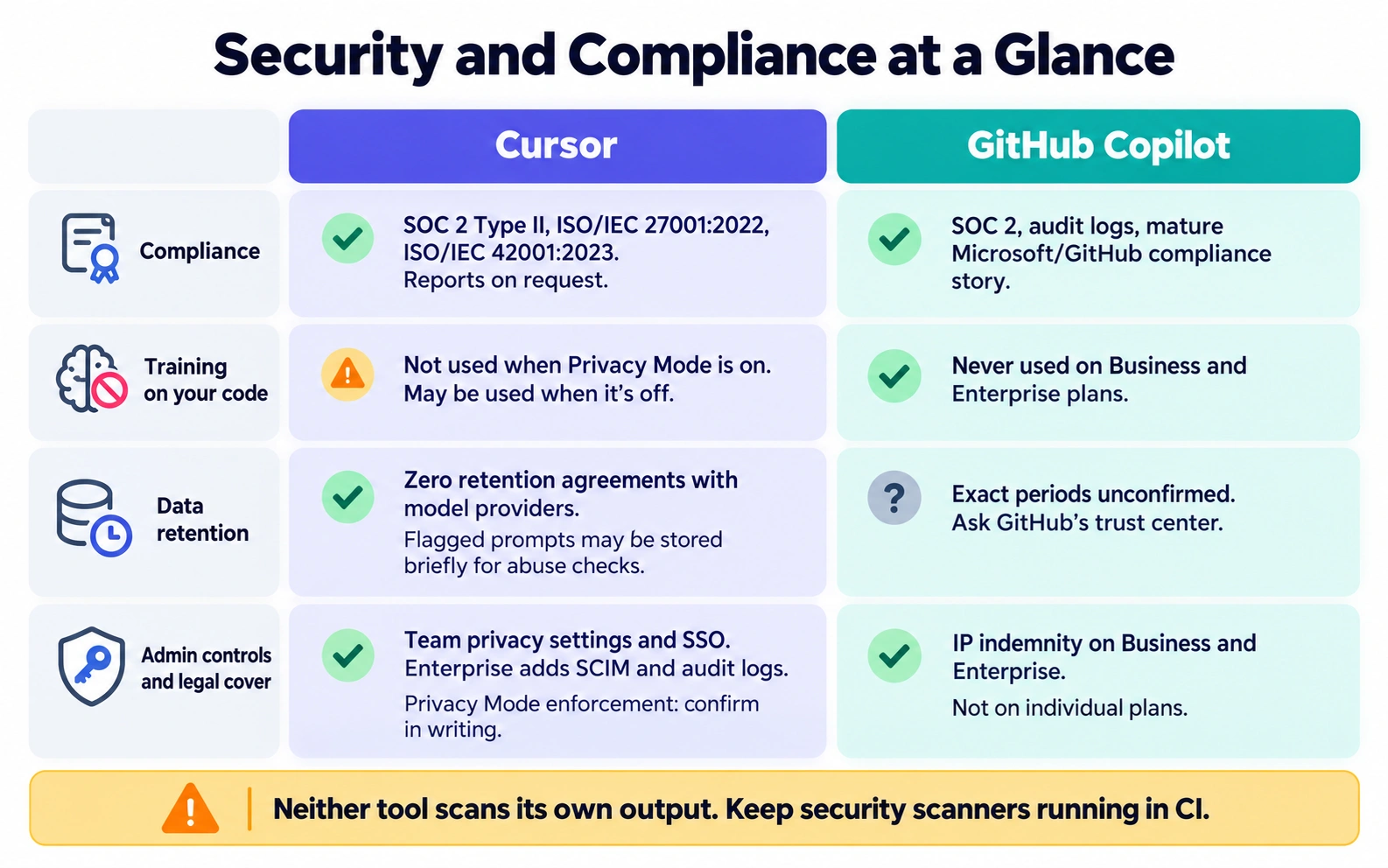
The leakage risk nobody mentions. Privacy policies cover what the vendor does with your code. They don’t cover whether the code the AI writes is safe. The Wiz comparison points out that neither tool checks its own output for security problems like exposed secrets or vulnerable libraries. So whichever tool you pick, keep your scanners running in CI. And write rules telling the agent what it must never touch. Cursor’s own docs warn that AI instructions shouldn’t be your only security control. They’re right.
Who wins this section? For a regulated company with a conservative legal team, Copilot’s IP indemnity and Microsoft backing make the paperwork simpler. Cursor has closed a lot of the gap, but expect more questions from procurement.
IDE Experience: Standalone VS Code Fork vs. Seamless IDE Extension
Let’s answer the question everybody types: is cursor a fork of vscode? Yes. It looks and feels like VS Code, your themes and most of your extensions come along, and your keyboard shortcuts mostly work. But it’s a separate app that Cursor ships and updates itself.
That’s what makes cursor vs vscode with copilot extension more than a feature debate. It’s a migration decision.
What Cursor asks of you.
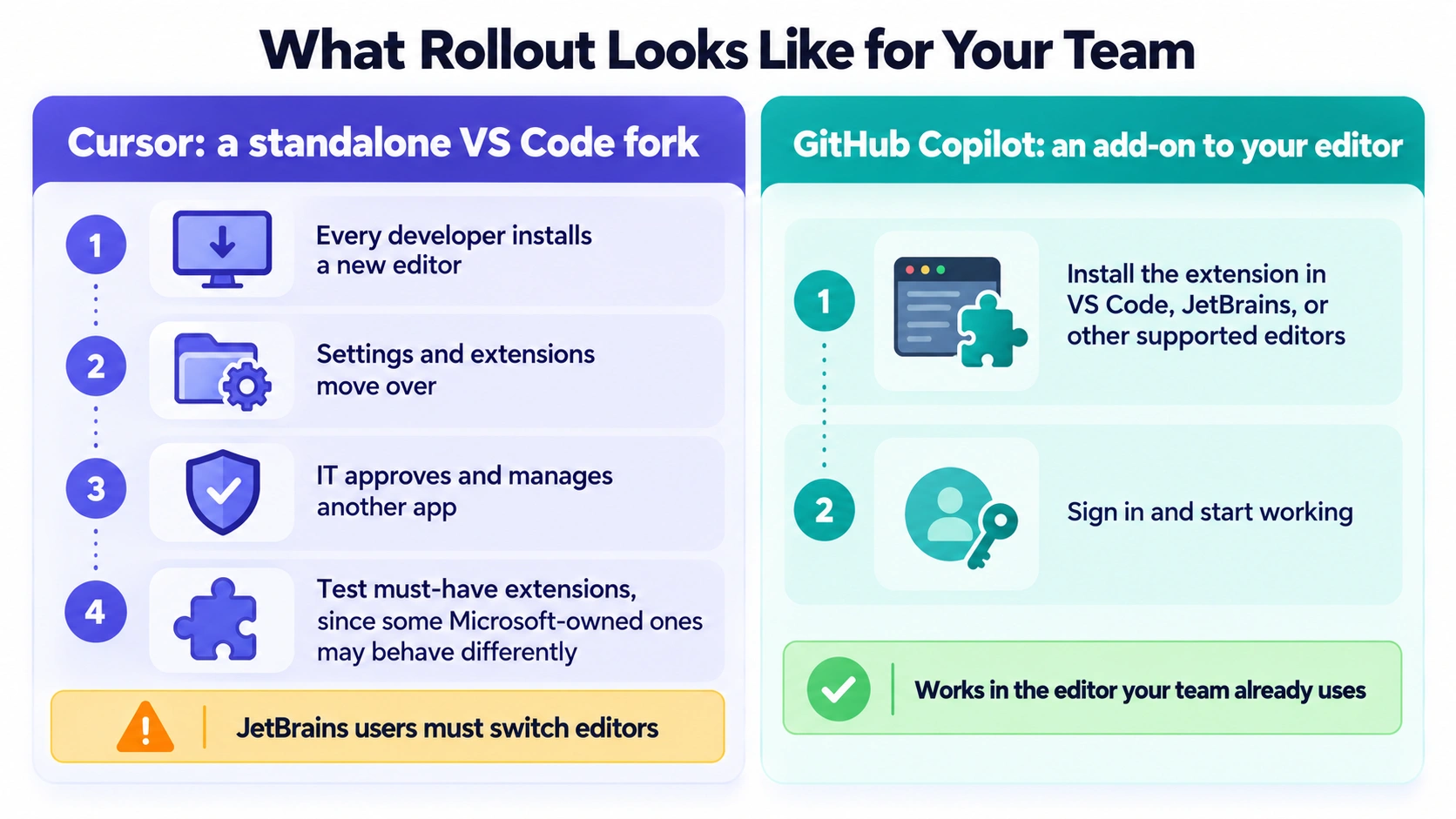
– Every developer installs a new editor and moves their settings.
– Your IT team has to approve and manage another piece of software.
– JetBrains users, and anyone who loves IntelliJ or PyCharm, are being asked to switch to something that’s not what they know. That’s a hard sell. Developers get attached to their editors.
– Extensions are mostly compatible, but some Microsoft-owned ones don’t always work the same way in a fork. Test the ones your team can’t live without.
What Copilot asks of you. Almost nothing. Install the extension in the editor your team already uses, sign in, and you’re running. It works in VS Code, JetBrains IDEs and others. That’s a big reason it wins on rollout speed.
Now the workflow difference, which is where cursor agent mode vs copilot inline chat comes in. In Cursor, you spend a lot of time talking to the agent: describe the change, review the diffs, nudge it, accept it. In Copilot, many people use inline suggestions and a chat panel, then reach for agent features when the job is bigger. Neither is better in the abstract. It comes down to how much of your work you want to hand off versus how much you want to type yourself.
Model flexibility. This is the custom model choice cursor vs copilot question. Both let you pick from several models. In Cursor, the Plus tier is limited to Cursor’s own models. Premium tiers and above unlock Claude, GPT and Gemini, billed at the providers’ list prices. Claude Sonnet 5.5, for example, is listed at $2 per million input tokens and $10 per million output tokens. Copilot’s paid plans include a broad model catalog, with the fancier models using up more of your credits. If a developer on your team swears by a particular model, check that it’s available on the plan you’re buying before you promise it.
Who wins this section? Copilot, easily, if your team uses a mix of editors. Cursor, if your team is mostly on VS Code already and ready to move.
Pricing Breakdown: License Costs, Model Selection, and API Usage Limits
Money time. This is where I’d slow down, because both vendors moved to usage-based billing and the sticker price tells you less than it used to.
Cursor pricing
For the cursor enterprise pricing per seat question, the honest answer is “it depends, and Enterprise is custom.” Here’s what’s public:
| Plan | Price per user per month | Notes |
| Teams (entry seat) | $30 | Usage matches the individual Premium tier |
| Teams (mid seat) | $100 | Matches the Super tier, about 15x the usage of the cheapest plan |
| Teams (top seat) | $200 | Matches the Ultra tier, about 50x |
| Enterprise | Custom | Pooled usage, SCIM, audit logs, spend controls |
You can mix seat types on a team, so your heavy agent users can sit on $100 seats while everyone else uses $30 ones. Third-party models on Teams and Enterprise cost the provider’s list price plus a small Cursor fee of $0.25 per million tokens. You can set a monthly cap, and admins see one shared balance. Annual billing is cheaper.
A warning for anyone comparing notes with older articles. Some guides still list Cursor Teams at $40 per user and individual plans at $20 and $60. Cursor’s own pricing page now shows the tiers above, and describes the older plans as legacy for existing customers. Check the live page before you budget.
GitHub Copilot pricing
A github copilot business vs enterprise cost comparison is simpler:
| Plan | Price per user per month | Included usage |
| Business | $19 | 1,900 AI credits per user |
| Enterprise | $39 | 3,900 AI credits per user, pooled |
Extra usage past the pool costs $0.01 per AI credit. That means the included credits are worth about as much as the seat price: roughly $19 of usage on Business and $39 on Enterprise. Code completions and next edit suggestions aren’t charged in credits and are unlimited on paid plans, so the credits only drain when people use chat, agents, code review and the like. Enterprise also requires GitHub Enterprise Cloud, which is its own cost if you’re not already there.
One more thing. Copilot’s rules changed a lot this year. Older articles talk about “premium requests” with per-request allowances. GitHub’s current billing docs describe AI credits instead, and the old premium request system only applies to some legacy annual subscribers. If someone’s article mentions 300 premium requests, it’s out of date for your team plan.
What it costs for a real team
Let’s price a 50-person engineering team on seat fees alone.
– Copilot Business: 50 x $19 = $950 per month, or $11,400 a year.
– Copilot Enterprise: 50 x $39 = $1,950 per month, or $23,400 a year.
– Cursor Teams at $30 seats: 50 x $30 = $1,500 per month, or $18,000 a year.
– Cursor with 10 heavy users on $100 seats and 40 on $30: $1,000 + $1,200 = $2,200 per month.
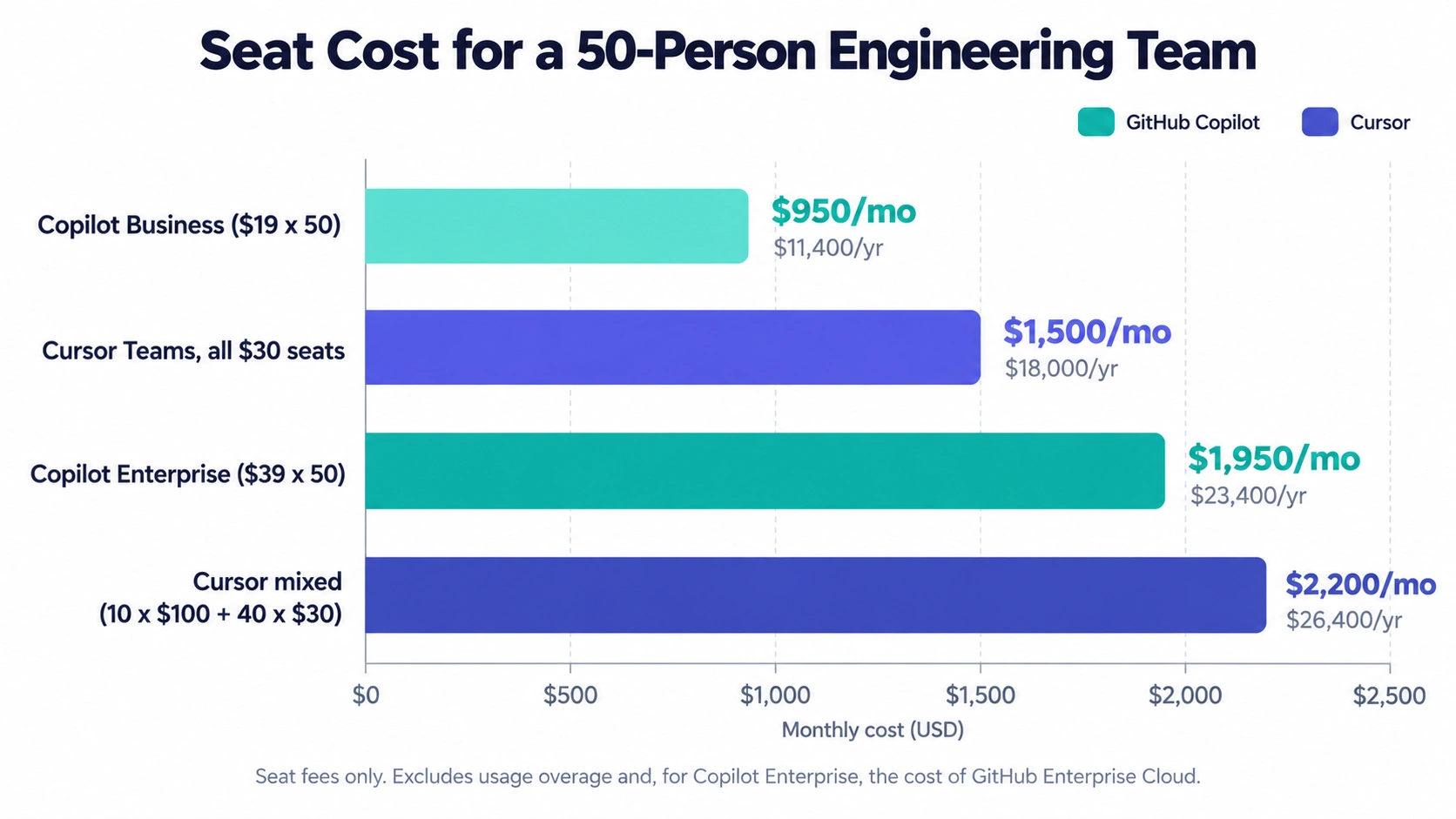
Then there’s overage. Both tools can cost more than the seat price when people use agents heavily, because agents burn through model usage fast. Neither bill is fixed. Set caps on day one, and check the usage dashboard weekly for the first two months.
So, is it worth it?
People ask is cursor worth it for dev teams like it’s a yes or no. It’s a math problem. If a $100 seat saves a senior engineer even two hours a month, it’s paid for. The trouble is knowing that. For ai code assistant roi for engineering, don’t trust self-reported “I feel 30% faster.” Track things you can count: pull requests merged, time from ticket to merge, review turnaround and how often generated code gets rewritten. Run a four-week pilot with 10 to 15 developers, split between both tools, and compare.
Final Verdict: Which Tool Should Your Engineering Team Standardize On?
Alright. Time to pick.
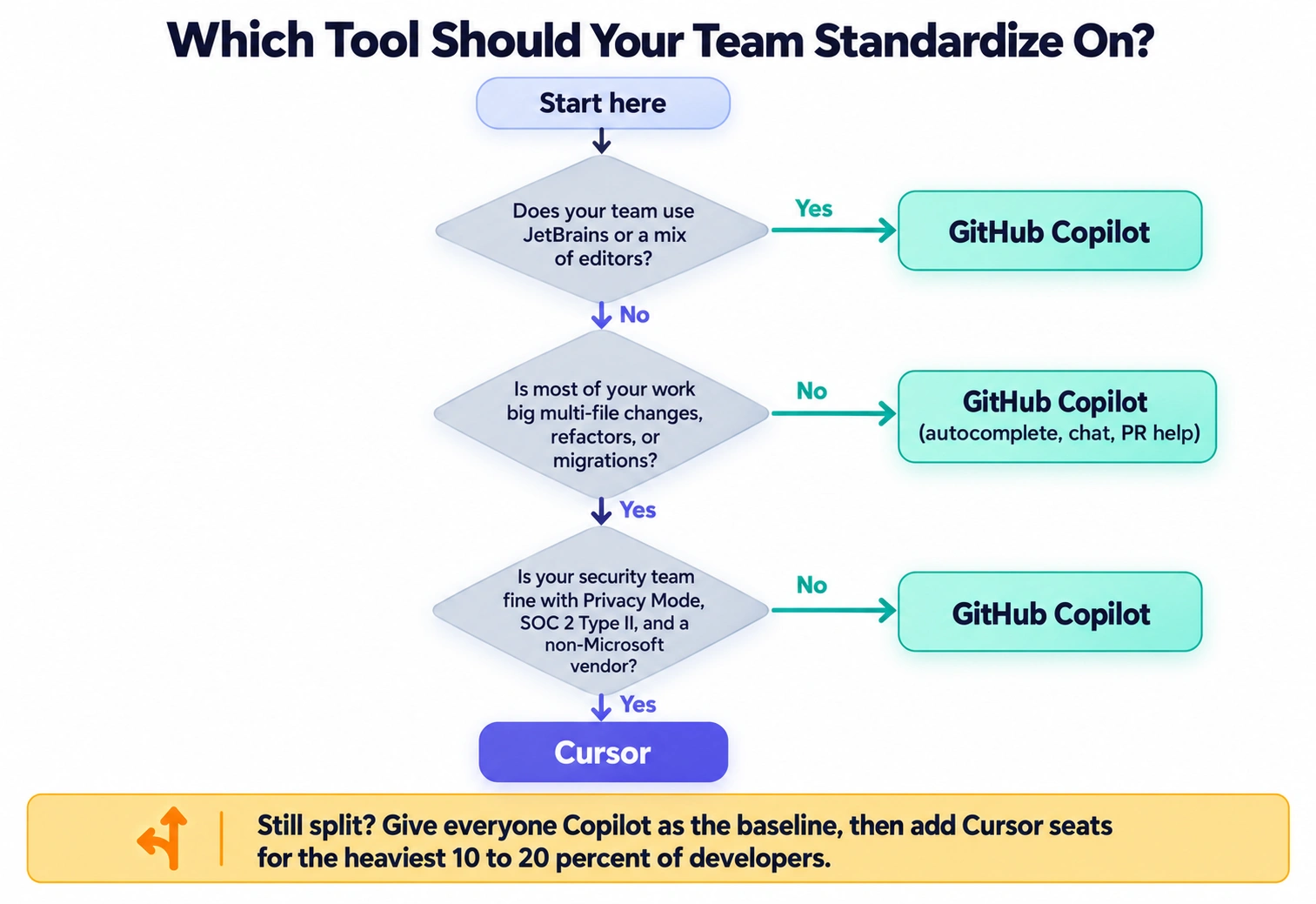
Choose Cursor if:
– Your developers already live in VS Code and are open to switching.
– Your work involves lots of cross-file changes, refactors, migrations or new features built from scratch.
– You want shared team rules so the AI follows your standards.
– You’re happy to pay more per seat for heavy users and manage usage caps.
– Your security team is fine with Privacy Mode, SOC 2 Type II and a vendor contract that isn’t Microsoft.
Choose GitHub Copilot if:
– Your team uses several editors, especially JetBrains.
– You’re already on GitHub and want pull request help in the same place.
– Procurement and legal prefer a big-vendor contract with IP indemnity.
– You want the lowest-friction rollout and a predictable seat price.
– Most of your usage is autocomplete and chat, not long-running agent work.
Skip Cursor if your developers refuse to leave their editor, or your compliance rules demand a vendor you can’t get approved in the next six months.
Skip Copilot if your team’s real need is agent-heavy work and your developers keep telling you the experience feels bolted on.
And if you can’t decide? Plenty of teams run both, and it isn’t as wasteful as it sounds. Give everyone Copilot as the baseline, since it’s cheap and easy. Then give Cursor seats to the 10 to 20 percent of developers doing the heaviest work. You’ll learn more from three months of that than from any comparison article, including this one.
Before you sign anything, do four things. Ask both vendors to put their data retention terms in writing. Confirm whether Privacy Mode can be enforced by an admin. Test the extensions your team can’t live without. And set a monthly spending cap.
FAQ
Is Cursor better than GitHub Copilot for teams?
It depends on the work. Cursor is stronger for big, multi-file changes and agent-driven work. Copilot is easier to roll out, works in more editors and has a more established enterprise contract, including IP indemnity.
Is Cursor secure for enterprise code?
Cursor has a SOC 2 Type II attestation and a Privacy Mode that stops training on your data and uses zero data retention agreements with model providers. Confirm in writing whether admins can enforce Privacy Mode, and note that some provider abuse checks can briefly store flagged prompts.
Is Cursor a fork of VS Code?
Yes. It’s a separate editor built on VS Code, so most settings and extensions carry over, but your team has to install and manage it as a new app.
How much does Cursor cost per seat for teams?
Teams seats are $30, $100 or $200 per user per month, depending on the usage tier. Enterprise is custom. Third-party models are billed at provider list prices plus a $0.25 per million token Cursor fee.
How much does GitHub Copilot cost for a business?
Copilot Business is $19 per user per month and Enterprise is $39. They include 1,900 and 3,900 AI credits per user, and extra credits cost $0.01 each. Code completions are unlimited on paid plans.
Does GitHub Copilot offer IP indemnification?
Business and Enterprise plans include it, subject to conditions. Individual plans don’t. Have your lawyer read the actual terms.

The Team Compare BizTech is made up of people from marketing backgrounds, digital marketing & content marketing backgrounds, each with unique experiences and nuggets of wisdom to share with you. The team is passionate about creating unique, accurate, and engaging content.