
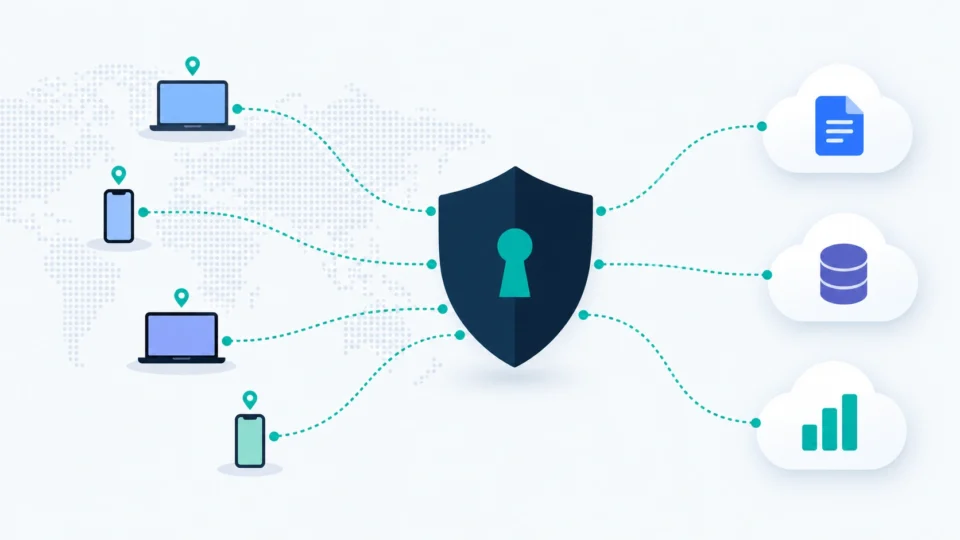
Your VPN probably worked fine when everyone sat in one office. Now your teams in six cities, half your apps are in the cloud, and one stolen password can give an attacker the keys to the whole network. That’s the problem zero trust network access is built to fix.
So, is it worth the money, and which product should you buy? That’s what this ZTNA buyer’s guide answers. I’ll explain what the tech does in plain words, compare the main ZTNA solutions on price and real-world fit, and be straight about where each one falls short. The short version: Cloudflare and Twingate are the easiest on-ramps for small teams, Tailscale suits technical crews, and Zscaler and Check Point are big-company tools with big-company price tags.
What is zero trust network access, in plain English?
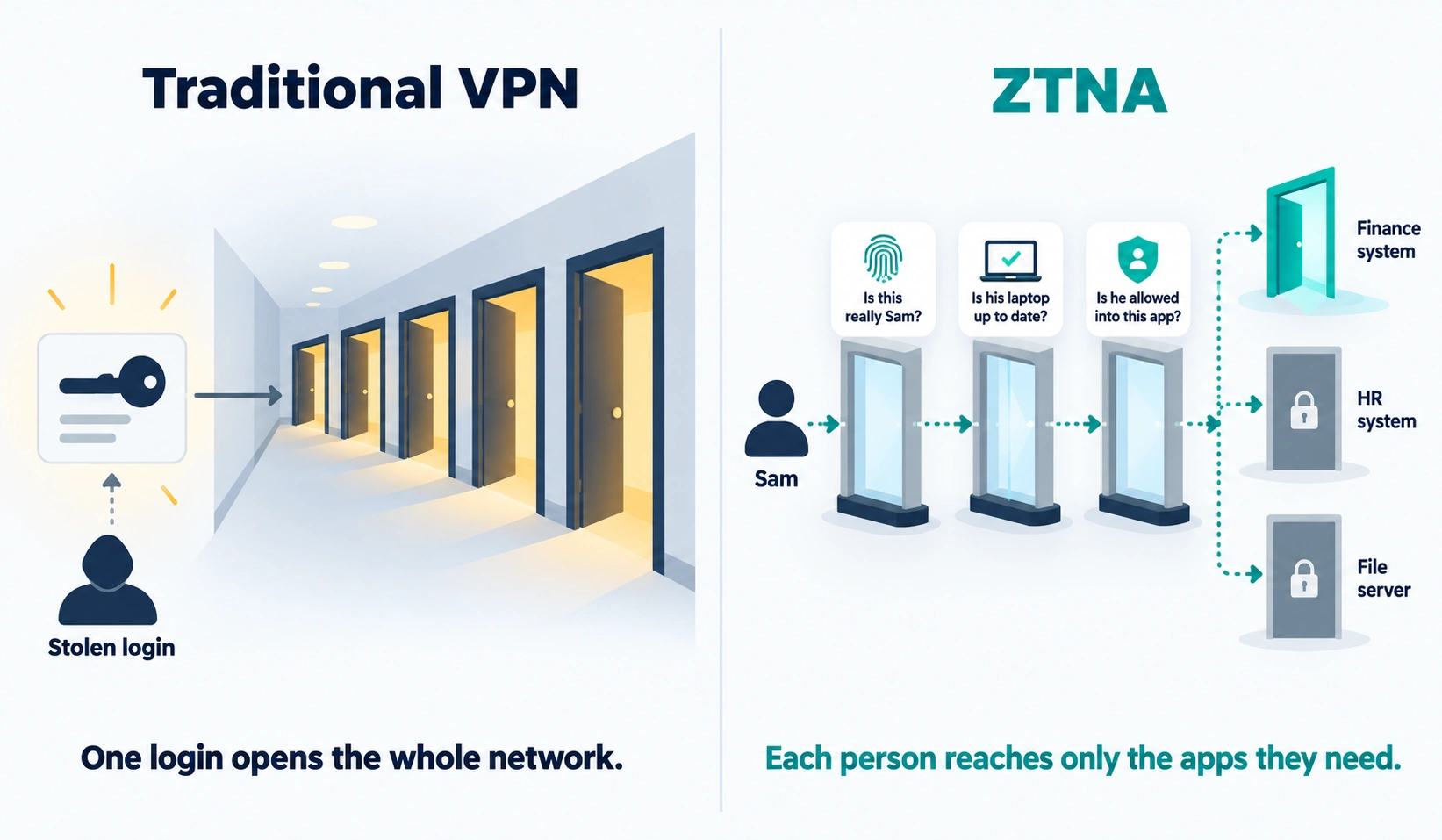
A traditional VPN works like a hotel key card that opens every door in the building. Log in once, and you’re on the network. If someone steals your login, they can wander.
Zero trust network access (ZTNA) flips that. It gives each person access only to the specific apps they need, and it checks who they are and what device they’re using every time. The idea behind it, “never trust, always verify,” is laid out in NIST’s zero trust architecture guidance, and CISA’s maturity model gives you a roadmap if you want one.
In practice, a ZTNA tool sits between your people and your apps. When Sam from accounting opens the finance system, the tool asks: Is this really Sam? Is Sam’s laptop up to date? Is Sam allowed into this app? If yes, Sam gets in. But Sam can’t see the HR system or the file server, because nobody gave him a door to them.
ZTNA vs VPN: what’s actually different?
Here’s the honest comparison, because it’s not all one-sided.
| Traditional VPN | ZTNA | |
| Access model | Whole network once connected | One app at a time |
| If a login is stolen | Attacker can roam | Attacker is boxed into what that user could reach |
| Device checks | Rare or basic | Common, ongoing |
| Setup | Familiar, often cheap | New concepts, some learning |
| Performance | Can bottleneck at one gateway | Usually routes through nearby cloud points |
| Cost | Often low or already paid for | Per user, per month |
So, is ZTNA vs VPN a landslide? Not always. If you’ve got ten staff, one office app and a well-run VPN with multi-factor login, you might not need to move this quarter. But if you’ve got remote workers, contractors, cloud apps or regulatory pressure, ZTNA is a real step up. And as a VPN replacement, the better tools are often easier to manage than an old VPN box.
A quick note on two terms you’ll hit in sales calls. Agent-based ZTNA means installing a small app on each device. Agentless ZTNA lets people reach certain apps through a web browser instead, which is handy for contractors on personal laptops. And SASE (secure access service edge) is a bigger bundle that adds web filtering, firewall and network features on top. When people compare SASE vs ZTNA, think of ZTNA as one ingredient and SASE as the whole meal.
What should you look for in a ZTNA tool?
Skip the feature bingo. These are the questions that decide whether you’ll be happy in a year:
- Does it work with your login system? Google Workspace, Microsoft Entra, Okta. If your identity provider doesn’t connect cleanly, move on.
- Can it check devices? Is the laptop encrypted and updated? Is antivirus running?
- How hard is setup? Some tools take an afternoon. Others need a project plan.
- What do logs look like? You’ll want to know who accessed what, and for how long you can see it.
- Is the pricing predictable? Per-user pricing is easy to budget. Custom quotes with add-ons and overages are not.
The top ZTNA solutions reviewed
Cloudflare Zero Trust: the easy, cheap starting point
Cloudflare Zero Trust pricing is simple. According to Cloudflare’s plans page, the free plan covers up to 50 users, the pay-as-you-go plan is $7 per user per month with no user cap, and a contract plan is custom-priced. Free comes with community support and about 24 hours of log history. Pay-as-you-go gets chat and ticket support and 30 days of logs.
The big strength is the global network behind it. You can put internal apps behind Cloudflare without opening holes in your firewall, and the free tier is generous enough that many small teams never leave it.
Weaknesses. Reviewers say setup gets complicated for large or spread-out environments, and there’s a learning curve if nobody on your team has done this before. Free-tier support is a forum, so don’t plan on hand-holding.
Right for: startups, small businesses and IT consultants who want to try ZTNA at no cost. Skip it if: you need phone support and a personal account manager from day one.
Twingate: the VPN replacement that’s easy to roll out
Twingate is built for teams who want to swap out a VPN without a long project. Its software-only setup is quick, and it plays nicely with infrastructure tools like Terraform and Kubernetes.
Twingate’s pricing is tiered and per-user:
- Starter: free, up to 5 users.
- Teams: about $5 per user per month on yearly billing, up to 100 users, with Google Workspace login and device posture checks.
- Business: about $10 per user per month on yearly billing, up to 500 users, with Okta and Entra login and more integrations.
- Enterprise: custom, with a year of log history.
The page’s own comparison table showed a couple of numbers that didn’t line up with the plan cards, so confirm current prices when you sign up.
Weaknesses. The free plan is tiny. Log history is short on lower tiers (24 hours on Starter, 7 days on Teams). Rolling it out through device-management tools like Intune or Jamf can get fiddly for larger teams.
Right for: small and midsize companies replacing a VPN. Skip it if: you need web filtering and a full security bundle in the same product.
Tailscale: great for technical teams
Tailscale is the favorite of developers. It builds a private network between your devices and servers with very little fuss. Based on its pricing page, Personal is free for up to 6 users, Standard is $8 per user per month, Premium is $18 per user per month, and Enterprise is custom. Standard adds user provisioning and device checks that connect to device-management and endpoint tools. Premium adds features like just-in-time access and network flow logs.
Weaknesses. It’s more of a network tool than a classic ZTNA product, so it can feel technical for non-IT folks. Some of the best controls cost more on higher tiers.
Right for: engineering teams, startups, and consultants who manage their own servers. Skip it if: your staff are non-technical and want a point-and-click setup with deep reporting.
If you’re picking between the last two, the Twingate vs Tailscale question usually comes down to people. Twingate feels more like a managed access product for business users. Tailscale feels like a toolkit for engineers.
Zscaler Private Access: the enterprise heavyweight
Zscaler Private Access is one of the most established names. It hides your apps from the internet entirely and connects users straight to what they need, and it can add browser isolation and content inspection.
Zscaler pricing is where it gets blurry. Zscaler doesn’t publish a rate card. A reseller price analysis shows framework prices of roughly $60 to $120 per user per year for standalone and platform bundles, but those are ceilings, not quotes. Its Transformation Edition on AWS Marketplace was listed at $155,000 for 12 months with a 500-seat minimum, which works out to about $310 per user per year. Term discounts reach about 10% for 24 months and 17% for 36 months. Add-ons like data protection and browser isolation cost extra, and so can bandwidth overages.
Weaknesses. Pricing complexity, renewal jumps if you don’t cap them in the contract, and some users report connection drops when switching networks.
Right for: large enterprises building a broader zero trust program. Skip it if: you’re under a few hundred people or want transparent pricing.
Check Point Harmony SASE (formerly Perimeter 81)
Perimeter 81 was a small-business favorite, and Check Point now sells it as Harmony SASE. It pairs ZTNA with web security, covers lots of device types including Chromebooks, and offers agentless options.
Pricing is custom. A buyer-reported estimate of roughly $8 per user per month floats around, but that’s an estimate, not a quote. Watch the extras: support can add about 17 to 22 percent of license cost, and professional services can run 10 to 30 percent of contract value. Minimum user counts vary by tier.
Weaknesses. Setup gets more complex in hybrid environments, there are file size limits on web content scanning, and add-on costs surprise people.
Right for: mid-sized firms that want ZTNA and web protection in one bundle. Skip it if: you want a clean, published price and zero add-ons.
Palo Alto Prisma Access and Netskope: the big-stack picks
These two belong on your list only in specific cases. Palo Alto’s Prisma Access keeps policies consistent between Palo Alto firewalls and the cloud, which is a real advantage if you already use their gear. But it takes design and tuning effort. Netskope’s private access product is strong on data loss prevention, though reviewers say it demands real expertise to set up and the agent can disconnect.
Both are quote-only. I couldn’t find a trustworthy public per-user price for either, so I won’t invent one.
Right for: large organizations already invested in Palo Alto (Prisma) or wanting heavy data protection (Netskope). Skip them if: you’re a small team without a security engineer.
Quick comparison table
| Tool | Starting price | Free tier | Best for | Biggest weakness |
| Cloudflare Zero Trust | $7 per user per month | Yes, up to 50 users | Small teams, cost-conscious | Setup gets complex at scale |
| Twingate | About $5 per user per month (Teams) | Yes, up to 5 users | VPN replacement | Short logs on low tiers |
| Tailscale | $8 per user per month (Standard) | Yes, up to 6 users | Technical teams | Network-tool feel |
| Zscaler Private Access | Quote only (reseller ceilings $60 to $120 per user per year) | No | Large enterprises | Opaque pricing, renewal jumps |
| Check Point Harmony SASE | Quote only (about $8 per user per month reported) | No | Mid-sized, all-in-one | Add-on costs |
| Prisma Access, Netskope | Quote only | No | Palo Alto shops, DLP | Complexity |
What does ZTNA really cost?
Let’s do the math for a 40-person company, since that’s a common size.
Cloudflare pay-as-you-go: 40 users at $7 a month is $280 a month, or $3,360 a year. Under 50 users, the free plan could be $0.
Twingate Teams: 40 users at about $5 a month is roughly $200 a month, or $2,400 a year on yearly billing.
Tailscale Standard: 40 users at $8 a month is $320 a month, or $3,840 a year.
Zscaler or Check Point: expect a quote, minimum commitments and add-ons. Budget meaningfully more, and don’t sign until you see the total.
But the software bill is only part of it. Rollout, training and locked-out users all take time. So when you compare ZTNA pricing, add a few days of IT effort, and any support or service fees.
If the numbers are tight, our guide to cost-saving hacks for business owners can help you find room in the budget. And if you run lots of cloud servers, a cloud cost management software roundup can free up cash for security spending.
Is Cloudflare Zero Trust really free?
For up to 50 users, yes, per Cloudflare’s plans page. It’s meant for smaller teams and proof-of-concept tests. The catch is support (community forums) and short log history. If you grow past 50 users or need more support, you move to paid. For many small businesses, it’s a genuinely useful place to start.
What’s the best ZTNA for a small business?
If I had to pick for zero trust for small business, I’d look at Cloudflare first, then Twingate. Cloudflare wins on price and a generous free tier. Twingate wins on simple setup. Tailscale joins the list if your team’s technical.
Skip the enterprise stack until you have the budget and staff to run it. A tool nobody can configure is just a more expensive way to feel secure.
How to roll out ZTNA step by step
You can follow this on Monday.
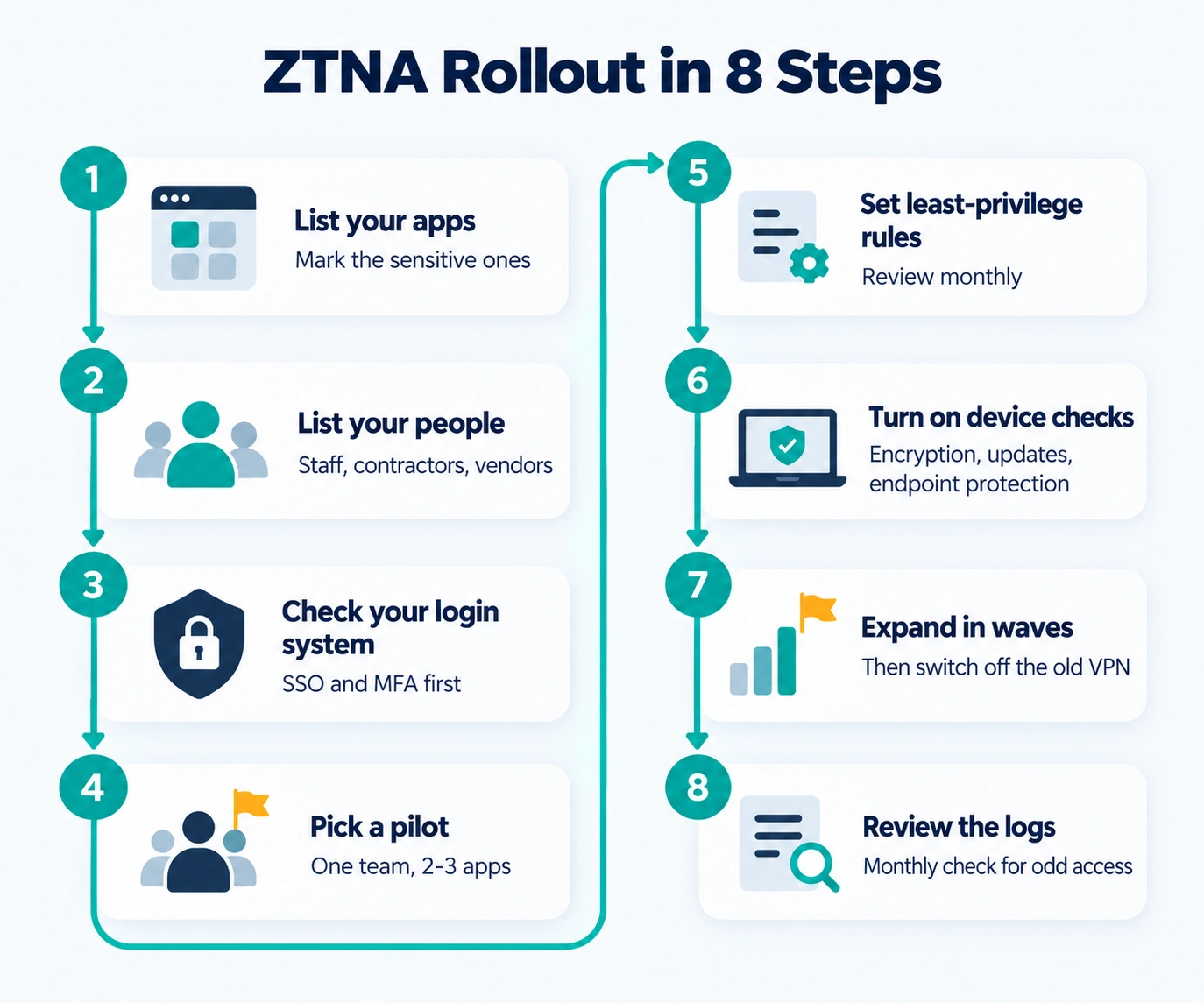
- List your apps. Write down every internal app, server and database your team uses. Mark the sensitive ones.
- List your people. Staff, contractors, vendors. Who needs what?
- Check your login system. Make sure single sign-on and multi-factor login work first. ZTNA is only as strong as the identity behind it.
- Pick a pilot. Choose one team and two or three apps. Don’t start with everyone.
- Set least-privilege rules. Give each group access to only what it needs. Review it monthly.
- Turn on device checks. Require encryption, updates and endpoint protection.
- Expand in waves. Add teams and apps gradually, then switch off the old VPN once everything works.
- Review the logs. Set a monthly check for odd access patterns.
If your internal apps run on your own servers, understanding your hosting helps. Our primers on VPS hosting and web hosting for small business can help you see what’s exposed. And for more planning help, browse these resources for small business owners.
Mistakes to avoid
- Skipping the pilot. Rolling out to everyone at once is how you get angry emails.
- Ignoring the renewal. Many contracts jump in price at renewal. Cap the increase in writing.
- Forgetting contractors. They’re often the weakest link. Use agentless or limited access.
So which ZTNA should you choose?
It depends on your size and your team.
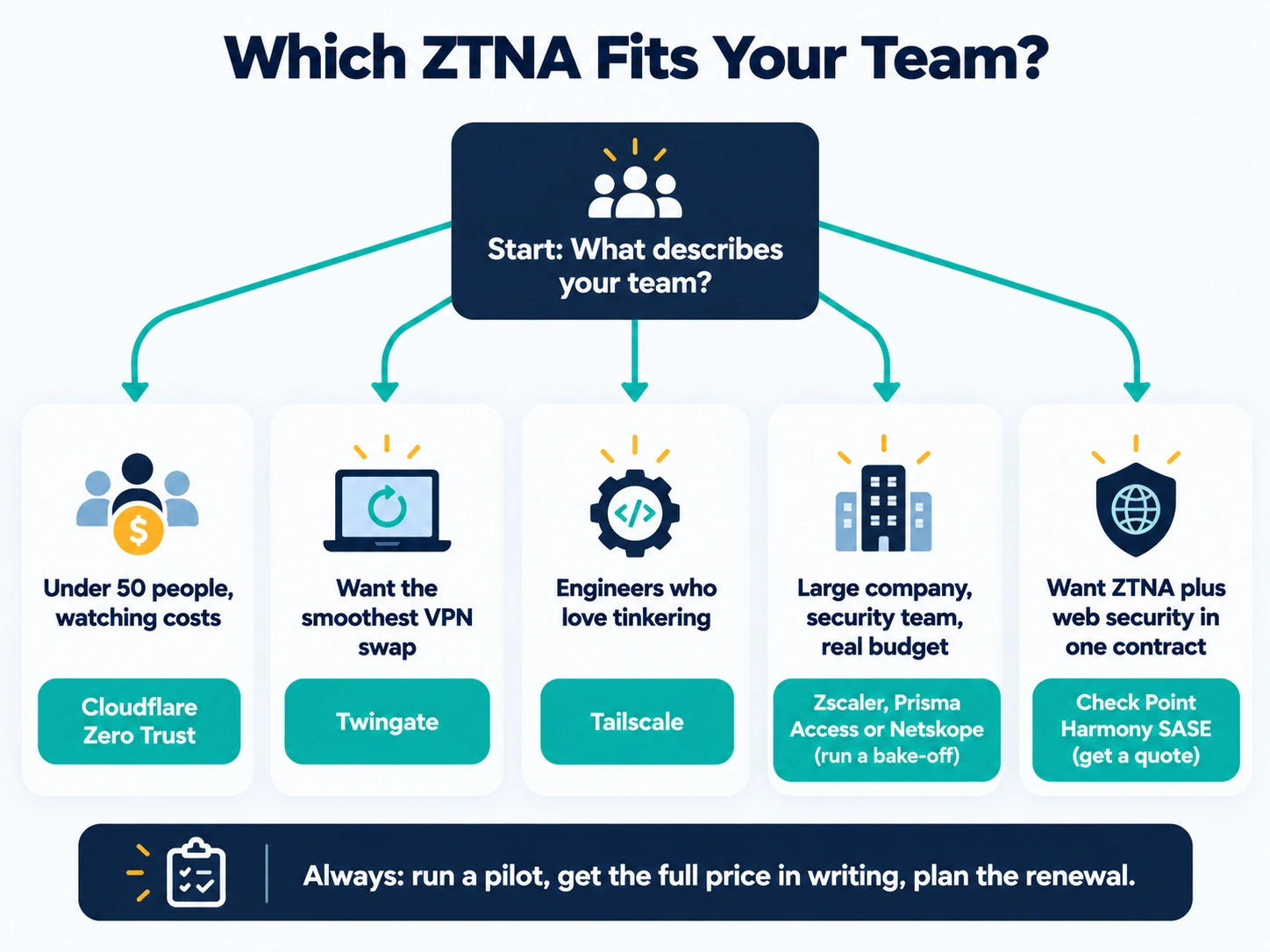
Under 50 people and watching costs? Start with Cloudflare Zero Trust. Want the smoothest swap from an old VPN? Try Twingate. Got engineers who love tinkering? Tailscale. Running a large company with a security team and a real budget? Zscaler, Prisma Access or Netskope deserve a proper bake-off. And if you want ZTNA plus web security in one contract, Check Point Harmony SASE is worth a quote.
Whichever you pick, run a pilot, get the full price in writing and plan the renewal. Prices and features change fast, and several figures here come from vendor pages and third-party reports, so verify them before you buy.
This guide is general information, not security or legal advice. Confirm pricing and features with each vendor.

The Team Compare BizTech is made up of people from marketing backgrounds, digital marketing & content marketing backgrounds, each with unique experiences and nuggets of wisdom to share with you. The team is passionate about creating unique, accurate, and engaging content.