
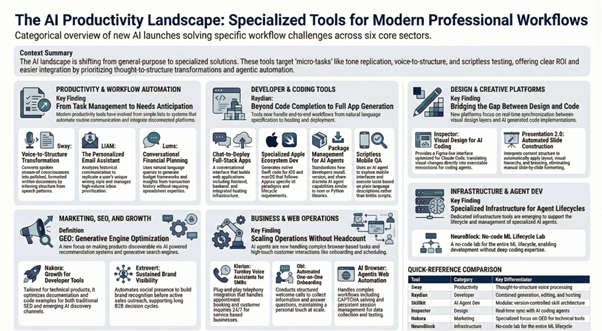
The artificial intelligence landscape continues to expand with tools designed to solve specific workflow challenges across industries. Tracking newly launched AI products helps teams identify emerging solutions before markets become saturated with alternatives. Recent launches span productivity automation, developer infrastructure, design systems, and marketing operations—each addressing pain points that established platforms have yet to solve comprehensively.
This analysis examines AI tools introduced within the past month across six core categories. The focus remains on practical applications rather than experimental features, evaluating how each product fits into existing technology stacks. Understanding these launches provides strategic context for adoption decisions, particularly for early-stage companies and technical teams building competitive advantages through tooling choices. Professional teams seeking AI productivity tools for daily workflows will find specialized solutions for communication, document management, task automation, and decision support.
Productivity and Workflow Automation
Productivity tools increasingly leverage AI to reduce manual coordination and content creation overhead. The category has shifted from simple task management toward systems that anticipate needs, automate routine communications, and integrate across disconnected platforms. Teams adopting these solutions typically seek time savings in administrative work, meeting management, and document processing.
Recent entries target specific friction points—email composition, voice transcription, and budget planning—rather than attempting to replace entire productivity suites. This focused approach allows faster implementation and clearer ROI measurement for organizations evaluating new AI tools for productivity. Professionals managing multiple communication channels, documentation requirements, and scheduling demands benefit most from these specialized AI productivity tools for professionals.
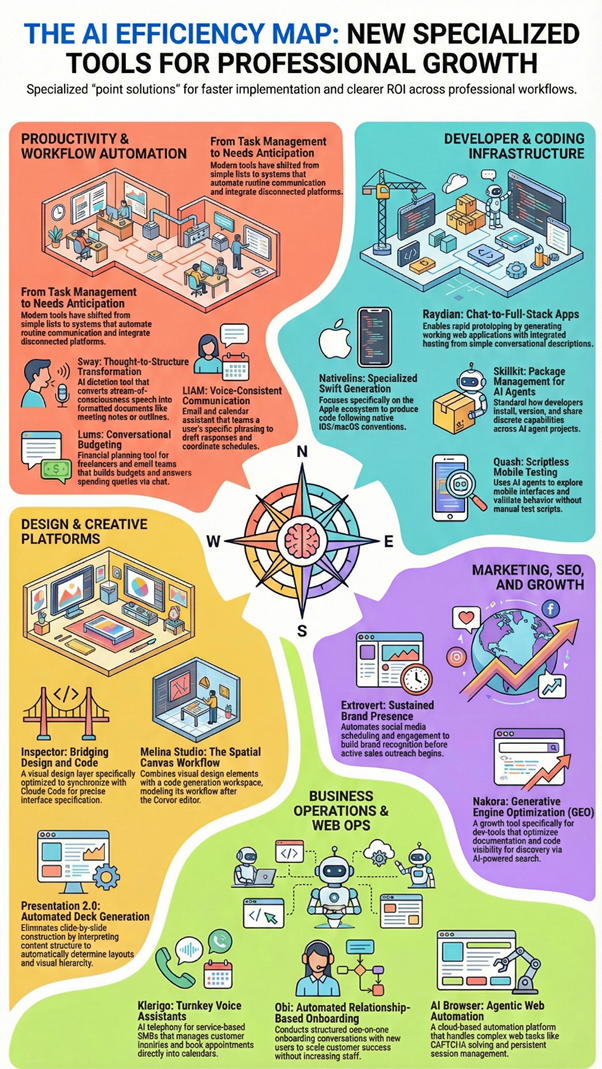
Sway
What It Does: Sway converts spoken input into organized written structure through voice-to-text processing optimized for clarity and coherence. The platform addresses the gap between stream-of-consciousness speech and polished written communication, applying formatting and structural logic to raw voice recordings.
Primary Use Cases: Content outlining, meeting notes, documentation drafting, and verbal brainstorming sessions. Users speak ideas naturally while Sway handles paragraph breaks, sentence structure, and basic formatting decisions. Functions as an AI voice-to-text tool for productivity where professionals process information verbally.
What Makes It Different: Focus on thought-to-structure transformation rather than simple transcription. Where traditional dictation tools require users to verbalize punctuation and formatting, Sway infers document structure from speech patterns and content context. Among the best AI dictation apps for transforming verbal thinking into written deliverables.
Key Points:
- Interprets speech patterns to create logical document structure automatically
- Eliminates need to verbalize punctuation and formatting commands
- Transforms stream-of-consciousness speaking into polished paragraphs
- Learns from individual speech patterns for improved accuracy over time
LIAM
What It Does: LIAM combines email drafting, inbox organization, and calendar scheduling into a unified interface powered by voice learning and behavioral pattern analysis. The system generates email responses that match individual writing styles after analyzing historical communication patterns, functioning as an AI email assistant for busy professionals.
Primary Use Cases: High-volume email management, automated response generation, inbox prioritization, and meeting coordination. Integration with scheduling systems allows automated meeting coordination without manual back-and-forth exchanges, positioning it among top AI scheduling tools for teams.
What Makes It Different: Voice consistency modeling adapts to user-specific phrasing, tone, and communication preferences rather than applying generic templates. This personalization extends across organizing principles and priority filtering based on actual user behavior. Among the most sophisticated AI email management tools for maintaining authentic communication voice.
Key Points:
- Analyzes historical emails to replicate individual writing style and tone
- Automatically prioritizes messages based on learned user behavior patterns
- Integrates calendar scheduling to eliminate coordination email chains
- Learns organizational preferences for inbox categorization and filtering
Ideal Users: Executives, sales professionals, and customer success teams where communication volume creates bottlenecks. Works well for roles requiring consistent tone across large volumes of correspondence, serving as an AI productivity assistant for communication-heavy workflows.
Lums
What It Does: Lums provides conversational budget management through natural language financial queries and automated budget construction based on transaction history and stated goals. Users ask questions about spending patterns while the system generates insights alongside actionable budget frameworks, functioning as an AI financial planning tool for professionals.
Primary Use Cases: Personal and small business budgeting, spending pattern analysis, financial goal tracking, and expense categorization. Creates budget structures without requiring manual spreadsheet work or financial expertise, serving as an AI budget assistant for non-accountants.
What Makes It Different: Chat-based approach to financial planning lowers the technical barrier typically associated with budgeting software. The system translates financial data into plain language and responds to questions about money management without requiring formula knowledge or accounting background.
Key Points:
- Answers natural language questions about spending and financial health
- Automatically categorizes transactions and identifies spending patterns
- Generates budget frameworks based on actual transaction history
- Provides financial insights without requiring spreadsheet expertise
Ideal Users: Freelancers, small business owners, and individuals seeking budget oversight without complexity. Particularly effective for users who avoid traditional finance software due to interface complexity or time investment requirements.
Developer and Coding Tools
AI tools for developers have evolved beyond code completion into full application generation, testing automation, and infrastructure management. The market now includes platforms handling entire development workflows—from initial specification through deployment—alongside specialized tools addressing specific engineering bottlenecks.
Recent launches emphasize reducing context-switching between tools and automating repetitive development tasks. Teams adopting these solutions typically aim to accelerate shipping velocity, improve code quality, or enable non-technical team members to contribute to product development.
Raydian
What It Does: Raydian enables full-stack web application creation through conversational interfaces, combining chat-based specification with visual editing and integrated hosting infrastructure. Users describe desired functionality and the platform generates working applications with deployable code, positioning it among emerging AI app builders for rapid development.
Primary Use Cases: Rapid prototyping, internal tool development, MVP creation, and non-technical stakeholder contributions to product development. The visual editor allows refinement after initial generation, supporting iterative development without requiring manual code editing for every change.
What Makes It Different: End-to-end approach handles both generation and hosting within a single environment. This reduces deployment friction and eliminates configuration overhead typical of separate build and hosting solutions, making it one of the most complete AI development tools for startups.
Key Points:
- Converts natural language descriptions into deployable web applications
- Includes visual editor for post-generation refinement without coding
- Provides integrated hosting eliminating separate deployment configuration
- Supports iterative development through conversation and visual editing
- Generates full-stack code spanning frontend, backend, and database layers
Ideal Users: Product teams needing fast iteration cycles, non-developers building functional prototypes, and startups creating internal tools where development speed outweighs highly customized requirements.
Nativeline
What It Does: Nativeline generates native Swift applications for iPhone, iPad, and Mac through AI-assisted development workflows. The platform focuses specifically on Apple ecosystem development, producing code that follows Swift conventions and platform-specific design patterns.
Primary Use Cases: iOS app development, native Apple platform prototyping, and web-to-native app conversion. Generated code remains editable within standard development environments like Xcode, allowing professional refinement after initial creation.
What Makes It Different: Specialization in Swift and Apple platforms provides more contextually appropriate code than general-purpose code generators. The system understands platform-specific UI paradigms, lifecycle management, and framework integrations unique to iOS and macOS development.
Key Points:
- Generates Swift code following Apple platform conventions and best practices
- Understands iOS, iPadOS, and macOS-specific UI patterns and frameworks
- Produces editable code compatible with Xcode and standard development tools
- Handles platform-specific lifecycle, permissions, and integration requirements
- Converts specifications into native apps rather than cross-platform wrappers
Ideal Users: Product teams building Apple-first experiences, developers prototyping native applications, and teams converting web products to native iOS applications without complete Swift rewrites.
Skillkit
What It Does: Skillkit functions as a package manager specifically for AI agent capabilities, allowing developers to install, share, and version control discrete agent skills across projects. The system standardizes how agents acquire new functions and maintain skill dependencies.
Primary Use Cases: AI agent development, capability sharing across teams, reproducible agent builds, and version-controlled skill management. The package management approach applies familiar development patterns to agent capability management.
What Makes It Different: Treats agent skills as dependencies similar to code libraries, enabling reproducible agent builds, collaborative skill development, and centralized capability discovery across the developer community working with AI agents.
Key Points:
- Manages AI agent skills like npm packages or Python libraries
- Enables version control and dependency management for agent capabilities
- Provides centralized repository for discovering and sharing agent skills
- Ensures reproducible agent builds across development and production
- Supports collaborative development of reusable agent functions
Ideal Users: Teams building production AI agents, researchers experimenting with agent architectures, and developers working with frameworks like Claude Code or custom agent systems requiring extensible capability sets.
Quash
What It Does: Quash automates mobile application testing through an AI agent that executes test scenarios without requiring pre-written test scripts. The system explores application interfaces, identifies functionality, and validates behavior based on natural language test descriptions.
Primary Use Cases: Mobile app quality assurance, regression testing, exploratory testing, and UI validation without script maintenance. The scriptless approach allows non-technical team members to define test scenarios in plain language.
What Makes It Different: Adapts to UI changes without brittle test script failures. The agent reasons about interface elements and user flows rather than following pixel-perfect script instructions, reducing test maintenance overhead significantly.
Key Points:
- Executes tests from natural language descriptions without scripting
- Adapts to UI changes without requiring test script updates
- Explores app interfaces intelligently to validate functionality
- Reduces QA maintenance burden compared to traditional automation
- Enables non-technical team members to contribute test scenarios
Ideal Users: Mobile development teams lacking dedicated QA automation engineers, products with frequently changing interfaces, and teams seeking to expand test coverage without scaling manual testing resources.
Design and Creative Platforms
Design tools incorporating AI now address both interface creation and collaborative workflows, moving beyond simple asset generation into systems that support complete design processes. Recent platforms focus on reducing friction between design tools, code editors, and development environments.
These launches target designers working closely with developers and technical teams requiring design capabilities without dedicated design resources. The category emphasizes integration with existing design systems and development workflows rather than standalone creative applications.
Inspector
What It Does: Inspector provides visual interface design capabilities specifically optimized for Claude Code workflows, functioning as a design layer for AI-generated applications. The tool allows visual specification and modification of interfaces that Claude Code can implement directly.
Primary Use Cases: Precise interface design for AI-generated apps, visual refinement of code-based prototypes, and designer-developer collaboration in AI-assisted workflows. The platform translates visual design decisions into specifications that coding agents can execute accurately.
What Makes It Different: Tight integration with Claude Code’s development model maintains bidirectional synchronization between visual design and generated implementation. Rather than designing independently and translating to code separately, changes flow seamlessly in both directions.
Key Points:
- Provides Figma-like interface specifically for Claude Code projects
- Maintains real-time sync between visual design and generated code
- Translates design specifications into Claude Code-compatible instructions
- Enables precise visual control beyond conversational descriptions
- Bridges gap between designer intent and AI code generation
Ideal Users: Teams using Claude Code who need design precision beyond conversational descriptions, product teams where designers and AI coding agents collaborate on interface implementation.
Melina Studio
What It Does: Melina Studio offers canvas-based design and development capabilities modeled after Cursor’s AI-assisted editing approach. The platform combines visual design elements with code generation in a unified workspace supporting both creative and technical workflows.
Primary Use Cases: Hybrid design-development projects, visual prototyping with immediate code implementation, and projects requiring both creative freedom and technical precision. The canvas approach supports spatial thinking while maintaining code-level precision.
What Makes It Different: Application of Cursor’s development paradigm to visual design contexts creates familiar workflows for developers who already use Cursor while extending capabilities into design-first thinking.
Key Points:
- Combines visual canvas with AI-assisted code generation like Cursor
- Supports both design-first and code-first workflows in single environment
- Enables spatial thinking with technical implementation precision
- Familiar interface for developers already using Cursor for coding
- Bridges creative design work with functional development
Ideal Users: Teams blending design and development roles, individuals handling both disciplines, designers comfortable with code, and developers expanding into visual work.
Presentation 2.0 by CubeOne
What It Does: Presentation 2.0 automates slide deck creation from content inputs, handling layout, visual hierarchy, and design consistency without manual slide construction. Users provide content and key messages while the system generates presentation-ready slides, making it among the best AI presentation tools for professionals.
Primary Use Cases: Sales presentations, pitch decks, internal reports, client deliverables, and recurring presentation workflows. The automation applies design principles and corporate branding consistently across generated decks.
What Makes It Different: Eliminates slide-by-slide construction while preserving presentation quality. Unlike template-based tools requiring manual adaptation, Presentation 2.0 interprets content structure and automatically determines appropriate layouts and visual treatments.
Key Points:
- Generates complete slide decks from content outlines or raw text
- Applies consistent design principles and visual hierarchy automatically
- Incorporates corporate branding and style guidelines
- Determines appropriate layouts based on content type and structure
- Eliminates manual slide formatting and design work
Ideal Users: Roles creating frequent presentations under time pressure, organizations seeking consistent presentation aesthetics across teams, and professionals where presentation volume makes manual design impractical, serving as essential AI slide generation software for busy professionals.
Marketing, SEO, and Growth Tools
Marketing technology has seen significant AI integration focused on content distribution, audience development, and search optimization. Recent tools address both traditional SEO challenges and emerging requirements around generative engine optimization and AI-driven discovery.
These platforms serve growth teams, developer relations functions, and marketing operations seeking efficiency in content production and distribution. The category increasingly includes tools specifically designed for technical products and developer-focused go-to-market strategies.
Extrovert
What It Does: Extrovert maintains continuous brand visibility across social channels and professional networks through automated content scheduling and engagement management. The platform focuses on building recognition before active sales outreach and sustaining presence throughout buyer journeys, functioning as an AI social media management tool for professionals.
Primary Use Cases: Consistent social presence maintenance, pre-sale brand building, multi-platform content distribution, and engagement opportunity identification. The system optimizes posting schedules and identifies engagement opportunities across multiple platforms.
What Makes It Different: Emphasis on pre-sale visibility and sustained engagement rather than one-time campaign execution. This approach supports longer sales cycles where brand familiarity significantly impacts conversion rates, making it valuable AI marketing automation software.
Key Points:
- Maintains consistent social presence without full-time resource dedication
- Optimizes posting schedules across multiple platforms simultaneously
- Identifies and surfaces engagement opportunities automatically
- Focuses on building brand recognition before active outreach begins
- Supports long sales cycles through sustained visibility
Ideal Users: B2B companies with extended decision cycles, products requiring trust-building before purchase consideration, and founder-led companies where executive visibility drives pipeline.
Nakora
What It Does: Nakora specializes in growth strategies for developer tools, combining traditional SEO with generative engine optimization techniques specific to technical products. The platform addresses how developers discover tools through both search engines and AI-powered recommendation systems.
Primary Use Cases: Developer tool discoverability, documentation optimization, code example visibility, and positioning within AI-generated technical recommendations. The focus includes both traditional search and emerging AI discovery channels.
What Makes It Different: Developer tool specialization and attention to GEO alongside traditional search optimization. The platform understands how technical audiences discover tools differently than general consumers and optimizes accordingly.
Key Points:
- Optimizes for both traditional search engines and AI recommendation systems
- Understands developer-specific discovery patterns and behaviors
- Focuses on documentation, code examples, and technical content visibility
- Addresses generative engine optimization for AI-powered search
- Tailored specifically for technical product marketing
Ideal Users: Developer-focused products, infrastructure tools competing for attention in crowded markets, and companies where developer adoption drives bottom-up purchasing decisions.
AI Productivity Tools for Task Management and Workflow Optimization
Task management represents a critical productivity domain where AI automation delivers measurable time savings. Modern AI task management tools go beyond simple to-do lists to provide intelligent prioritization, deadline prediction, and workload balancing across team members.
These AI workflow automation tools analyze historical completion patterns to estimate task duration accurately, flag potential bottlenecks before they impact deadlines, and suggest optimal task sequencing based on dependencies and resource availability. Professionals managing complex projects benefit from AI project management assistants that surface insights human planners might miss.
NeuroBlock
What It Does: NeuroBlock provides a no-code interface for complete AI model workflows including training, dataset access, and inference deployment. The platform abstracts technical complexity while maintaining control over model architecture and training parameters.
Primary Use Cases: AI feature development for products, custom model training without MLOps resources, rapid experimentation, and production model deployment. The visual interface supports experimentation without requiring infrastructure setup or deployment engineering.
What Makes It Different: Combines accessibility with production capabilities. Unlike tools serving only experimentation or only deployment, NeuroBlock handles the full workflow from data preparation through serving predictions.
Key Points:
- Provides visual no-code interface for entire ML lifecycle
- Handles training, evaluation, and production deployment in one platform
- Maintains technical control over architecture and training parameters
- Eliminates infrastructure setup and deployment engineering requirements
- Supports rapid experimentation with production-grade capabilities
Ideal Users: Product teams adding AI capabilities, data teams lacking specialized ML engineering resources, and organizations running multiple model experiments requiring quick iteration cycles.
OpenAI APIs and Developer Tools
What It Does: OpenAI provides API access to language models and multimodal AI capabilities alongside development tools, SDKs, and infrastructure for building AI-powered products. The platform includes models at various capability and cost tiers with comprehensive developer documentation.
Primary Use Cases: Conversational AI integration, content generation systems, reasoning capabilities, fine-tuning for specific domains, and production AI infrastructure. The ecosystem includes prompt management tools and usage analytics.
What Makes It Different: Model capability leadership combined with developer-focused tooling and extensive ecosystem support. The platform balances cutting-edge capabilities with production reliability and comprehensive documentation.
Key Points:
- Provides API access to state-of-the-art language and multimodal models
- Includes models at different capability and cost tiers
- Offers fine-tuning capabilities for domain-specific applications
- Comprehensive developer documentation and extensive SDK support
- Production-grade reliability with usage analytics and monitoring
Ideal Users: Teams building products where AI represents core functionality, organizations requiring proven scalable AI infrastructure, and developers working across use cases from customer service automation to complex analytical reasoning.
Business Operations and Communication
Operations-focused AI tools address specific business processes requiring human interaction, data synthesis, or coordinated scheduling. Recent platforms emphasize automating workflows that traditionally required dedicated staff while maintaining quality standards.
These solutions serve small and medium businesses seeking to scale operations without proportional headcount growth. The category includes voice assistants, customer interaction automation, and onboarding process management.
Klariqo AI Voice Assistants
What It Does: Klariqo delivers AI voice and chat assistants designed for service-based SMBs, integrating telephony systems with calendar-based appointment booking. The platform provides turnkey implementation for businesses needing customer interaction automation without technical complexity.
Primary Use Cases: Appointment scheduling automation, initial customer inquiry handling, routine phone interactions, and after-hours coverage. Integration with existing calendaring systems enables direct booking without human intermediation.
What Makes It Different: Packaging voice AI specifically for small business operations with minimal setup requirements. Unlike developer platforms requiring custom integration work, Klariqo provides ready-to-deploy solutions for common service business scenarios.
Key Points:
- Integrates telephony with calendar systems for automated booking
- Handles customer inquiries and appointment scheduling 24/7
- Provides plug-and-play implementation for non-technical businesses
- Extends business availability beyond normal operating hours
- Reduces administrative overhead for service-based operations
Ideal Users: Salons, clinics, professional services, and local businesses where phone-based scheduling creates bottlenecks or operations currently limited by phone coverage hours or administrative capacity.
Obi
What It Does: Obi automates one-on-one onboarding calls through AI agents capable of conducting structured conversations, answering questions, and collecting information from new customers or users. The system handles initial onboarding interactions that typically require human schedulers or customer success staff.
Primary Use Cases: New customer welcome calls, onboarding information collection, initial product orientation, and standardized onboarding workflows. The agent maintains conversation quality while gathering necessary information and setting expectations.
What Makes It Different: Focus on relationship-building conversations rather than transactional interactions. The system balances information collection with welcoming new customers, maintaining the personal touch typically associated with human onboarding.
Key Points:
- Conducts structured onboarding conversations at scale
- Collects necessary customer information while building relationships
- Answers common questions during initial onboarding phase
- Maintains consistent onboarding quality across all customers
- Eliminates scheduling bottlenecks for human onboarding calls
Ideal Users: SaaS companies with standardized onboarding processes, service businesses serving high customer volumes, and organizations where human onboarding creates scheduling bottlenecks or where consistent onboarding quality matters for retention.
Automation and Web Operations
Web automation tools have evolved to handle complex browser-based workflows including authentication, session management, and anti-bot circumvention. Recent platforms focus on reliable execution at scale, supporting both manual automation and scheduled operations.
These solutions serve growth teams running data collection, competitive intelligence gathering, and automated testing operations. The category addresses reliability challenges that limit traditional web automation approaches.
AI Browser
What It Does: AI Browser provides agentic browser automation with cloud-based session management, CAPTCHA solving capabilities, and scheduling infrastructure. The platform handles web automation tasks requiring persistent sessions, authentication management, and anti-detection measures.
Primary Use Cases: Automated web data collection, competitive intelligence gathering, web-based testing workflows, and scheduled browser tasks. The agent-based approach allows complex multi-step workflows with decision logic.
What Makes It Different: Combines automation reliability with agent intelligence. The system adapts to website changes and handles obstacles like CAPTCHAs without brittle script failures common in traditional automation.
Key Points:
- Provides cloud-based browser sessions with persistent state management
- Handles CAPTCHAs and anti-bot measures automatically
- Adapts to website changes without script rewrites
- Supports complex multi-step workflows with conditional logic
- Enables scheduled automation with reliable execution
Ideal Users: Growth operations teams, data collection operations, QA teams requiring reliable web data collection, and teams automating complex web-based workflows, particularly when automation targets sites with active anti-bot measures.
PinMe
What It Does: PinMe enables instant website publishing directly from browser environments without separate hosting setup or deployment processes. Users create and modify sites within the browser with changes reflected immediately without build steps or transfer protocols.
Primary Use Cases: Rapid prototyping, temporary documentation sites, simple project websites, and deployments where iteration speed matters. The direct browser-to-public workflow eliminates configuration overhead typical of traditional hosting.
What Makes It Different: Immediacy of browser-to-published-site workflow removes deployment as a distinct step, treating website publication as instantaneous as saving a document.
Key Points:
- Publishes websites instantly from browser without deployment steps
- Eliminates hosting configuration and setup requirements
- Changes reflect immediately without build or transfer processes
- Reduces friction for simple site deployments and prototypes
- Treats publication as immediate action rather than separate workflow
Ideal Users: Developers prototyping public-facing projects, non-technical users needing simple publishing capabilities, and scenarios where traditional hosting setup creates unnecessary friction, particularly for temporary sites or projects where iteration speed matters.
Recently Launched Artificial Intelligence Products
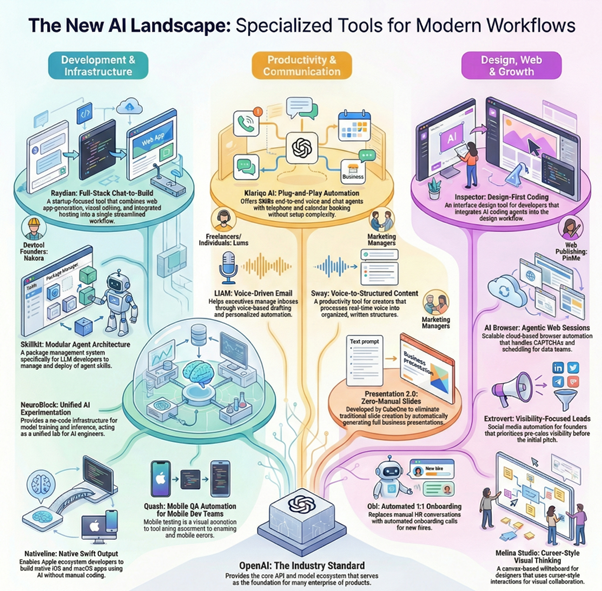
The comparison table below highlights newly launched AI tools across productivity, developer platforms, marketing automation, design, and infrastructure. Each product is compared by primary use case, target users, and key differentiation to help readers quickly identify relevant AI software based on real-world needs.
| AI Product Name | Primary Category | Core Functionality | Ideal Users | Key Differentiator |
| Klariqo AI Voice Assistants | AI Voice and Chat Automation | Plug-and-play voice and chat agents with telephony and calendar-based booking | Service-based SMBs | End-to-end customer interaction automation without setup complexity |
| Raydian | Full-Stack Web App Development | Chat-to-build web applications with visual editing and integrated hosting | Startup teams and solo developers | Combines app generation, editing, and hosting in one workflow |
| AI Browser | Browser Automation Tools | Cloud-based agentic browser sessions with CAPTCHA handling and scheduling | Growth operators and data teams | Scalable browser automation without local infrastructure |
| Extrovert | Social Media and Lead Generation | Visibility-focused social media automation for lead nurturing | Founders and sales teams | Focus on pre-sales visibility before pitching |
| Inspector | AI Coding and Interface Design | Code interface design and AI-assisted development workflows | Developers using AI coding agents | Design-first approach to AI coding environments |
| Sway | AI Dictation and Productivity | Converts spoken thoughts into structured written content | Knowledge workers and creators | Real-time voice-to-structure processing |
| PinMe | Web Publishing and Hosting | Publish websites instantly from the browser | Indie builders and open-source users | Browser-native site publishing |
| Melina Studio | Digital Whiteboards and Design | Canvas-based visual thinking and collaboration | Designers and product teams | Cursor-style interaction for visual workspaces |
| Skillkit | AI Agent Development Tools | Package management system for AI agent skills | LLM developers | Modular skill-based AI agent architecture |
| Quash | Mobile QA Automation | Scriptless mobile application testing using AI agents | Mobile development teams | No-code QA testing on real devices |
| Nakora | SEO and GEO Tools | Improve adoption and discoverability for developer tools | Devtool founders | Focus on GEO-driven visibility |
| NeuroBlock | AI Infrastructure Platform | No-code model training, datasets, and inference workflows | AI engineers and researchers | Unified lab-style AI experimentation |
| Presentation 2.0 by CubeOne | AI Presentation Software | Automatically generates presentations without manual slides | Business and startup teams | Eliminates traditional slide creation workflows |
| Nativeline | AI App Development | Builds native iOS and macOS apps using AI | Apple ecosystem developers | Native Swift output without manual coding |
| LIAM | AI Email Productivity | Voice-based email drafting with inbox organization | Professionals and executives | Personalized email automation |
| OpenAI | AI APIs and Developer Tools | APIs and models for building AI-powered products | Developers and enterprises | Industry-standard AI model ecosystem |
| Obi | AI Onboarding Automation | Conducts automated 1:1 onboarding calls | HR and operations teams | Replaces manual onboarding conversations |
| Lums | AI Budgeting Tools | Conversational budgeting and financial planning | Individuals and freelancers | Chat-based personal finance management |
Frequently Asked Questions
How should teams evaluate newly launched AI products before adoption?
Evaluation should focus on specific workflow problems rather than general capabilities. Successful adoption typically requires clear measurement of time savings or quality improvements in defined processes. Testing with limited scope—single team or specific use case—provides realistic performance data before broader rollout. Technical evaluation should examine integration requirements, data handling practices, and vendor stability indicators including funding status and customer references.
What distinguishes recently launched AI tools from established productivity software?
Recent AI products typically address narrower use cases with deeper automation than established platforms attempting broad functionality. Many new tools focus on eliminating entire workflow steps rather than incremental efficiency gains. The tradeoff often involves less customization and ecosystem maturity in exchange for faster implementation and targeted problem-solving. Integration patterns differ significantly, with newer tools often requiring less configuration but offering fewer extension points.
Which types of organizations benefit most from early adoption of AI tools?
Organizations with high-volume repetitive workflows gain immediate value from automation-focused tools. Teams comfortable with technical experimentation can leverage platforms still refining features and interfaces. Early-stage companies often benefit from tools enabling small teams to achieve outputs previously requiring larger headcount. However, enterprises with strict compliance requirements typically need to wait for security certifications and vendor maturity before adoption.
What risks accompany adopting AI products shortly after launch?
Platform stability represents the primary technical risk, with newly launched products more likely to experience outages or breaking changes. Vendor continuity concerns increase with early-stage companies lacking proven business models. Data handling practices may evolve as products scale, potentially affecting compliance or privacy commitments. Feature deprecation happens more frequently in early-stage products as companies refine positioning and capabilities based on usage patterns.
How do open-source AI tools compare to commercial alternatives for production use?
Open-source tools provide infrastructure control and customization depth valuable for technical teams with specific requirements. Commercial products typically offer better documentation, support resources, and managed infrastructure reducing operational overhead. Cost structures differ fundamentally—open-source tools shift expenses toward implementation and maintenance while commercial products charge for usage or seats. Security considerations vary, with open-source enabling internal auditing but requiring dedicated security maintenance.
What determines whether AI automation tools deliver measurable value?
Value realization depends on accurate workflow analysis before implementation. Tools targeting high-frequency tasks with clear quality metrics typically demonstrate ROI most readily. Success requires realistic expectations—most AI tools augment rather than replace human judgment, particularly for nuanced decisions. Measurement frameworks established before adoption prevent post-implementation rationalization and identify cases where traditional solutions prove more effective despite lower technological sophistication.
Conclusion
The current generation of AI product launches reflects market maturation toward solving specific operational problems rather than pursuing general intelligence capabilities. Tools addressing defined workflow bottlenecks demonstrate clearer value propositions than platforms attempting to revolutionize entire job functions.
Successful adoption requires matching product capabilities to actual organizational needs rather than chasing technological novelty. The most effective implementations typically start with narrow applications where success metrics are quantifiable and failure costs remain manageable. Teams building competitive advantages through tooling select products that integrate cleanly into existing workflows while solving problems that genuinely constrain current operations.
Monitoring new launches provides strategic context for understanding where AI automation delivers reliable results versus where human judgment remains irreplaceable. The distinction between genuinely useful tools and overhyped solutions becomes clearer through systematic evaluation focused on workflow impact rather than feature lists or technological sophistication.