
Picking XDR software feels like it should be simple. Three big names, three similar-looking websites, three “request a demo” buttons. So why does every buyer end up confused?
Because the products really do overlap, and the sales pages won’t tell you where they fall short. This CrowdStrike vs SentinelOne vs Palo Alto Cortex breakdown does. I’ll cover what you’ll actually pay, what each tool is good at, where each one will annoy you, and who should skip it. Short version: CrowdStrike is the polished all-rounder, SentinelOne is the one that does the most on its own, and Cortex XDR makes sense mainly if you already run Palo Alto gear.
What does XDR actually mean?
Quick definitions first, because the acronyms pile up fast.
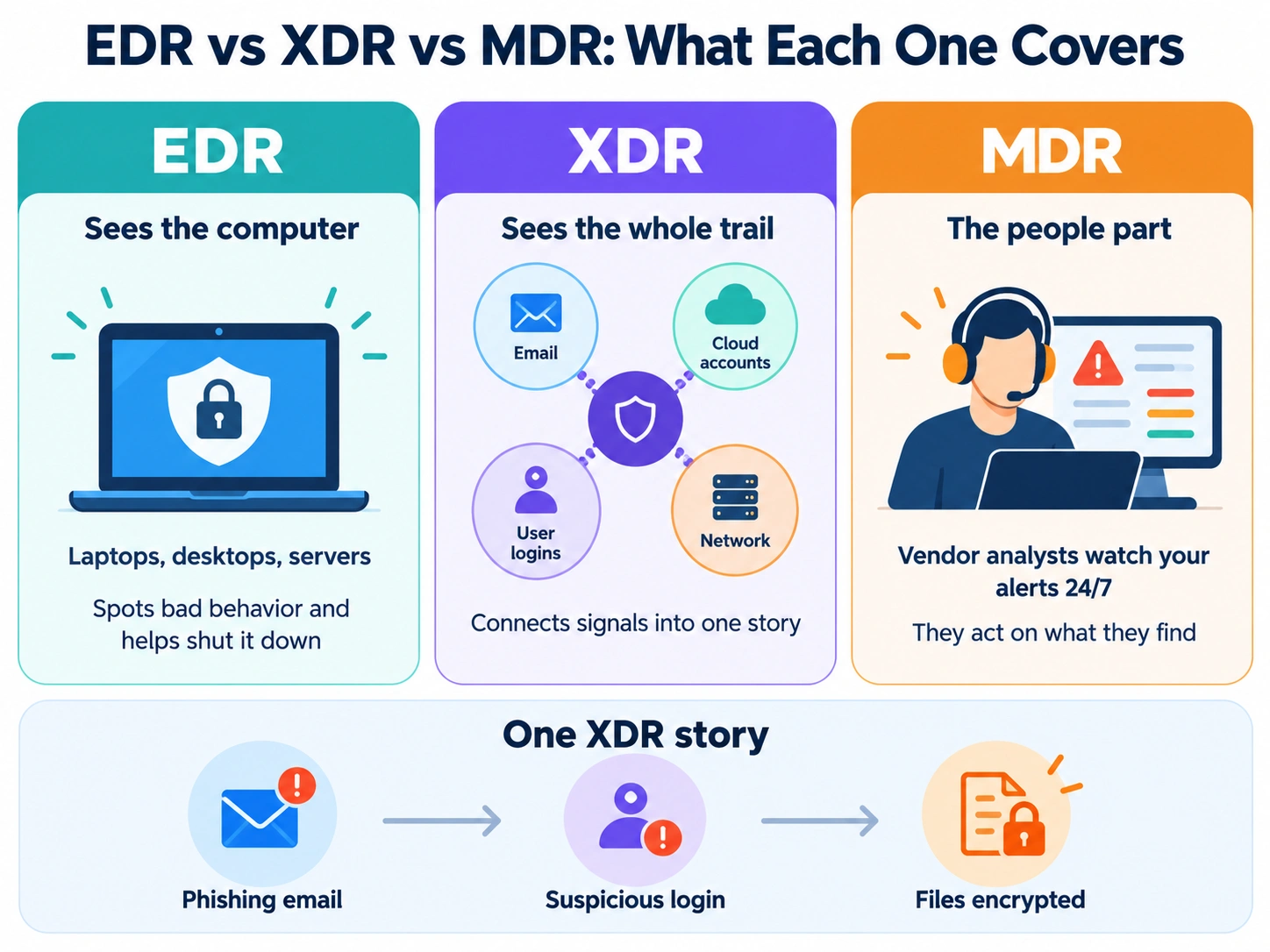
EDR (endpoint detection and response) watches laptops, desktops and servers for bad behavior and helps you shut it down. Think of it as a security camera plus a lock on every computer.
XDR (extended detection and response) takes that further. It pulls in signals from more places, like email, cloud accounts, user logins and the network, and connects the dots. So instead of ten separate alerts, you get one story: “This phishing email led to this login, which led to this file being encrypted.”
So, what’s the real EDR vs XDR difference? EDR sees the computer. XDR sees the whole trail.
Managed detection and response (MDR) is the people part. A vendor’s analysts watch your alerts around the clock and act on them. And this is the piece most small teams underestimate, which I’ll come back to.
The quick verdict
If you want the fast answer before the details:
- CrowdStrike Falcon: best for businesses that want strong detection, clear published pricing and a mature managed option.
- SentinelOne Singularity: best for lean teams that can’t watch a dashboard all day and want the tool to act automatically.
- Cortex XDR: best for companies already on Palo Alto firewalls that have someone technical to tune it.
None of these is a bad choice. The wrong choice is the one that doesn’t match your team.
CrowdStrike Falcon: the polished all-rounder
CrowdStrike Falcon is the name most people know. It runs from one small agent on each device and is managed from the cloud, so there’s no server to set up.
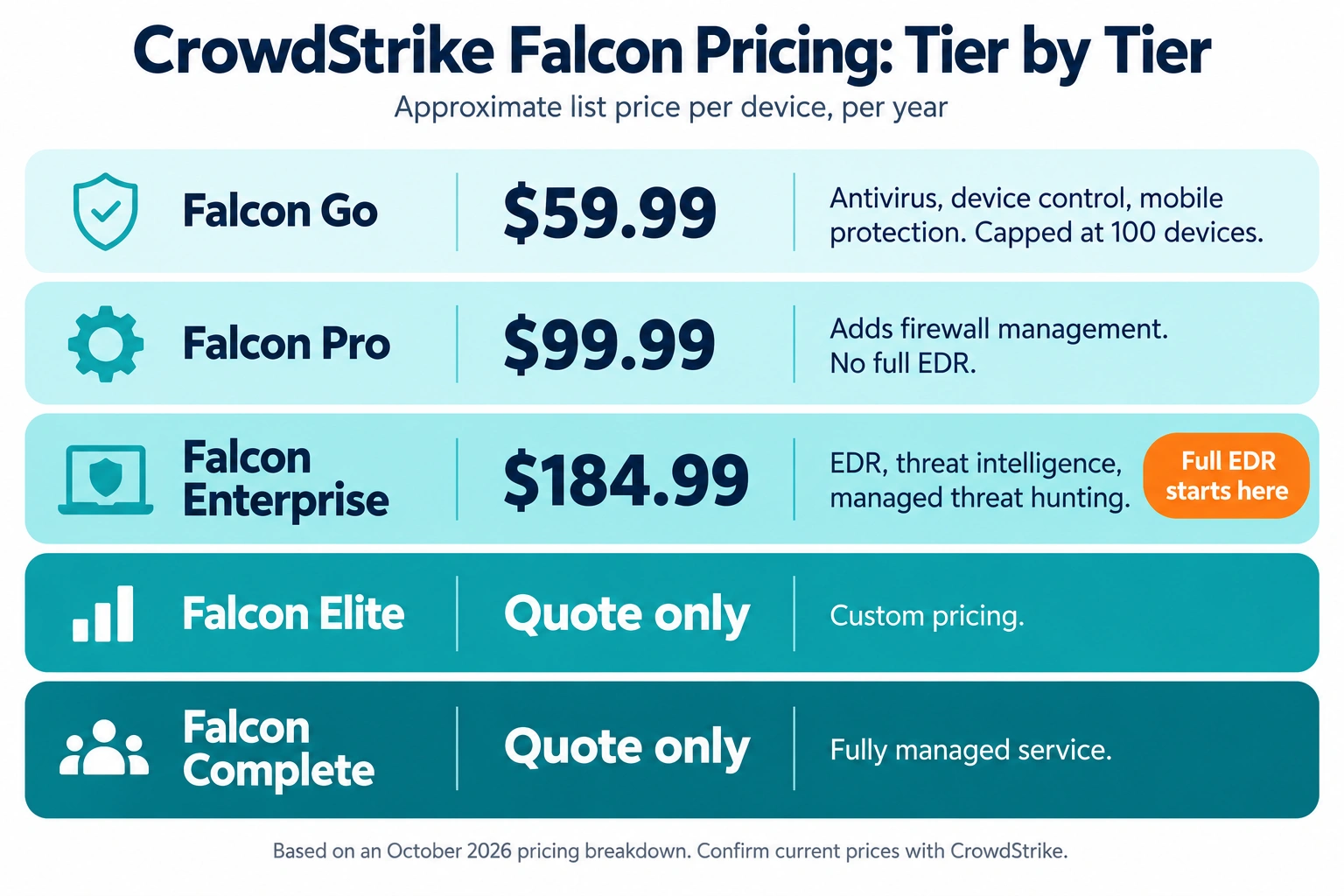
CrowdStrike Falcon pricing is the clearest of the three. As of the October 2026 pricing breakdown I reviewed, the published per-device yearly prices look like this:
- Falcon Go: about $59.99 per device per year. It covers antivirus, device control and mobile protection, and it’s capped at 100 devices.
- Falcon Pro: about $99.99. It adds firewall management. Based on the breakdown I reviewed, it doesn’t include full EDR.
- Falcon Enterprise: about $184.99. This is where EDR, threat intelligence and managed threat hunting start.
- Falcon Elite and Falcon Complete (fully managed): quote only.
Check CrowdStrike’s own pricing page before you budget, since list prices change and the summary I used came from a competitor’s blog.
What it does well. Detection is excellent, and CrowdStrike has been named a Leader in Gartner’s endpoint protection report six times running. It also took part in MITRE’s 2025 evaluations, which two of its rivals skipped (more on that below). The console is clean, rollout is fast, and its managed options, OverWatch hunting and Falcon Complete, are the most mature in this group.
Where it hurts.
- Add-ons add up. Identity protection, log management and extra modules each cost more.
- The good stuff sits in higher tiers. If you buy Go or Pro, you’re not really getting XDR.
- It leans on cloud connectivity.
- There’s no built-in ransomware rollback like SentinelOne has.
- And then there’s July 2024. A faulty CrowdStrike content update crashed millions of Windows machines worldwide. It wasn’t a hack, and the company has changed how it rolls out updates since. But if you run a small team with no IT backup, it’s a fair question to ask in a sales call: how do you stage updates, and can I delay them?
Right for: growing businesses that want transparent pricing and strong detection, and midsize companies that’ll pay for a managed service. Skip it if: you’re a tiny shop with no one to watch alerts and no budget for Falcon Complete.
SentinelOne Singularity: the one that acts on its own
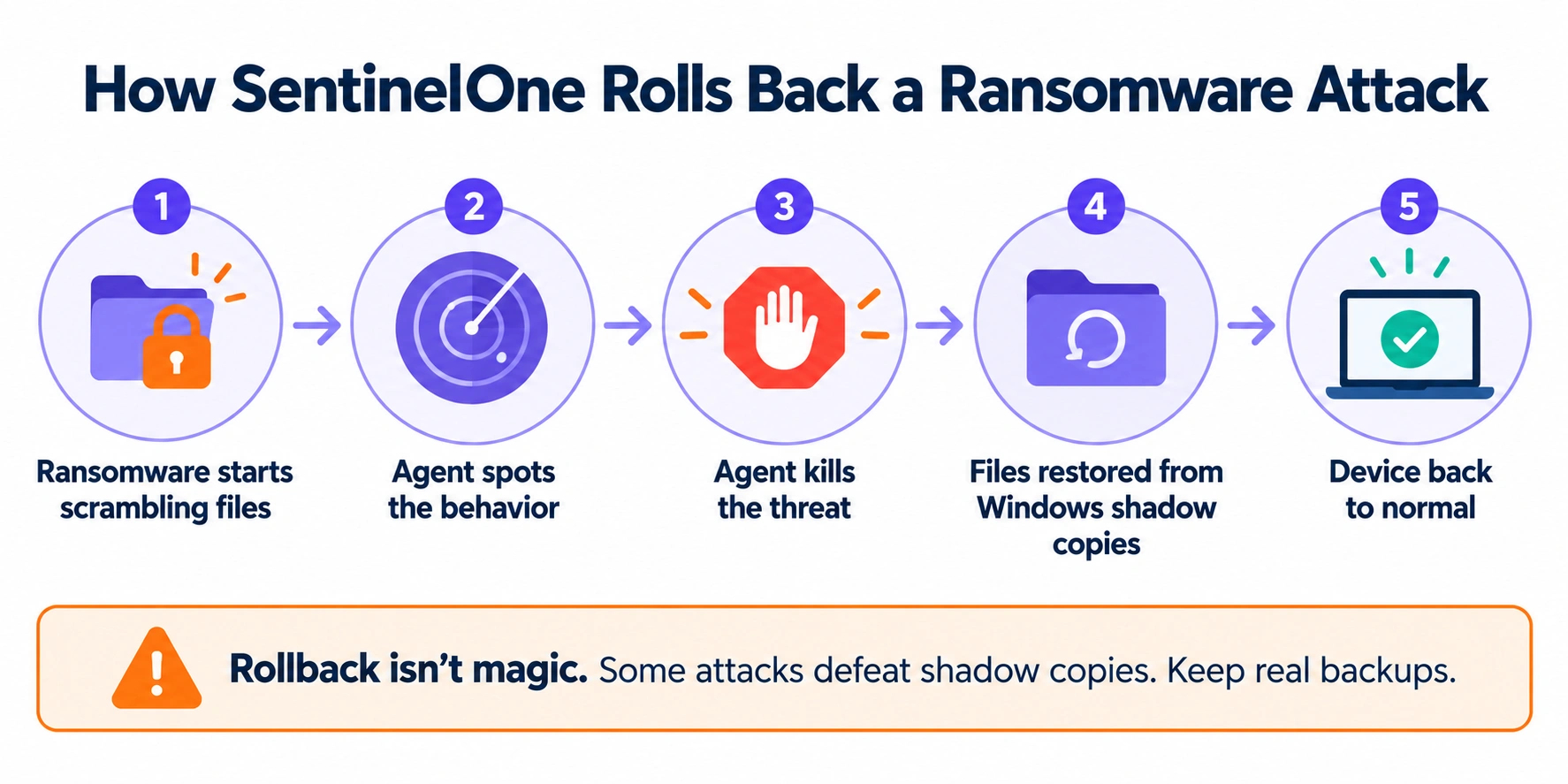
SentinelOne Singularity has a different personality. Its pitch is autonomy. The agent spots a threat, kills it and can roll back the damage without waiting for a human.
That rollback feature is the headline. When ransomware starts scrambling files, SentinelOne can restore them from Windows shadow copies. For ransomware protection software, that’s a genuinely nice safety net. Its Storyline feature also builds a visual timeline of an attack automatically, which saves a ton of clicking for people who aren’t security pros. The agent keeps protecting a device even when it’s offline.
SentinelOne Singularity pricing isn’t posted on a public price page, so everything comes from resellers. The numbers I found:
- Core: roughly $69.99 per endpoint per year.
- Control: roughly $79.99.
- Complete: roughly $179.99. This is where full EDR and threat hunting live.
- Enterprise: custom quote.
One reseller list showed a “Commercial” tier priced higher than Complete despite seemingly fewer features. That looks like an error, which tells you how messy this pricing is. Get a written quote.
Where it hurts.
- No public pricing, so you can’t compare easily before talking to sales.
- Threat intelligence is generally seen as a step behind CrowdStrike’s.
- In one independent managed-services comparison, its coverage and response time trailed CrowdStrike’s. Treat that as a data point, not gospel.
- Rollback isn’t magic. Attackers know about shadow copies, and some attacks defeat them. Keep real backups.
- Managed services are sold separately, so ask exactly what’s included.
SentinelOne has been a Gartner Leader five years running, so it’s no underdog.
Right for: small and midsize teams with one IT person or none, plus ransomware-worried businesses and companies with remote staff who are often offline.
Skip it if: you want a public price list, or your security team lives and dies by threat intelligence.
Palo Alto Cortex XDR: powerful, but built for Palo Alto shops
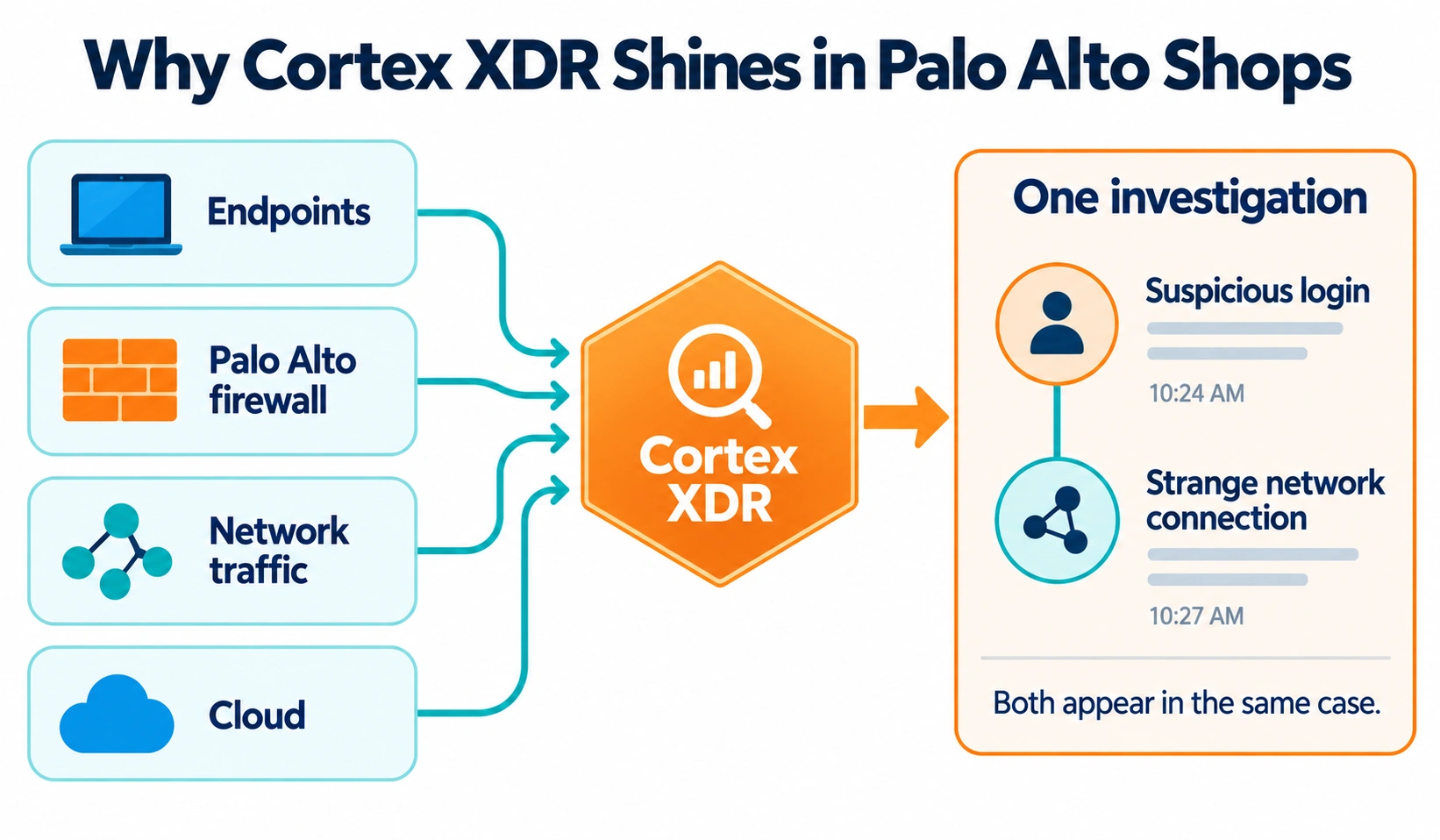
Cortex XDR is Palo Alto Networks’ answer, and it’s the most “XDR” of the three in the traditional sense. Its strength is combining endpoint data with firewall, network and cloud data in one place. If you run Palo Alto firewalls, that’s a big deal. A suspicious login and a strange network connection show up in the same investigation.
Cortex XDR pricing is the least transparent. Palo Alto doesn’t publish a price list. Reseller-reported figures put the Pro tier at around $6.75 per endpoint per month, billed yearly, which works out to roughly $81 per endpoint per year. Prevent (the basic endpoint tier) and managed threat hunting are quote-only. Extra data storage in the Cortex data lake costs more, with one estimate near $11,000 per terabyte per year. Palo Alto’s documentation on license plans explains the tiers, but not the cost.
Those reseller numbers are rough. Treat them as a starting point for a quote, not a price.
Where it hurts.
- No public pricing at all.
- Heavier setup and more tuning than the other two, especially outside the Palo Alto ecosystem.
- Licensing spans several Palo Alto products, which can confuse buyers.
- It’s less compelling if you don’t own Palo Alto firewalls, because its best trick is the network data.
- Palo Alto skipped MITRE’s 2025 evaluation, so there’s less fresh independent testing to lean on.
Right for: companies already using Palo Alto firewalls or Prisma Cloud, with a security engineer who enjoys tuning. Skip it if: you don’t have a Palo Alto setup and you want something up and running this week.
Side-by-side: CrowdStrike vs SentinelOne vs Cortex XDR
| CrowdStrike Falcon | SentinelOne Singularity | Cortex XDR | |
| Best for | Strong detection, managed options | Lean teams, auto-response | Palo Alto shops |
| Public pricing | Yes (Go, Pro, Enterprise) | No, reseller quotes | No, reseller quotes |
| Rough yearly cost per endpoint | $60 to $185, plus add-ons | About $70 to $180 | About $81 for Pro (reseller reported) |
| Ransomware rollback | No built-in equivalent | Yes (shadow copy based) | Limited, check with Palo Alto |
| Managed service | OverWatch, Falcon Complete | Sold separately, ask for details | Managed threat hunting via quote |
| Setup effort | Low | Low | Higher |
| Takes part in 2025 MITRE tests | Yes | No | No |
| Biggest weakness | Add-on costs, tiers | Opaque pricing, weaker intel | Complexity, opaque pricing |
What do the independent tests say?
Test results matter, but they’re easy to misread.
MITRE runs yearly ATT&CK evaluations where vendors face simulated attacks. The 2025 round was bigger than usual: it included a cloud-focused attack scenario and a state-sponsored one. According to SecurityWeek’s coverage, eleven vendors took part, including CrowdStrike. SentinelOne, Palo Alto Networks and Microsoft sat it out, saying the program demanded a lot of resources.
Two takeaways. First, don’t read a missing result as a failing grade. It just means less fresh data. Second, MITRE says outright that the evaluations don’t rank vendors, and an analyst quoted in that coverage warned that some “100 percent” claims come from selective reporting. So when a salesperson waves a perfect score at you, ask which test, which year and which settings.
Gartner is a better tiebreaker for overall market position, and it has both CrowdStrike and SentinelOne as Leaders for endpoint protection. It won’t tell you which one fits your team, though.
The cost nobody puts on the pricing page
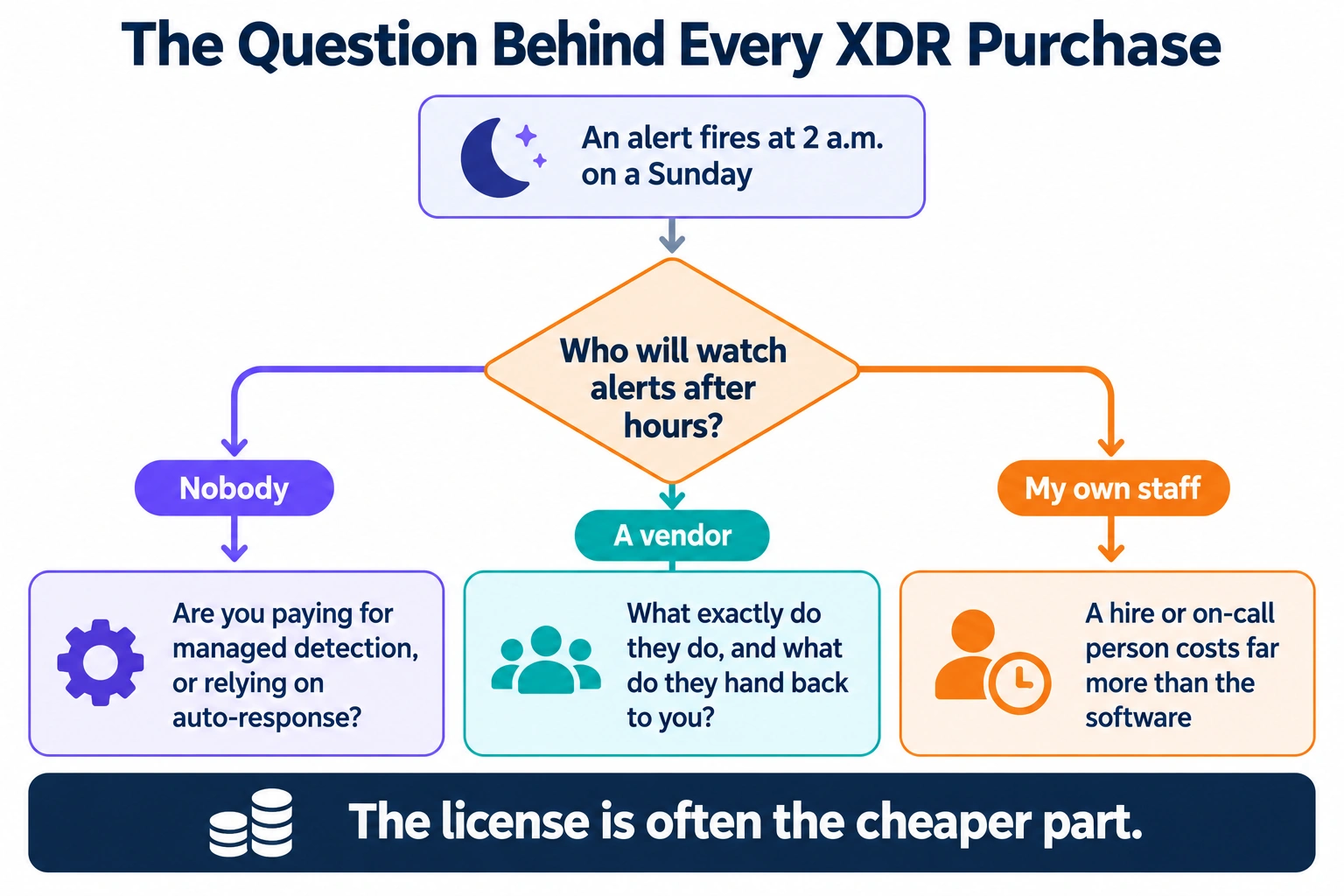
Here’s the thing that surprises first-time buyers. The license is often the cheaper part.
XDR creates alerts. Someone has to read them, decide which are real and act, at 2 a.m. on a Sunday if needed. That person costs far more than the software, whether it’s a hire or a service.
So, three questions beat any feature list:
- Who will watch the alerts after hours?
- If it’s nobody, are you paying for managed detection, or relying on auto-response?
- If it’s a vendor, what exactly do they do, and what do they hand back to you?
This is why SentinelOne tends to win with tiny teams, and why CrowdStrike wins when a business pays for Falcon Complete. And it’s why a cheap Cortex license can turn expensive if you need to hire a specialist to tune it.
If you’re trying to keep security spend in check without cutting corners, our guide to cost-saving hacks for business owners is a good place to sanity check the rest of your budget. And if your servers live in the cloud, a cloud cost management tool can free up money for exactly this kind of spending.
How to choose, step by step
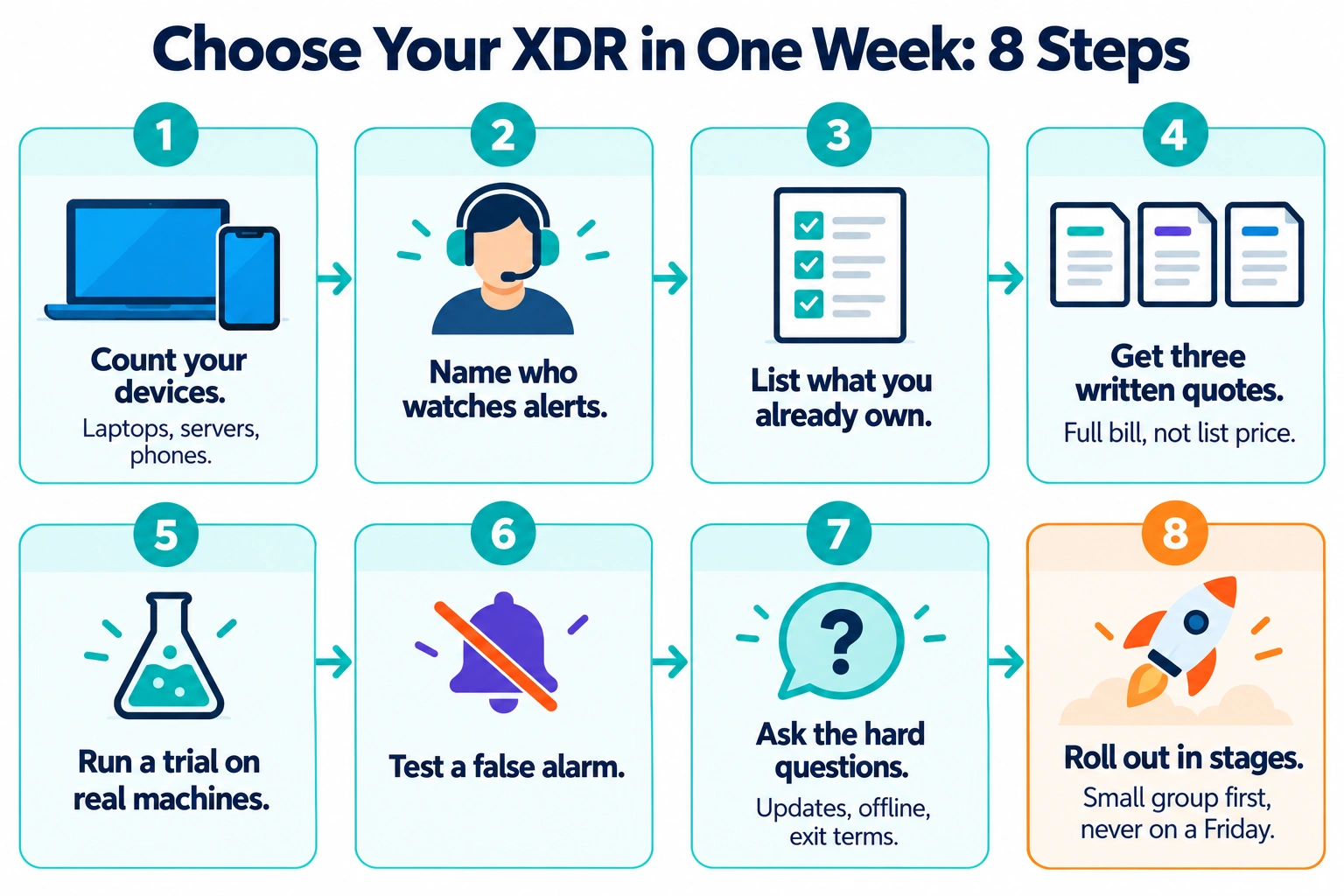
You can do this in a week.
- Count your devices. Include laptops, servers and phones. Pricing scales per device.
- Be honest about who watches alerts. No one means you need managed service or heavy automation.
- List what you already own. Palo Alto firewalls point toward Cortex. A Microsoft-heavy shop might also check Microsoft’s own offering.
- Get three written quotes. Ask for the full bill: license, add-ons, managed service, support, data storage and onboarding. Compare totals, not list prices.
- Run a trial on real machines. Test the cheapest tier you’d actually buy, not the premium demo version.
- Test a false alarm. See how easy it is to investigate and dismiss one. If it’s miserable now, it’ll be miserable at scale.
- Ask the hard questions. How are updates staged? What happens when the agent loses internet? What’s the exit process and the contract length?
- Plan the rollout. Start with a small group, then expand. Don’t flip it on for everyone on a Friday.
If you’re also exploring automation to handle repetitive security tasks, our look at AI agent frameworks for enterprise workflow automation and the Zapier vs Make vs n8n comparison show how teams are wiring up alerts and responses without writing much code.
Who should pick what?
Pick CrowdStrike Falcon if:
You want published pricing you can budget around.
You’ll pay for managed hunting or Falcon Complete.
You’re a midsize or growing company with compliance pressure.
Pick SentinelOne Singularity if:
You’re a small team and the tool needs to do the heavy lifting.
Ransomware is your top fear.
Your staff work remotely and often offline.
Pick Cortex XDR if:
You already run Palo Alto firewalls or cloud security.
You have an engineer who’ll tune it.
You want endpoint and network data in one investigation.
For a very small business: XDR for small business can be overkill. If you’ve got fewer than 25 devices and no IT staff, a managed endpoint service or a tool like Falcon Go may be enough. Don’t buy a tool you can’t run.
And while you’re tightening security, don’t forget the basics at the edge. A solid host with good defaults, like the ones in our best web hosting for small business roundup, takes a few attack paths off the table before XDR ever has to notice them.
So, which one wins?
Honestly, it depends on your team more than the technology.
CrowdStrike gets the nod for the broadest all-round package and the best-developed managed options, as long as you watch the add-ons. SentinelOne gets the nod for small teams that need the product to react by itself. Cortex XDR gets the nod only when Palo Alto is already your base.
Whichever you pick, get the full price in writing, run a real trial, and write down who’s on call. A great tool nobody watches is just an expensive log file.
Prices, tiers and test results change often, and several figures here come from reseller and third-party reports. Confirm everything with each vendor before you buy. This article is general guidance, not security or legal advice.

The Team Compare BizTech is made up of people from marketing backgrounds, digital marketing & content marketing backgrounds, each with unique experiences and nuggets of wisdom to share with you. The team is passionate about creating unique, accurate, and engaging content.