

HeyReach wins if you run five or more LinkedIn senders, Expandi wins if you want one tightly controlled account per seller, and Waalaxy wins only if you’re a solo founder watching every euro. Everything else is a compromise.
That’s the short version. Here’s the long one, with the numbers vendors would rather you didn’t add up yourself.
The One-Minute Verdict
| If you are… | Buy this | Why |
| An agency or team running 5+ LinkedIn senders | HeyReach | Per-sender pricing, unlimited extra users, and flat packs once you pass roughly 13 senders |
| A founder or sales team with 1 to 4 senders who wants a conservative safety posture | Expandi | One plan, every feature, dedicated IP, branching campaigns |
| A solo founder or very small team on a tight budget | Waalaxy | Lowest entry price, easy setup |
| A mid-sized team that wants A/B testing and CRM sync at a mid price | Dripify | Tiered plans, HubSpot and API on higher tiers |
| A technical user who’ll accept a local app to save money | Linked Helper | From about $15/month, runs on your own machine |
Now the part that actually matters: the subscription is the smallest line item in your real cost. We’ll get to that.
First, a Reality Check on Risk
LinkedIn’s User Agreement prohibits third-party automation. Every tool in this guide operates in that gray zone. Anyone who tells you their product is “100% safe” is selling you something.
What the evidence does say:
- Restrictions are staged. Most first-time offenders get a temporary limit (often 24 to 72 hours) or an identity verification prompt before anything permanent happens.
- Published restriction-rate figures vary wildly. One vendor-adjacent analysis claims roughly 40% of accounts using non-compliant tools were restricted in Q1 2026. Another puts it at 23% within 90 days. Both come from companies selling alternatives, so treat them as directional, not gospel.
- The common triggers are boring: sudden volume spikes, connection acceptance rates below about 30%, repetitive copy, logging in from changing IPs, and running more than one automation tool at once.
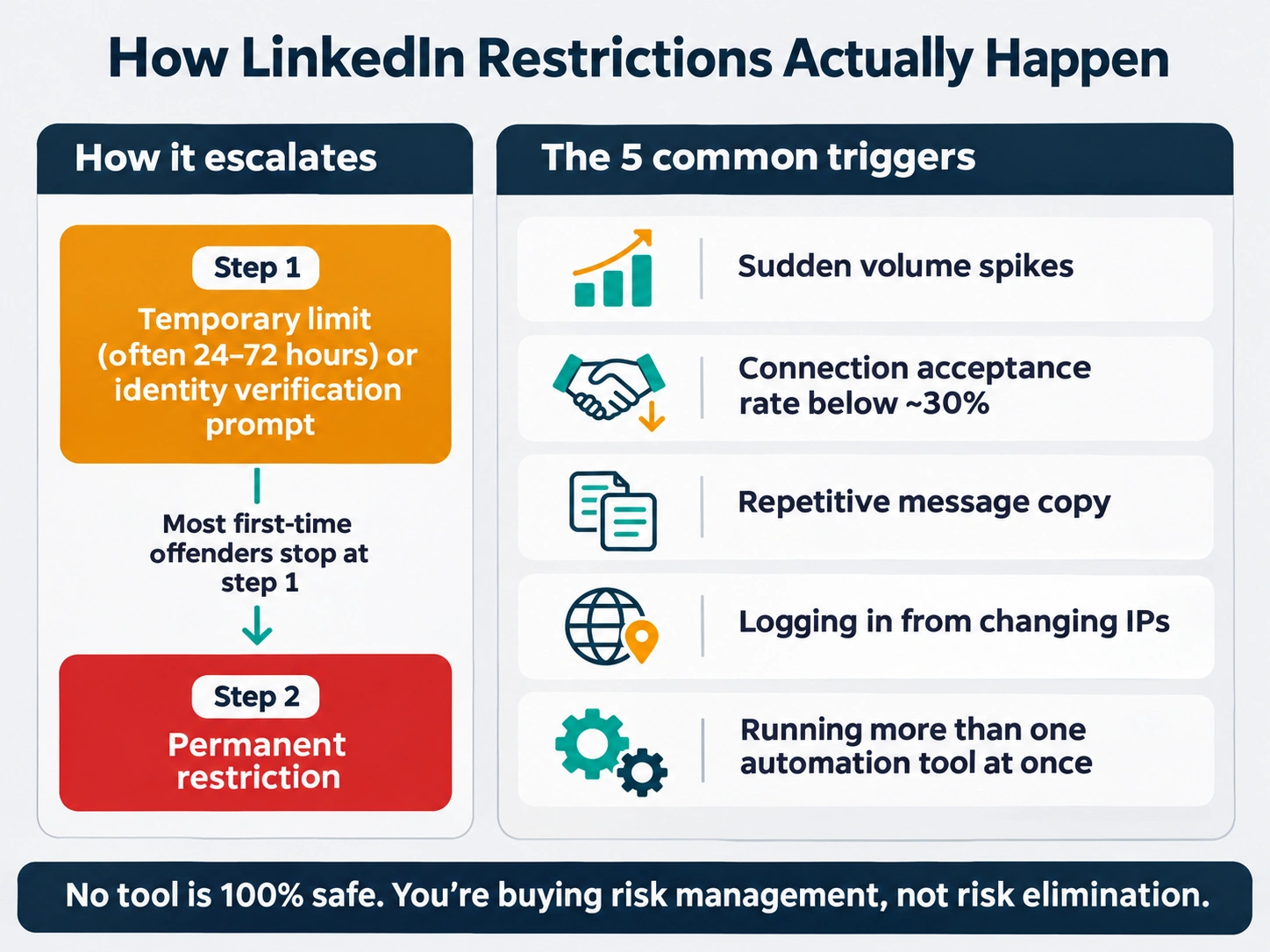
The takeaway for a CTO: you’re buying risk management, not risk elimination. Your selection criteria should be architecture (cloud with a dedicated IP vs a browser extension vs a local app), pacing controls, and what happens operationally when an account gets flagged.
And one more thing nobody puts on a pricing page. If the LinkedIn account belongs to your top seller, a restriction costs you far more than a year of software fees. Don’t connect your CEO’s profile to a tool you haven’t piloted.
What “AI” Actually Means in These Tools
Be skeptical. In most LinkedIn outreach tools, “AI” means one of three things:
- Message drafting: an LLM writes the opener from profile data. Useful, but easy to spot at scale.
- Lead scoring or enrichment: credit-metered and usually the hidden upsell.
- Reply classification: tagging replies as interested or not.
None of this fixes a bad list or a bad offer. If your acceptance rate is under 30%, an AI-written opener won’t save you. Your targeting will.
Pay for AI only where it saves rep hours (reply triage, enrichment) rather than where it adds risk (mass-generated, near-identical personalization).
The 7 Criteria That Decide the Purchase
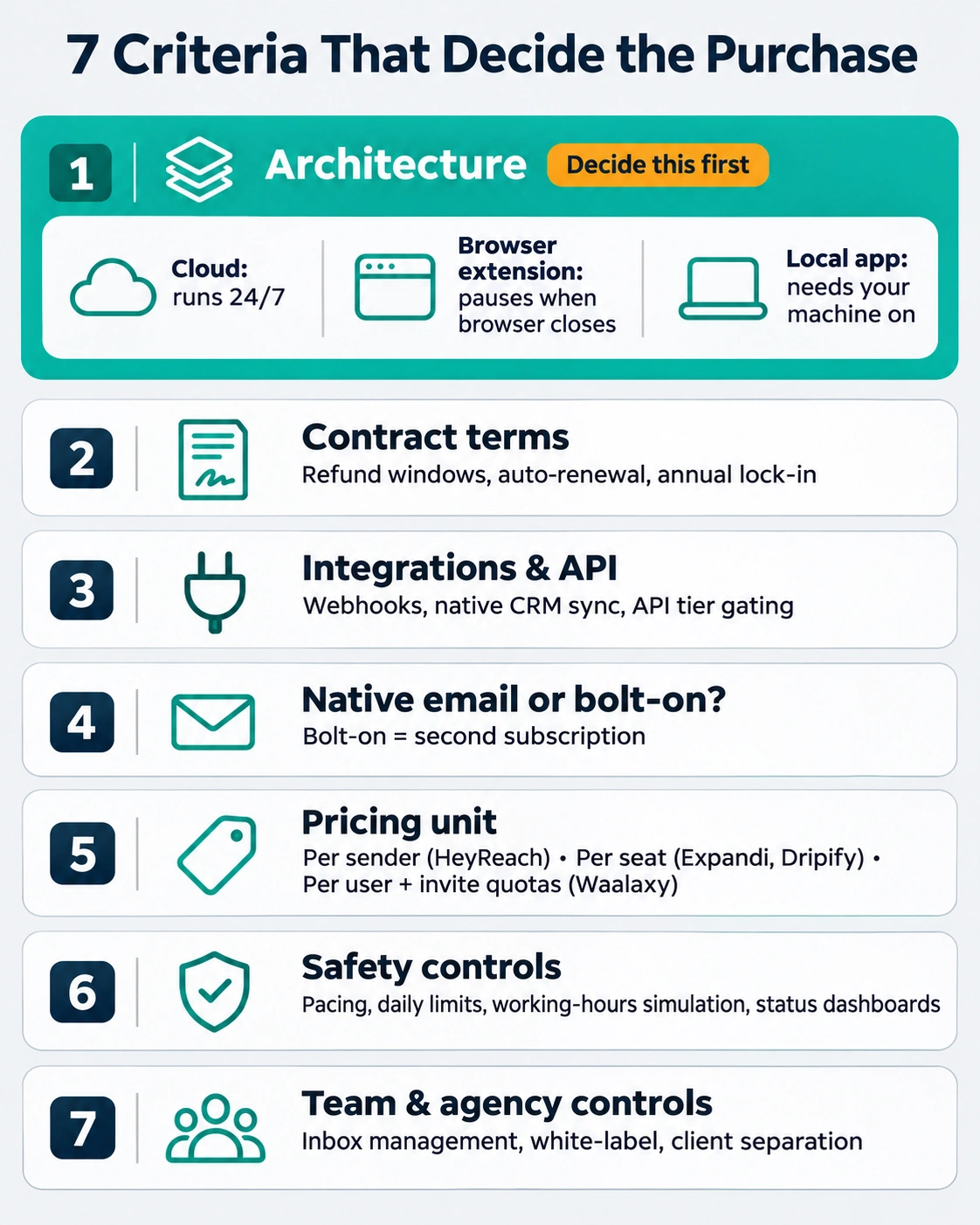
Architecture. Cloud tools run 24/7 on dedicated infrastructure. Browser extensions pause when your browser closes. Local apps need your machine on. Cloud is the default for scale; local is the budget play.
- Contract terms. Refund windows, auto-renewal, and annual lock-in.
- Integrations and API. Webhooks, native CRM sync, and whether API access is gated behind a higher tier.
- Native email or bolt-on? Bolt-ons mean a second subscription.
- Pricing unit. Per sender (HeyReach), per seat (Expandi, Dripify), or per user with invite quotas (Waalaxy). This single choice determines how your bill scales.
- Safety controls. Pacing, daily limits, working-hours simulation, status dashboards.
- Team and agency controls. Inbox management, white-label, client separation.
Tool-by-Tool: Pricing, Friction, and Who Should Walk Away
HeyReach: built for senders in bulk
Pricing (verified against several trackers, Aug to Nov 2026):
- Growth: $79 per sender per month, $71 quarterly, $63 yearly, with 100 enrichment credits per sender
- Agency: $999 for 25 senders
- Unlimited: $2,999, capped at 300 senders
- A quote-only managed tier above that
- 14-day trial, up to 3 LinkedIn accounts
The hidden stuff:
- A June 2026 price increase. Archived pricing pages show the old grid until May 20 and the new one from June 9. One tracker reports the 50-account price rose about 40% and Unlimited about 50%. Any review written before June is quoting stale numbers.
- Proxies and credits aren’t in the sticker price on the Agency and Unlimited packs. You supply proxies and pay for credits separately.
- Email isn’t native. Email steps run through Instantly, Smartlead or EmailBison, which means a second tool and a second bill.
- LinkedIn scrutiny. Competitor comparisons reference a March 2026 LinkedIn action against HeyReach, which the vendor itself addressed in a post. We couldn’t verify the details, so ask their team directly what changed and how it affects your accounts before you sign.
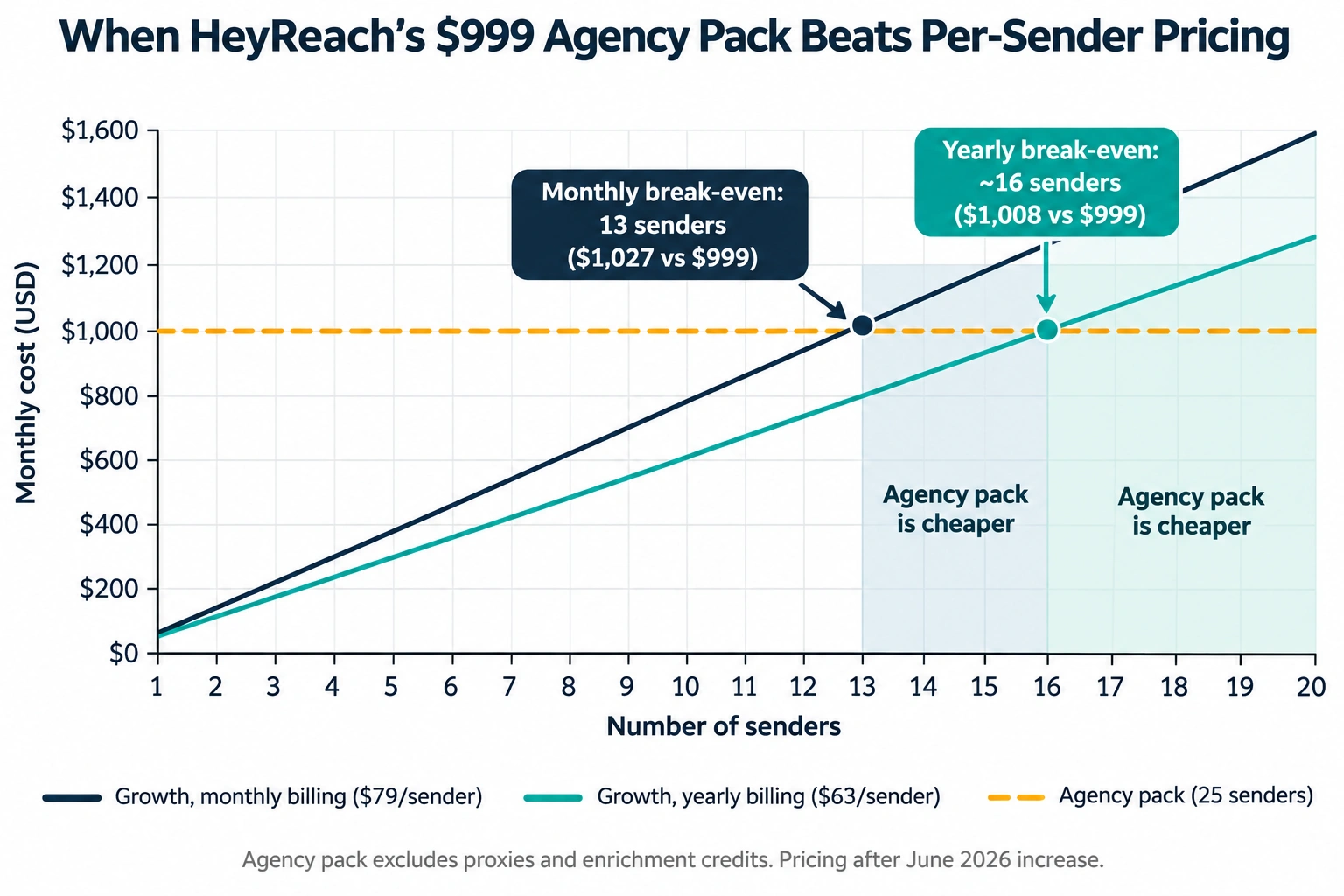
The crossover math: At $79 monthly, 13 senders cost about $1,027, so the $999 Agency pack becomes cheaper at 13. On yearly billing ($63), the break-even is around 16 senders. Below those numbers, stay on Growth.
Who should avoid HeyReach
- Solo founders and 1 to 2 sender teams. You’re paying for a multi-account platform you don’t need.
- Teams who want email and LinkedIn in one tool. You’ll be stitching a second product on.
- Anyone who can’t tolerate vendor-level regulatory noise. If a LinkedIn action against your tool vendor would keep your COO up at night, pick a vendor with a calmer track record and ask hard questions anyway.
Expandi: one plan, no feature gating
Pricing: One plan, $99 per seat per month, or $79 per seat on an annual prepay (about 20% off). Agency pricing is custom, starting around 10+ seats. One seat equals one LinkedIn account.
The hidden stuff:
- Seats add up fast. Ten reps is $990 a month on monthly billing before anything else.
- Video and dynamic image personalization are separate subscriptions. Hyperise and SendSpark integrations need their own plans. If the demo showed a personalized GIF, budget for it.
- Agency pricing is opaque. You’ll need a sales call to learn it.
- Email is a side step, not a core strength.
The upside: No feature tiers means no upsell trap. Cloud automation with a dedicated IP and an automation status dashboard (added in 2026) answers the “why did my campaign stop?” question that used to burn hours.
Who should avoid Expandi
- Teams of 10+ senders. Per-seat pricing at $79 to $99 gets expensive against HeyReach’s flat packs.
- Budget-constrained solo founders. Cheaper tools handle basic connect-and-message workflows.
- Anyone who wants an all-in-one email and LinkedIn engine without bolting things together.
Waalaxy: the cheapest door in
Pricing (EUR only, no USD shown even to US visitors): Pro €19, Advanced €49, Business €69 per user per month. The discount ladder is aggressive: quarterly saves about 20%, annual up to roughly 50% depending on plan.
The hidden stuff:
- The free plan is gone. It disappeared from the pricing page in April 2026. Older articles still promise it. You get a 14-day trial instead.
- API and MCP access are reserved for Advanced and Business. On Pro, you can’t automate around it.
- Invite quotas are gated by plan. Pro caps at 300 invites a month. Run the math against your target volume before you celebrate the €19.
- Architecture caveat. A competitor’s teardown says Waalaxy leans on a Chrome extension, meaning sequences pause when the browser closes. That’s a competitor’s claim, so test it in your trial.
- Euro-only billing adds FX noise for US teams.
Who should avoid Waalaxy
- Teams who need always-on, 24/7 sequences without babysitting a browser.
- Anyone who needs API access on the cheapest plan. It isn’t there.
- Agencies managing many client accounts. It’s one user per LinkedIn account, and the model wasn’t built for that.
Dripify: transparent tiers, sharp edges on the contract
Pricing: Basic $59, Pro $79, Advanced $99 per user per month on monthly billing. Annual billing drops to $39 / $59 / $79 (34%, 25% and 20% off). Enterprise is custom. One seat equals one LinkedIn account. Pricing has been stable since mid-2025, but plan contents have grown: HubSpot and A/B testing appeared on the cards by September 2026, and the Open API and MCP server by October.
The hidden stuff:
- The refund clock is brutal. Monthly purchases are non-refundable, and annual plans are refundable only within 24 hours of payment. Everything auto-renews. Calendar your renewal date the day you sign up.
- Daily quotas are gated by plan, so cheaper tiers throttle you.
- Entry pricing draws complaints. Reviewers regularly call $59 high for the Basic tier, and some complain about the billing partner.
Who should avoid Dripify
- Anyone who wants to “try annual and see.” Twenty-four hours isn’t a pilot.
- Teams who need rich API access on a low tier. Better features sit higher up.
- Large teams. Per-user pricing multiplies cost with headcount.
Linked Helper: the local-app budget option
Standard starts at about $15 per month and Pro at about $45, running as a desktop app on your own IP rather than in the cloud. Standard throttles messaging with images and webhook volume until you upgrade to Pro.
Avoid it if you can’t leave a machine running, need cloud uptime, or want teammates managing campaigns without remote desktops. Pick it if you’re technical, price-sensitive, and comfortable owning the infrastructure.
The Cost Nobody Budgets: LinkedIn Sales Navigator
Most teams price the automation tool and forget the data source.
- Core: $119.99 per seat monthly, or about $89.99 annually ($1,079.88 a year)
- Advanced: $159.99 monthly, or about $149.99 annually
- Advanced Plus: quote-based, commonly cited around $1,300 to $1,600+ per seat per year
- 50 InMail credits per month on every tier
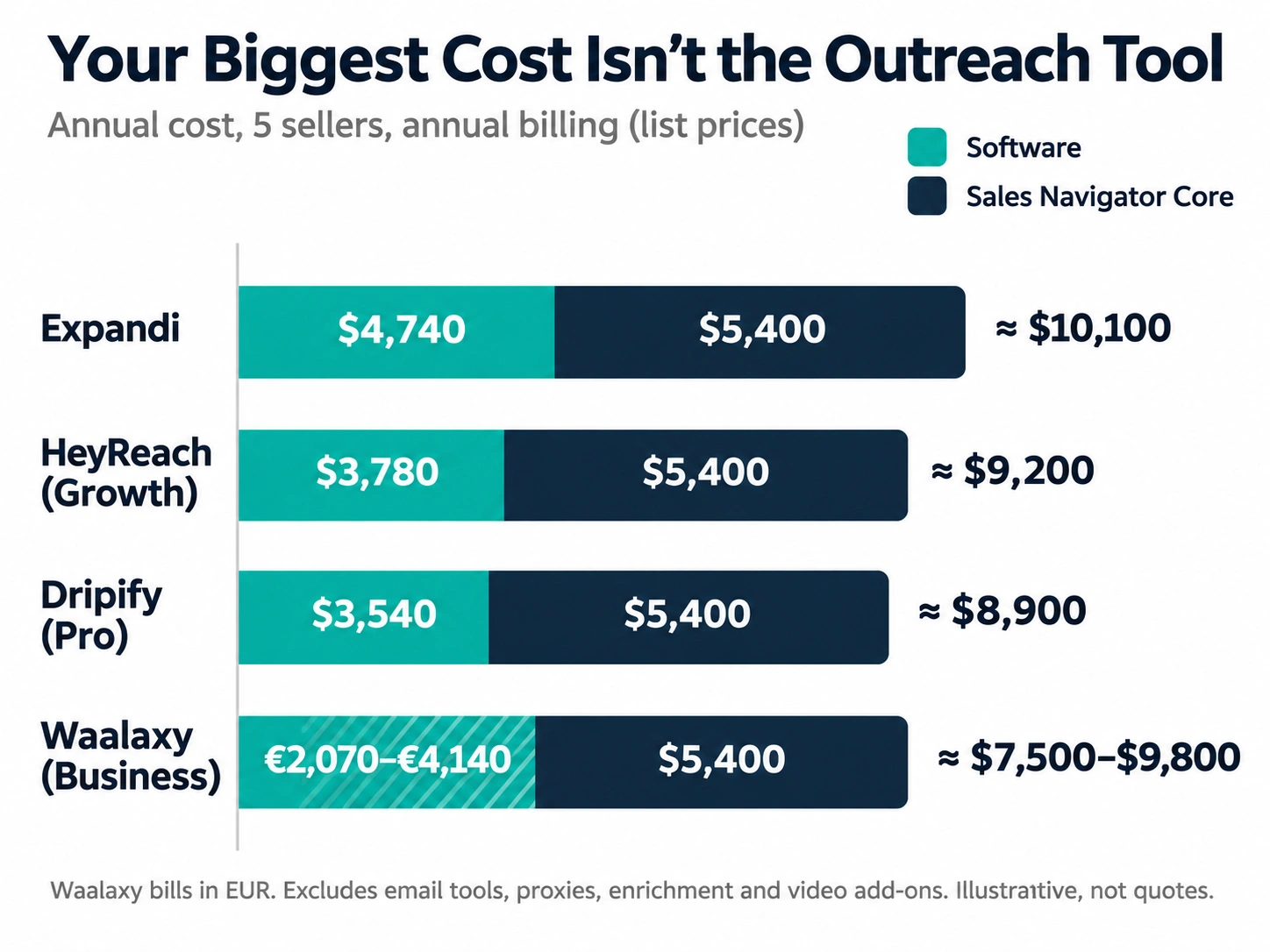
The contrarian point: for a five-seller team on annual billing, Sales Navigator Core costs about $5,400 a year, more than the automation tool itself. Meanwhile Advanced adds team features and buyer-intent signals, but not more InMails. Start on Core and upgrade only when a limit you can name blocks real work.
One tracker reports Sales Navigator rises roughly 8 to 15% a year. Verify that on LinkedIn’s own page, but plan for increases.
True Total Cost of Ownership: A 5-Seller Team, Annual Billing
These figures use list prices from above. They’re illustrative, not quotes.
| Cost line | HeyReach (Growth) | Expandi | Dripify (Pro) | Waalaxy (Business) |
| Software, per month for 5 senders | $315 ($63 x 5) | $395 ($79 x 5) | $295 ($59 x 5) | up to about €172 at a 50% annual discount (€69 x 5 at list is €345) |
| Software, per year | about $3,780 | about $4,740 | about $3,540 | about €2,070 to €4,140 |
| Email add-on | Separate tool required | Limited, side step | Limited | Gated by plan |
| Sales Navigator Core, per year | about $5,400 | about $5,400 | about $5,400 | about $5,400 |
| Enrichment | 100 credits per sender included | Not included | Email verification credits extra | Credits capped by plan |
| Video or dynamic personalization | Not native | Extra subscription | Not native | Not native |
| Realistic annual TCO (software + Sales Nav) | about $9,200+ | about $10,100+ | about $8,900+ | about $7,500 to $9,800 |
Look at the proportions. In every column, Sales Navigator is roughly 55% or more of the spend. Choosing the “cheapest” automation tool saves you hundreds. Choosing the wrong one costs you restricted accounts, which cost far more.
Add soft costs: setup time, a proxy budget if you scale, an email tool, rep training, and the lost pipeline when an account is down.
Comparison Table
| HeyReach | Expandi | Dripify | Waalaxy | |
| Entry price | $79/sender/mo | $99/seat/mo | $59/user/mo | €19/user/mo |
| Annual pricing | $63/sender | $79/seat | $39 to $79/user | up to about 50% off |
| Pricing unit | Per sender | Per seat | Per user | Per user |
| Scale option | $999 for 25 senders; $2,999 up to 300 | Custom agency (10+) | Enterprise custom | Business tier |
| Free trial | 14 days, up to 3 accounts | Yes | Check page | 14 days |
| Native email | No (via Instantly, Smartlead, EmailBison) | Side step | Limited | Gated by plan |
| API / integrations | Webhooks, API on higher tiers; verify | Native CRM logging | HubSpot, Open API, MCP on higher tiers | API/MCP on Advanced and Business only |
| Architecture | Cloud | Cloud, dedicated IP | Cloud | Reported extension-based; test it |
| Biggest gotcha | June 2026 price hike; proxies and credits extra on big packs | Per-seat cost scales; add-ons for video | 24-hour annual refund window | Euro-only; free plan removed; quota gates |
| Best for | Agencies, 5+ senders | 1 to 4 senders, safety-first | Mid-size teams wanting tiers | Solo and budget |
Decision Triggers for Founders and CTOs
Use these as rules, not suggestions.
Switch to HeyReach if:
- You pass 5 senders and want per-sender pricing with unlimited extra users
- You manage client accounts as an agency
- You’ll cross 13 monthly-billed senders (about 16 on yearly) and can use the flat pack
Stay on or pick Expandi if:
- You run 1 to 4 senders and want every feature without tier games
- Your CTO wants a dedicated-IP cloud setup and a status dashboard
- You can absorb $79 to $99 per seat
Pick Waalaxy if:
- You’re one person and need the lowest entry price
- You’ll run a 14-day trial and confirm the browser-dependency claim doesn’t hurt you
- You don’t need API access yet
Pick Dripify if:
- You want A/B testing and HubSpot at a mid price
- You’re confident enough to commit before the refund window closes (or you stay monthly)
Avoid all of them if:
- Your seller’s personal profile is your brand and you can’t afford a restriction. Run a human-in-the-loop workflow instead.
- You haven’t proven your offer manually. Automation amplifies a bad pitch.
- You need SOC 2 evidence out of the box. Ask every vendor for their compliance documentation, because none of the published pricing pages answer it.
The Vendor Questions That Expose the Truth
Send these before you sign. A weak answer is an answer.
- Which plan unlocks API and webhooks, and what are the rate limits?
- Where do my prospects’ data and my sellers’ credentials live, and what’s your data-processing agreement?
- What happened with the March 2026 LinkedIn action (HeyReach) or any equivalent incident, and what changed technically?
- How do you handle a restricted account? Do campaigns pause automatically?
- What’s the refund policy on annual plans, in writing?
- What does the price look like at 2x my current seat count?
- Are proxies, enrichment credits and email verification included?
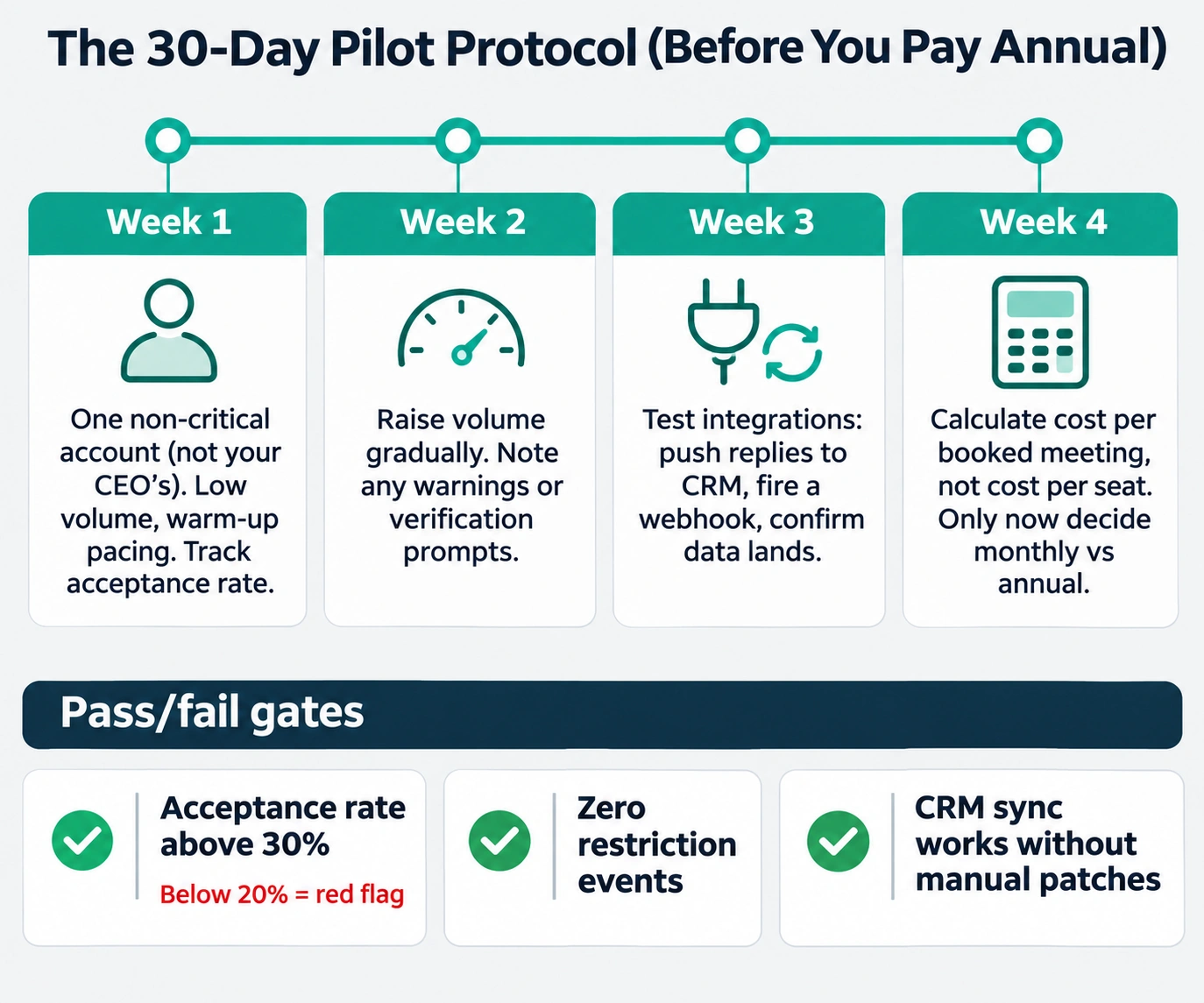
A 30-Day Pilot Protocol (Do This Before Annual)
- Week 1: One non-critical account (not your CEO’s). Low volume, warm-up pacing. Track acceptance rate.
- Week 2: Raise volume gradually, but stay conservative. Note any warnings or verification prompts.
- Week 3: Test the integration path: push replies to your CRM, fire a webhook, confirm the data lands correctly.
- Week 4: Calculate cost per booked meeting, not cost per seat. Decide on monthly vs annual only now.
Pass/fail gates: acceptance rate above 30% (below 20% is a red flag), zero restriction events, and CRM sync working without manual patches.
Compliance and Data: The Vital Part Most Buyer’s Guides Skip
- Credential custody. Cloud tools hold session access to your sellers’ accounts. That’s a security question for your CTO, not just a sales question.
- GDPR and CCPA. You’re processing personal data of prospects. If you sell into the EU, you need a lawful basis and a vendor data-processing agreement. Some vendors are EU-based (Waalaxy is French); others aren’t. Ask.
- Ask how you export leads and conversation history if you cancel.
- Opt-out hygiene. Maintain a do-not-contact list across LinkedIn and email so a prospect who says no on one channel isn’t hit on the other.
FAQ
What are the best AI LinkedIn outreach tools in 2026?
For multi-sender teams, HeyReach. For small teams wanting a conservative cloud setup, Expandi. For solo budgets, Waalaxy. Dripify is the mid-tier option, and Linked Helper is the cheapest local-app route.
Is LinkedIn automation safe in 2026?
It violates LinkedIn’s terms, so no tool is risk-free. Cloud tools with pacing controls, dedicated IPs and conservative volumes reduce risk but don’t remove it. Most first restrictions are temporary.
How much does LinkedIn outreach software cost?
List prices run from about €19 to $99 per seat per month, with HeyReach’s agency packs at $999 for 25 senders. The real cost includes Sales Navigator ($89.99 to $159.99 per seat per month) and any email, proxy and enrichment add-ons.
Do I need Sales Navigator to use these tools?
Not strictly, but most teams use it as the lead source, and it often costs more than the automation tool.
HeyReach vs Expandi: which is better?
HeyReach wins on scale and per-sender economics. Expandi wins on simplicity and single-plan feature access for small teams.
Can I combine LinkedIn and email outreach?
Yes. HeyReach does it through Instantly, Smartlead or EmailBison. Waalaxy and Dripify offer native email on certain plans. Expandi treats email as a side step.
Conclusion
If you’ve read this far, here’s the decision in one breath. Five or more senders: HeyReach. Fewer than five and you want a quiet, controlled setup: Expandi. Solo and broke: Waalaxy. Mid-size and want A/B testing: Dripify. Then pilot for 30 days on a non-critical account before you commit to anything annual.
And budget for Sales Navigator. It’s probably your biggest line item.
Last updated: November 15, 2026. Pricing was read from vendor pages and third-party trackers between July and November 2026. Vendors change plans constantly (HeyReach raised prices in June, Waalaxy killed its free plan in April), so confirm on the live page before you buy.

Neeraj Kumar is a content marketer with 20+ years of experience in SEO, content strategy, and brand storytelling. He helps businesses grow organic visibility, build authority, and generate leads through strategic, AI-augmented content.