

Somewhere in your business right now, someone’s doing something by hand that a tool could quietly handle while they sleep. Copying a lead out of WhatsApp into a spreadsheet, chasing an invoice that’s been overdue for three weeks, typing out the same answer to the fifth “do you deliver to Pune” message this week. None of that is actually your job, it’s just the tax you pay for not having set up AI automation for small business yet.
This isn’t about replacing people. I really mean that. It’s about getting the boring, repetitive, entirely predictable stuff off everyone’s plate so the humans on your team get to do the part that actually needs a human: talking a nervous client through a big order, closing a tricky deal, handling a complaint that needs real judgment instead of a script. A five-person team that automates its lead capture and invoicing doesn’t suddenly need a sixth person just to keep growing. Not fewer people. Just less of everyone’s week lost copying data between browser tabs that should already be talking to each other.
Below are 25 processes worth running through business process automation in 2026, grouped by where they actually sit in your business. There’s also a section on what you genuinely shouldn’t hand off to a bot, and a rough order to tackle it all in without breaking everything by week one.
What Is AI Automation, Actually?
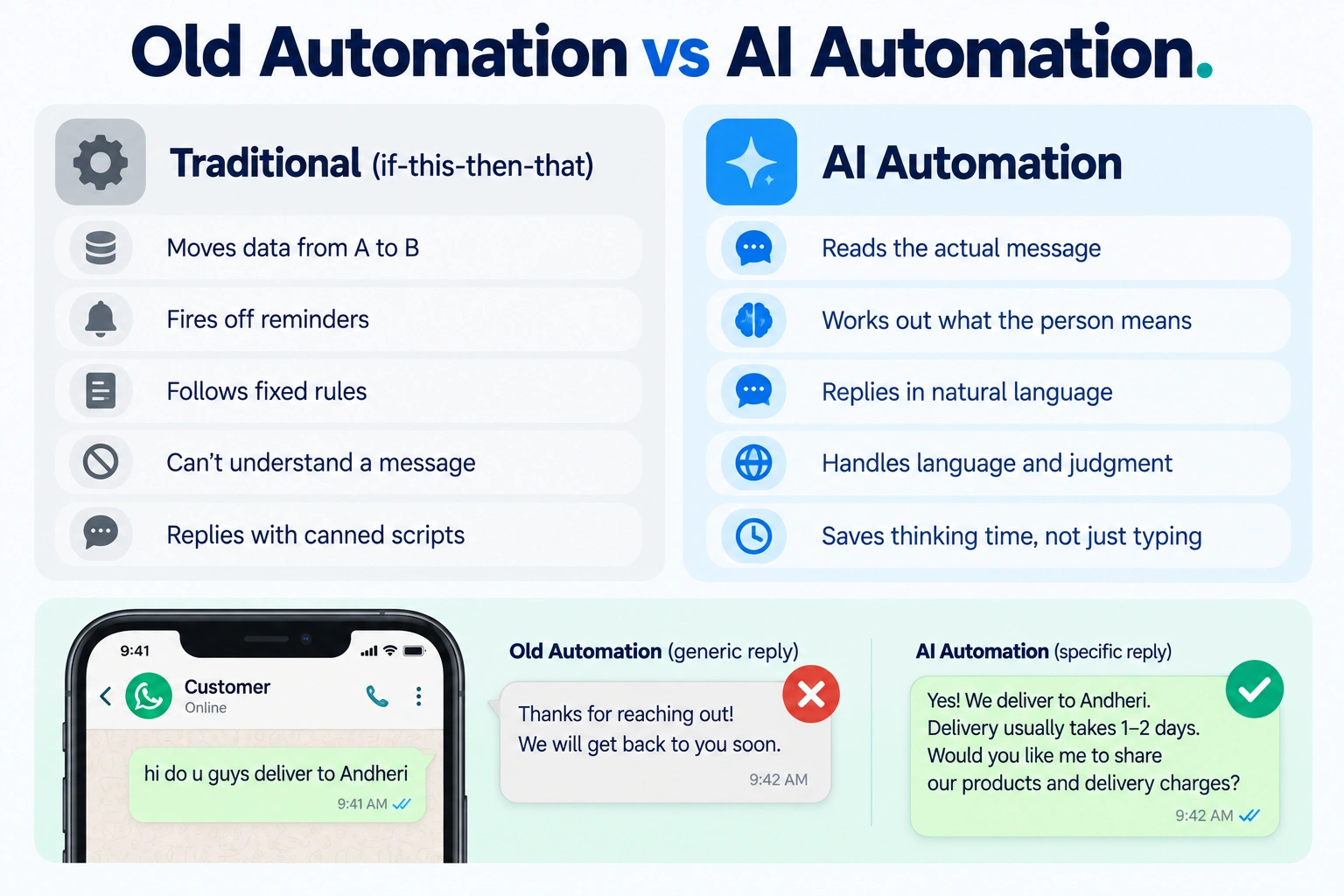
Strip the buzzword away and it’s a pretty simple idea. Something happens, a form gets filled, an invoice date passes, a lead replies, and a system does a task on its own, using AI for the bits that need actual judgment or language rather than a fixed if-then rule. Old-school automation could shuffle data from A to B just fine. What it couldn’t do was read a message and figure out what someone actually meant by it.
That’s the difference with AI workflow automation now, it can read the message, work out the intent, and reply in a way that doesn’t sound like a robot reading off a card. That part’s what actually saves you thinking time, not just typing time.
Most of this runs on a handful of tools stitched together. Something to connect your apps, usually Zapier or Pabbly Connect. A model to write or summarize things, ChatGPT does that job well enough. And whatever actually runs your day, your CRM, your accounting software, your WhatsApp Business number. You’re almost never buying one tool here, you’re wiring a few together so they talk to each other without you standing in the middle relaying messages back and forth like some kind of human API.
Five years ago “if this happens, then do that” could move a file around or fire off a reminder. It had zero idea what a message actually said though, and it definitely couldn’t reply like a person would. The AI layer is what lets a system read something like “hi do u guys deliver to Andheri” and actually answer that specific question, instead of firing back a canned reply that ignores what was asked. That’s the part worth paying attention to before you decide what to build first.
Sales
Leads slip through cracks constantly, and it’s rarely anyone’s fault exactly. It’s just what happens when the same data lives in five places at once and nobody’s actual job is to reconcile it.
Website form, Instagram DM, WhatsApp message, doesn’t matter where the lead comes from, it should show up in Zoho CRM or HubSpot the moment it happens. Not get typed in three days later when someone finally remembers. Zapier or Pabbly Connect does the actual wiring here.
Then there’s routing. Get leads sent to the right salesperson automatically, by territory, product line, deal size, whatever your team actually splits work by. Zoho CRM’s workflow rules handle this from the Professional plan up, so leads stop sitting untouched in a shared inbox because nobody happened to check it that morning.
Marketing
A mass email nobody opens isn’t marketing anymore. Honestly, it’s just noise sitting in a spam folder somewhere. Run promotions through WhatsApp instead, open rates there are genuinely far higher. Interakt handles this well, starting around ₹999 to ₹3,499 a quarter, plus Meta’s own per-message charge stacked on top of that base.
And nobody should be staring at a blank screen writing the fifth Diwali sale caption of the week either, that’s just a waste of a Tuesday afternoon. Hand ChatGPT your product details and a couple of past posts, let it draft five variations, edit the best one down. Won’t nail your brand voice first try, not even close some days. But it kills the blank-page problem, which is honestly half the actual battle.
Lead Qualification
Not every enquiry deserves the same speed of follow-up, even though most teams treat them like it does.
Zoho CRM’s Zia AI assistant, from Enterprise at ₹2,400 a user monthly, scores incoming leads against past conversion patterns. So your team’s time goes toward the leads actually likely to close, not every single form fill treated as equally urgent, which frankly most of them aren’t.
Worth asking too, does someone on your team really need to ask “what’s your budget” fifty times a week? A simple chatbot flow on WhatsApp or your website can ask that before a human ever joins the chat. Most WhatsApp Business platforms, Interakt included, build this in as a flow builder rather than something you buy separately.
Pricing, delivery timelines, return policy, these questions repeat endlessly and someone’s rewriting the same answer over and over instead of just letting a template handle it. Set up drafts ChatGPT generates automatically off the incoming question, you review, you hit send.
A lead going quiet after your first email shouldn’t just fall off a cliff, but it also shouldn’t get an awkward “just checking in!” after they’ve already said yes and someone on your team missed it. HubSpot or Zoho CRM’s Campaigns nudge at day 3, then day 7, then stop the second there’s an actual reply.
Support
Freshdesk reads an incoming email, tags it by category, billing, delivery, product issue, and routes it to the right person without anyone sorting a queue by hand. Growth plan and up, $19 per agent monthly on annual billing, gets you this much at least.
Then there’s Freddy, Freshdesk’s AI copilot, drafts a reply based on your knowledge base and past tickets and your agent edits it instead of starting cold each time. Costs extra on top of your base plan. Worth it once ticket volumes past a trickle, not really worth it before that honestly.
CRM
Client signs, client pays, the deal stage in your CRM should move on its own, nobody should have to remember to click it three days later. Standard workflow stuff inside Zoho CRM, or wired through Zapier if your CRM and invoicing tool happen to live on different platforms entirely.
Two team members adding the same client twice happens more than anyone likes to admit, it’s just what happens with more than one person entering data. Zoho CRM and HubSpot both flag likely duplicates and can auto-merge based on rules you set, so the database doesn’t quietly rot over a year of entry from three people who never checked first.
Meetings
Otter.ai or Fireflies.ai joins the call, transcribes it, pulls out what needs to happen next. Nobody’s half-listening while also trying to scribble notes anymore, which if you’ve ever tried doing both at once, you know how badly that usually goes. Otter starts around $8.33 a month annually, Fireflies at $10, both have a free tier worth trying before you commit to either one.

Proposals
Instead of building a fresh document from scratch every single time, pull the client’s name, deal size, and product details straight out of your CRM into a template. Send it for e-signature through Zoho Sign, which starts around ₹750 a user monthly in India, noticeably cheaper than DocuSign for basically the same core job.
Invoices
Nobody should be manually typing line items into a template at 9pm because a sale closed at 6pm. Zoho Books generates a GST-compliant invoice automatically the moment a deal closes, free under ₹25 lakh turnover, then from ₹899 a month once you need bank feeds and recurring billing on top of that.
Chasing overdue invoices is nobody’s favorite part of the job, doesn’t need to be a person’s job at all actually. Zoho Books can send reminders on a schedule, three days before due, on the due date, a week after, so you’re never the one typing “just following up on this” ever again.
Reporting
Instead of manually pulling numbers from five different tools every Monday morning, connect sales, support, and finance data into one dashboard that updates itself while you’re doing literally anything else. Zoho Analytics does this across the Zoho ecosystem, and Zapier or Pabbly can pull in whatever lives outside it.
HR
Offer letter, ID creation, laptop request, induction schedule, none of that needs a human remembering every single step for every single new joiner. A workflow in Zoho People, or honestly even a basic Zapier sequence, triggers each task the moment HR marks someone as hired.
And here’s a small one that saves more friction than it sounds like it would: standard, policy-compliant leave requests, within balance, not during a blackout period, shouldn’t need a manager clicking yes on something that was never actually in doubt to begin with.
Recruitment
Zoho Recruit‘s Zia candidate matching, from the Professional plan around $50 a recruiter monthly, scores applications against the job description. Your team reviews a shortlist instead of every single resume that lands in the inbox, which, if you’ve hired before, you know can be a lot.
Once someone’s shortlisted, Calendly, from $10 a seat monthly on annual billing, lets them pick a slot straight off your calendar. Cuts out the five-email back-and-forth that somehow always happens just to land on a time that works for everyone involved, every single time.
Social Media
Write your week’s content once, schedule it across Instagram, Facebook, and LinkedIn through Zoho Social, from $15 a month, instead of logging into each app separately, every single day, like it’s still 2016.
Not every comment on a post needs a reply. The ones asking about price or availability do though, and they get buried under emoji spam fast, which is annoying because those are usually the ones closest to actually buying. Tools with AI comment filtering surface just the ones that actually need a human answer.
Ecommerce
Someone adds items to a cart and vanishes. That’s not necessarily the end of the story if an automated WhatsApp or email nudge goes out an hour later, it happens more than you’d think. Interakt’s Shopify integration does exactly this for WhatsApp recovery specifically, and it genuinely claws back a meaningful chunk of carts that would’ve just disappeared otherwise.
Confirmed, shipped, out for delivery, delivered, each stage can trigger an automatic WhatsApp or SMS update pulled straight from your order system. So support isn’t answering “where’s my order” all day for information the system already had the whole time anyway.
The 25 Ideas at a Glance
Skimming this on your phone during lunch? Here’s the whole thing in one place, no scrolling back up required.
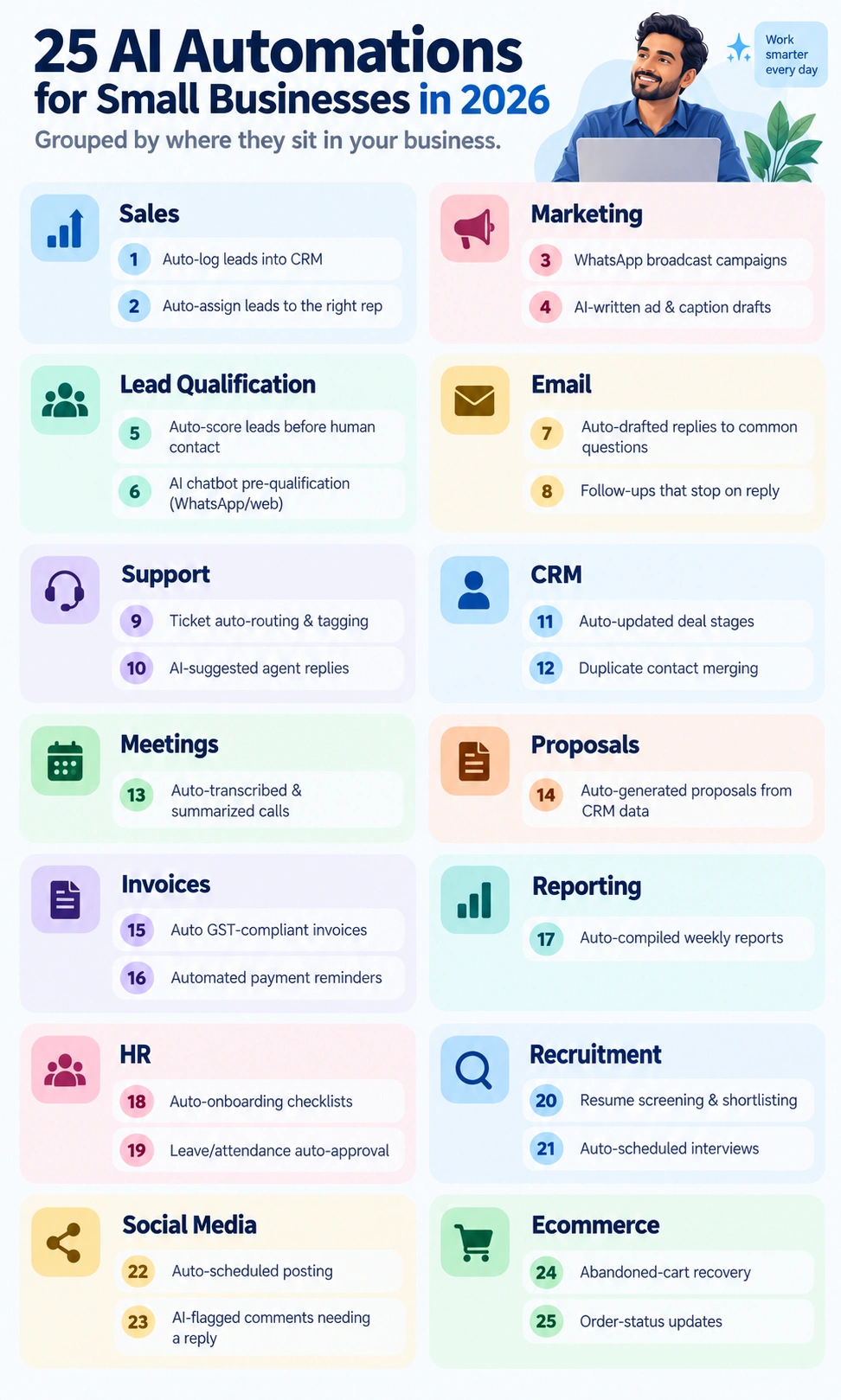
- Auto-log leads into your CRM
- Auto-assign leads to the right salesperson
- WhatsApp broadcast campaigns
- AI-written first drafts for ads and captions
- Auto-score leads before a human touches them
- AI chatbot pre-qualification on WhatsApp or web
- Auto-drafted replies to common questions
- Follow-up email sequences that stop on reply
- Support ticket auto-routing and tagging
- AI-suggested replies for support agents
- Auto-updated CRM deal stages
- Duplicate contact merging
- Auto-transcribed and summarized client calls
- Auto-generated proposals from CRM data
- Auto-generated GST-compliant invoices
- Automated payment reminders
- Auto-compiled weekly business reports
- Auto-onboarding checklists for new hires
- Leave and attendance auto-approval
- Resume screening and shortlisting
- Auto-scheduled interviews
- Auto-scheduled social posting
- AI-flagged comments needing a response
- Abandoned cart recovery
- Order status updates without a human typing them
Not all 25, not even close. Pick the five that map to your actual bottlenecks and start there, the rest can wait its turn.
What Not to Automate
A few things on this list don’t belong in every business. A handful don’t belong on any automation list at all, honestly, no matter how tempting the time savings look on paper. Skip automating anything where the entire value is a human paying attention, a big client’s first complaint, a sensitive HR conversation, a price negotiation where reading the room matters more than following a script ever could. Get the moment wrong and it doesn’t just look lazy from the outside, it actually costs you the trust you were trying to build in the first place.
Decent rule of thumb: automate what’s repetitive and predictable, keep a human wherever getting it wrong would genuinely hurt somebody. Simple as that, mostly.
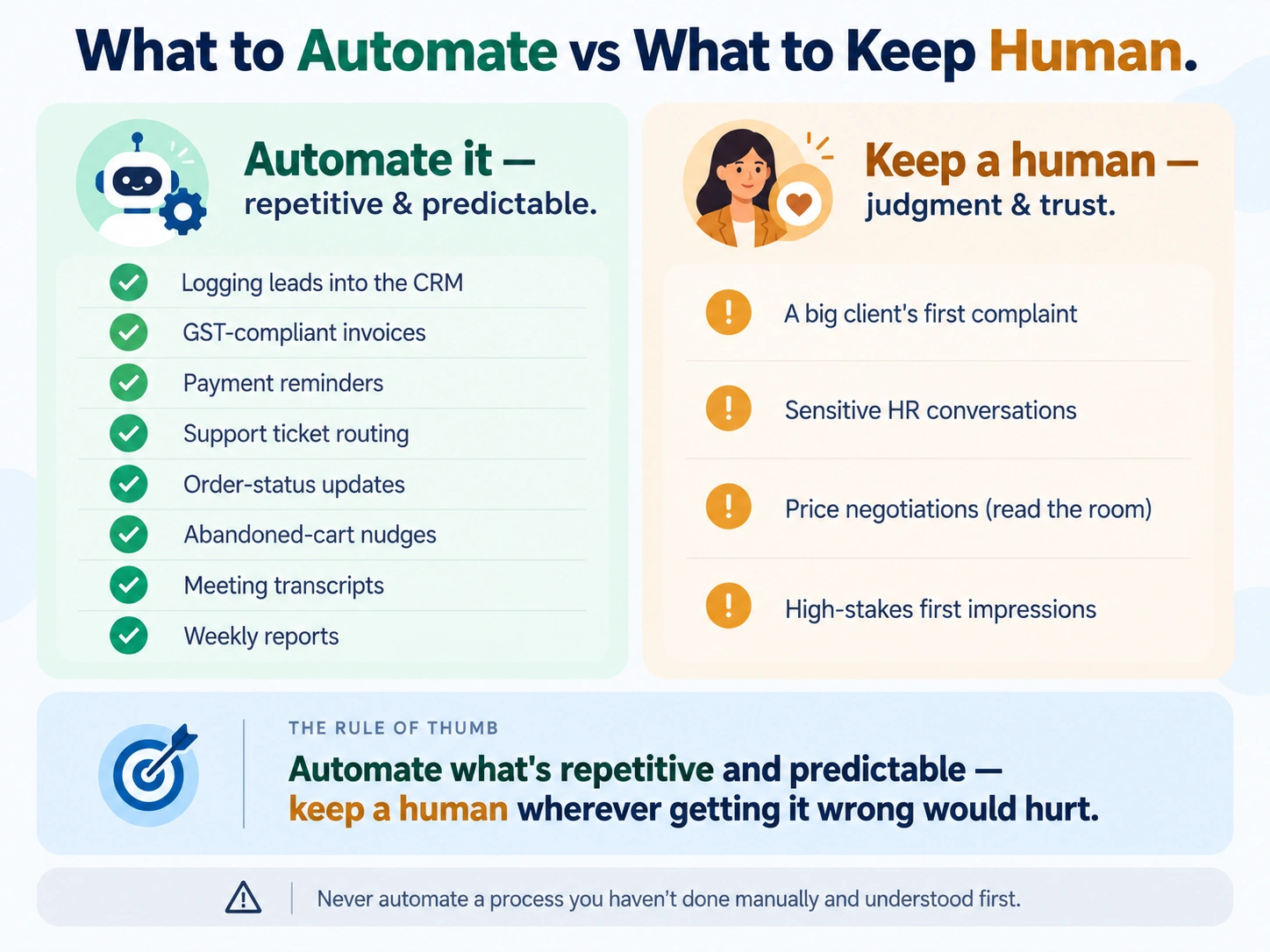
One more thing worth saying plainly. Don’t automate something you haven’t done manually and actually understood first. Can’t explain your own follow-up process clearly enough to teach a new hire? Then you’re not ready to hand it to a bot either, you’ll just end up automating confusion faster and calling it progress.
A Rough Roadmap
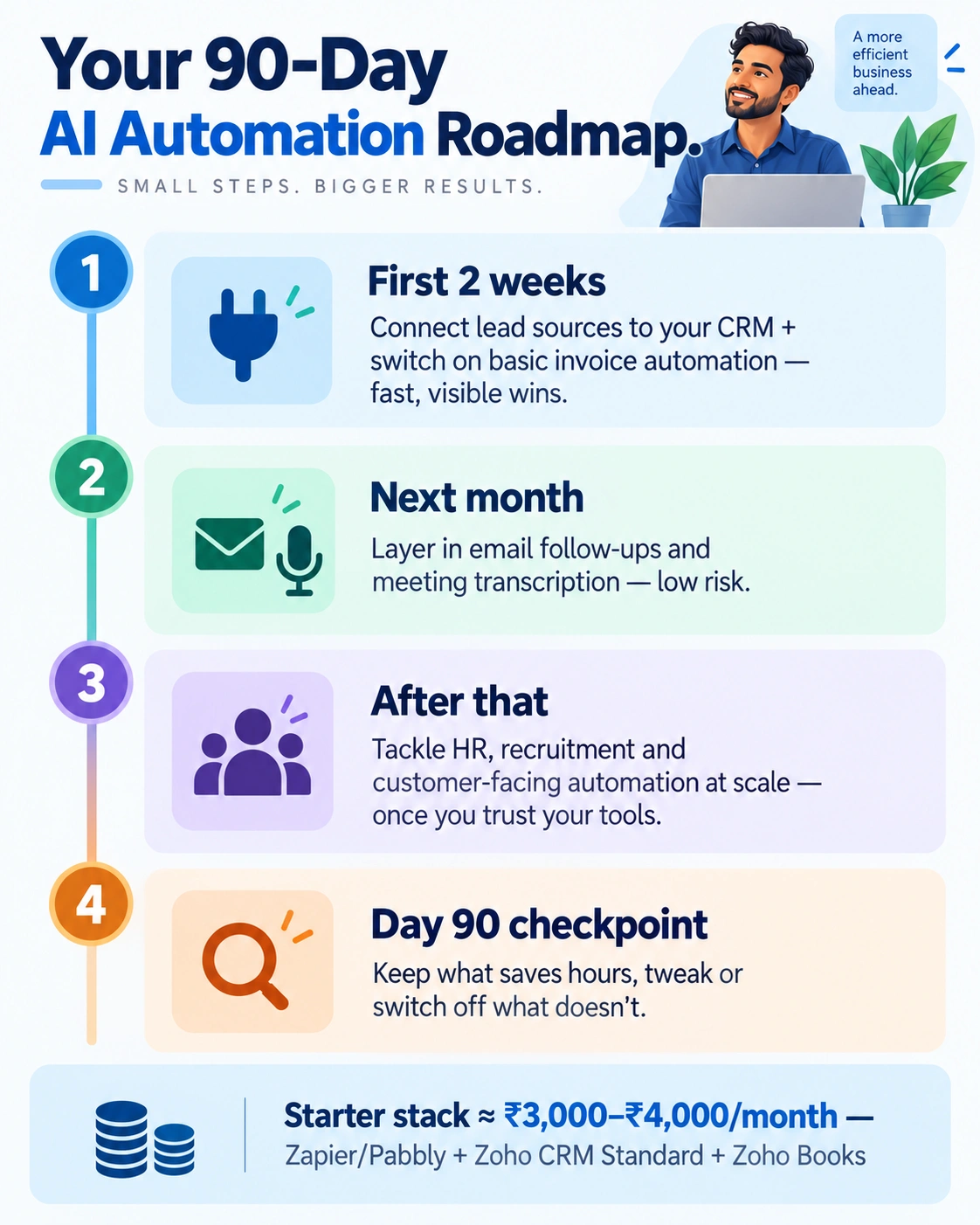
Don’t try to set up all 25 of these in one month, you’ll break more than you fix and probably annoy a client or two along the way. Start with whatever’s actually eating the most time right now, usually lead capture or invoicing, get that one thing running clean before touching the next.
First two weeks: connect your lead sources to your CRM, get basic invoice automation live. Both tend to pay off fast and visibly, which matters when you’re trying to convince yourself, or a partner, this whole thing is worth the setup time it takes.
Over the month after that, layer in email follow-ups and meeting transcription. Neither carries much risk if something goes slightly sideways at first. Save HR, recruitment, and anything customer-facing at real scale for last, once you actually trust the tools you’ve already got running and know exactly where they tend to slip up.
Check back in after 90 days. Some of what you built will genuinely save hours every week. Some of it will need tweaking, or honestly, switching off entirely because it caused more mess than it solved, and that’s fine, that’s normal even. It doesn’t mean small business automation was the wrong call, just that the first version wasn’t quite right, which is true of almost everything built for the first time, software or otherwise.
On budget: most of this is cheap relative to what it actually saves you. A basic starter setup, Zapier or Pabbly for connections, Zoho CRM Standard for leads, Zoho Books for invoicing, runs under ₹3,000 to ₹4,000 a month combined. Less than a single junior hire’s daily wage, for work that would otherwise eat a chunk of somebody’s actual day, every single day, forever.
The goal was never to automate everything on this list. It’s really just AI productivity in the most literal sense there is, freeing up your own time, or your team’s, for work that never needed a human doing it to begin with. Get even five of these 25 right and you’ll feel the difference inside a month. No exaggeration needed here.

Praveen Kumar Panjiar is the founder of CompareBizTech.com, where he cuts through the noise in B2B tools with sharp, no-fluff comparisons. His work focuses on breaking down features, pricing, and real-world use cases, built specifically for high-intent buyers evaluating tools and looking to choose the right solution, fast.