

A CV can contain relevant experience yet make it difficult for a reader to find it. Reviewing its structure, wording and relevance before applying can help you present that experience more clearly.
FreeCVAudit.com offers a free automated CV review, an optional AI rewrite and a separate job-description matching workflow. This guide explains how to use them and how to interpret the feedback responsibly.
1. Upload your CV for a free audit
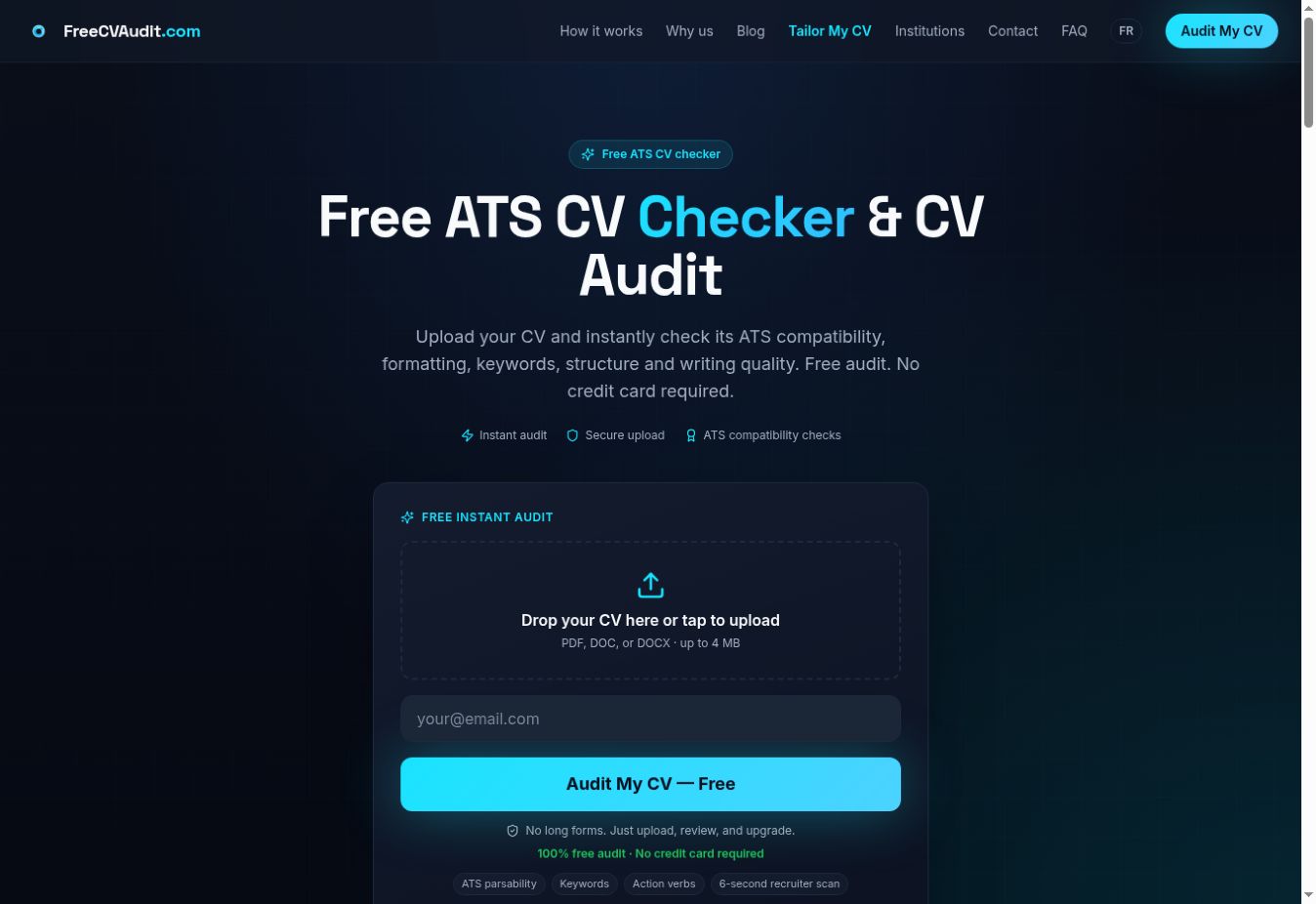
Open freecvaudit.com, select the upload area and choose your CV. The form accepts PDF, DOC and DOCX files up to 4 MB. Enter your email address, then select “Audit My CV — Free”. You do not need to create an account or enter payment details to run the audit.
Use a text-based document where possible. For a PDF, try selecting and copying a sentence before uploading. If it is only a scanned image, the free audit may be unable to extract the text.
Figure 1. The live upload form, including the file limit and email field.
2. Read the audit results and understand the score
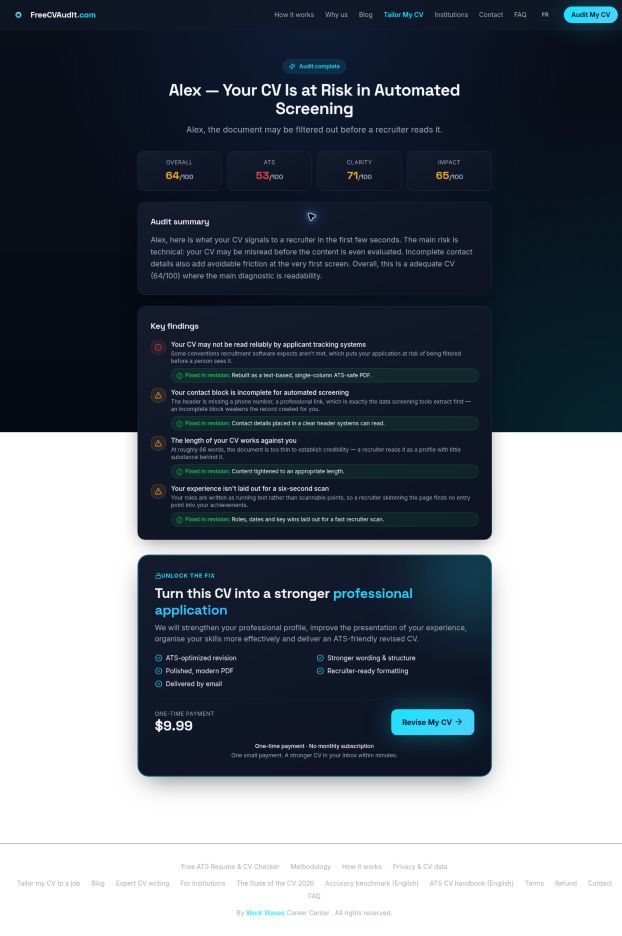
After processing, review the score cards, audit summary and key findings. In the fictional example below, the live interface displays Overall, ATS, Clarity and Impact scores. It also highlights contact information, length and presentation issues. Your results will depend on the uploaded document.
Figure 2. Actual audit output generated from a fictional demonstration CV. The risk wording is an automated indication, not evidence of an employer rejection.
Start with a finding you can verify against your document. If contact information is flagged, check whether the correct details are present and extractable. If the assessment appears wrong, inspect the original file rather than changing accurate information just to raise a score.
3. Understand what the ATS compatibility analysis checks
According to the published methodology, the free audit extracts document text and applies fixed rules. Signals include identifiable contact details, recognised headings, unusual characters, word count, bullets, numerical evidence, action verbs, generic phrasing, repetition and long paragraphs. This is separate from the generative AI used for paid rewriting.
The methodology describes four underlying dimensions: ATS compatibility, professional impact, content strength and structure. It assigns weights of 30%, 30%, 25% and 15%, respectively, with fixed deductions for detected issues. These methodological terms differ from the shorter labels shown in the current result screen.
The audit does not run your CV through a specific employer’s ATS or access that employer’s screening criteria. Its score is guidance, not a probability of success. It does not guarantee interviews, employment or compatibility with every ATS.
4. Improve structure, wording and readability
Turn the findings into a short editing checklist. First check essential facts and headings. Then improve the experience section, making each bullet easy to understand without removing useful context.
- Use familiar headings such as Experience, Education and Skills. Keep roles and dates easy to locate.
- Replace vague responsibilities with specific actions. “Responsible for newsletters” could become “Produced a weekly email newsletter for 2,000 subscribers”, if that is true.
- Break dense paragraphs into focused bullets. Remove repeated claims and explain what you actually did.
- Add evidence where available: project scale, workload, time saved or results. Never invent figures to satisfy a scoring rule.
- Review spelling, layout and reading order yourself. An automated text check is not a complete visual review of every font, table or design element.
Keep a copy of the original CV so you can compare changes. A higher score should support a clearer, more accurate document; it should not become the purpose of the CV.
5. Use the optional AI-powered CV rewrite
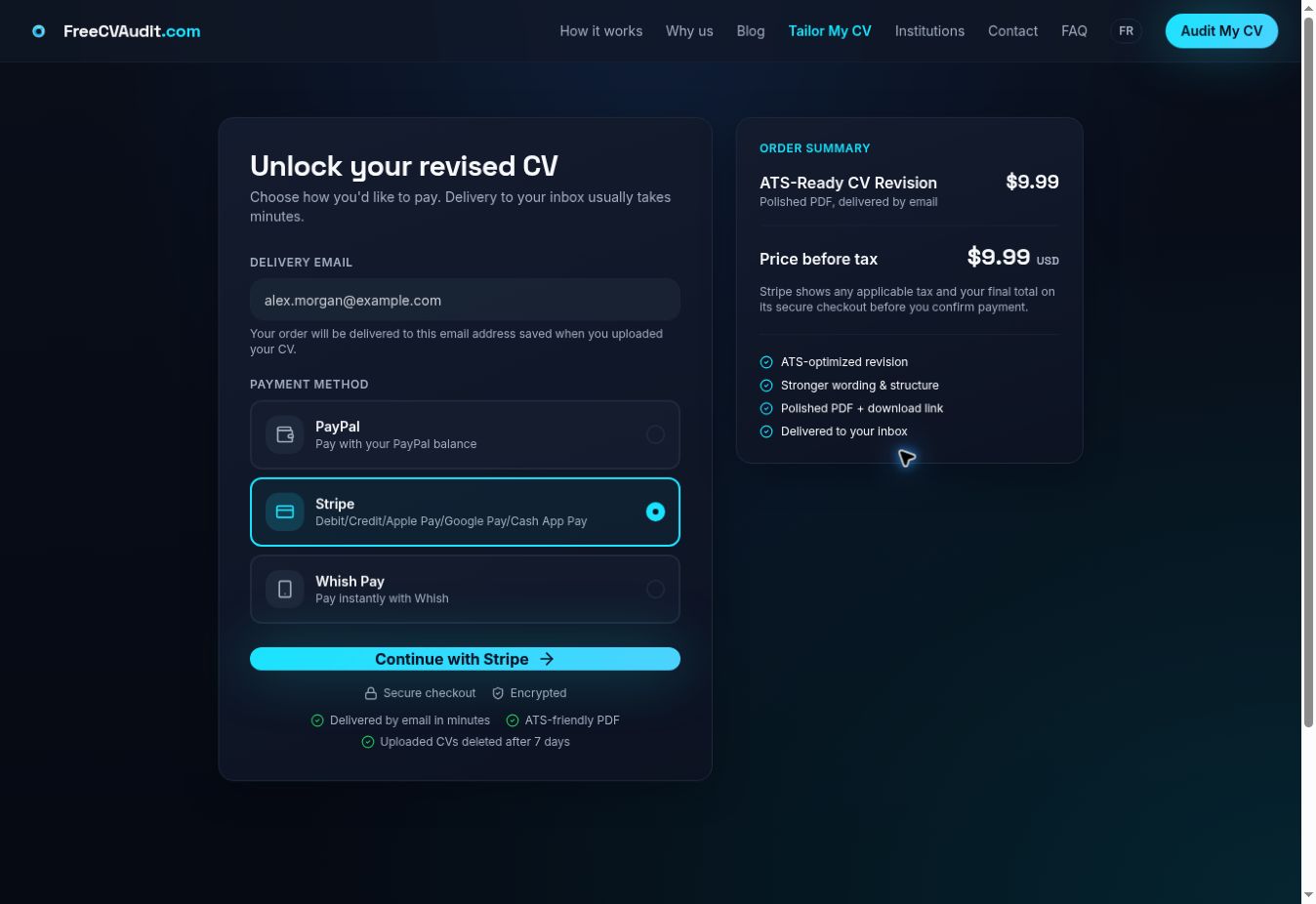
If you want the platform to revise the document, select “Revise My CV” from the audit result. The checkout shows the delivery email, available payment methods and an order summary. Check the address before continuing.
The English workflow lists a one-time $9.99 revision, with no monthly subscription. The checkout labels this as the price before tax; review the final total before paying. Payment choices shown during this walkthrough included PayPal, Stripe and Whish Pay. Availability can vary.
Figure 3. The live optional rewrite checkout. The email belongs to the fictional demonstration; no purchase was completed.
After successful payment, the AI-generated revision is delivered as a PDF by email. The published workflow also describes a download link on the success page. Delivery is usually described as taking minutes, rather than a guaranteed deadline.
Before applying, compare the rewritten document with your original. Check names, dates, titles, qualifications and achievements. Refine any wording that overstates your experience. AI-assisted editing still needs your final review.
6. Tailor a CV to a specific job description
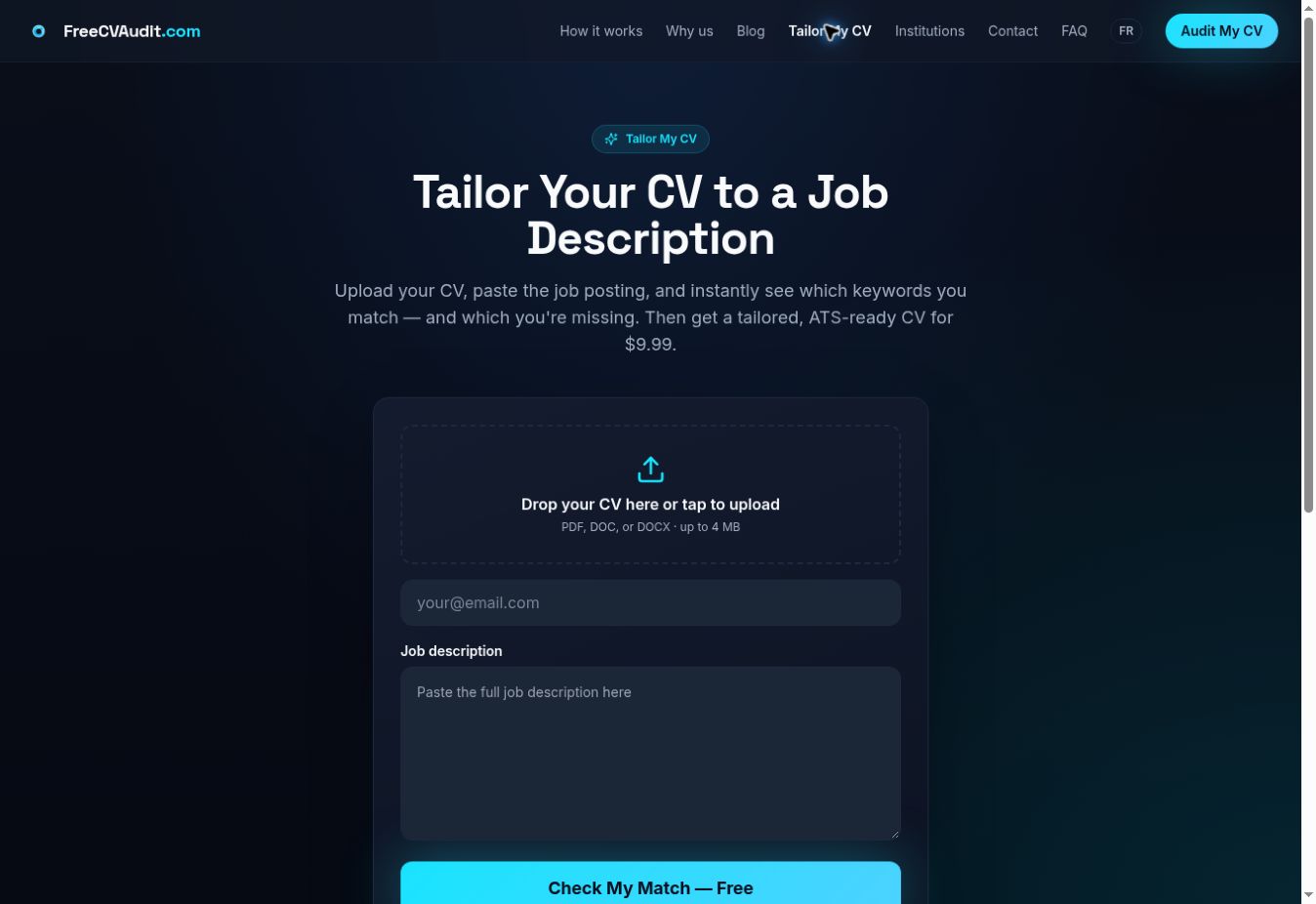
A general audit reviews the document itself. To compare it with an actual vacancy, choose “Tailor My CV” in the navigation, which opens https://freecvaudit.com/tailor-cv.
- Upload your CV and enter your email address.
- Paste the full job description into the dedicated field, including responsibilities and requirements.
- Select “Check My Match — Free” to review matched and missing keywords.
- Compare any missing terms with your real experience. Add relevant evidence only when you have it.
- If you choose the paid option, the page advertises a tailored CV for $9.99. Review the order details before purchasing.
Figure 4. The actual Tailor My CV form, with separate CV upload and job-description fields.
For example, if a marketing vacancy asks for email campaigns, reporting and stakeholder coordination, bring your relevant work forward. A missing keyword does not automatically mean you lack a skill, and matching words do not prove that you meet the employer’s requirements. Read the vacancy as a whole.
7. Choose English or French
The platform provides English and French interfaces. Use the language switch in the navigation, or open https://freecvaudit.com/fr/ for French. The French upload form also accepts PDF, DOC and DOCX files up to 4 MB.
The English rewrite journey is intended to produce an English CV, while the French journey is intended to produce a French CV, including when the uploaded document starts in another language. Choose the intended output language before ordering and check translated job titles and qualifications carefully.
Pricing labels currently vary: the French homepage advertises 9,99 €, while the checkout observed in this walkthrough displayed $9.99 USD. Check the currency and final total shown at checkout before paying.
8. Apply the feedback to your career stage
- Students: make coursework, projects, volunteering and relevant skills easy to identify.
- Fresh graduates: use internships and academic projects to show what you contributed, without presenting them as full-time employment.
- Experienced professionals: prioritise relevant accomplishments and scope of responsibility, while keeping dates and progression clear.
- Career changers: explain transferable experience using the language of the target role, supported by examples.
Use the audit as one review step before applying. Combine its findings with an honest comparison against the vacancy, a manual proofread and the employer’s file-format instructions.
Frequently Asked Questions
Is FreeCVAudit really free?
Yes, the CV audit is free. You don’t need an account or payment details. You upload your CV, enter your email and get your results. The AI rewrite and the tailored CV are optional paid extras.
What file types can I upload?
PDF, DOC and DOCX, up to 4 MB. Try to use a text-based file. If your PDF is only a scanned image, the audit may not be able to read the text. A quick test is to try selecting and copying a sentence from it.
What does the audit score actually measure?
The free audit reads your CV’s text and applies fixed rules. It looks at things like contact details, section headings, length, bullets, numbers, action verbs, generic phrasing and long paragraphs. Your results show Overall, ATS, Clarity and Impact scores, plus key findings.
Does the ATS score mean employers will reject or accept my CV?
No. The audit doesn’t run your CV through any employer’s real ATS (applicant tracking system), and it can’t see their screening rules. Treat the score as guidance for spotting problems, not as a prediction of interviews or job offers.
How much does the AI CV rewrite cost?
It’s a one-time $9.99 with no monthly subscription. The checkout shows this as the price before tax, so check the final total before you pay. The payment options shown during our walkthrough were PayPal, Stripe and Whish Pay, but availability can vary.
How and when do I get the rewritten CV?
After payment, the revised CV arrives by email as a PDF. The published workflow also mentions a download link on the success page. Delivery usually takes minutes, but there’s no guaranteed time, so check the email address at checkout.
Can I tailor my CV to a specific job?
Yes. Open “Tailor My CV”, upload your CV, paste the full job description and select “Check My Match — Free”. You’ll see matched and missing keywords. A tailored CV is also offered as a paid option at $9.99. A missing keyword doesn’t mean you lack the skill, and a match doesn’t prove you meet the requirements, so read the whole job ad too.
Does FreeCVAudit work in French?
Yes. There’s a French version at freecvaudit.com/fr/ with the same upload limits. The English journey is designed to produce an English CV and the French one a French CV. Check translated job titles and qualifications carefully, and confirm the currency at checkout, since the French homepage shows 9,99 € while the checkout we tested showed $9.99 USD.
What happens to my CV after I upload it?
The checkout page says uploaded CVs are deleted after 7 days. Please confirm this against your privacy policy before publishing this answer, because it comes from a screenshot and not from the article text.

Mnawar Mohammed is the founder of Work Waves and FreeCVAudit.com, a career consultant and a generative AI specialist. His work combines career support, communication and practical AI tools for job seekers. He is writing about a platform he owns.