

The shift toward distributed work and AI-assisted productivity has created demand for specialized software that bridges traditional project management with modern automation needs. Teams building content at scale, managing developer workflows, or coordinating across time zones now require tools that integrate AI capabilities without disrupting established processes.
This analysis examines fourteen platforms designed for specific pain points in remote collaboration, creative production, and technical operations. Each tool addresses distinct workflow challenges—from live stream translation to AI agent authentication—that standard productivity suites don’t adequately solve. The focus remains on practical application rather than feature comparison, with emphasis on implementation scenarios that justify adoption costs.
Readers will find detailed breakdowns of each platform’s core function, ideal user profiles, and integration points within existing workflows. The goal is to provide decision-making frameworks for teams evaluating whether niche tools deliver measurable improvements over general-purpose alternatives.
SuperX: Social Media Growth Infrastructure for X Platform
SuperX functions as an analytics and automation layer built specifically for content creators using X (formerly Twitter). The platform combines audience growth tracking, engagement pattern analysis, and scheduling capabilities into a unified dashboard designed to reduce manual effort in profile management.
Primary use cases center on creators managing multiple accounts, tracking follower acquisition rates, and identifying optimal posting windows based on historical engagement data. The tool aggregates metrics that X’s native analytics present separately, allowing users to spot content performance trends without switching between interface panels.
Mid-tier creators with 5,000–50,000 followers benefit most from the consolidated view of growth metrics and competitor analysis features. Teams managing brand accounts gain efficiency through bulk scheduling and performance comparison across campaign periods.
The platform integrates with existing X workflows by operating as a browser extension, maintaining access to native posting features while adding data layers for decision-making. Users continue creating content through familiar interfaces but gain visibility into engagement velocity and follower demographic shifts that inform content strategy adjustments.
Key Takeaways:
- Consolidates X analytics into single-view dashboards for faster pattern recognition
- Reduces time spent on manual scheduling through bulk queue management
- Tracks competitor growth metrics to inform content strategy adjustments
- Works as browser extension to preserve native X posting workflows
- Delivers value primarily for accounts with established followings above 5,000
Unicorne: Startup Growth Monitoring Through Revenue Signals
Unicorne provides real-time tracking of emerging startups by monitoring TrustMRR data to identify companies experiencing rapid revenue growth. The platform serves market researchers, investors, and competitive intelligence teams who need early signals about market movement before mainstream coverage occurs.
The tool aggregates payment processing data from connected SaaS platforms to calculate month-over-month revenue growth rates. This approach surfaces companies gaining traction in specific verticals weeks or months before traditional startup databases reflect the momentum.
Venture capital analysts and corporate development teams use Unicorne to build outreach lists for partnerships or acquisitions. Product teams at established SaaS companies monitor the platform to identify emerging competitors entering their market segment with differentiated approaches.
Integration occurs through API access to growth data, allowing teams to pipe startup tracking information into existing CRM systems or market intelligence dashboards. The platform functions as a data source rather than a standalone workflow tool, requiring downstream systems to act on the signals it provides.
Key Takeaways:
- Identifies high-growth startups through payment data before public announcements surface
- Supports investor deal flow screening with quantitative revenue growth metrics
- Enables competitive intelligence teams to spot emerging market entrants early
- Functions primarily as API data source for integration into existing systems
- Most valuable for users with established processes for acting on growth signals
Umbrel Pro: Self-Hosted Cloud Storage with Privacy Controls
Umbrel Pro delivers a 16TB network-attached storage system designed for users who want cloud-like file access without relying on third-party data hosting. The hardware device runs open-source software that enables remote file access, application hosting, and backup automation while keeping data on premises.
Core applications include centralized media storage for home networks, development environment hosting for programmers testing applications, and private cloud storage for teams with strict data residency requirements. The system supports Docker containers, allowing technically proficient users to run custom applications alongside built-in file management tools.
Privacy-conscious professionals and small technical teams benefit most from the control over data location and access permissions. Developers use the platform to host personal projects, run local AI models, or maintain backup copies of critical codebases without cloud service dependencies.
Workflow integration happens through WebDAV and SMB protocols that make the device accessible as a network drive on any connected computer. Mobile apps provide remote file access similar to Dropbox or Google Drive, but with encryption keys controlled by the device owner rather than a cloud provider.
Key Takeaways:
- Provides 16TB local storage with cloud-style remote access through encrypted connections
- Supports Docker containers for hosting custom applications alongside file management
- Appeals to users prioritizing data sovereignty over third-party cloud convenience
- Requires network configuration knowledge for optimal security and remote access setup
- Best suited for technical users comfortable managing their own infrastructure
Rivva: Energy-Based Calendar Scheduling with AI Optimization
Rivva approaches task scheduling by analyzing user energy patterns throughout the day and suggesting optimal time blocks for different work types. The platform uses AI to learn when individuals perform focused work most effectively versus when they handle administrative tasks with less cognitive drain.
Primary use cases involve knowledge workers managing varied task types who struggle with traditional time-blocking methods. The system suggests moving deep work sessions to morning hours for users who report higher concentration then, while batching meetings during afternoon energy dips.
Professionals with autonomy over their schedules—consultants, researchers, freelancers—gain the most utility from energy-aligned planning. The tool proves less useful for roles with externally imposed schedules or shift work patterns that don’t align with personal energy fluctuations.
Integration occurs through calendar sync with Google Calendar or Outlook, where Rivva analyzes existing meeting patterns and suggests rearrangements. Users maintain their current calendar platforms while receiving recommendations for optimizing task placement based on accumulated energy data.
Key Takeaways:
- Schedules tasks based on learned energy patterns rather than fixed time blocks
- Reduces decision fatigue around when to tackle different work types
- Requires several weeks of data collection to generate accurate recommendations
- Most effective for users with flexible schedules and varied task types
- Works as overlay on existing calendars rather than replacement system
Dropstone 3: Collaborative Code Editing with Multiplayer Features
Dropstone 3 enables multiple developers to edit the same codebase simultaneously with AI-assisted autocomplete and debugging suggestions. The platform combines real-time collaboration similar to Google Docs with development environment features like syntax highlighting and terminal access.
Teams use the tool for pair programming sessions, code review walkthroughs, and onboarding new developers who benefit from watching experienced team members work through problems in real time. The shared chat feature allows developers to discuss implementation decisions without switching to separate communication tools.
Distributed development teams with members across time zones benefit from the ability to collaborate synchronously when schedules align. The platform reduces context-switching by keeping code, conversation, and AI suggestions in a single interface rather than fragmenting workflow across editor, chat, and documentation tools.
Workflow integration happens through project imports from Git repositories, allowing teams to pull existing codebases into the collaborative environment. Changes sync back to version control systems, maintaining compatibility with standard development practices while adding multiplayer capabilities during active work sessions.
Key Takeaways:
- Enables real-time code collaboration similar to document editing in Google Docs
- Reduces tool switching by combining editor, chat, and AI assistance
- Most valuable during scheduled pair programming or debugging sessions
- Requires team coordination around simultaneous working hours to maximize value
- Integrates with existing Git workflows for version control compatibility
ClawdTalk: Phone Number Assignment for AI Voice Agents
ClawdTalk provides phone number provisioning for AI chatbots, allowing conversational agents to receive and place voice calls. The service bridges text-based AI systems with telephony infrastructure, enabling automated customer service, appointment scheduling, and information hotlines without human operators.
Primary applications include small businesses automating appointment confirmations, support teams handling common questions outside business hours, and service providers offering information lines that don’t require live staffing. The platform handles number assignment, call routing, and voice-to-text conversion that feeds into existing AI conversation systems.
Businesses with high volumes of repetitive phone inquiries benefit most from deploying voice-enabled AI agents. The technology proves most effective for structured conversations—appointment changes, order status checks, basic troubleshooting—rather than complex problem-solving requiring human judgment.
Integration requires connecting existing chatbot logic to ClawdTalk’s API, where the platform handles voice synthesis and call management. Teams with chatbots already deployed in text channels can extend those same conversation flows to phone interactions without rebuilding core logic.
Key Takeaways:
- Assigns phone numbers to AI agents for automated voice interactions
- Handles voice-to-text conversion and call routing infrastructure management
- Most effective for structured conversations with predictable question patterns
- Requires existing chatbot logic that can be adapted for voice interactions
- Reduces staffing needs for high-volume, low-complexity phone inquiries
DubStream by CAMB.AI: Real-Time Translation for Live Video Content
DubStream provides simultaneous translation of live video streams into 150+ languages, allowing content creators to reach global audiences without pre-recording multilingual versions. The platform processes audio in real time, generates translations, and outputs dubbed streams with minimal latency.
Use cases center on live events, educational webinars, and content creators streaming to international audiences. Event organizers use the tool to make conferences accessible without hiring simultaneous interpreters, while educators broadcasting lessons can serve students across language barriers without creating separate sessions.
Organizations hosting recurring live content with international viewership gain the most value from automated translation. One-time events may find the setup overhead less justified compared to traditional interpretation services, while frequent streamers amortize the integration effort across many broadcasts.
Technical integration involves connecting DubStream to existing streaming infrastructure through RTMP protocols. The platform processes the original audio feed, generates translated audio tracks, and outputs separate streams for each language that viewers select through the hosting platform’s language options.
Key Takeaways:
- Translates live streams into 150+ languages with minimal latency
- Eliminates need for pre-recording multilingual content versions or hiring interpreters
- Most cost-effective for organizations with recurring international live content
- Requires RTMP-compatible streaming setup for technical integration
- Quality varies by language pair and audio clarity of source material
OpenAI Frontier: Enterprise Platform for AI Agent Deployment
OpenAI Frontier provides infrastructure for businesses to deploy and manage multiple AI agents performing specialized tasks across different departments. The platform handles authentication, usage tracking, and coordination between agents working on interconnected processes.
Organizations use the system to deploy AI assistants for customer service, data analysis agents for finance teams, and content generation tools for marketing departments. The central management interface allows IT teams to control access permissions, monitor usage patterns, and ensure consistent behavior across different agent deployments.
Mid-sized to large enterprises with technical operations teams benefit most from centralized AI agent management. Smaller organizations may find standalone AI tools simpler to deploy, while enterprises gain efficiency from unified governance and cross-functional agent coordination.
Integration occurs through API connections to existing business systems, where agents pull data from CRM platforms, accounting software, or content management systems. The platform acts as orchestration layer rather than replacing existing tools, adding AI capabilities to workflows while preserving established data systems.
Key Takeaways:
- Manages multiple AI agents across different business functions from single platform
- Provides enterprise controls for usage monitoring and access permissions
- Most valuable for organizations deploying AI agents in 3+ departments
- Requires technical operations team for initial setup and ongoing management
- Serves as orchestration layer integrated with existing business systems
Apple Creator Studio: Integrated Design and Productivity Suite
Apple Creator Studio bundles professional-grade creative applications with productivity tools optimized for Apple hardware. The suite includes video editing, music production, graphic design, and document creation software designed to work seamlessly across Mac, iPad, and iPhone devices.
Creative professionals use the platform for end-to-end content production—shooting video on iPhone, editing on iPad during travel, and finalizing on Mac with full processing power. The unified file format and iCloud sync allow projects to move between devices without compatibility issues or manual transfers.
Individuals and small teams already invested in Apple hardware ecosystems benefit most from the integrated workflow. The value proposition diminishes for users working on mixed device environments or collaborating with teams using Windows-based software.
Workflow integration happens through native file formats that open across all included applications and devices. Projects sync automatically through iCloud, allowing users to start work on one device and continue on another without export steps or cloud upload delays.
Key Takeaways:
- Combines video editing, music production, and design tools in unified suite
- Optimizes performance for Apple Silicon processors across Mac, iPad, and iPhone
- Delivers most value for users fully committed to Apple hardware ecosystem
- Seamless file sync through iCloud reduces manual project transfer steps
- Less compatible with cross-platform teams using mixed device environments
Anima: Design-to-Code Automation with Brand Consistency
Anima converts design files from Figma or Adobe XD into production-ready code while maintaining brand style guidelines. The platform analyzes design systems to generate components that match established patterns, reducing inconsistencies between designer mockups and developer implementations.
Product teams use the tool to accelerate handoff between design and engineering, particularly for marketing pages and UI components that follow established design systems. The automation works best for components with defined patterns—navigation bars, form inputs, card layouts—rather than novel interface designs requiring custom development.
Organizations with mature design systems and frequent component creation benefit most from automated code generation. Startups still establishing design patterns may find manual coding more flexible, while established products gain efficiency from standardized component output.
Integration requires connecting Anima to design tools through plugins, then linking generated code to development repositories. Design teams continue working in familiar tools while developers receive code that matches specifications without manual translation from mockups.
Key Takeaways:
- Converts Figma and Adobe XD designs into production code automatically
- Maintains brand consistency by learning established design system patterns
- Most effective for organizations with mature design systems and component libraries
- Reduces designer-developer handoff time for standardized UI components
- Less useful for novel interfaces requiring custom development approaches
CRML: Declarative Language for Cybersecurity Risk Documentation
CRML provides a specialized programming language for defining cybersecurity risks as code, allowing security teams to version control threat models and automate risk assessments. The language enables teams to document security requirements in machine-readable format that integrates with compliance monitoring systems.
Security teams use CRML to codify threat models for different system components, track how security requirements change over time, and automatically flag when infrastructure changes introduce new risks. The code-based approach makes security documentation reviewable through standard development workflows like pull requests.
Organizations with complex compliance requirements and mature DevSecOps practices gain the most utility from declarative risk management. Smaller teams may find traditional documentation sufficient, while enterprises benefit from automating compliance checks across large infrastructure estates.
Integration happens through Git repositories where security teams maintain CRML files alongside application code. Automated systems parse the risk definitions to generate compliance reports or trigger alerts when monitored conditions match defined threat scenarios.
Key Takeaways:
- Defines cybersecurity risks using declarative programming language for version control
- Enables automated compliance checking when integrated with monitoring systems
- Most valuable for organizations with complex regulatory requirements
- Requires security teams comfortable with code-based documentation approaches
- Integrates with existing DevSecOps workflows through Git repositories
Agent Credit: Financial Infrastructure for AI Agent Transactions
Agent Credit provides credit lines specifically designed for AI agents making autonomous purchases or paying for services. The platform handles authentication, spending limits, and transaction monitoring for automated systems that need financial access without human approval for each transaction.
Use cases include AI agents purchasing cloud computing resources, automated trading systems accessing market data subscriptions, and research agents paying for API access to information sources. The credit system allows autonomous operation within defined parameters while maintaining visibility into spending patterns.
Organizations deploying AI agents that require real-time access to paid services benefit from autonomous payment capabilities. Manual approval processes create bottlenecks for time-sensitive agent actions, while Agent Credit maintains oversight through spending limits and transaction review.
Technical integration involves API connections where AI systems authenticate through Agent Credit before making purchases. The platform acts as financial intermediary, approving transactions within preset parameters and alerting administrators when spending patterns deviate from expected behavior.
Key Takeaways:
- Provides credit lines for AI agents making autonomous financial transactions
- Maintains spending controls through preset limits and anomaly detection
- Most useful for organizations running AI agents requiring real-time paid service access
- Reduces bottlenecks from manual approval processes for routine agent purchases
- Requires careful parameter setting to balance autonomy with financial oversight
Bezel: Wireless iPhone Screen Mirroring for Mac Devices
Bezel enables wireless screen sharing from iPhone to Mac without cables or third-party cloud services. The tool supports high-quality display mirroring for presentations, app demonstrations, and screen recording workflows that require showing mobile interfaces on larger displays.
Content creators use Bezel for recording iOS app tutorials, designers present mobile prototypes during client meetings, and developers demonstrate iPhone applications during video calls. The wireless connection eliminates cable management while maintaining low latency compared to cloud-based screen sharing solutions.
Professionals regularly demonstrating mobile applications to audiences viewing Mac screens benefit most from dedicated mirroring tools. Occasional users may find built-in QuickTime screen recording sufficient, while frequent presenters value the streamlined wireless connection process.
Integration occurs through local network connection between iPhone and Mac, with Bezel handling device discovery and stream optimization. The tool works alongside existing presentation software, providing a video source that can be captured in recording applications or displayed during screen shares.
Key Takeaways:
- Mirrors iPhone screens to Mac wirelessly without cables or cloud services
- Maintains low latency suitable for real-time demonstrations and presentations
- Most valuable for professionals regularly showcasing mobile applications
- Works over local network connection requiring both devices on same WiFi
- Integrates with screen recording and presentation software as video source
Afterpage: AI-Powered Document Organization and Retrieval
Afterpage uses AI to automatically organize documents by learning how users categorize and access files over time. The platform analyzes document content, usage patterns, and relationship between files to suggest folder structures and enable natural language search across stored materials.
Knowledge workers managing large document libraries use the tool to reduce time spent filing and searching for materials. Researchers benefit from AI-suggested connections between related papers, while consultants find documents through concept search rather than remembering exact filenames.
Professionals who accumulate hundreds of documents monthly gain the most value from automated organization. Users with small, stable file collections may find manual organization sufficient, while those dealing with information overload benefit from AI-assisted retrieval.
The platform integrates with existing cloud storage services like iCloud, automatically analyzing documents as they’re added and suggesting organizational improvements. Users continue saving files to familiar locations while gaining enhanced search capabilities and organizational recommendations.
Key Takeaways:
- Organizes documents automatically by learning user categorization patterns over time
- Enables natural language search across file contents rather than filename matching
- Most effective for users managing hundreds of new documents monthly
- Integrates with iCloud and existing storage platforms without migration
- Requires initial learning period before organization suggestions improve significantly
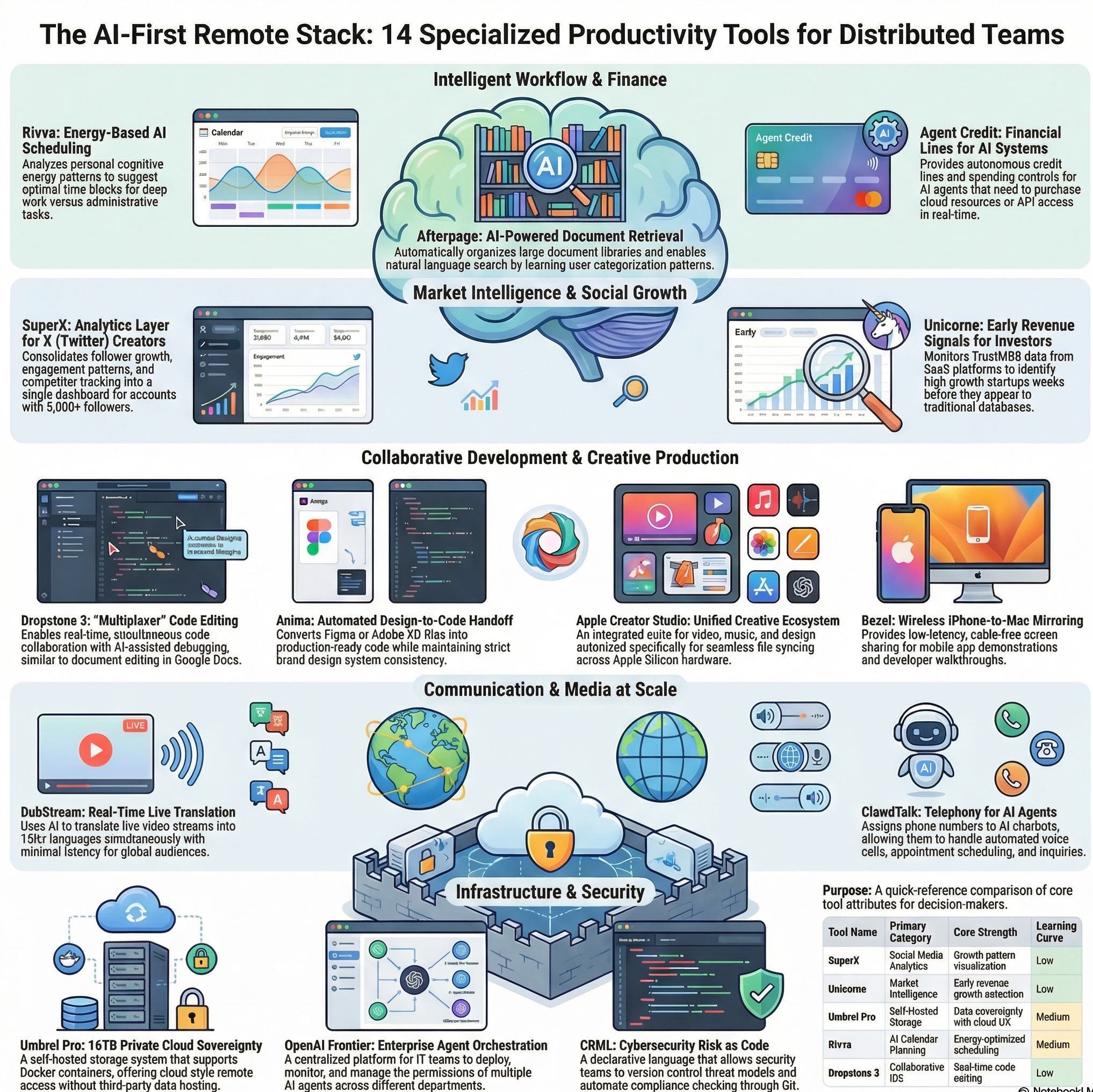
Tool Comparison Overview
| Tool Name | Primary Category | Ideal User Type | Core Strength | Learning Curve | Best Use Scenario |
| SuperX | Social Media Analytics | X creators with 5K+ followers | Growth pattern visualization | Low | Scaling content strategy based on engagement data |
| Unicorne | Market Intelligence | Investors and analysts | Early revenue growth detection | Low | Identifying emerging competitors before market awareness |
| Umbrel Pro | Self-Hosted Storage | Privacy-focused users | Data sovereignty with cloud UX | Medium | Maintaining file access without third-party hosting |
| Rivva | AI Calendar Planning | Knowledge workers | Energy-optimized scheduling | Medium | Aligning task types with personal productivity rhythms |
| Dropstone 3 | Collaborative IDE | Distributed dev teams | Real-time code editing | Low | Pair programming across time zones |
| ClawdTalk | AI Voice Infrastructure | Small businesses | Phone number provisioning for AI agents | Medium | Automating appointment confirmations and support calls |
| DubStream | Live Translation | Event organizers | Real-time multilingual streaming | Medium | Making live events accessible globally without interpreters |
| OpenAI Frontier | Enterprise AI Platform | IT operations teams | Centralized agent management | High | Coordinating AI agents across multiple departments |
| Apple Creator Studio | Creative Production Suite | Apple ecosystem users | Cross-device creative workflow | Low | End-to-end content production on Apple hardware |
| Anima | Design-to-Code Tool | Product teams | Automated component generation | Medium | Converting design files to production code with brand consistency |
| CRML | Security Documentation | Security engineers | Cyber risk as code | High | Version-controlled threat modeling for compliance |
| Agent Credit | AI Financial Services | AI operations teams | Autonomous transaction handling | Medium | Enabling AI agents to purchase services independently |
| Bezel | Screen Mirroring | iOS developers/creators | Wireless iPhone-to-Mac display | Low | Recording iOS app demonstrations without cables |
| Afterpage | Document Management | Knowledge workers | AI-driven file organization | Low | Managing large document libraries with natural language search |
Category-Based Tool Comparison
| Category | Tools | Primary Differentiator | Integration Complexity |
| Content Creation | SuperX, Apple Creator Studio, Bezel | SuperX: analytics focus; Apple: ecosystem integration; Bezel: mobile display | Low to Medium |
| AI Infrastructure | ClawdTalk, OpenAI Frontier, Agent Credit | ClawdTalk: voice only; Frontier: enterprise scale; Agent Credit: financial access | Medium to High |
| Collaboration | Dropstone 3, DubStream, Anima | Dropstone: code editing; DubStream: language barriers; Anima: design handoff | Low to Medium |
| Data Management | Umbrel Pro, Afterpage, CRML | Umbrel: self-hosted; Afterpage: AI organization; CRML: security-specific | Medium to High |
| Business Intelligence | Unicorne, Rivva | Unicorne: startup tracking; Rivva: personal productivity optimization | Low |
Technical Requirements Comparison
| Tool | Infrastructure Needs | Technical Expertise Required | Deployment Time | Ongoing Maintenance |
| SuperX | Browser only | Minimal | Minutes | None |
| Unicorne | API integration | Low | Hours | Low |
| Umbrel Pro | Physical hardware, network | Medium-High | Days | Medium |
| Rivva | Calendar access | Minimal | Minutes | None |
| Dropstone 3 | Git integration | Low | Hours | Low |
| ClawdTalk | Chatbot logic, API | Medium | Days | Low |
| DubStream | RTMP streaming setup | Medium | Days | Low |
| OpenAI Frontier | Enterprise IT infrastructure | High | Weeks | High |
| Apple Creator Studio | Apple devices | Low | Hours | Low |
| Anima | Design tool plugins | Low-Medium | Hours | Low |
| CRML | Git, monitoring systems | High | Weeks | Medium |
| Agent Credit | AI agent infrastructure | Medium-High | Days | Medium |
| Bezel | Mac and iPhone | Minimal | Minutes | None |
| Afterpage | Cloud storage | Minimal | Minutes | None |
Choosing Tools Based on Workflow Maturity and Team Structure
Tool selection effectiveness correlates strongly with existing workflow sophistication rather than feature availability. Teams with established processes benefit from specialized tools that optimize specific functions, while organizations still defining workflows often find general-purpose platforms more adaptable to changing needs.
Small teams under ten people typically maximize value from tools requiring minimal coordination—individual productivity enhancers like Rivva or Bezel that improve personal efficiency without requiring team-wide adoption. Mid-sized organizations between 10-50 members gain efficiency from collaboration platforms like Dropstone 3 that reduce coordination overhead across distributed contributors. Enterprise deployments above 50 users justify infrastructure investments like OpenAI Frontier that provide centralized governance across multiple use cases.
Technical skill distribution within teams determines implementation success more than feature sophistication. Tools requiring infrastructure management like Umbrel Pro or CRML demand technical operations capability for ongoing maintenance. Platforms with managed services like DubStream or Agent Credit reduce operational burden but limit customization options. Teams should align tool complexity with available technical expertise rather than aspirational capability development.
Emerging Patterns in Specialized Productivity Infrastructure
The platforms examined share common characteristics that distinguish modern productivity tools from previous software generations. Most operate as enhancement layers over existing systems rather than wholesale replacements—they integrate with established calendars, storage platforms, and development environments rather than requiring workflow migration.
AI assistance appears embedded throughout these tools but focused on specific functions rather than general-purpose intelligence. Translation, scheduling optimization, document organization, and code generation all use machine learning for well-defined tasks with measurable outputs. This targeted application of AI proves more immediately useful than generalized assistants that attempt to address any request.
Privacy and data control emerge as differentiating factors for certain platforms. Tools like Umbrel Pro and CRML appeal specifically to users prioritizing data sovereignty and audit trails over convenience features. This reflects growing sophistication in how organizations evaluate cloud service trade-offs between operational simplicity and compliance requirements.
The shift toward agent-based workflows appears across multiple platforms, from ClawdTalk’s voice capabilities to Agent Credit’s financial infrastructure. These tools anticipate increased automation where AI systems perform tasks autonomously rather than assisting human operators. Organizations evaluating these platforms should consider whether their workflows benefit from delegation to automated agents or primarily need augmentation of human decision-making.
Frequently Asked Questions
Which tools work best for teams just starting with AI-assisted workflows?
Teams new to AI-enhanced productivity should begin with tools that layer onto existing workflows rather than requiring process changes. SuperX, Rivva, and Bezel integrate with platforms already in use—X, calendar applications, and Mac devices respectively—minimizing adoption friction. These tools provide immediate value without demanding team coordination or technical infrastructure setup. More complex platforms like OpenAI Frontier or CRML require workflow maturity that emerging teams typically lack.
How do pricing models differ across these productivity platforms?
Most platforms operate on subscription models scaled by usage volume or team size. SuperX and Rivva typically charge per user monthly, while infrastructure tools like Umbrel Pro involve upfront hardware costs with minimal ongoing fees. Enterprise platforms including OpenAI Frontier and DubStream often use consumption-based pricing tied to API calls or streaming hours. Agent Credit functions differently, taking transaction percentages similar to payment processors. Teams should evaluate total cost of ownership including setup time and maintenance effort, not just subscription fees.
Can these tools integrate with existing business software?
Integration capabilities vary significantly by platform design. API-first tools like Unicorne and Agent Credit connect readily to existing systems through standard protocols. Dropstone 3 integrates with Git workflows, while Anima connects to design applications through plugins. Standalone tools like Umbrel Pro operate independently but support standard protocols like WebDAV for file access. OpenAI Frontier specifically designed for integration across multiple business systems. Organizations should verify specific integration requirements before committing to platforms that claim compatibility.
What security considerations apply when using AI-powered productivity tools?
Security implications differ based on data handling approaches. Cloud-based platforms like DubStream and Afterpage process content on external servers, requiring evaluation of vendor security practices and data residency compliance. Self-hosted solutions like Umbrel Pro keep data on premises but shift security responsibility to the organization. Tools processing sensitive information—financial data through Agent Credit or security documentation in CRML—require additional scrutiny around encryption, access controls, and audit logging. Teams handling regulated data should prioritize platforms offering compliance certifications relevant to their industry.
How long does implementation typically take for these specialized tools?
Implementation timelines range from minutes to weeks depending on technical complexity. Browser extensions like SuperX and screen mirroring tools like Bezel activate immediately after installation. Calendar integration tools like Rivva require initial setup and several weeks of data collection before providing useful recommendations. Infrastructure platforms including Umbrel Pro demand hardware provisioning and network configuration spanning days. Enterprise systems like OpenAI Frontier typically require weeks of integration work connecting to existing business systems and configuring access controls across departments.
Which tools require ongoing technical maintenance after deployment?
Maintenance requirements align with infrastructure complexity. Cloud-hosted platforms like SuperX, Rivva, and Afterpage require minimal ongoing attention beyond subscription management. Self-hosted systems like Umbrel Pro need regular security updates, backup verification, and storage capacity monitoring. Platforms integrated into development workflows including Dropstone 3 and CRML require maintenance when underlying systems change. Enterprise deployments like OpenAI Frontier demand dedicated operations teams for user management, usage monitoring, and integration updates as business systems evolve.
Are these tools suitable for organizations with strict data compliance requirements?
Compliance suitability varies by tool architecture and vendor capabilities. Platforms processing data in specific jurisdictions should provide documentation of data residency and processing locations. Umbrel Pro appeals to compliance-focused organizations specifically because data never leaves organizational control. CRML addresses security documentation needs directly. Tools like DubStream and Afterpage that process content in cloud environments require careful evaluation of vendor certifications against specific regulatory frameworks like GDPR, HIPAA, or SOC 2. Organizations should request compliance documentation and data processing agreements before adoption.
Can individual team members adopt these tools without organization-wide commitment?
Individual adoption feasibility depends on collaboration requirements. Personal productivity tools like Rivva, Bezel, and Afterpage deliver value without requiring team coordination. Content creation platforms including SuperX and Apple Creator Studio work for individual creators. Collaboration tools like Dropstone 3 require at least two participants to realize benefits. Infrastructure platforms including OpenAI Frontier, CRML, and Agent Credit demand organizational commitment due to security, financial, or technical requirements that individuals cannot fulfill independently.
How do these tools handle multilingual teams or international operations?
Internationalization support varies across platforms. DubStream specifically addresses multilingual content distribution through real-time translation. Most productivity tools including Rivva, Dropstone 3, and Afterpage operate in English with varying levels of localization for other languages. Business intelligence platforms like Unicorne track global startups regardless of origin language. Teams operating internationally should verify language support for user interfaces and whether tools handle non-English content appropriately in their core functions.
What happens to data if a platform discontinues service?
Data portability and continuity planning differ significantly by platform type. Self-hosted solutions like Umbrel Pro provide inherent continuity since data resides on organizational hardware. Cloud platforms should offer export capabilities for critical data—document libraries from Afterpage, code from Dropstone 3, or analytics history from SuperX. Enterprise platforms typically provide migration assistance in vendor agreements. Organizations should evaluate export capabilities and data formats during tool selection, particularly for platforms storing irreplaceable intellectual property or compliance records.